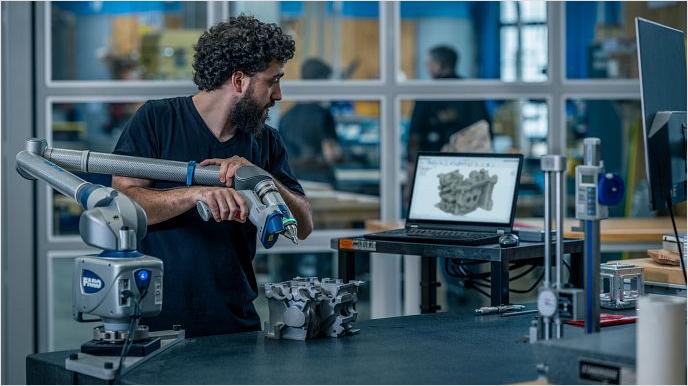
Fusion Manufacturing Extension
Unlock high-performance CAM in Autodesk Fusion
Access advanced CAM capabilities in Autodesk Fusion, including 4- and 5-axis simultaneous machining, sheet-based nesting and fabrication, and metals-based additive manufacturing.
Primary benefits
Shorten project delivery times
Automate manufacturing workflows to remove repetitive tasks, reduce errors, and shorten the time to go from design to manufactured parts.
Produce better quality parts
Maximize production quality and consistency with advanced CAM tools. Boost your profit margins and efficiency today.
Avoid overpriced software
Get flexible access to advanced manufacturing tools with technology that pays for itself in weeks.
Fusion manufacturing extension features
Speak to an expert about Fusion Manufacturing Extension
Connect with an expert for a demo of Fusion Manufacturing Extension.
Speak to an expert about Fusion Manufacturing Extension
Connect with an expert for a demo of Fusion Manufacturing Extension.
Questions? We have answers
The Autodesk Fusion Manufacturing Extension unlocks more advanced manufacturing functionality within Autodesk Fusion. The extension includes tools and workflows focused on subtractive CNC machining, sheet-based nesting and fabrication, and metals-based additive manufacturing. A subscription to Fusion is required prior to accessing the capabilities in the manufacturing extension.
Yes, the Autodesk Fusion Manufacturing Extension has the same capabilities as the previous Fusion 360 Machining Extension. Additionally, the Autodesk Fusion Manufacturing Extension also includes all features that were previously included in both the Fusion 360 Nesting & Fabrication Extension and the Fusion 360 Additive Build Extension.
A free trial is available for the Autodesk Fusion Manufacturing Extension. You can download a free trial or activate it directly in Autodesk Fusion following these steps.
Yes, with the Autodesk Fusion Manufacturing Extension, you can design sheet metal parts and document flat patterns using 2D drawings and DXFs. You can also streamline the manufacture of your designs using CNC routers, waterjet, laser, and plasma-cutting machines. The Fusion Manufacturing Extension can help fabricators to:
Optimize material yield
Simplify the generation of machining setups
Automatically update nests if the 3D design changes
Create efficient cutting toolpaths
Export NC code for a large variety of machine types
Produce customizable reports and setup sheets
Generate labels to help with assembly and packing
Yes, the Autodesk Fusion Manufacturing Extension builds on the core capabilities of Autodesk Fusion to support many 3D printing / additive manufacturing applications and hardware types. Autodesk Fusion supports Fused-filament fabrication (FFF), Multi-jet Fusion (MJF), powder-bed and multi-axis deposition (such as directed energy deposition) in a wide range of metals, polymers, and organics and includes:
Automatic part orientation
Associative support structures
Volumetric latticing
Part packing optimization
Print simulation
Yes, the functionality included in the manufacturing extension is included in Autodesk Fusion for Manufacturing. If you do not currently own a subscription to Autodesk Fusion and need advanced CAM capabilities, consider Autodesk Fusion for Manufacturing.
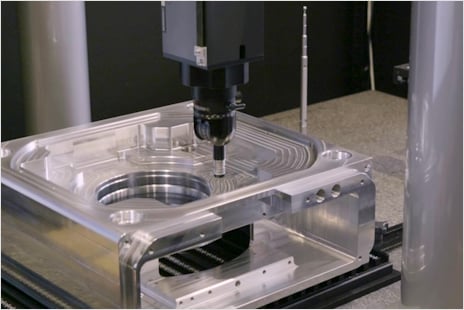
The Autodesk Fusion Manufacturing Extension elevates CAM workflows with advanced tools for 3-, 4-, and 5-axis milling and turning, automated strategies for complex parts, and quick toolpath refinement without full recalculation. CAD based probing and in process inspection automate setup and improve accuracy. Associative and multi-sheet nesting streamline fabrication with automatically updated layouts and smarter material grouping. Integrated metal additive tools handle orientation, supports, and simulation to prevent failures and deliver higher quality printed parts. Click here to download a free trial or activate directly in Autodesk Fusion following these steps.
Any team that outgrows the base CAM capabilities in Autodesk Fusion and deals with complex parts, or wants to automate more of their machining, inspection, or nesting workflows will benefit most from the Autodesk Fusion Manufacturing Extension.
Key capabilities in the Autodesk Fusion Manufacturing Extension include:
Milling & turning
3‑axis machining
4‑axis machining
5‑axis machining
High‑quality NC code
Deburr
Toolpath edits
Automated setup
Associative nesting
Multi‑sheet nesting
Material grouping
Metal 3D printing
Auto orientation
Associative supports
Print simulation
See how you can take your existing Fusion workflows to the next level, with a free trial to the Autodesk Fusion Manufacturing Extension.
The Fusion Manufacturing Extension streamlines CAM automation by generating intelligent, whole part toolpaths, automatically refining them with advanced modification tools, and reducing manual setup through CAD-based probing and part alignment. It also automates nesting updates as designs change and accelerates additive prep with auto-orientation and associative supports - cutting programming time while improving accuracy and consistency across machining, fabrication, and printing workflows.
The Autodesk Fusion Manufacturing Extension improves manufacturing efficiency by automating repetitive workflows, reducing errors, and shortening the path from design to finished parts. It also enhances machine utilization with advanced tools that boost part quality, consistency, and overall production profitability. See pricing options here.
The Autodesk Fusion for Manufacturing Extension helps manufacturers make better use of machinery for metal-based additive manufacturing, CNC machining, and the nesting and fabrication of parts from sheet materials. See pricing options here.
The Autodesk Fusion Manufacturing Extension unlocks advanced CAM capabilities directly in Autodesk Fusion, including 4- and 5-axis simultaneous machining, sheet-based nesting and fabrication, and metals-based additive manufacturing. Access to this functionality is seamless with an extension subscription if you have a subscription to Autodesk Fusion. No external add-ons or plug-ins are needed. See pricing options here.
A subscription to the Autodesk Fusion Manufacturing Extension is available for {{price.F36MEIA.month}} per month, paid annually. See pricing options here.
Yes, a subscription to Autodesk Fusion is required to access the Autodesk Fusion Manufacturing Extension. If you already have a Autodesk Fusion subscription, you can subscribe to the Autodesk Fusion Manufacturing Extension here. If you do not currently have a Autodesk Fusion subscription, subscribe to Autodesk Fusion for Manufacturing for access to core Autodesk Fusion capabilities plus the advanced machining capabilities included in the Autodesk Fusion Manufacturing Extension.
Keep exploring
Keep exploring
We stand by our products
From payment flexibility to always-on support, we back up our work with excellent customer service.