3D ANIMATION SOFTWARE
Artist-friendly 3D animation software
Artist-friendly 3D animation software
Create faster and more collaboratively than ever before. Unlock worlds of creativity with Autodesk 3D animation software.
ONI: Thunder Gods Tale. Image courtesy of Megalis VFX.
 An artist motion captures an actors movements for 3D animation
What is 3D animation?
What is 3D animation?
3D animation is a technique that enables you to breathe life into static objects, making them look like they’re moving and interacting within a three-dimensional space.
Using computer graphics (CG), you can create scenes and characters that perform an incredible range of actions — from a subtle gesture to a complex, high-speed chase.
The process starts with 3D modeling software, where you sculpt your digital creations. Then, through rigging, you add a virtual skeleton, giving your characters the freedom to move as naturally as a living being.
Newer animation software methods take this a step further using motion capture technology. These tools can record an actor’s live movements and transfer them directly onto your digital character to make it more expressive and lifelike.
The possibilities of 3D animation software are endless. Whether you’re crafting immersive experiences in film, creating dynamic characters for gaming, or designing virtual environments that feel astonishingly real, 3D animation is your gateway to innovation.
Create experiences that captivate, engage, and transport people to new realities.
3D animation is a technique that enables you to breathe life into static objects, making them look like they’re moving and interacting within a three-dimensional space.
Using computer graphics (CG), you can create scenes and characters that perform an incredible range of actions — from a subtle gesture to a complex, high-speed chase.
The process starts with 3D modeling software, where you sculpt your digital creations. Then, through rigging, you add a virtual skeleton, giving your characters the freedom to move as naturally as a living being.
Newer animation software methods take this a step further using motion capture technology. These tools can record an actor’s live movements and transfer them directly onto your digital character to make it more expressive and lifelike.
The possibilities of 3D animation software are endless. Whether you’re crafting immersive experiences in film, creating dynamic characters for gaming, or designing virtual environments that feel astonishingly real, 3D animation is your gateway to innovation.
Create experiences that captivate, engage, and transport people to new realities.
Steps of a 3D animation pipeline
Animation software helps make your ideas real every step of the way.
Animation software helps make your ideas real every step of the way.

3D modeling
3D modeling
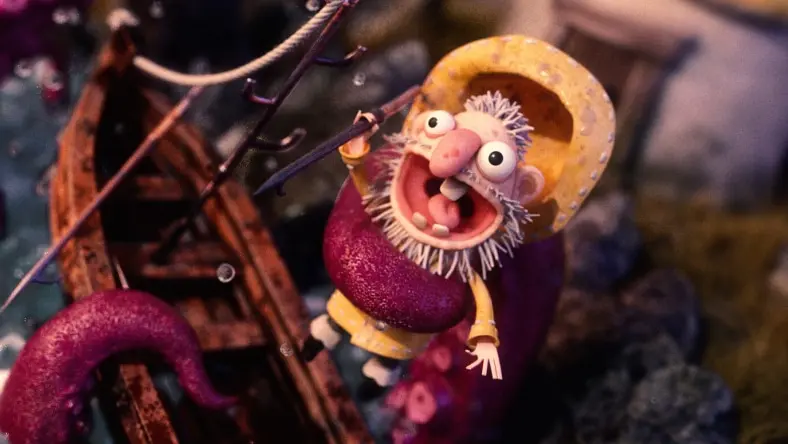
Straight from your imagination to the screen, 3D animation software like Autodesk Maya or Autodesk 3ds Max help you build your objects’ and characters’ basic structures, which can then be mapped onto a 3D grid.
Straight from your imagination to the screen, 3D animation software like Autodesk Maya or Autodesk 3ds Max help you build your objects’ and characters’ basic structures, which can then be mapped onto a 3D grid.
Texturing
Texturing
Give your 3D objects some style. Texturing is how you ‘dress up’ your objects and give them their overall appearance. This step makes your models more realistic by defining their surface qualities and visual details.
Give your 3D objects some style. Texturing is how you ‘dress up’ your objects and give them their overall appearance. This step makes your models more realistic by defining their surface qualities and visual details.

Rigging
Rigging
Maya offers a handy ‘quick rig’ feature that automates the creation of simple rigs, so you can focus on the fun stuff.
Maya offers a handy ‘quick rig’ feature that automates the creation of simple rigs, so you can focus on the fun stuff.

Animation
Animation
Animation is where your characters and objects truly come to life, gaining the movements and actions that define their identities and roles. With Maya’s animation tools, you can craft fluid, lifelike sequences to ensure your vision plays out exactly as you imagined.
For projects requiring crowds or multiple characters, Golaem crowd simulation software easily plugs into Maya to fill your environments with lifelike behaviors and movements.
Animation is where your characters and objects truly come to life, gaining the movements and actions that define their identities and roles. With Maya’s animation tools, you can craft fluid, lifelike sequences to ensure your vision plays out exactly as you imagined.
For projects requiring crowds or multiple characters, Golaem crowd simulation software easily plugs into Maya to fill your environments with lifelike behaviors and movements.

Lighting and rendering
Lighting and rendering
Lighting and rendering are the final touches that transform your scenes into visually stunning masterpieces. By adjusting the lighting, you can enhance the mood and add depth, while advanced rendering techniques produce high-quality images or videos that fully realize the potential of your 3D animation.
Lighting and rendering are the final touches that transform your scenes into visually stunning masterpieces. By adjusting the lighting, you can enhance the mood and add depth, while advanced rendering techniques produce high-quality images or videos that fully realize the potential of your 3D animation.

Composting
Composting
Blend your animated elements with backgrounds and effects to create a harmonious masterpiece. Compositing is the final step to transform your 3D animation, bringing everything together to create a cohesive and polished scene with stunning clarity and impact.
Blend your animated elements with backgrounds and effects to create a harmonious masterpiece. Compositing is the final step to transform your 3D animation, bringing everything together to create a cohesive and polished scene with stunning clarity and impact.

NEW OFFER - Flex now starting at $99
Autodesk Flex lets you prepay with tokens for flexible access to 100+ Autodesk products for a daily rate. Rates vary based on the product used. Flex is a great option for team members or solopreneurs who want to explore a product or only need project-based access. Combine Flex tokens with Autodesk products on select projects to:
Access 3D capabilities, BIM modeling and industry-specific toolsets.
Run advanced simulations, generate photorealistic renders, and access specialized manufacturing tools.
Scale software access up during production peaks without extra seats or long-term commitments.
Autodesk software for 3D animation
 A 3D model by Peter Sandeman entitled Theres a Snake in My Boots shows a boy on a hobby horse.
Enhanced principles
Enhanced principles
Using animation software for 3D modeling makes it easier to apply the 12 principles of animation. Tools like keyframes, motion paths, and curve drawing help bolster the seventh principle of arcs, which can promote realism or help you exaggerate for style. 3D modeling perfectly suits the 11th principle of solid drawing, in which weight, gravity, light, and shadow are all foundational to working with 3D animation.
Using animation software for 3D modeling makes it easier to apply the 12 principles of animation. Tools like keyframes, motion paths, and curve drawing help bolster the seventh principle of arcs, which can promote realism or help you exaggerate for style. 3D modeling perfectly suits the 11th principle of solid drawing, in which weight, gravity, light, and shadow are all foundational to working with 3D animation.
 Image courtesy of Joel Zakrisson.
Meet growing demand with powerful 3D animation workflows
Meet growing demand with powerful 3D animation workflows
With an appetite for high-quality animated content soaring and timelines getting tighter, you need powerful animation software and workflows to scale efficiently and keep up with demand. Autodesk 3D animation solutions can help address these challenges.
With an appetite for high-quality animated content soaring and timelines getting tighter, you need powerful animation software and workflows to scale efficiently and keep up with demand. Autodesk 3D animation solutions can help address these challenges.
 Image courtesy of Alexandre Mougenot.
Animate your vision into reality with battle-tested features
Animate your vision into reality with battle-tested features
Immerse your audience in your vision with believable on-screen movement. 3D animation software like Maya excels here, with capabilities like keyframe, nonlinear, and motion capture animation. Plus, features like cached playback allow you to view your work in real-time, enabling more creative iterations without the need for playblasts.
Immerse your audience in your vision with believable on-screen movement. 3D animation software like Maya excels here, with capabilities like keyframe, nonlinear, and motion capture animation. Plus, features like cached playback allow you to view your work in real-time, enabling more creative iterations without the need for playblasts.
3D animation software features
Discover the top 3D animation tools and features available with Autodesk software.
Discover the top 3D animation tools and features available with Autodesk software.

Asset modeling
Asset modeling
Create true-to-life 3D character animations and CG assets with artist-friendly modeling tools. Add fine detail to props and scenes with intuitive texturing and shading tools.
Create true-to-life 3D character animations and CG assets with artist-friendly modeling tools. Add fine detail to props and scenes with intuitive texturing and shading tools.
Character animation software
Character animation software
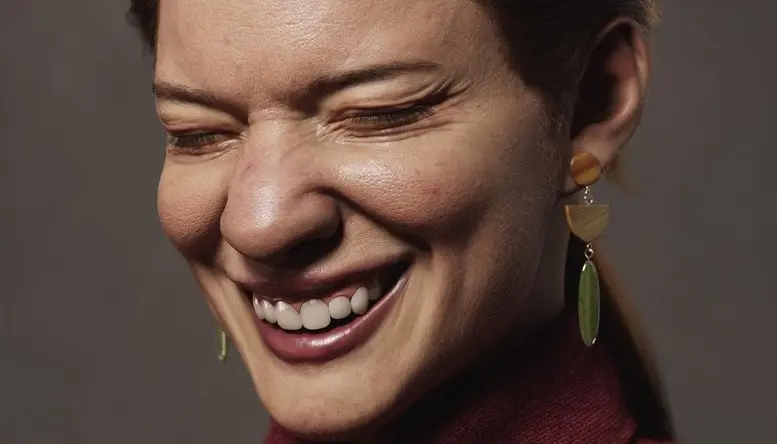
Keyframe or motion capture animation breathes life into your 3D characters by adding complex body mechanics, gestures, and facial expression emotes.
Keyframe or motion capture animation breathes life into your 3D characters by adding complex body mechanics, gestures, and facial expression emotes.
Dynamics and effects
Dynamics and effects
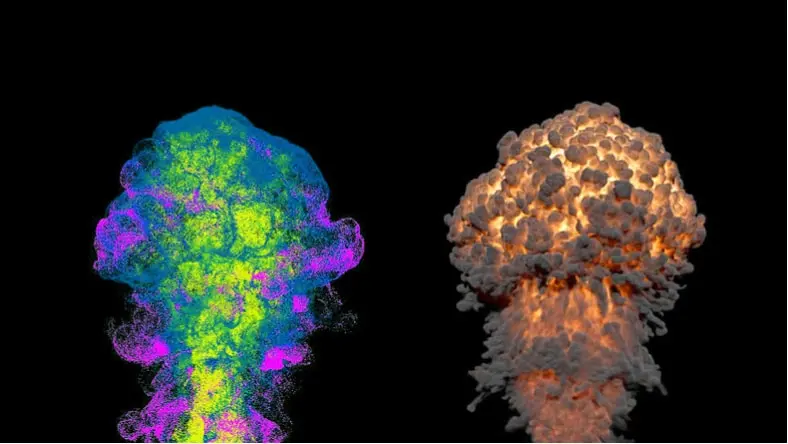
Powerful tools simulate environmental effects like liquids, gases, fine particles, and fire while character physics adds realism to aspects like cloth and hair.
Powerful tools simulate environmental effects like liquids, gases, fine particles, and fire while character physics adds realism to aspects like cloth and hair.
Unlock educational access to Autodesk software
Unlock educational access to Autodesk software
Autodesk is committed to helping educate tomorrow's leaders. Get free access to our entire portfolio of products with the Autodesk Education plan.
 Image courtesy of Mikros Animation
Balancing art and technology for storytelling in animation
Balancing art and technology for storytelling in animation
Mikros Animation shares how they push the boundaries of storytelling in 3D animation and seamlessly balance technology and art to create Teenage Mutant Ninja Turtles: Mutant Mayhem (2023) and The Spongebob Movie: Sponge on the Run (2020).
Mikros Animation shares how they push the boundaries of storytelling in 3D animation and seamlessly balance technology and art to create Teenage Mutant Ninja Turtles: Mutant Mayhem (2023) and The Spongebob Movie: Sponge on the Run (2020).
Examples of 3D animation software in use
Discover how industry innovators use Autodesk 3D animation software to create their projects.
Discover how industry innovators use Autodesk 3D animation software to create their projects.

A showreel of peak moments in film, tv & games
A showreel of peak moments in film, tv & games
Watch the 2025 Autodesk Media & Entertainment showreel featuring top films, tv shows, and games, showcasing peak creative achievements powered by Autodesk's tools.
Watch the 2025 Autodesk Media & Entertainment showreel featuring top films, tv shows, and games, showcasing peak creative achievements powered by Autodesk's tools.

Golaem & the magic of Arcane
Golaem & the magic of Arcane
Read how Fortiche used the Golaem plug-in for Maya to create animated crowds for Season 2 of Arcane.
Read how Fortiche used the Golaem plug-in for Maya to create animated crowds for Season 2 of Arcane.

Qvisten animation adopts OpenUSD
Qvisten animation adopts OpenUSD
Learn why a small Norwegian studio rebuilt their animation pipeline to integrate OpenUSD with Maya and Arnold.
Learn why a small Norwegian studio rebuilt their animation pipeline to integrate OpenUSD with Maya and Arnold.

Delivering standout visuals for FINAL FANTASY XVI
Delivering standout visuals for FINAL FANTASY XVI
Uncover how SQUARE ENIX pushed the boundaries of what’s possible in game dev with Autodesk animation solutions.
Uncover how SQUARE ENIX pushed the boundaries of what’s possible in game dev with Autodesk animation solutions.
 Image courtesy of EyeQube Studios Pvt. Ltd.
How is 3D animation changing?
How is 3D animation changing?
3D animation is evolving at a breathtaking pace with cutting-edge technologies. AI-driven tools now simplify complex tasks and speed up production, while real-time rendering lets you see your changes instantly.
With procedural generation, you can automate asset creation and movement, reducing manual effort and opening up new creative possibilities. Cloud-based 3D animation software offers flexible, scalable ways to easily manage your various resources and projects.
Our tools help you stay on top of 3D animation trends, giving you the AI support and collaboration that help you create more successful and creative animations. Embrace these advancements and turn your creative visions into extraordinary realities.
3D animation is evolving at a breathtaking pace with cutting-edge technologies. AI-driven tools now simplify complex tasks and speed up production, while real-time rendering lets you see your changes instantly.
With procedural generation, you can automate asset creation and movement, reducing manual effort and opening up new creative possibilities. Cloud-based 3D animation software offers flexible, scalable ways to easily manage your various resources and projects.
Our tools help you stay on top of 3D animation trends, giving you the AI support and collaboration that help you create more successful and creative animations. Embrace these advancements and turn your creative visions into extraordinary realities.
 Image courtesy of Tim Burroughs.
Future-proof animation workflows with open standards
Future-proof animation workflows with open standards
As the demand for high-quality content grows, so does the complexity and scale of 3D animation projects.
Maya’s integration of OpenUSD (Universal Scene Description) empowers you to streamline teamwork and future-proof your productions. With seamless exchange of 3D data, constructive collaboration, and industry-wide support, Maya’s OpenUSD integration paves the way for a new era of creativity and efficiency in 3D animator software.
As the demand for high-quality content grows, so does the complexity and scale of 3D animation projects.
Maya’s integration of OpenUSD (Universal Scene Description) empowers you to streamline teamwork and future-proof your productions. With seamless exchange of 3D data, constructive collaboration, and industry-wide support, Maya’s OpenUSD integration paves the way for a new era of creativity and efficiency in 3D animator software.
 Image courtesy of Cinzia Angelini.
Boost your brand with intuitive 3D animation software
Boost your brand with intuitive 3D animation software
Diversification and expansion of services are key for competitiveness and financial stability — our 3D animation tools offer a variety of ways to help you grow your business. Using multiple expertise or a cross-platform approach can lower risk, guarantee steady revenue, and prevent talent downtime.
Diversification and expansion of services are key for competitiveness and financial stability — our 3D animation tools offer a variety of ways to help you grow your business. Using multiple expertise or a cross-platform approach can lower risk, guarantee steady revenue, and prevent talent downtime.
Free 3D animation software resources
Get started in 3D animation with these tutorials, guides, tips, and resources.
Get started in 3D animation with these tutorials, guides, tips, and resources.
Autodesk Media & Entertainment YouTube channel
Get exclusive 3D animation learning content, industry insights, and behind-the-scenes access to a world of realistic 3D characters, exceptional effects, and expansive worlds.
Get exclusive 3D animation learning content, industry insights, and behind-the-scenes access to a world of realistic 3D characters, exceptional effects, and expansive worlds.
Breaking into 3D animation with Ricky Baba
Ricky Baba, who broke into the animation industry working for companies including Dreamworks and Meta, shares his advice for aspiring 3D artists.
Ricky Baba, who broke into the animation industry working for companies including Dreamworks and Meta, shares his advice for aspiring 3D artists.
Autodesk Media & Entertainment blog
Get industry insights, stories, and news about animation, visual effects, game development, and production, as well as case studies from studios and companies using Autodesk tools.
Get industry insights, stories, and news about animation, visual effects, game development, and production, as well as case studies from studios and companies using Autodesk tools.
Intro to Maya
This course takes you from interface to integrated pipeline. From modeling basics, the fundamentals of animation, to diving into Bifrost, and everything in between — get up to speed with Maya.
This course takes you from interface to integrated pipeline. From modeling basics, the fundamentals of animation, to diving into Bifrost, and everything in between — get up to speed with Maya.
3D animation guide
Explore Autodesk’s 3D animation solutions for film, TV, and games - featuring powerful tools like Maya and 3ds Max to bring characters and stories to life.
Explore Autodesk’s 3D animation solutions for film, TV, and games - featuring powerful tools like Maya and 3ds Max to bring characters and stories to life.
Maya Learning Channel
Autodesk’s official hub for 3D content creation tutorials, covering modeling, rigging, animation, VFX, rendering, and motion graphics.
Autodesk’s official hub for 3D content creation tutorials, covering modeling, rigging, animation, VFX, rendering, and motion graphics.
Frequently asked questions (FAQ) on 3D animation software
What is 3D animation?
3D animation uses computer graphics to make objects look like they’re moving in three-dimensional space. Artists use 3D modeling software to build these objects. Next comes rigging, the process of creating a skeleton for the 3D model or character. Animators pose the rig at strategic points, enabling it to move and perform a range of actions and gestures. Newer methods of animation involve motion capture, which records an actor’s live movements for digital animation.
What are the essential skills required for 3D animation?
The most essential skills for making 3D animation are the comprehensive skills needed for animation software such as Maya or 3ds Max. These skills include creating 3D models, textures, lighting, other visual effects, and the animation itself through keyframing and/or motion capture.
Additional artistic and soft skills will also help. Understanding the principles of animation in general—like timing, spacing, anticipation, and squash-and-stretch—will apply to 3D animation specifically, as will a knack for drawing, visual composition, color, and design. Attention to detail and soft skills like problem-solving and good team communication are also important.
How long does it take to create a 3D animation?
Creating a 3D animation takes a considerable amount of time, as well as skills and organization. The specific time it takes for 3D animation depends on the animation’s complexity and required detail, the number and experience level of contributors, the length of the animation, and the specific hardware and software technologies.
A very simple 3D animation may take only a few hours, or it could take several days to create a 30-second clip. Popular feature-length 3D-animated movies almost universally require a large team and multiple years to produce.
Can 3D animation be used in virtual reality (VR) experiences?
Yes, 3D animation can be and quite frequently is used in VR experiences. 3D animations help build out the immersive and interactive environments of VR. Their ability to represent hyperrealistic surroundings with lifelike textures, physics, lighting, and so forth can make VR worlds convincing to the user.
However, 3D animations intended specifically for VR use need to factor in concerns like user interactivity, potential motion sickness, and so on. Those concerns contribute to making 3D animations for VR even more complicated to create than 3D animations for traditional screens.
Which Autodesk software is best for 3D animation?
Autodesk offers a complete suite of tools for creating high-quality animated content:
3ds Max offers a rich and flexible toolset for modeling 3D assets and environments.
Maya has the animation toolset to bring 3D assets to life, from animating attributes of any object to transforming joints and bones, inverse kinematics (IK) handles, and models over time.
Arnold is integrated with Maya and 3ds Max, enabling high-quality previews and quick iterations.
MotionBuilder helps you capture, edit, and play back complex character animations.
Flow Production Tracking (formerly ShotGrid) streamlines workflows for animation studios by unifying production management, creative reviews, and pipelines.
What collaboration features are included in Autodesk 3D animation software?
Autodesk software excels at making collaboration on 3D animation projects more efficient. The Media & Entertainment Collection includes all the tools necessary to build a powerful and scalable 3D animation pipeline. Add Flow Production Tracking (formerly ShotGrid) production management software to simplify animation reviews and project management and unify geographically dispersed teams.
How can Autodesk software help speed up 3D animation workflows?
Autodesk software drives efficiency in 3D animation workflows. From 3ds Max and Maya for modeling and animation to Arnold for rendering and Flow Production Tracking (formerly ShotGrid) for production management, Autodesk software streamlines the entire process from asset creation through final output. Recent updates to both 3ds Max and Maya have focused on helping animators work more efficiently. For example, cached playback in Maya drastically increases the speed of animation playback by letting you evaluate iterations of animation right in the viewport, rather than producing multiple playblasts. Arnold is the default renderer in both 3ds Max and Maya, allowing you to see high-quality previews of animations and iterate changes fast.
Why choose 3ds Max or Maya for 3D animation?
3ds Max and Maya are both used by creative studios around the world for animation, modeling, visual effects, and rendering. 3ds Max offers a robust toolset for modeling, intuitive texturing and shading, and high-quality rendering; Maya offers powerful tools for character creation, lifelike animation, and detailed simulations.
Read more about the differences between 3ds Max and Maya.
What is the difference between 2D and 3D animation?
2D animation involves drawing characters and scenes in a two-dimensional space, often by hand or using digital tools. 3D animation uses computer-generated imagery to create three-dimensional models and environments. While 2D animation has a more traditional, artistic feel, 3D animation offers greater depth and realism.