CREATE WITHOUT LIMITS
3D modeling with 3ds Max
3D modeling with 3ds Max
Discover how modeling with 3ds Max can unlock your creativity and deliver impressive results across many different industries.
Image courtesy of G BIN.
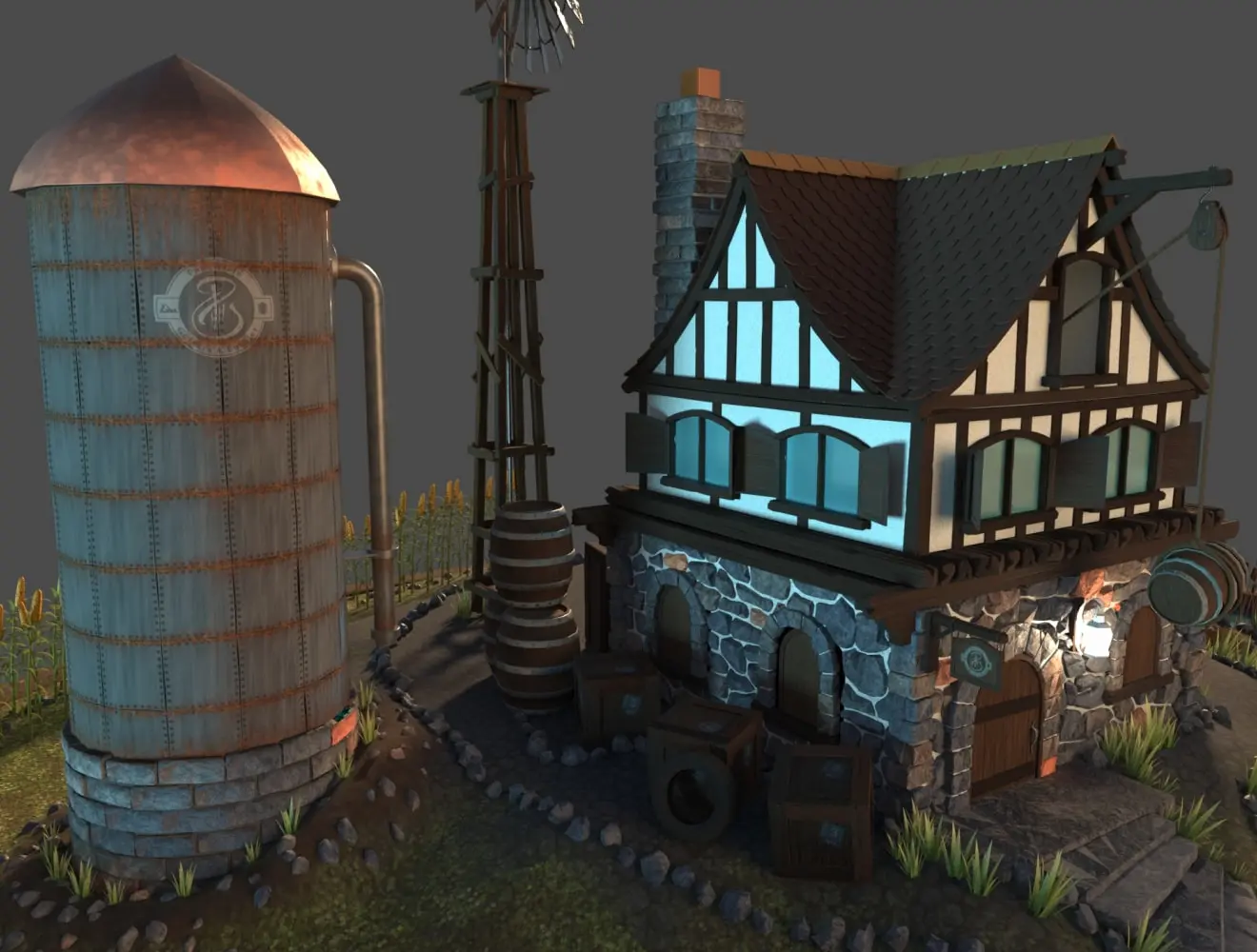
 Stylised environment created with 3ds Max. Image courtesy of Pengzhen Zhang.
Unlock the power of 3D modeling in 3ds Max
Unlock the power of 3D modeling in 3ds Max
3ds Max is ideal for anyone looking to create professional-standard 3D models and is trusted by professionals across the world and in many different industries. With 3ds Max, you can create everything from characters, assets, and complex 3D scenes for film, TV, and video games, to architectural designs and product visualizations. Compatible with Windows 10 and 11, it’s a powerful and versatile modeling solution. Start a free trial today to discover first-hand the benefits of modeling in 3ds Max.
3ds Max is ideal for anyone looking to create professional-standard 3D models and is trusted by professionals across the world and in many different industries. With 3ds Max, you can create everything from characters, assets, and complex 3D scenes for film, TV, and video games, to architectural designs and product visualizations. Compatible with Windows 10 and 11, it’s a powerful and versatile modeling solution. Start a free trial today to discover first-hand the benefits of modeling in 3ds Max.
Why use 3ds Max for modeling?
Expansive modeling toolset
When modeling in 3ds Max, you can easily create 3D geometry and shapes using dedicated tools, add lighting, transform a 2D object into a 3D object with a Lathe modifier, take advantage of advanced retopology tools to automatically reconstruct mesh data, and much more.
When modeling in 3ds Max, you can easily create 3D geometry and shapes using dedicated tools, add lighting, transform a 2D object into a 3D object with a Lathe modifier, take advantage of advanced retopology tools to automatically reconstruct mesh data, and much more.
Non-destructive editing
Thanks to the modifier stack workflow, you can explore your ideas non-destructively with a range of modifiers, which can be adjusted or reverted at any time.
Thanks to the modifier stack workflow, you can explore your ideas non-destructively with a range of modifiers, which can be adjusted or reverted at any time.
Industry-standard
3ds Max is used a standard and respected across many industries, including film and TV, game development, product design, architecture, engineering and construction.
3ds Max is used a standard and respected across many industries, including film and TV, game development, product design, architecture, engineering and construction.
Multiple file format support
A variety of different file formats are supported when modeling in 3ds Max, including model file types like .max, .fbx, .obj, and .stl; CAD formats such as .dwg, .dxf, and .sldprt; and image/texture formats like .bmp, .jpg, and .png. This makes sharing and collaborating with others a smooth experience.
A variety of different file formats are supported when modeling in 3ds Max, including model file types like .max, .fbx, .obj, and .stl; CAD formats such as .dwg, .dxf, and .sldprt; and image/texture formats like .bmp, .jpg, and .png. This makes sharing and collaborating with others a smooth experience.
Integrated 3D rendering
When you create models in 3ds Max, you can render them from within the software and view changes in real-time using our integrated Arnold renderer.
When you create models in 3ds Max, you can render them from within the software and view changes in real-time using our integrated Arnold renderer.
Try 3ds Max for free for 30 days

Flex gives you pay as you go pricing
Flex gives you pay as you go pricing
If your 3D modeling needs tend to fluctuate or you need to use it for specific projects, you can use 3ds Max with Autodesk Flex. Flex is our pay-as-you-go option, giving on-demand access to premium Autodesk software like Maya, AutoCAD, Fusion, and Revit. It works via a token system – simply buy tokens for you or your team and use them to purchase access to the software you want on a daily basis (the amount of tokens per day varies for each product).
Flex is also a cost-effective option if you need to use more than one Autodesk product – such as 3ds Max and Revit – from time to time, but without the need for a monthly subscription. The cost of Flex per token is significantly reduced when you buy 5,000 or more, and the more you buy, the larger the discount. This can be a good choice if you’re growing your business and need cost-effective ad-hoc access to a range of software.
If you work extensively with 3D modeling, though, a monthly or annual subscription may be more cost-effective.
If your 3D modeling needs tend to fluctuate or you need to use it for specific projects, you can use 3ds Max with Autodesk Flex. Flex is our pay-as-you-go option, giving on-demand access to premium Autodesk software like Maya, AutoCAD, Fusion, and Revit. It works via a token system – simply buy tokens for you or your team and use them to purchase access to the software you want on a daily basis (the amount of tokens per day varies for each product).
Flex is also a cost-effective option if you need to use more than one Autodesk product – such as 3ds Max and Revit – from time to time, but without the need for a monthly subscription. The cost of Flex per token is significantly reduced when you buy 5,000 or more, and the more you buy, the larger the discount. This can be a good choice if you’re growing your business and need cost-effective ad-hoc access to a range of software.
If you work extensively with 3D modeling, though, a monthly or annual subscription may be more cost-effective.
What's new in 3D modeling with 3ds Max?
We’re constantly improving 3ds Max and adding new features. Here are some of the latest additions.
We’re constantly improving 3ds Max and adding new features. Here are some of the latest additions.
OpenPBR
Now 3ds Max's new default material, OpenPBR is an open source shading model that enables assets to have a consistent look across renderers and platforms.
Now 3ds Max's new default material, OpenPBR is an open source shading model that enables assets to have a consistent look across renderers and platforms.
Improved Vertex Weld Modifier
Improvements include support for spline objects and additional cleanup operations.
Improvements include support for spline objects and additional cleanup operations.
Enhanced viewport performance
Experience faster and more responsive viewport interactions with boosted playback speed and optimized multithreading.
Experience faster and more responsive viewport interactions with boosted playback speed and optimized multithreading.
Flow Retopology
Leverage the power of cloud computing to process mesh operations and continue working on your model in 3ds Max while the job completes.
Leverage the power of cloud computing to process mesh operations and continue working on your model in 3ds Max while the job completes.
Create high-quality characters and immersive worlds
Give your character designs personality
Give your character designs personality
Character modeling with 3ds Max is accomplished using a large set of modeling tools suitable for creating everything from video game characters to CGI creatures in blockbuster movies. Versatile sculpting tools make it possible to create detailed and highly realistic or stylized characters to engage audiences. Once the model is complete, 3ds Max’s Integrated Character Animation Toolkit (CAT) has all the tools you need to quickly rig and animate your characters, including muscle simulation and graph-based motion editing. You can also use built-in hair, cloth and fur simulation tools to make your character appear even more lifelike.
Character modeling with 3ds Max is accomplished using a large set of modeling tools suitable for creating everything from video game characters to CGI creatures in blockbuster movies. Versatile sculpting tools make it possible to create detailed and highly realistic or stylized characters to engage audiences. Once the model is complete, 3ds Max’s Integrated Character Animation Toolkit (CAT) has all the tools you need to quickly rig and animate your characters, including muscle simulation and graph-based motion editing. You can also use built-in hair, cloth and fur simulation tools to make your character appear even more lifelike.
Image courtesy of CD PROJEKT RED

Who uses 3ds Max for modeling?

Game developers
Game developers
3ds Max’s modeling features enable game designers to create believable characters, props and environments. Integration with popular game engines like Unreal and Unity helps ensure smooth workflows.
3ds Max’s modeling features enable game designers to create believable characters, props and environments. Integration with popular game engines like Unreal and Unity helps ensure smooth workflows.

Animation and VFX artists
Animation and VFX artists
Animation and visual effects studios can use the software to model, rig and animate realistic or stylized CGI characters and environments that captivate audiences.
Animation and visual effects studios can use the software to model, rig and animate realistic or stylized CGI characters and environments that captivate audiences.

Architects
Architects
With 3ds Max, architects can create detailed 3D visualizations of their concepts and designs, which they can then show to clients and other stakeholders.
With 3ds Max, architects can create detailed 3D visualizations of their concepts and designs, which they can then show to clients and other stakeholders.

Product designers
Product designers
Product designers, working in a range of industries, can use 3ds Max to make virtual prototypes and numerous iterations of product models in their work.
Product designers, working in a range of industries, can use 3ds Max to make virtual prototypes and numerous iterations of product models in their work.
 City environment made with 3ds Max by Michael Shkliaryk
How does 3D modeling work in 3ds Max?
How does 3D modeling work in 3ds Max?
Whether you’re creating worlds, crafting characters, designing products or modeling buildings, you’ll find 3ds Max intuitive to use. The main toolbar is home to the various features and functions you’ll work with when 3D modeling, and you’ll find a host of powerful sculpting tools in the dedicated command panel.
While you’re creating your model, you can watch it take shape in viewports that display it in 3D from a variety of angles, tailored to your design process. Once the mesh is complete, you can use the Material Editor to choose the materials and textures you want to apply, while the Render Frame window provides an instant preview of what the final model will look like. You can also drill down even deeper with the Script Editor, unlocking additional functionality through custom plugins and code for 3ds Max modeling.
Whether you’re creating worlds, crafting characters, designing products or modeling buildings, you’ll find 3ds Max intuitive to use. The main toolbar is home to the various features and functions you’ll work with when 3D modeling, and you’ll find a host of powerful sculpting tools in the dedicated command panel.
While you’re creating your model, you can watch it take shape in viewports that display it in 3D from a variety of angles, tailored to your design process. Once the mesh is complete, you can use the Material Editor to choose the materials and textures you want to apply, while the Render Frame window provides an instant preview of what the final model will look like. You can also drill down even deeper with the Script Editor, unlocking additional functionality through custom plugins and code for 3ds Max modeling.
Innovative features for bringing 3D designs to life
Advanced animation support
Beyond modeling, 3ds Max includes tools like rigging, keyframing, and procedural animation—helping you bring your designs to life with natural movement.
Beyond modeling, 3ds Max includes tools like rigging, keyframing, and procedural animation—helping you bring your designs to life with natural movement.
Easy material switching
With 3ds Max’s Material Switcher tool, you can test how an object will look with multiple materials, all within just a few clicks.
With 3ds Max’s Material Switcher tool, you can test how an object will look with multiple materials, all within just a few clicks.
Accurate color management
3ds Max uses advanced color management to help ensure that colors are reproduced accurately across a variety of applications.
3ds Max uses advanced color management to help ensure that colors are reproduced accurately across a variety of applications.
High-quality materials
One reason 3D modeling in 3ds Max is so popular is that it enables designers to create realistic objects through features like integrated Open Shading Language, Bake to Texture, and physically based rendering.
One reason 3D modeling in 3ds Max is so popular is that it enables designers to create realistic objects through features like integrated Open Shading Language, Bake to Texture, and physically based rendering.
Real life camera simulation
Using the software’s physical camera, you can simulate real-life photography with your models by adjusting settings such as shutter speed, aperture and exposure just as you would in the real world.
Using the software’s physical camera, you can simulate real-life photography with your models by adjusting settings such as shutter speed, aperture and exposure just as you would in the real world.
Interactive viewports
Render quality viewport previews mean you can see exactly how your model will look, so there’s less need to make changes later on in the design process.
Render quality viewport previews mean you can see exactly how your model will look, so there’s less need to make changes later on in the design process.
See how our customers use 3ds Max modeling features

Unit Image crafts superhero-worthy stylized models for Marvel Rivals cinematic trailer
Unit Image crafts superhero-worthy stylized models for Marvel Rivals cinematic trailer
Learn how Alexandre Lerouge and his team at Unit Image used 3ds Max for modeling assets and environments, as well as assembling scene lighting and rendering for the Marvel Rivals game trailer “No One Rivals Doom”.
Learn how Alexandre Lerouge and his team at Unit Image used 3ds Max for modeling assets and environments, as well as assembling scene lighting and rendering for the Marvel Rivals game trailer “No One Rivals Doom”.

Industrial Light & Magic uses 3ds Max in Apple's hit show Severance Season 2
Industrial Light & Magic uses 3ds Max in Apple's hit show Severance Season 2
Watch how the talent at Industrial Light & Magic used 3ds Max to add snow to "Severance" environments and populate bodies of water with icebergs.
Watch how the talent at Industrial Light & Magic used 3ds Max to add snow to "Severance" environments and populate bodies of water with icebergs.

How Binyan Studios produces accurate architecture visualizations
How Binyan Studios produces accurate architecture visualizations
Binyan Studios uses 3ds Max for modeling accurate and realistic architectural visualizations for clients across the world. Discover more in this interview with CEO Andrei Dolnikov.
Binyan Studios uses 3ds Max for modeling accurate and realistic architectural visualizations for clients across the world. Discover more in this interview with CEO Andrei Dolnikov.
Benefits of using 3ds Max for 3D modeling
There are many reasons why so many professionals turn to 3ds Max for 3D modeling, including:
There are many reasons why so many professionals turn to 3ds Max for 3D modeling, including:
Expansive toolbox
3ds Max comes with many different tools for 3D modeling, including retopology tools for creating clean and efficient topologies for animation and real-time rendering, smart extrusion tools, parametric modeling, and spline-based tools.
3ds Max comes with many different tools for 3D modeling, including retopology tools for creating clean and efficient topologies for animation and real-time rendering, smart extrusion tools, parametric modeling, and spline-based tools.
Versatile interface
Modeling in 3ds Max is well-suited to a wide variety of industries, such as architecture and game design, as well as spaces where they overlap.
Modeling in 3ds Max is well-suited to a wide variety of industries, such as architecture and game design, as well as spaces where they overlap.
Intuitive workflows
For beginners and pros alike, 3ds Max has a user-friendly interface that is easy to use, allowing you to focus on the more creative aspects of your work.
For beginners and pros alike, 3ds Max has a user-friendly interface that is easy to use, allowing you to focus on the more creative aspects of your work.
Time-saving automation
With the MaxScript language, you can program and automate important but repetitive tasks, so you don’t have to spend countless hours painstakingly creating every detail of a large environment or complex model.
With the MaxScript language, you can program and automate important but repetitive tasks, so you don’t have to spend countless hours painstakingly creating every detail of a large environment or complex model.
In-depth 3ds Max learning from our YouTube channel
Top 10 golden rules for easier modeling in 3ds Max
Top 10 golden rules for easier modeling in 3ds Max
Learn from Paul Neale, a 3D Technical Director and trainer, as he shares his top 10 golden rules for easier modeling in 3ds Max. Discover how procedural modeling in 3ds Max can shorten production time, while giving you more time to focus on unleashing your creativity.
Learn from Paul Neale, a 3D Technical Director and trainer, as he shares his top 10 golden rules for easier modeling in 3ds Max. Discover how procedural modeling in 3ds Max can shorten production time, while giving you more time to focus on unleashing your creativity.
Image courtesy of Paul Neale
Autodesk University: Advanced learning sessions featuring 3ds Max

Mastering design visualization: Unleashing 3ds Max, Arnold, and Autodesk Flow Capture for collaborative workflows
Mastering design visualization: Unleashing 3ds Max, Arnold, and Autodesk Flow Capture for collaborative workflows
Learn how to master design visualization with 3ds Max, Arnold, and Autodesk Flow Capture. Enhance your skills in 3D modeling, high-quality rendering, and collaborative workflows for stunning and efficient design projects.
Learn how to master design visualization with 3ds Max, Arnold, and Autodesk Flow Capture. Enhance your skills in 3D modeling, high-quality rendering, and collaborative workflows for stunning and efficient design projects.

Make your architectural model shine from Revit to 3ds Max
Make your architectural model shine from Revit to 3ds Max
Find out how 3ds Max can be used in tandem with Revit, including linking a Revit model into 3ds Max, adding and controlling lights, configuring rendering views, and adjusting image quality with rendering parameters.
Find out how 3ds Max can be used in tandem with Revit, including linking a Revit model into 3ds Max, adding and controlling lights, configuring rendering views, and adjusting image quality with rendering parameters.

Unleashing efficiency and creativity in 3ds Max
Unleashing efficiency and creativity in 3ds Max
Explore how 3ds Max can be used to overcome key challenges in architectural visualization. In this video, you’ll learn methods for creativity and productivity in 3ds Max, organizing and managing scene composition and more non-destructively, and managing render capacity effectively. You’ll also learn techniques for minimizing errors when using 3ds Max.
Explore how 3ds Max can be used to overcome key challenges in architectural visualization. In this video, you’ll learn methods for creativity and productivity in 3ds Max, organizing and managing scene composition and more non-destructively, and managing render capacity effectively. You’ll also learn techniques for minimizing errors when using 3ds Max.
Resources for getting started with 3D modeling in 3ds Max
Animating 3D models in 3ds Max
Get started with creating keyframes and animating geometry to make your 3d models move.
Get started with creating keyframes and animating geometry to make your 3d models move.
Sculpting 3D models in 3ds Max with retopology
Learn how to shape high-resolution models and create an optimized topology.
Learn how to shape high-resolution models and create an optimized topology.
Rendering 3D models with 3ds Max
Find out how to use 3ds Max’s rendering tools to transform designs from AutoCAD and Revit into stunning visualizations.
Find out how to use 3ds Max’s rendering tools to transform designs from AutoCAD and Revit into stunning visualizations.
Autodesk Media & Entertainment Blog
Get inspiration, top tips and more in our Media & Entertainment blog.
Get inspiration, top tips and more in our Media & Entertainment blog.
3ds Max YouTube learning channel
Learn all about modeling in 3ds Max on our dedicated YouTube channel.
Learn all about modeling in 3ds Max on our dedicated YouTube channel.
Autodesk Media & Entertainment YouTube channel
Watch sessions from events, discover new features, and follow tutorials from leading creatives and studios.
Watch sessions from events, discover new features, and follow tutorials from leading creatives and studios.
Frequently asked questions about 3D modeling with 3ds Max
When is 3ds Max 2026 available?
Autodesk 3ds Max is available now. It was released on March 26, 2025. You can find out more .
What is the difference between 3ds Max and Maya?
3ds Max and Maya are used by creative studios around the world for animation, modeling, visual effects, and rendering. Use our comparison guide to explore each product’s strengths.
Is 3D modeling in 3ds Max good for beginners?
Yes, 3ds Max is suitable for complete beginners as well as experienced pros. It includes a variety of beginner-friendly features such as intuitive viewport navigation, a helpful welcome screen and basic geometries to begin modeling. For more info, check out our quick-start guide.
Is 3ds Max suitable for architectural modeling?
Yes, 3ds Max is used for 3D modeling by designers and architects. 3ds Max includes a range of features suitable for animation and architectural visualizations, including the ability to render realistically with lighting and non-destructive editing. Physical camera settings, meanwhile, make life-like visualizations possible. Often used in conjunction with other Autodesk products like AutoCAD or Revit, architects can seamlessly transition from 2D drawings to 3D models, enhancing their design workflow and achieving comprehensive and stunning architectural visualizations.
Does 3ds Max have a similar command like “Drape” in SketchUp?
3ds Max does not have a direct equivalent to SketchUp's "Drape" command. However, you can achieve similar results by using 3ds Max tools such as the Conform Compound Object, FFD (Free Form Deformation) Modifier, and ProBoolean Modifier. These tools allow for versatile and precise surface projection and modeling.
Can 3ds Max run on a Mac?
3ds Max is designed to run on Windows and does not have a native version for macOS. However, it can be run on a Mac using solutions like Boot Camp, Parallels Desktop, or other virtualization software to install and run Windows on the Mac.
How do I import a 3D model with texture into 3ds Max?
Importing models with textures is simple. First, open the asset browser in the editor and navigate to the folder where you want to import the model. Then, click import. In the import options that appear, ensure that materials, shared materials, create materials folder, textures, and shared textures are all switched on. Then, click import. You can find a more detailed explanation here.
Is there a 3ds Max community for learning more about 3D modeling?
Yes, there is. You can ask and respond to questions on our 3ds Max forums. In addition, you can also share your own knowledge and experience, and explore specific fields relating to using 3ds Max.