Schematic Design Software
Streamline the architectural design process with schematic design software
Streamline the architectural design process with schematic design software
Use precise drafting and powerful visualization tools to transform ideas into reality. Enhance collaboration, minimize errors, and manage resources efficiently – ensuring every project starts on solid ground.
 Schematic design software helps architects move a project from the initial concept to the finalized plans.
What is architectural schematic design software?
What is architectural schematic design software?
Schematic building design software is an essential tool in an architect’s toolkit, bridging the gap between conceptual ideas and concrete architectural plans. It helps architects create preliminary designs and layouts, providing a platform to visualize concepts and draft initial ;plans. At this early stage, users can explore spatial relationships, scale, and functionality and make rapid iterations and adjustments based on client feedback and site-specific requirements.
Schematic design software for architecture supports 2D drafting and 3D modeling features, making it a versatile choice for presenting everything from simple floor plans to complex three-dimensional visualizations. With these capabilities, architects can toggle between different views to better understand how spaces will feel and function. The 3D features are particularly valuable for communicating design intent to clients and stakeholders, offering a lifelike representation of the architectural vision that can be essential for approval processes.
Schematic building design software is an essential tool in an architect’s toolkit, bridging the gap between conceptual ideas and concrete architectural plans. It helps architects create preliminary designs and layouts, providing a platform to visualize concepts and draft initial ;plans. At this early stage, users can explore spatial relationships, scale, and functionality and make rapid iterations and adjustments based on client feedback and site-specific requirements.
Schematic design software for architecture supports 2D drafting and 3D modeling features, making it a versatile choice for presenting everything from simple floor plans to complex three-dimensional visualizations. With these capabilities, architects can toggle between different views to better understand how spaces will feel and function. The 3D features are particularly valuable for communicating design intent to clients and stakeholders, offering a lifelike representation of the architectural vision that can be essential for approval processes.
 As part of the schematic design process, architects use software like Forma Site Design to generate quick models they can test and iterate.
Architectural schematic design process
Architectural schematic design process
In the schematic design phase, architects start by transforming initial hand-sketched concepts into detailed digital sketches and models. Utilizing schematic building design software such as Forma Site Design, Revit, and AutoCAD enables quick generation and modification of 2D sketches and 3D models. This digital approach supports precise design exploration and visualizing early structural and spatial concepts.
Forma Site Design streamlines the iterative review and feedback cycle, helping refine the schematic design. Its collaborative tools enable real-time sharing, annotating, and modifying designs, facilitating swift feedback integration from all stakeholders. Once the design is finalized, Forma Site Design seamless integration with other architectural and engineering tools ensures a smooth transition to detailed design and construction documentation phases. This efficient, integrated approach maintains the design’s integrity and accelerates project development from conception through to completion.
In the schematic design phase, architects start by transforming initial hand-sketched concepts into detailed digital sketches and models. Utilizing schematic building design software such as Forma Site Design, Revit, and AutoCAD enables quick generation and modification of 2D sketches and 3D models. This digital approach supports precise design exploration and visualizing early structural and spatial concepts.
Forma Site Design streamlines the iterative review and feedback cycle, helping refine the schematic design. Its collaborative tools enable real-time sharing, annotating, and modifying designs, facilitating swift feedback integration from all stakeholders. Once the design is finalized, Forma Site Design seamless integration with other architectural and engineering tools ensures a smooth transition to detailed design and construction documentation phases. This efficient, integrated approach maintains the design’s integrity and accelerates project development from conception through to completion.
Where does schematic design fit within the overall design process?
Schematic design is just one part of the larger architectural process:
Schematic design is just one part of the larger architectural process:

Pre-design
Pre-design
Research is carried out and information is gathered on the goals and requirements of the client. Site analysis, scope and budget are also considered.
Research is carried out and information is gathered on the goals and requirements of the client. Site analysis, scope and budget are also considered.

Schematic design
Schematic design
The architectural schematic design phase is where everything starts to come together. Preliminary sketches, floor plans and more are created to convey the overall picture of the design.
The architectural schematic design phase is where everything starts to come together. Preliminary sketches, floor plans and more are created to convey the overall picture of the design.

Design development
Design development
Following approval of the building’s schematic design, the design is refined and more detail added, as well as specific materials being selected and dimensions finalized.
Following approval of the building’s schematic design, the design is refined and more detail added, as well as specific materials being selected and dimensions finalized.

Creation of construction documents
Creation of construction documents
Detailed blueprints and technical documents are created based on the previous phases, which will be used for construction and for the bidding phase.
Detailed blueprints and technical documents are created based on the previous phases, which will be used for construction and for the bidding phase.

NEW OFFER - Flex now starting at $99
Autodesk Flex lets you prepay with tokens for flexible access to 100+ Autodesk products for a daily rate. Rates vary based on the product used. Flex is a great option for team members or solopreneurs who want to explore a product or only need project-based access. Combine Flex tokens with Autodesk products on select projects to:
Access 3D capabilities, BIM modeling and industry-specific toolsets.
Run advanced simulations, generate photorealistic renders, and access specialized manufacturing tools.
Scale software access up during production peaks without extra seats or long-term commitments.
Autodesk schematic design software
Schematic design software features
Discover the dynamic features of schematic design software for architecture, from real-time collaboration to advanced 3d modeling and seamless integration.
Discover the dynamic features of schematic design software for architecture, from real-time collaboration to advanced 3d modeling and seamless integration.
2D and 3D modeling
Enable precise architectural drafting and spatial modeling with seamless switching between 2D and 3D views.
Enable precise architectural drafting and spatial modeling with seamless switching between 2D and 3D views.
Collaboration and review
Support real-time collaboration with live updates and feedback tools, ensuring team alignment throughout the design process.
Support real-time collaboration with live updates and feedback tools, ensuring team alignment throughout the design process.
Visualization and presentation
Provide advanced visualization tools for creating realistic renderings and animations, communicating analytical results, and aiding decision-making.
Provide advanced visualization tools for creating realistic renderings and animations, communicating analytical results, and aiding decision-making.
 During the schematic design stage, architects establish a projects overall layout and functionality before moving on to the design development stage.
Architectural schematic design versus design development
Architectural schematic design versus design development
Schematic design in architecture and design development serve distinct functions in& architectural planning. Schematic design is the initial phase where architects focus on conceptualizing and defining the project through sketches and models. This stage sets the vision, overall layout, and basic functionality through broad explorations of form and space to establish the project’s scope, aesthetic direction, and sustainable design principles. Stakeholders review multiple design options to choose the most feasible one, shaping the project’s future trajectory.
Design development refines these initial concepts into detailed plans. This phase involves deep collaboration between architects and engineers to produce precise drawings and specifications that detail materials, structural systems, and interior designs. It addresses the technical requirements for compliance with building codes and integrates detailed engineering solutions. This stage transforms the approved schematic design into detailed construction documents, preparing the project for permitting and construction.
Schematic design in architecture and design development serve distinct functions in& architectural planning. Schematic design is the initial phase where architects focus on conceptualizing and defining the project through sketches and models. This stage sets the vision, overall layout, and basic functionality through broad explorations of form and space to establish the project’s scope, aesthetic direction, and sustainable design principles. Stakeholders review multiple design options to choose the most feasible one, shaping the project’s future trajectory.
Design development refines these initial concepts into detailed plans. This phase involves deep collaboration between architects and engineers to produce precise drawings and specifications that detail materials, structural systems, and interior designs. It addresses the technical requirements for compliance with building codes and integrates detailed engineering solutions. This stage transforms the approved schematic design into detailed construction documents, preparing the project for permitting and construction.
The importance of site analysis prior to schematic design
The importance of site analysis prior to schematic design
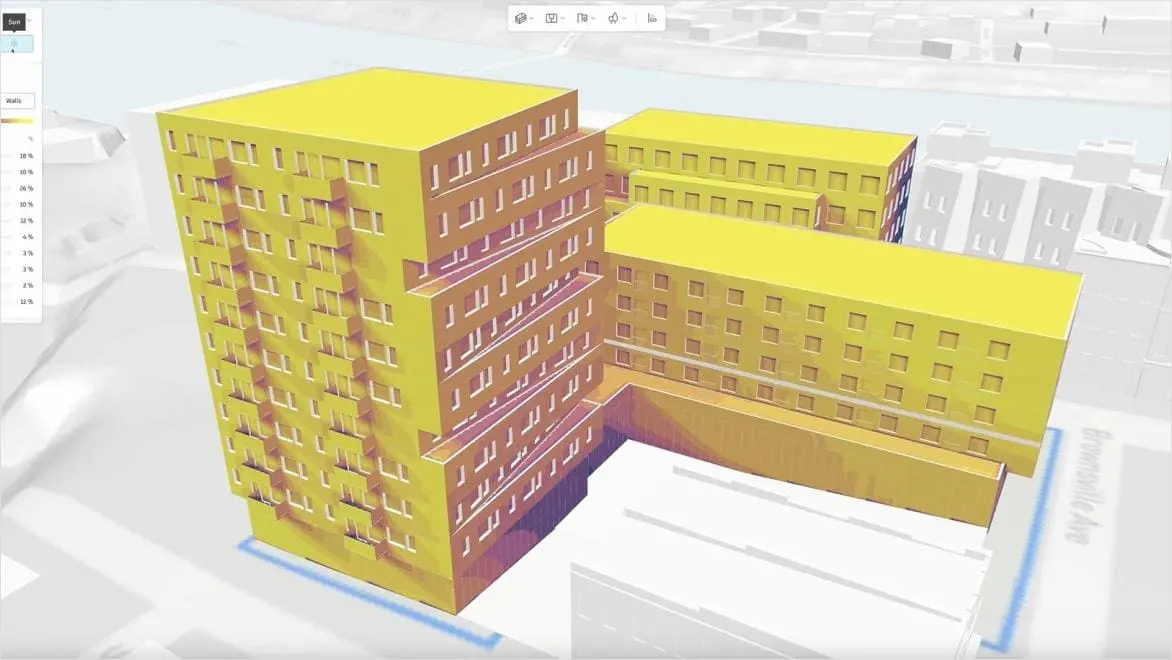
A thorough and comprehensive site analysis is essential to any construction project, and provides critical input for the schematic design process. Understanding the geographical, infrastructural and legal context of the proposed site can have substantial influences on the architectural schematic design process, and the accuracy of the site analysis is vital to allow informed decisions to be made. A variety of sources will be considered in the site analysis, including actual site visits, historic documents, public records and digital data. Autodesk Forma Site Design is a valuable tool that can be used during this phase.
A thorough and comprehensive site analysis is essential to any construction project, and provides critical input for the schematic design process. Understanding the geographical, infrastructural and legal context of the proposed site can have substantial influences on the architectural schematic design process, and the accuracy of the site analysis is vital to allow informed decisions to be made. A variety of sources will be considered in the site analysis, including actual site visits, historic documents, public records and digital data. Autodesk Forma Site Design is a valuable tool that can be used during this phase.
How to use schematic building design software in architecture
Harness schematic design software to transform residential, commercial, and urban projects through advanced visualization and strategic site analysis.
Harness schematic design software to transform residential, commercial, and urban projects through advanced visualization and strategic site analysis.
Conceptual design and visualization
Architectural schematic drawing software is crucial for conceptual design and visualization, equipped with powerful tools like 3D modeling to construct and adjust detailed digital representations of architectural concepts. With these software offerings, architects can explore design options efficiently and include advanced rendering and animation to convey visualizations of a project’s aesthetic and functional elements. Such features are instrumental for communicating design intent to clients and stakeholders, showing a vivid preview of a space’s potential before physical construction starts.
Architectural schematic drawing software is crucial for conceptual design and visualization, equipped with powerful tools like 3D modeling to construct and adjust detailed digital representations of architectural concepts. With these software offerings, architects can explore design options efficiently and include advanced rendering and animation to convey visualizations of a project’s aesthetic and functional elements. Such features are instrumental for communicating design intent to clients and stakeholders, showing a vivid preview of a space’s potential before physical construction starts.
Site analysis and planning
Architectural schematic design software is essential for effective site analysis and planning. Architects can import or build comprehensive site models that include topography, existing structures, and key site features. This allows detailed assessment of how a proposed design interacts with its physical and regulatory environment. Architects can integrate and analyze data on environmental factors, zoning laws, and surrounding infrastructure directly within schematic design software like Forma Site Design for a holistic, contextual analysis. This thorough approach ensures that designs are feasible and well-integrated with their surroundings, meeting regulatory standards and environmental considerations.
Architectural schematic design software is essential for effective site analysis and planning. Architects can import or build comprehensive site models that include topography, existing structures, and key site features. This allows detailed assessment of how a proposed design interacts with its physical and regulatory environment. Architects can integrate and analyze data on environmental factors, zoning laws, and surrounding infrastructure directly within schematic design software like Forma Site Design for a holistic, contextual analysis. This thorough approach ensures that designs are feasible and well-integrated with their surroundings, meeting regulatory standards and environmental considerations.
Design iteration and exploration
Schematic building design software like Forma Site Design, Revit, and AutoCAD significantly enhances design iteration and exploration. Revit’s parametric modeling capabilities allow changes to be automatically updated throughout the model, streamlining revisions and ensuring consistency. This feature is crucial for rapidly testing and modifying& design scenarios in real time. AutoCAD adds powerful drafting tools and a comprehensive component library for swift adjustments and precise conceptual sketches. Both platforms offer real-time collaboration features, enabling seamless updates and team alignment throughout the design process, optimizing decision-making and project development.
Schematic building design software like Forma Site Design, Revit, and AutoCAD significantly enhances design iteration and exploration. Revit’s parametric modeling capabilities allow changes to be automatically updated throughout the model, streamlining revisions and ensuring consistency. This feature is crucial for rapidly testing and modifying& design scenarios in real time. AutoCAD adds powerful drafting tools and a comprehensive component library for swift adjustments and precise conceptual sketches. Both platforms offer real-time collaboration features, enabling seamless updates and team alignment throughout the design process, optimizing decision-making and project development.

The role of client feedback in schematic design
The role of client feedback in schematic design
Although the expertise and creativity of the architect is vital for the successful completion of any architectural schematic design, client feedback also plays an essential role. The feedback loop provided by regular updates and progress meetings allows for the design to be aligned with the client’s goals through an iterative process, and helps bring the architect’s schematic design in line with the client’s vision, budget and needs.
Although the expertise and creativity of the architect is vital for the successful completion of any architectural schematic design, client feedback also plays an essential role. The feedback loop provided by regular updates and progress meetings allows for the design to be aligned with the client’s goals through an iterative process, and helps bring the architect’s schematic design in line with the client’s vision, budget and needs.
Examples of schematic design software in action

Making dramatic business gains with Forma Site Design
Making dramatic business gains with Forma Site Design
Implementing Forma Site Design in the schematic design phase helped Baker Barrios Architects boost creativity and provide better client service.
Implementing Forma Site Design in the schematic design phase helped Baker Barrios Architects boost creativity and provide better client service.

Bringing AI-assisted rendering to schematic design in architecture
Bringing AI-assisted rendering to schematic design in architecture
AI-powered rendering with Forma Site Design integration improves creativity and decision-making for AEC design technology services provider EvolveLAB.
AI-powered rendering with Forma Site Design integration improves creativity and decision-making for AEC design technology services provider EvolveLAB.

Making architectural dreams a reality through design-assist
Making architectural dreams a reality through design-assist
Using the design-assist model, this manufacturer of precast concrete systems is streamlining the building process while reaching toward big ideas.
Using the design-assist model, this manufacturer of precast concrete systems is streamlining the building process while reaching toward big ideas.

Saving time, building sustainably
Saving time, building sustainably
Kuwait’s busiest highway gets a much-needed overhaul faster than expected thanks to architectural design software.
Kuwait’s busiest highway gets a much-needed overhaul faster than expected thanks to architectural design software.

Accelerating outcome-based BIM with Podium
Accelerating outcome-based BIM with Podium
Discover how Forma Site Design integration with Podium’s AI-based process can accelerate your building schematic design projects. In this video, you’ll learn how Podium and Forma Site Design enable real-time outcome-based design, and see how developers use the software to embed cost and sustainable design early in the design process.
Discover how Forma Site Design integration with Podium’s AI-based process can accelerate your building schematic design projects. In this video, you’ll learn how Podium and Forma Site Design enable real-time outcome-based design, and see how developers use the software to embed cost and sustainable design early in the design process.

Getting started with schematic design software
Getting started with schematic design software
Learn everything you need to know about using Autodesk’s Forma Site Design software for architectural schematic design and more. In this collection of tutorials, you’ll learn:
How to create and setup projects in Forma Site Design
About basic buildings in Forma Site Design
How to carry out an analysis
How to apply constraints and edit bases in Forma Site Design
Learn everything you need to know about using Autodesk’s Forma Site Design software for architectural schematic design and more. In this collection of tutorials, you’ll learn:
How to create and setup projects in Forma Site Design
About basic buildings in Forma Site Design
How to carry out an analysis
How to apply constraints and edit bases in Forma Site Design
Architectural schematic design software resources
Schematic design development with AutoCAD architecture
Explore the powerful capabilities of the AutoCAD Architecture toolset in the context of schematic design development.
Explore the powerful capabilities of the AutoCAD Architecture toolset in the context of schematic design development.
Conceptual design in AEC
Learn how conceptual design transforms abstract ideas into real-world solutions, solving problems as they come up along the way.
Learn how conceptual design transforms abstract ideas into real-world solutions, solving problems as they come up along the way.
How AI in architecture is shaping future design and construction
Discover how AI in architecture is transforming design and construction, driving efficiency, innovation, and sustainability.
Discover how AI in architecture is transforming design and construction, driving efficiency, innovation, and sustainability.
Architectural drawing software
Architectural schematic drawing software and tools from Autodesk empower you to bring your designs to life.
Architectural schematic drawing software and tools from Autodesk empower you to bring your designs to life.
Architectural programming: The blueprint for purposeful design
Architectural programming helps architects design buildings that serve their intended purpose, by identifying client goals and needs early in the process.
Architectural programming helps architects design buildings that serve their intended purpose, by identifying client goals and needs early in the process.
Autodesk Forma Site Design environmental impact analysis for architects
Autodesk Forma Site Design empowers architects with comprehensive, easy-to-use environmental impact analyses for pre-design and schematic design. Explore concepts and optimize living quality and sustainability.
Autodesk Forma Site Design empowers architects with comprehensive, easy-to-use environmental impact analyses for pre-design and schematic design. Explore concepts and optimize living quality and sustainability.
Frequently asked questions (FAQ) about schematic design software
How does schematic design software differ from other architectural software?
Schematic building design software is tailored for the initial phases of architectural projects, focusing on conceptualization and creativity. Unlike software used in later stages that require detailed specifications and adherence to regulations, schematic design tools offer ease of use and flexibility, enabling architects to quickly translate abstract ideas into digital visual concepts. These tools are equipped with robust collaboration features to facilitate real-time feedback and iterative design processes early. Additionally, they offer seamless integration with more advanced systems like BIM and specialized engineering software, ensuring a smooth transition as the project progresses.
Why is the schematic design phase important?
The architectural schematic design phase is crucial as it establishes the project’s vision and sets the stage for subsequent planning and construction. This phase involves creating initial concepts that define layout, functionality, and aesthetics for client approval and collaborative adjustments. It also allows preliminary cost estimation and feasibility analysis, ensuring the design aligns with budgetary constraints and regulatory requirements. By incorporating feedback from stakeholders, including engineers and designers, this stage ensures a multidisciplinary approach to project development.
What features should I look for in schematic design software?
When selecting schematic design software, look for features that enhance the architectural design process. Key features should include robust 2D and 3D fluid modeling capabilities, the flexibility to produce iterative design options, an intuitive interface, and efficient collaboration tools that support real-time multiuser editing and feedback. The software should integrate seamlessly with other architectural and engineering tools and offer advanced visualization and rendering capabilities for clear client presentations. Customizability, strong technical support, sustainability assessments, and compliance tools are also important to adapt the software to various project needs and ensure designs meet regulatory standards.
Can schematic design software be used for both residential and commercial projects?
Schematic design software for architecture is both versatile and robust to support different project scales and requirements, and it can be used effectively for both residential and commercial architectural projects. Architects can use it to handle everything from small-scale residential designs to complex, large-scale commercial structures. The software facilitates detailed floor planning, 3D modeling, and real-time visualization and collaboration, which are crucial for accommodating the demands of residential and commercial projects. Whether it’s modifying designs to meet client expectations or integrating complex systems in commercial buildings, schematic design software offers tools that ensure flexibility, efficiency, and precision in architecture.
How does schematic design software integrate with other tools?
Schematic design software integrates seamlessly with a wide range of tools to enhance architectural workflows, ensuring consistency and efficiency from concept to construction. It connects fluidly with building information modeling (BIM) systems, CAD software, and various engineering and analysis tools, turning initial designs into detailed, technically feasible models. Integration with project management platforms helps track timelines and resources, while visualization and rendering software support high-quality client presentations. Additionally, the software can link with environmental analysis tools for sustainability assessments and compliance software for code checking so designs will meet regulatory and performance standards.
Can schematic design software help with collaboration?
Schematic building design software greatly facilitates collaboration across architecture and construction projects by providing tools that support real-time communication, version control, and integrated review and markup. It lets multiple users work simultaneously on the same project, with changes visible instantly, enhancing decision-making and feedback integration. Cloud-based platforms offer centralized data storage for easy access to up-to-date project information from any location. Additionally, different access levels can be set for team members to secure sensitive information while maintaining transparency. By integrating with other design and project management tools, schematic design software ensures a cohesive and efficient workflow, aligning stakeholders and streamlining the project development process.
What are some common outputs of the schematic design phase?
The architectural schematic design phase generates crucial outputs that lay the groundwork for further project development, including conceptual drawings, site plans, floor plans, elevations, and sections. These elements provide a comprehensive overview of the building’s layout, appearance, and interaction with its environment. Additionally, 3D models and detailed renderings help visualize the project in context, enhancing understanding and communication with clients and stakeholders. This phase also produces the preliminary gross area calculations, project cost estimates, rough material selections, and presentation materials essential for securing client approvals and moving forward with detailed design development and construction documentation.
How can I learn to use schematic design software effectively?
To learn schematic design software, start by selecting a tool that aligns with your project needs, such as Autodesk Forma Site Design or Autodesk Revit. Engage in formal training courses and supplement your learning with online tutorials to understand the software’s features. Practicing through real or simulated projects helps you apply what you’ve learned. Utilize online resources, join user communities, and seek feedback to continuously enhance your skills. Stay updated on software developments and industry practices by participating in webinars, attending industry conferences, and subscribing to newsletters. If possible, gain hands-on experience through internships or work in design firms to see how professionals use these tools in real-world scenarios. Learning the software is just the beginning. The real mastery comes from gaining a deep understanding of how to use these tools to enhance your design thinking, and the design principles behind great architecture.
What file formats are commonly used in schematic design software?
Architectural Schematic design software commonly utilizes a variety of file formats to ensure compatibility and integration with other tools, essential for collaborative and interdisciplinary workflows. Key formats include DWG and DXF for AutoCAD, which are standard for storing 2D and 3D data across design disciplines. Autodesk Revit uses RVT files for comprehensive building information modeling (BIM). Additionally, PDFs are widely used for documentation and presentation due to their universal compatibility. IFC files support BIM interoperability, facilitating data exchange across different software applications. For visual outputs, JPEG and PNG are popular to quickly share renderings.