 Fusion
 Autodesk Fusion for education
Autodesk Fusion for education
Take them from classroom to career with Fusion. Teach design, engineering, and manufacturing on one connected platform. Free for education.
Overview
What is Autodesk Fusion?
Autodesk Fusion is a professional, full-scale integrated 3D modeling cloud-based CAD/CAM/CAE/PCB platform that lets you design and make anything.
Fusion is free for eligible educators and students. Available on Mac, PC, and Chromebook.
Education benefits
Review and manage student assignments
Centralize and manage students' assignments and projects. Students can share a link to their design, and you can view it, add markup, slice the model, and comment directly in your browser, on any device.
Education benefits
Get to machining faster
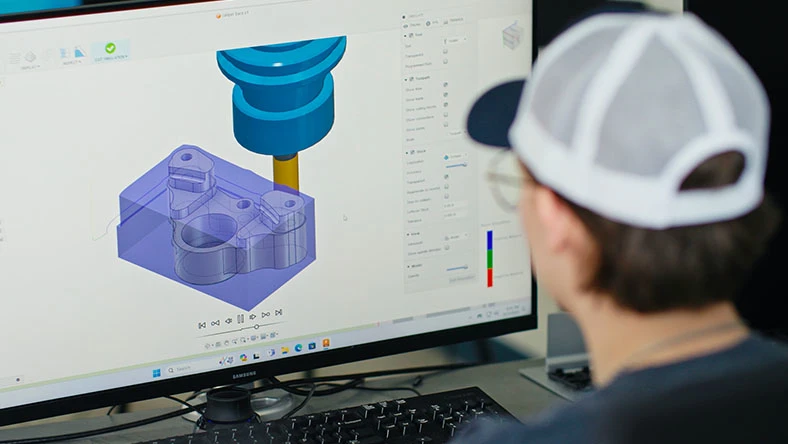
Get students to produce CNC machined parts and additively manufacture builds with a wide range of integrated CNC and 3D printers ready to simulate, test and prototype designs.
Education benefits
Student teams collaboration
Make it easier for students to work on the same project – when a new version of a dataset is uploaded, it is immediately available to everyone collaborating on the project.
Classroom management
Getting started with new classroom management tools
Unite multidisciplinary project teams for higher efficiency, collaboration, and impact in the office or on the jobsite.
Fusion is free for eligible educators and students. Available on Mac, PC, and Chromebook.
Classroom management
How to use Fusion Classrooms
Dive deeper and discover how to supercharge your teaching, provide meaningful feedback, and enhance the student experience.
Classroom management
How to set up Fusion Classrooms
Setting up a classroom is now easier than ever. Follow this step-by-step guide to successfully set up your first Fusion Classroom.
Overview
What is Autodesk Fusion?
Autodesk Fusion is a professional, full-scale integrated 3D modeling cloud-based CAD/CAM/CAE/PCB platform that lets you design and make anything.
Fusion is free for eligible educators and students. Available on Mac, PC, and Chromebook.
Education benefits
Review and manage student assignments
Centralize and manage students' assignments and projects. Students can share a link to their design, and you can view it, add markup, slice the model, and comment directly in your browser, on any device.
Education benefits
Get to machining faster
Get students to produce CNC machined parts and additively manufacture builds with a wide range of integrated CNC and 3D printers ready to simulate, test and prototype designs.
Education benefits
Student teams collaboration
Make it easier for students to work on the same project – when a new version of a dataset is uploaded, it is immediately available to everyone collaborating on the project.
Classroom management
Getting started with new classroom management tools
Unite multidisciplinary project teams for higher efficiency, collaboration, and impact in the office or on the jobsite.
Fusion is free for eligible educators and students. Available on Mac, PC, and Chromebook.
Classroom management
How to use Fusion Classrooms
Dive deeper and discover how to supercharge your teaching, provide meaningful feedback, and enhance the student experience.
Classroom management
How to set up Fusion Classrooms
Setting up a classroom is now easier than ever. Follow this step-by-step guide to successfully set up your first Fusion Classroom.
Autodesk Fusion features to accelerate your creativity
Flexible 3D CAD
Explore many iterations quickly with easy-to-use CAD software.
Integrated CAD/CAM
Produce high-quality CNC machined parts, and additively manufacture builds.
Unified PCB design
Gain all the advantages of a full-featured schematic capture and electronics design.
Seamless 3D simulation
Test your designs to ensure they survive real world conditions.
Explorative generative design tools
Explore many manufacturing-ready outcomes.
Instant-on data management
Manage product data on the cloud.
Free training for educators
Fusion training for educators (US only)
A free 12-hour course aimed at training educators how to use, teach, and implement Fusion.
Free training for educators
Fusion training for educators (US only)
A free 12-hour course aimed at training educators how to use, teach, and implement Fusion.
Autodesk Fusion resources for educators

Learning
Fusion curriculum
Explore teaching and learning resources for Fusion, designed and organized for easy implementation.
Certification
Fusion certification
Help students gain confidence and stand out by earning certifications.
Autodesk education plans
Begin your Fusion journey today with a free trial or a limited, free version for personal use.

Student plan
Student plan
Free for students and educators at qualified educational institutions.
1 named-user seat
Renewable 1-year subscription

Educator plan
Educator plan
Free access for educators at qualified educational institutions.
250 named-user seats
Renewable 1-year subscription
Invite an entire class or invite individual students

IT Administrator plan
IT Administrator plan
Free for school IT administrators at qualified educational institutions.
3,000 named-user seats
Renewable 3-year subscription
Single sign-on (SSO)
Frequently asked questions (FAQ) on Autodesk Fusion for education
Is Autodesk Fusion free for students?
Yes, Autodesk offers a free version of Autodesk software, including Autodesk Fusion, with full features and functionality for qualifying students and educators.
How long does Autodesk Fusion student version last?
The Autodesk Education plan offers one-year free access to Autodesk software and services for qualifying students and educators. Educational access is renewable annually as long as you are eligible.
How do I get a student version of Autodesk Fusion?
If you are eligible, you can select Autodesk Fusion on the Education Products page to start the verification process. Once you are successfully verified, you can access all software available through the Education Community, and access is renewable anually as long as you are eligible.
Does Autodesk Fusion education license expire?
Autodesk offers one-year free access to Autodesk software, including Autodesk Fusion, and services for our Individual or Classroom plans. Educational access is renewable annually as long as you are eligible.
Is Fusion free for university students?
Yes, Autodesk offers eligible university students one-year free access to Autodesk software, including Autodesk Fusion, and services.
How do I download Autodesk Fusion for free as a student?
If you already have an Autodesk account, sign in first to get the best experience. If you're new to Autodesk, signing up for the Education plan will create your Autodesk account. After you sign in, select Autodesk Fusion on the Education Products Page. Next, select the subscription plan that matches your role.
Can I use the educational version of Autodesk Fusion for commercial purposes?
Software and cloud-based services subject to an Educational license or subscription may be used by eligible users solely for Educational Purposes and shall not be used for commercial, professional or any other for-profit purposes.
Are there any limitations in the Autodesk Fusion educational version compared to the commercial version?
Autodesk offers qualified educational institutions access to the same design software used by the world’s leading professionals to help students build the skills and knowledge needed for a successful career.
What happens if I no longer qualify for the Autodesk Fusion educational license?
If you no longer qualify for the Autodesk Fusion educational license, you can sign up for a free 30-day trial.
Can educators manage multiple student licenses?
Institutions now have greater control to distribute Autodesk software to up to 3,000 students and educators with fewer verification steps. You can also enable the optional Autodesk SSO to make product access even easier.

