
Autodesk Fusion for Circuit design
Circuit design software for PCB and electronics
Circuit design software for PCB and electronics
Fusion is an all-in-one circuit design program for schematic capture, simulation, and PCB integration. Powerful, comprehensive, connected, and easy-to-use circuit design tools for every circuit board engineer.

What is circuit design software?
What is circuit design software?
Circuit design involves the creation of a schematic that acts as a blue print, showing how components connect to form the desired function. This process involves choosing the right parts and planning how everything connects. It also includes testing and making changes so that the design works well and is reliable before building it. Good circuit design is key to making electronics that work smoothly, are efficient, and can be manufactured without problems.
Circuit design software helps create and check electronic circuits by allowing users to draw schematics, run simulations, and design the physical PCB layout all in one place. Unlike basic electronic design programs, circuit design software includes features like schematic capture, PCB layout, design rule checks, signal testing, simulation, and automated routing.
Circuit design involves the creation of a schematic that acts as a blue print, showing how components connect to form the desired function. This process involves choosing the right parts and planning how everything connects. It also includes testing and making changes so that the design works well and is reliable before building it. Good circuit design is key to making electronics that work smoothly, are efficient, and can be manufactured without problems.
Circuit design software helps create and check electronic circuits by allowing users to draw schematics, run simulations, and design the physical PCB layout all in one place. Unlike basic electronic design programs, circuit design software includes features like schematic capture, PCB layout, design rule checks, signal testing, simulation, and automated routing.
Why choose Autodesk Fusion for circuit design?
Why choose Autodesk Fusion for circuit design?
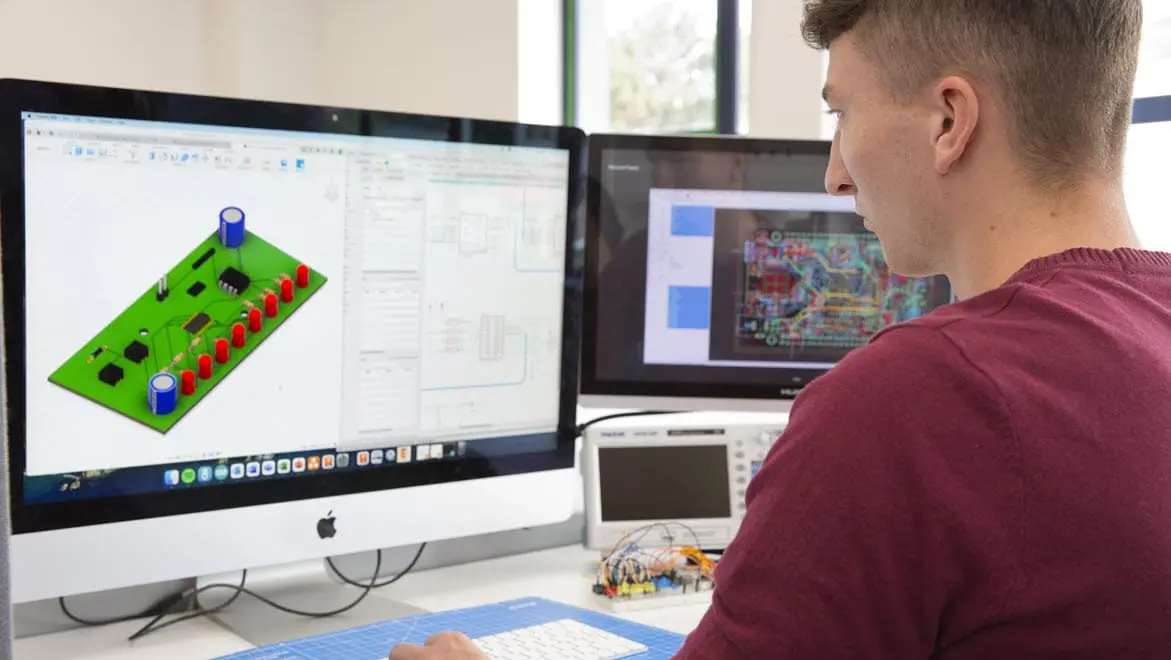
Using multiple tools for your electronics circuit design needs is inefficient. Autodesk Fusion is all-in-one circuit design software that combines schematic capture, PCB layout, and 3D mechanical design within a single platform. This integration simplifies the entire circuit design process, so users can easily create, test, and simulate circuits. Fusion is designed to handle everything from simple circuits to complex systems for more streamlined workflows and the elimination of disconnected tools.
Fusion is a complete circuit design program with real-time simulation features such as SPICE analysis, signal integrity, and thermal checks. Cloud collaboration and data management tools allow teams to work together from anywhere, with version control and multi-user design access enhancing coordination.
Fusion can also generate manufacturing outputs like Gerber files, drill files, and BOMs. It's a powerful choice for efficient, modern electronic circuit design programs that meet today’s product development demands.
Using multiple tools for your electronics circuit design needs is inefficient. Autodesk Fusion is all-in-one circuit design software that combines schematic capture, PCB layout, and 3D mechanical design within a single platform. This integration simplifies the entire circuit design process, so users can easily create, test, and simulate circuits. Fusion is designed to handle everything from simple circuits to complex systems for more streamlined workflows and the elimination of disconnected tools.
Fusion is a complete circuit design program with real-time simulation features such as SPICE analysis, signal integrity, and thermal checks. Cloud collaboration and data management tools allow teams to work together from anywhere, with version control and multi-user design access enhancing coordination.
Fusion can also generate manufacturing outputs like Gerber files, drill files, and BOMs. It's a powerful choice for efficient, modern electronic circuit design programs that meet today’s product development demands.
Core features of Fusion circuit design software
Circuit design software, Fusion offers a rich set of features to streamline the entire electronic circuit design process.
Circuit design software, Fusion offers a rich set of features to streamline the entire electronic circuit design process.
Schematic capture and library package generator
Schematic capture and library package generator
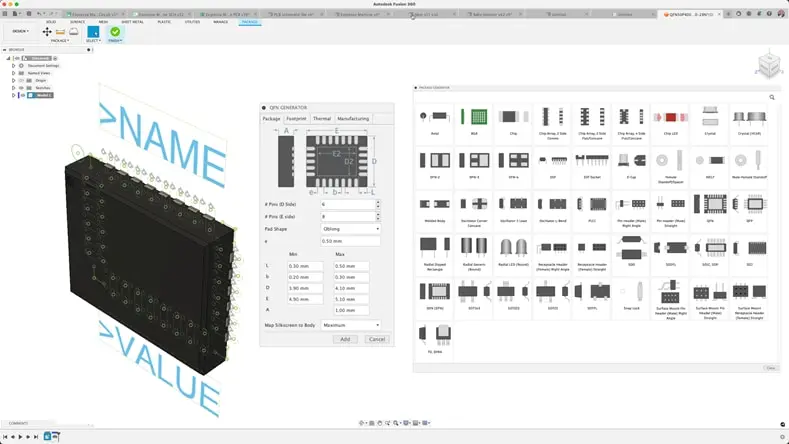
Easily edit circuit design schematics and select components from extensive IPC-compliant libraries. Circuit design software, Autodesk Fusion, includes a built-in library package generator that automatically creates footprints and 3D models based on component details, saving time and improving accuracy.
Easily edit circuit design schematics and select components from extensive IPC-compliant libraries. Circuit design software, Autodesk Fusion, includes a built-in library package generator that automatically creates footprints and 3D models based on component details, saving time and improving accuracy.
Advanced routing
Advanced routing
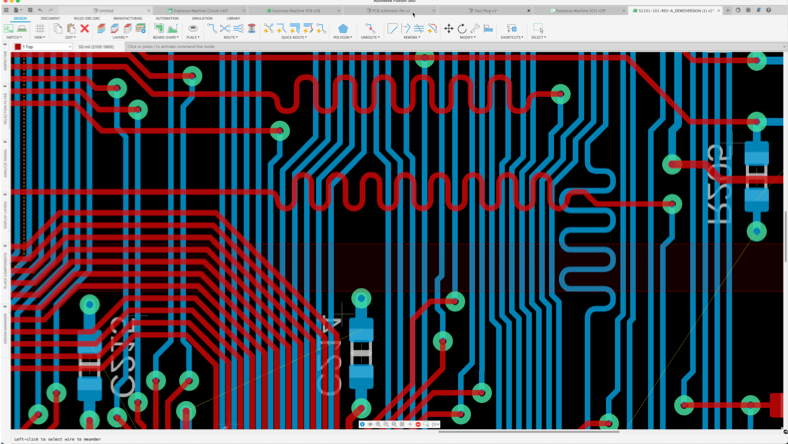
For PCB layout and circuit design, Fusion offers advanced routing tools including live Design Rule Checks (DRC), quick route, group route, and violator modes. These circuit design software features make it easier to achieve precise and efficient routing, even for the most complex boards.
For PCB layout and circuit design, Fusion offers advanced routing tools including live Design Rule Checks (DRC), quick route, group route, and violator modes. These circuit design software features make it easier to achieve precise and efficient routing, even for the most complex boards.
ECAD/MCAD collaboration
ECAD/MCAD collaboration
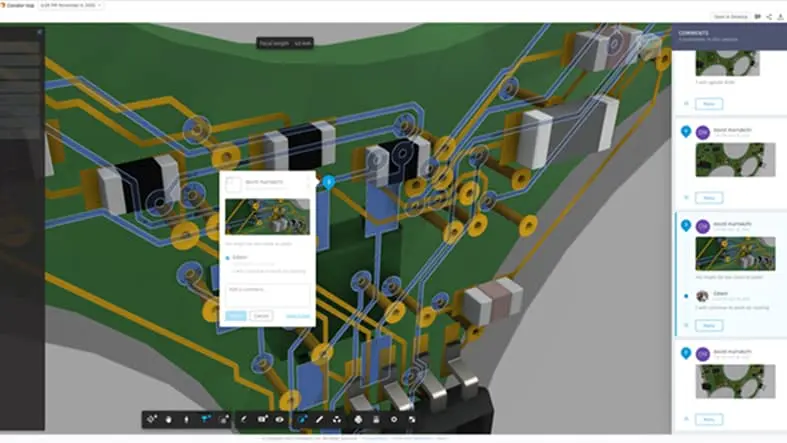
Fusion supports ECAD/MCAD collaboration, enabling electronic circuit design and mechanical design teams to work together in real time. With our circuit design software, teams can share designs, review updates, and track versions without extra steps. This eliminates file conversions and streamlines communication for faster, more accurate product development.
Fusion supports ECAD/MCAD collaboration, enabling electronic circuit design and mechanical design teams to work together in real time. With our circuit design software, teams can share designs, review updates, and track versions without extra steps. This eliminates file conversions and streamlines communication for faster, more accurate product development.
Autodesk Fusion circuit design software solutions
Benefits of Autodesk Fusion for circuit design
Streamline the design process
Streamline the design process
The advanced circuit design tools in Fusion include real-time design validation, 3D visualization, and simulation capabilities, making it easy to go from design to manufacture.
The advanced circuit design tools in Fusion include real-time design validation, 3D visualization, and simulation capabilities, making it easy to go from design to manufacture.
Improve product perfomance
Improve product perfomance
Fusion includes simulation capabilities that allow you to test your design and identify potential issues before building the circuit.
Fusion includes simulation capabilities that allow you to test your design and identify potential issues before building the circuit.
Access comprehensive component libraries
Access comprehensive component libraries
Fusion electronics provides an extensive repository of components. Partners such as Ultra Librarian and SnapEDA have created Fusion add-ins to help you quickly build your components.
Fusion electronics provides an extensive repository of components. Partners such as Ultra Librarian and SnapEDA have created Fusion add-ins to help you quickly build your components.
Export standardized file formats
Export standardized file formats
Fusion electronics can export designs in various standard formats such as Gerber, ODB++, including Ansys export for simulations and analysis.
Fusion electronics can export designs in various standard formats such as Gerber, ODB++, including Ansys export for simulations and analysis.
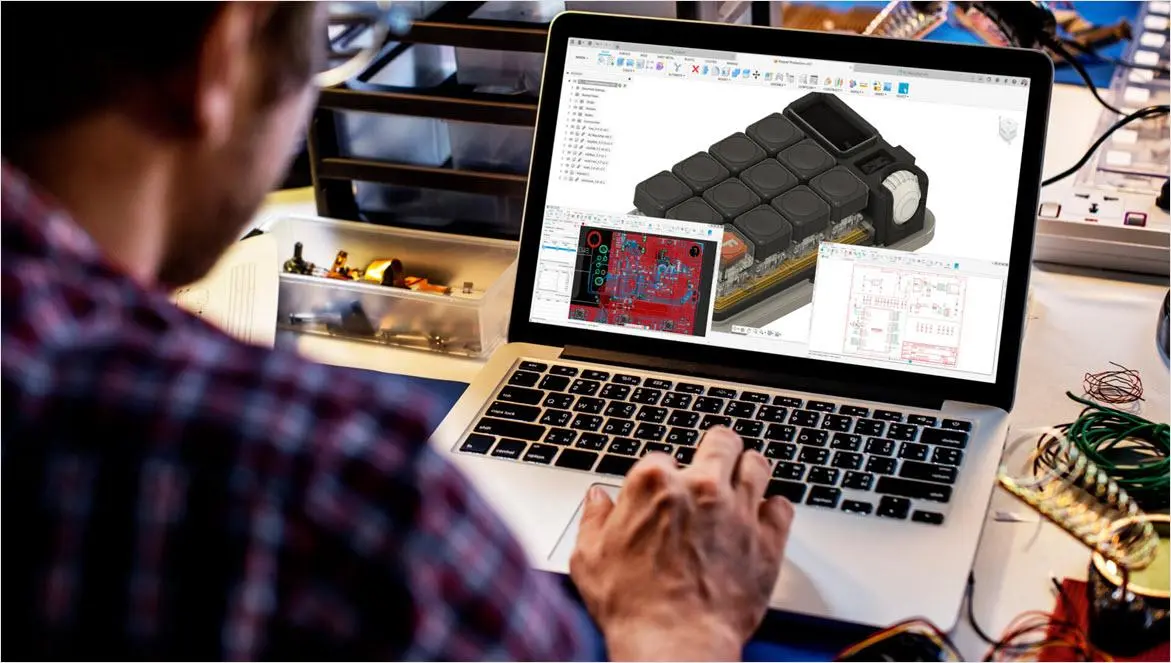
How to optimize your electronic circuit design workflow with Fusion
How to optimize your electronic circuit design workflow with Fusion
Fusion is an electronic circuit design program that integrates design for manufacturing (DFM) checks directly into the workflow, helping reduce costly errors early in the process. These automated checks validate designs against manufacturing constraints, preventing issues that can delay production or increase costs. By catching potential problems before fabrication, Fusion saves time and money while ensuring high-quality, reliable circuit boards.
Cloud-based collaboration allows teams to work together from anywhere in real time. This speeds up decision-making, streamlines feedback, and keeps everyone on the same page with version control and multi-user access. Designers and engineers can share updates seamlessly, reducing bottlenecks and accelerating time-to-market for electronic products.
The unified ECAD + MCAD environment in Fusion eliminates the disconnect often found between electrical and mechanical teams. By combining electronic circuit design with mechanical design tools in one platform, Fusion offers the easy synchronization between PCB layouts and 3D mechanical models. This integration helps prevent costly fit and clearance errors, improves communication, and ensures the final product’s electronic and mechanical parts work perfectly together from the start.
Fusion is an electronic circuit design program that integrates design for manufacturing (DFM) checks directly into the workflow, helping reduce costly errors early in the process. These automated checks validate designs against manufacturing constraints, preventing issues that can delay production or increase costs. By catching potential problems before fabrication, Fusion saves time and money while ensuring high-quality, reliable circuit boards.
Cloud-based collaboration allows teams to work together from anywhere in real time. This speeds up decision-making, streamlines feedback, and keeps everyone on the same page with version control and multi-user access. Designers and engineers can share updates seamlessly, reducing bottlenecks and accelerating time-to-market for electronic products.
The unified ECAD + MCAD environment in Fusion eliminates the disconnect often found between electrical and mechanical teams. By combining electronic circuit design with mechanical design tools in one platform, Fusion offers the easy synchronization between PCB layouts and 3D mechanical models. This integration helps prevent costly fit and clearance errors, improves communication, and ensures the final product’s electronic and mechanical parts work perfectly together from the start.
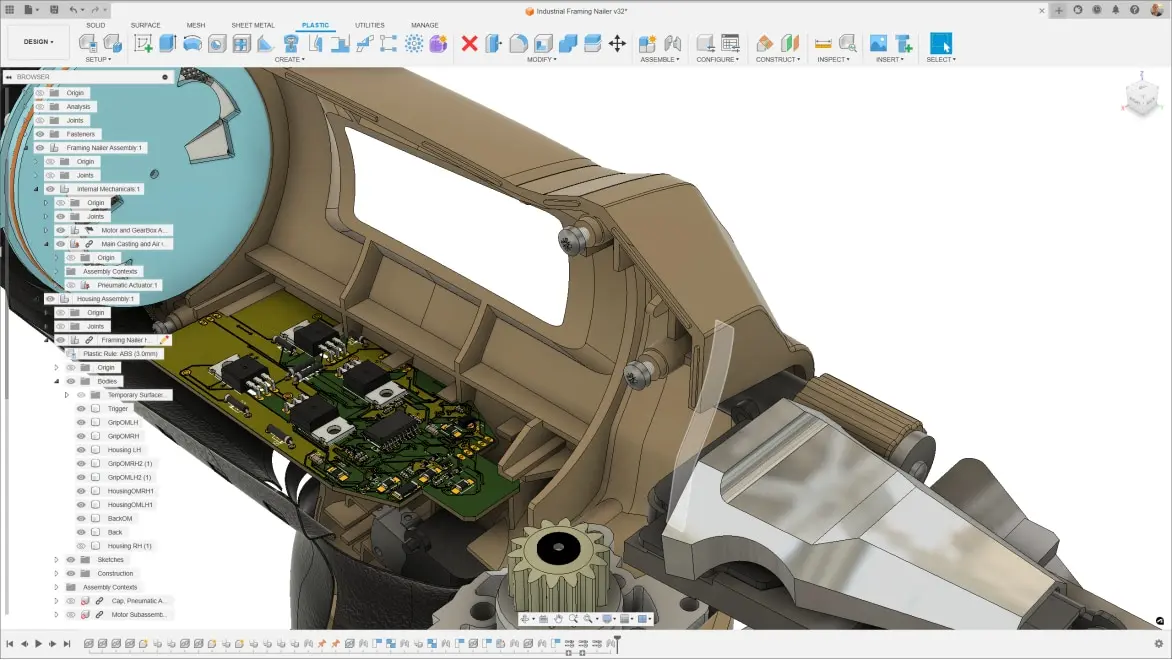
Circuit design software for consumer products
Circuit design software for consumer products
Product designers require solutions that help them bring consumer products to market faster and to easily transition from design to production. Autodesk Fusion enables seamless integration of 3D design and electronics circuit design.
Iterate faster with simultaneous collaboration capabilities
Minimize delays with ECAD/MCAD integration
Simplify project communications with connected teams in one platform
Product designers require solutions that help them bring consumer products to market faster and to easily transition from design to production. Autodesk Fusion enables seamless integration of 3D design and electronics circuit design.
Iterate faster with simultaneous collaboration capabilities
Minimize delays with ECAD/MCAD integration
Simplify project communications with connected teams in one platform
Additional circuit design applications
Industrial automation
Industrial automation
Build reliable control systems and robotics with circuit design software like Autodesk Fusion. From motor drivers and sensor interfaces to power management and EMI/EMC considerations, our tools streamline schematic capture, PCB layout, and verification so your electronic circuit design performs in harsh, high‑duty environments. Integrated ECAD/MCAD workflows help you optimize enclosures, harness routing, and thermal performance for factory‑floor readiness.
Build reliable control systems and robotics with circuit design software like Autodesk Fusion. From motor drivers and sensor interfaces to power management and EMI/EMC considerations, our tools streamline schematic capture, PCB layout, and verification so your electronic circuit design performs in harsh, high‑duty environments. Integrated ECAD/MCAD workflows help you optimize enclosures, harness routing, and thermal performance for factory‑floor readiness.
Automotive systems
Automotive systems
Create advanced automotive systems with robust circuit design capabilities. Circuit design software, like Autodesk Fusion, supports complex electronic circuit design for safety-critical components, infotainment systems, and power management. With real-time collaboration and simulation tools, you can optimize designs for durability and compliance in demanding automotive environments.
Create advanced automotive systems with robust circuit design capabilities. Circuit design software, like Autodesk Fusion, supports complex electronic circuit design for safety-critical components, infotainment systems, and power management. With real-time collaboration and simulation tools, you can optimize designs for durability and compliance in demanding automotive environments.
IoT devices
IoT devices
Bring innovative IoT devices to life with powerful electronic circuit design tools. Autodesk’s circuit design software, Fusion, enables seamless PCB layout, component selection, and connectivity optimization for smart sensors and edge devices. Integrated ECAD/MCAD workflows ensure your IoT designs are compact, efficient, and ready for rapid deployment.
Bring innovative IoT devices to life with powerful electronic circuit design tools. Autodesk’s circuit design software, Fusion, enables seamless PCB layout, component selection, and connectivity optimization for smart sensors and edge devices. Integrated ECAD/MCAD workflows ensure your IoT designs are compact, efficient, and ready for rapid deployment.
Try Fusion circuit design software today
Start your free trial of Fusion, the all-in-one circuit design program that goes beyond traditional electronic circuit design programs.
Start your free trial of Fusion, the all-in-one circuit design program that goes beyond traditional electronic circuit design programs.
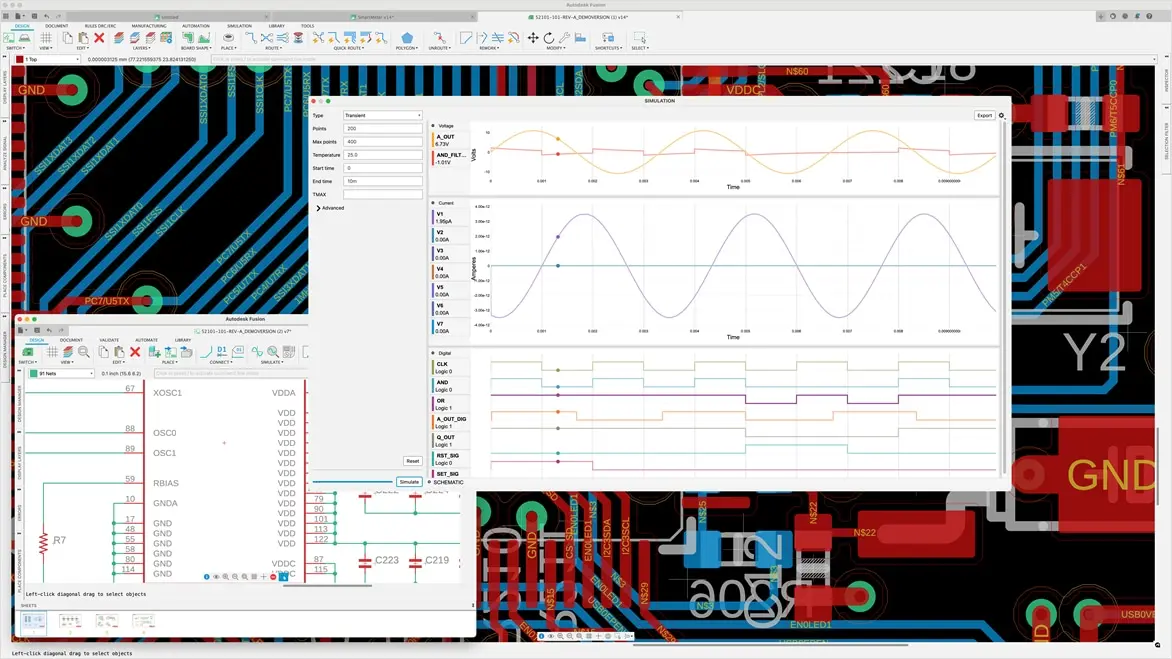
What are the types of circuit design?
What are the types of circuit design?
In electronics, circuit design includes two primary types: analog and digital.
Analog circuit design focuses on continuous signals that vary smoothly over time, often involving amplification, filtering, and signal conditioning. These circuits work with components like resistors, capacitors, and operational amplifiers to process real-world signals such as sound and temperature. Designing analog circuits is typically more complex because they require careful management of noise, signal distortion, and power efficiency to achieve precise and stable operation.
Digital circuit design deals with discrete signals represented by binary states—ones and zeros. Digital circuits use logic gates, microcontrollers, and other digital components to perform operations such as arithmetic, control, and data processing. Compared to analog, digital circuit design is often simpler and benefits from numerous automated electronic circuit design programs for rapid prototyping and simulation. Many products use both, requiring careful integration to avoid interference, and ensure reliable performance.
Circuit design software and circuit design programs help engineers navigate these challenges by providing comprehensive tools to create, test, and optimize both analog and digital circuits efficiently.
In electronics, circuit design includes two primary types: analog and digital.
Analog circuit design focuses on continuous signals that vary smoothly over time, often involving amplification, filtering, and signal conditioning. These circuits work with components like resistors, capacitors, and operational amplifiers to process real-world signals such as sound and temperature. Designing analog circuits is typically more complex because they require careful management of noise, signal distortion, and power efficiency to achieve precise and stable operation.
Digital circuit design deals with discrete signals represented by binary states—ones and zeros. Digital circuits use logic gates, microcontrollers, and other digital components to perform operations such as arithmetic, control, and data processing. Compared to analog, digital circuit design is often simpler and benefits from numerous automated electronic circuit design programs for rapid prototyping and simulation. Many products use both, requiring careful integration to avoid interference, and ensure reliable performance.
Circuit design software and circuit design programs help engineers navigate these challenges by providing comprehensive tools to create, test, and optimize both analog and digital circuits efficiently.

Workflow for electrical and mechanical design
Workflow for electrical and mechanical design
The ECAD/MCAD workflows in Fusion bring electronics and mechanical design together in one powerful circuit design software solution. Because everything is unified, design changes are adopted instantly—without the need for file conversions or translations.
When you modify a circuit design in the assembly workspace, those updates automatically are reflected in the PCB workspace, making Fusion the only circuit design program that seamlessly connects electronics, mechanics, and manufacturing.
This integration is what sets it apart from other electronic circuit design programs - accuracy, speed, and collaboration across every stage of development.
The ECAD/MCAD workflows in Fusion bring electronics and mechanical design together in one powerful circuit design software solution. Because everything is unified, design changes are adopted instantly—without the need for file conversions or translations.
When you modify a circuit design in the assembly workspace, those updates automatically are reflected in the PCB workspace, making Fusion the only circuit design program that seamlessly connects electronics, mechanics, and manufacturing.
This integration is what sets it apart from other electronic circuit design programs - accuracy, speed, and collaboration across every stage of development.
Free circuit design software
Download free version of Fusion
This free version for hobbyists and makers includes 2 schematic sheets, 2 signal layers, and 80-cm2 board area.
This free version for hobbyists and makers includes 2 schematic sheets, 2 signal layers, and 80-cm2 board area.
Free circuit design software for students and educators
We offer free circuit design software for students and educators around the world.
We offer free circuit design software for students and educators around the world.

Circuits on Tinkercad
Circuits on Tinkercad
Circuits empower you to bring your ideas to life with free, easy-to-use online tools.
Simulate and program Arduino and breadboard components
Use standard modules to build complex circuits
Create and explore circuits then export to PCB design software, like Autodesk Fusion
Circuits empower you to bring your ideas to life with free, easy-to-use online tools.
Simulate and program Arduino and breadboard components
Use standard modules to build complex circuits
Create and explore circuits then export to PCB design software, like Autodesk Fusion
Circuit design basics for electronics beginners
PCB layout basics
PCB layout basics
The printed circuit board (PCB) layout brings your circuit design to life in its physical form. Learn more about the PCB layout process and how to design your own.
The printed circuit board (PCB) layout brings your circuit design to life in its physical form. Learn more about the PCB layout process and how to design your own.
Circuitry schematic design basics
Circuitry schematic design basics
The schematic design defines connectivity between your electrical component symbols. Learn more about the schematic design process and how to design your own.
The schematic design defines connectivity between your electrical component symbols. Learn more about the schematic design process and how to design your own.
SPICE simulation basics
SPICE simulation basics
SPICE simulation allows you to analyze voltage and current performance in your circuit design. Learn more about SPICE and how to run your first SPICE simulation.
SPICE simulation allows you to analyze voltage and current performance in your circuit design. Learn more about SPICE and how to run your first SPICE simulation.
Circuit design software resources
What is electronic circuit design?
Electronic circuit design involves ideation, creation, and revision. Learn about PCB design and the circuit design process.
Electronic circuit design involves ideation, creation, and revision. Learn about PCB design and the circuit design process.
10 tips for high-speed circuit design
Learn how to make your first high-speed PCB design a success by minimizing crosstalk, EMI, and more.
Learn how to make your first high-speed PCB design a success by minimizing crosstalk, EMI, and more.
Interactive routing with Fusion electronics
Learn how Autodesk Fusion provides you with the necessary routing tools and environment settings to make interactive routing easy and efficient.
Learn how Autodesk Fusion provides you with the necessary routing tools and environment settings to make interactive routing easy and efficient.
PCB routing tips for beginners
Use these top 10 PCB routing tips to make your first PCB layout a success.
Use these top 10 PCB routing tips to make your first PCB layout a success.
Design your next PCB like a pro
Learn how to design your printed circuit board (PCB) layout with these tips for routing, component placement, heat dissipation, and more.
Learn how to design your printed circuit board (PCB) layout with these tips for routing, component placement, heat dissipation, and more.
Electronics cooling
By simulating the flow of air, heat transfer, and other factors, identify potential issues and optimize designs for maximum efficiency.
By simulating the flow of air, heat transfer, and other factors, identify potential issues and optimize designs for maximum efficiency.
Circuit design and electronic circuit design software frequently asked questions (FAQs)
What features should you look for in PCB design software?
Look for a tool that supports the full PCB development workflow, including schematic capture, PCB layout, design rule checking, ECAD-MCAD collaboration, component library management, and manufacturing output generation. Autodesk Fusion brings these capabilities together in a connected environment, which can reduce the need to move data between separate applications. This helps minimize version-control issues and improves coordination between electrical and mechanical teams.
What is circuit design software?
Circuit design software, like Autodesk Fusion, is a tool that helps engineers and designers create, simulate, and optimize electronic circuits. It streamlines workflows from schematic capture to PCB layout and verification.
Why do I need circuit design software?
Circuit design software, like Autodesk Fusion reduces errors, accelerates development, and ensures compliance with industry standards. It also integrates simulation and collaboration features for better product quality.
What should I look for in PCB design software as a professional?
Beyond core design capabilities, evaluate how the software supports collaboration, version control, component management, manufacturing readiness, and integration with mechanical design tools. It's also important to consider whether the platform can scale from prototype development to production workflows. Autodesk Fusion combines PCB design with integrated ECAD-MCAD collaboration and cloud-based data management, helping electrical and mechanical teams stay aligned throughout product development.
What features should I look for in circuit design software?
Key features in circuit design software, like Autodesk Fusion, include schematic capture, PCB layout tools, component libraries, simulation capabilities, and ECAD/MCAD integration for mechanical collaboration.
How do I choose the best circuit design software?
Finding the right circuit design software can feel overwhelming. Circuit design is just one step in creating complete product solutions, and it requires close collaboration with other engineering disciplines—especially mechanical engineering. The ideal software should make it easy to design high-quality circuits while streamlining your workflow. Look for a solution with seamless electromechanical integration, version control, and real-time collaboration features so you can work with team members, access designs anywhere, and track changes effortlessly. In addition, consider ease of use, integration with CAD tools, simulation capabilities, library support, and collaboration features to match your project needs—so you can focus on the design process, not the tools. Autodesk Fusion is a great solution!
How does circuit design software improve accuracy?
It automates design rule checks, generates footprints and 3D models, and provides real-time error detection, reducing manual mistakes and improving precision.
Can I perform simulations on my circuit design?
Yes, Fusion includes simulation capabilities that allow you to test your design and identify potential issues before building the circuit board.
Can cloud-based tools handle complex multilayer PCB designs?
Yes. The complexity of a PCB design is determined by the capabilities of the design software, not whether the software uses cloud technologies. Autodesk Fusion supports multilayer PCB design and stackup management while providing cloud-based data management and collaboration capabilities. This allows teams to manage complex projects, share design information more easily, and maintain access to the latest design data across distributed teams.
What is the difference between schematic capture and PCB layout, and does one tool handle both?
Schematic capture defines the electrical connections and components in a design, while PCB layout determines the physical placement of those components and routes the electrical connections on the board. Some workflows use separate applications for these tasks, requiring data translation between tools. Autodesk Fusion handles both schematic capture and PCB layout within a connected environment, helping maintain consistency between the electrical design and the physical board implementation.
How does Autodesk Fusion support circuit designers?
Autodesk Fusion offers an integrated platform for electronics design, combining schematic capture, PCB layout, and 3D visualization. It enables:
Real-time design validation
Seamless integration
Access to extensive component libraries
Export options for industry-standard formats like Gerber and ODB++
Does Fusion support spice simulation?
Inside Fusion’s electronics workspace, you can run SPICE-based circuit simulations directly from your schematic designs. This allows you to test circuit behavior, verify performance, and troubleshoot issues such as voltage levels, current flow, and signal integrity before moving on to PCB layout and manufacturing.
Can circuit designers collaborate using Autdesk Fusion?
Autodesk Fusion includes a modern, collaborative environment to connect teams and stakeholders. You'll gain the ability to:
Manage how internal and external stakeholders interact with your data
Capture and share feedback from any device using comments and markups
Access your data on any device
Share public previews
Is there a free trial for Autodesk Fusion circuit design software?
Yes. Autodesk offers a free 30-day trial for Fusion so you can explore its features before purchasing.
Can Autodesk Fusion handle complex circuit designs?
Absolutely. Fusion is built for both simple and complex designs, offering advanced simulation and validation tools.