AI motion capture with Flow Studio
AI motion capture with Flow Studio
Autodesk Flow Studio is the AI-powered motion capture that you can control.

What is AI motion capture in Flow Studio?
What is AI motion capture in Flow Studio?
Flow Studio’s AI motion capture technology was built by artists, for artists—delivering markerless motion capture data from live-action videos shot on any camera. If you can film an actors performance, Flow Studio can animate it as a CG character for games, films, or virtual production of any kind. No complex set-ups, suits, markers, stages, or green screens required. Just upload your footage to Flow Studio’s browser-based cloud platform, and it automatically identifies human actors and applies their motion to pre-loaded or custom 3D characters. All results are editable and directable.
For professionals using Maya, Blender, Unreal Engine, or USD compatible DCC tools, Flow Studio exports full 3D scenes and essential elements—including mocap data, camera tracking, character passes, clean plates, and alpha masks.
Independent filmmakers, YouTubers, and other creators can also elevate their content with professional VFX regardless of their technical knowledge. Flow Studio is easy to use and reduces budget and time-consuming tasks—and now, anyone can get Flow Studio for free. Whether you're a solo creator or part of a larger team, Flow Studio enhances productivity, boosts content quality, and scales to fit any project.
Flow Studio’s AI motion capture technology was built by artists, for artists—delivering markerless motion capture data from live-action videos shot on any camera. If you can film an actors performance, Flow Studio can animate it as a CG character for games, films, or virtual production of any kind. No complex set-ups, suits, markers, stages, or green screens required. Just upload your footage to Flow Studio’s browser-based cloud platform, and it automatically identifies human actors and applies their motion to pre-loaded or custom 3D characters. All results are editable and directable.
For professionals using Maya, Blender, Unreal Engine, or USD compatible DCC tools, Flow Studio exports full 3D scenes and essential elements—including mocap data, camera tracking, character passes, clean plates, and alpha masks.
Independent filmmakers, YouTubers, and other creators can also elevate their content with professional VFX regardless of their technical knowledge. Flow Studio is easy to use and reduces budget and time-consuming tasks—and now, anyone can get Flow Studio for free. Whether you're a solo creator or part of a larger team, Flow Studio enhances productivity, boosts content quality, and scales to fit any project.
Key features of Flow Studio AI mocap
The cloud-based, AI-powered Autodesk Flow Studio performs markerless motion capture on live-action video footage, with fast, editable, and exportable results.
The cloud-based, AI-powered Autodesk Flow Studio performs markerless motion capture on live-action video footage, with fast, editable, and exportable results.

Markerless AI motion capture
Markerless AI motion capture
Flow Studio's AI-powered technology records and interprets motion capture data without needing motion capture suits, markers, or sensor hardware required for traditional motion capture. The system collects mocap data from standard footage and actors' performance to composite 3D characters and 3D animated scenes, all without the need for specialized gear. This capability is also known as markerless motion capture.
Flow Studio's AI-powered technology records and interprets motion capture data without needing motion capture suits, markers, or sensor hardware required for traditional motion capture. The system collects mocap data from standard footage and actors' performance to composite 3D characters and 3D animated scenes, all without the need for specialized gear. This capability is also known as markerless motion capture.
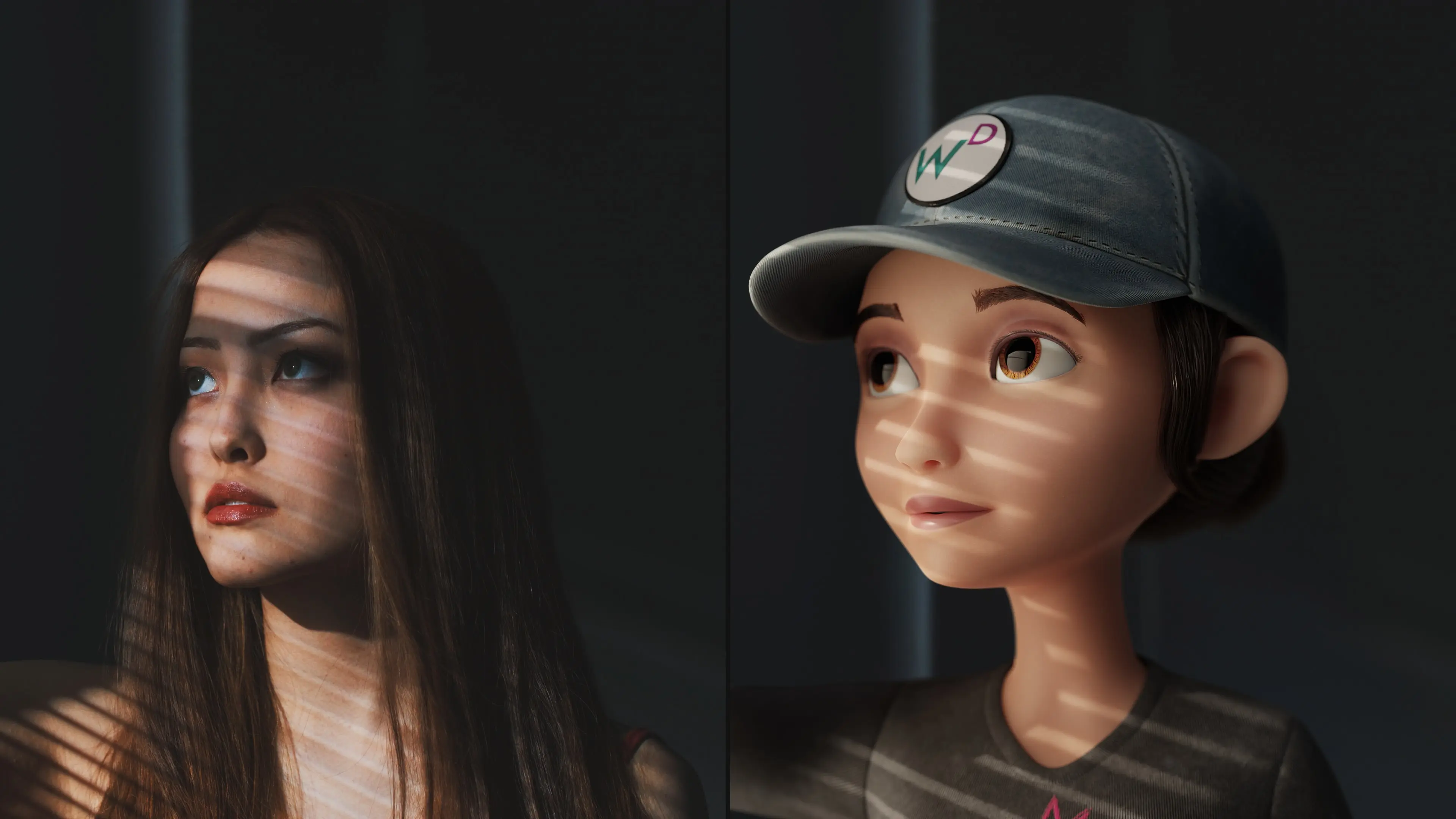
Hands, face, and body mocap
Hands, face, and body mocap
Even though Flow Studio’s AI mocap is markerless, it results in highly detailed body movements, hand gestures, and facial expressions. Its markerless facial motion capture identifies and tracks detailed facial movements from eyes/eyebrows, lips/mouths, and noses within your footage. Markerless body and hand mocap are also advanced, with exportable tracking data available.
Even though Flow Studio’s AI mocap is markerless, it results in highly detailed body movements, hand gestures, and facial expressions. Its markerless facial motion capture identifies and tracks detailed facial movements from eyes/eyebrows, lips/mouths, and noses within your footage. Markerless body and hand mocap are also advanced, with exportable tracking data available.

Rig compatibility and auto-retargeting
Rig compatibility and auto-retargeting
Flow Studio’s markerless motion capture can be applied directly to the platforms built-in rigs or your own imported custom characters. It features easy, advanced retargeting using inverse kinematics (IK), allowing for seamless integration of custom rigs with human performances from any live-action footage, shot on any camera.
Flow Studio’s markerless motion capture can be applied directly to the platforms built-in rigs or your own imported custom characters. It features easy, advanced retargeting using inverse kinematics (IK), allowing for seamless integration of custom rigs with human performances from any live-action footage, shot on any camera.

Iterate in real-time
Iterate in real-time
Flow Studio not only speeds up mocap recording, it also accelerates iteration. Motion tracking and animation footage are available in a fraction of the time it would take with traditional mocap setups, allowing for quick turnarounds and creative refinement.
Flow Studio not only speeds up mocap recording, it also accelerates iteration. Motion tracking and animation footage are available in a fraction of the time it would take with traditional mocap setups, allowing for quick turnarounds and creative refinement.
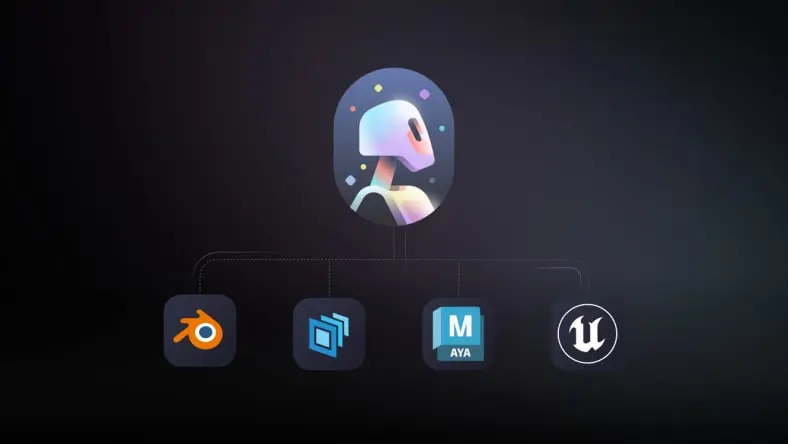
Editable VFX elements
Editable VFX elements
Flow Studio’s mocap and VFX elements are all fully editable in popular DCC tools like Maya, Blender, Unreal, and 3ds Max via USD. You can also perform quick fixes and edits within the program through built-in cleanup tools like automatic foot locking, smoothing, and trajectory fixes.
Flow Studio’s mocap and VFX elements are all fully editable in popular DCC tools like Maya, Blender, Unreal, and 3ds Max via USD. You can also perform quick fixes and edits within the program through built-in cleanup tools like automatic foot locking, smoothing, and trajectory fixes.
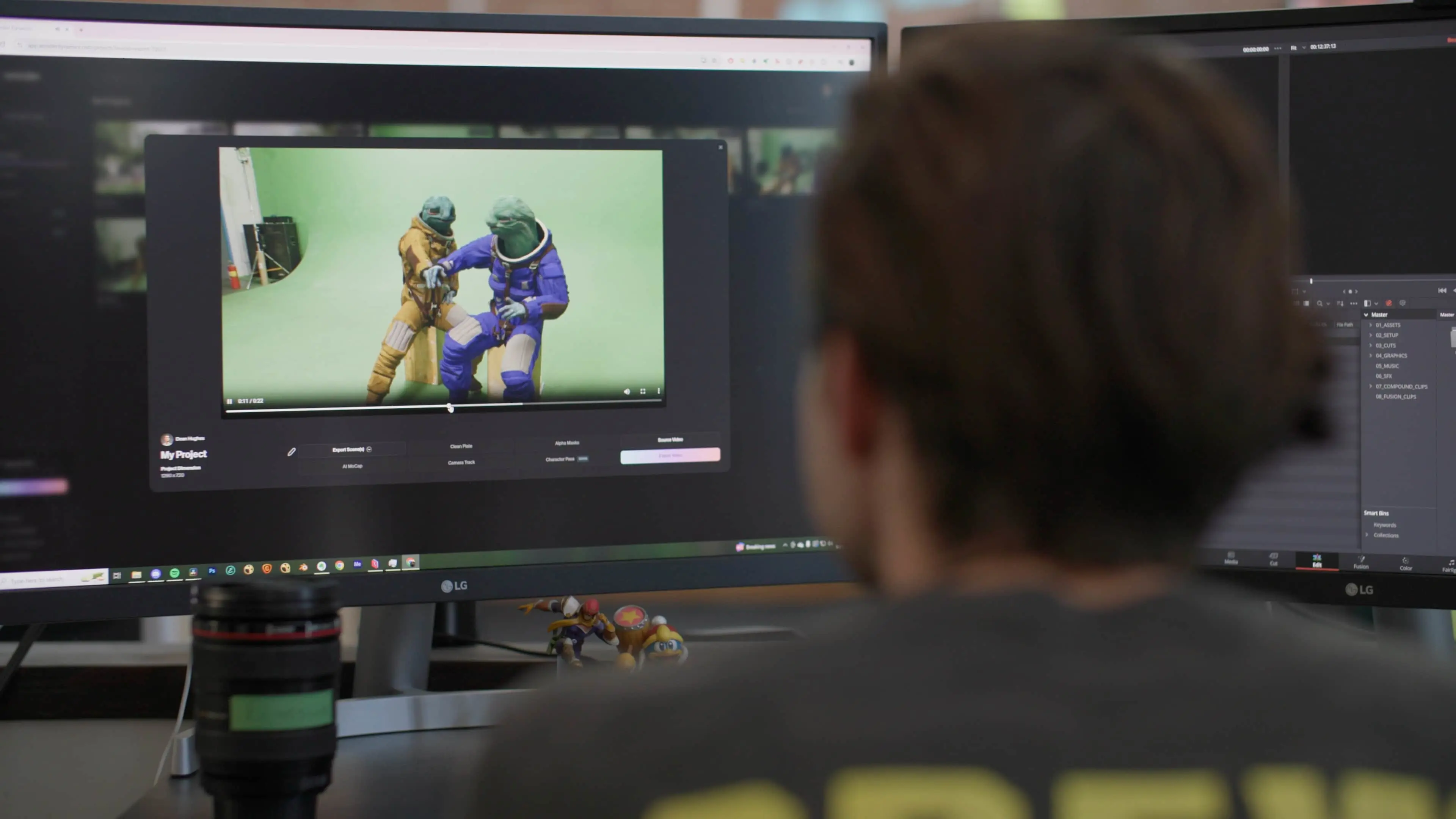
Cloud-based processing
Cloud-based processing
With cloud-based processing, Flow Studio is easily accessible from any desktop or laptop computer via popular web browsers and internet connection. It offloads tasks to the cloud to offer fast and reliable rendering, allowing the system to support multiple projects at once.
With cloud-based processing, Flow Studio is easily accessible from any desktop or laptop computer via popular web browsers and internet connection. It offloads tasks to the cloud to offer fast and reliable rendering, allowing the system to support multiple projects at once.
Benefits of Flow Studio's AI mocap
Fast, affordable, and fully editable AI mocap—Flow Studio makes it easy for studios and creators alike to add VFX without complex setups or costly gear.
Fast, affordable, and fully editable AI mocap—Flow Studio makes it easy for studios and creators alike to add VFX without complex setups or costly gear.
Add VFX with ease
Add VFX with ease
With Flow Studio, anyone can add CG animated characters and export VFX elements with ease. No need for technical knowledge or specialized hardware that traditional motion capture systems require. Flow Studio is also cloud-based, so you can access it from a web browser on any computer.
With Flow Studio, anyone can add CG animated characters and export VFX elements with ease. No need for technical knowledge or specialized hardware that traditional motion capture systems require. Flow Studio is also cloud-based, so you can access it from a web browser on any computer.
Fit to your existing pipeline
Fit to your existing pipeline
Flow Studio accelerates your creative workflow with fast markerless mocap technology. In addition, it can automatically generate 3D scene files and essential element export files to seamlessly fit into your existing pipeline. Exports are compatible with Maya, Blender, and Unreal Engine, as well as 3ds Max and other tools via USD files.
Flow Studio accelerates your creative workflow with fast markerless mocap technology. In addition, it can automatically generate 3D scene files and essential element export files to seamlessly fit into your existing pipeline. Exports are compatible with Maya, Blender, and Unreal Engine, as well as 3ds Max and other tools via USD files.
Save time and budget
Save time and budget
Flow Studio helps teams of any size or budget collect motion capture data in a fraction of the time traditional mocap set-ups require - without the expensive and unwieldy mocap suits or stages. Subscription plans are scaled to meet the demands of any project, large or small.
Flow Studio helps teams of any size or budget collect motion capture data in a fraction of the time traditional mocap set-ups require - without the expensive and unwieldy mocap suits or stages. Subscription plans are scaled to meet the demands of any project, large or small.
Get AI-powered motion capture with Autodesk Flow Studio.

How does motion capture work in Flow Studio?
How does motion capture work in Flow Studio?
Get ready to witness the power of Flow Studio’s markerless motion capture. This quick video tutorial shows you how straightforward it is to apply a 3D character to an actor’s performance in a live-action video and to export the 3D scene and individual layer elements for editing in other 3D tools.
Get ready to witness the power of Flow Studio’s markerless motion capture. This quick video tutorial shows you how straightforward it is to apply a 3D character to an actor’s performance in a live-action video and to export the 3D scene and individual layer elements for editing in other 3D tools.
Use cases for using Flow Studio's AI motion capture
Save time, cut costs, and boost creativity with Flow Studio’s AI mocap workflows.
Save time, cut costs, and boost creativity with Flow Studio’s AI mocap workflows.
For studios
Studios of any size can benefit from Flow Studio for rapid storyboarding, previsualization for projects, and to pitch ideas or to get approval for proofs of concept. Studio pre-vis artists can iterate fast using Flow Studio to block out scenes with rough animation, camera movement, and timing—conveying the direction of the story. Studios can spend less time on basic layouts and have more time to experiment with different shot selections.
Studios of any size can benefit from Flow Studio for rapid storyboarding, previsualization for projects, and to pitch ideas or to get approval for proofs of concept. Studio pre-vis artists can iterate fast using Flow Studio to block out scenes with rough animation, camera movement, and timing—conveying the direction of the story. Studios can spend less time on basic layouts and have more time to experiment with different shot selections.
For professional creators
Flow Studio gives independent creators the power to produce cinematic content with professional VFX—on a budget and tight timeline. Whether you're making music videos or YouTube shorts, you can integrate motion-captured 3D characters without the traditional mocap gear or complex pipelines. Used by creators like Corridor Digital, Flow Studio unlocks high-end results for artists of any skill level, helping them stand out through imagination and creativity.
Flow Studio gives independent creators the power to produce cinematic content with professional VFX—on a budget and tight timeline. Whether you're making music videos or YouTube shorts, you can integrate motion-captured 3D characters without the traditional mocap gear or complex pipelines. Used by creators like Corridor Digital, Flow Studio unlocks high-end results for artists of any skill level, helping them stand out through imagination and creativity.

Why choose Autodesk Flow Studio?
Why choose Autodesk Flow Studio?
Autodesk Flow Studio is the ideal AI markerless motion capture platform for productions of any scale. Built to flex with the needs of both small teams and large studios, it runs on Autodesk’s trusted cloud infrastructure—designed for fast, secure collaboration across even the most demanding creative workflows.
Flow Studio integrates seamlessly with Autodesk’s ecosystem and major DCC tools, automatically exporting 3D scene files along with key elements like motion capture data, camera tracking, character passes, clean plates, and alpha masks. Exports are compatible with Maya, Blender, Unreal Engine, 3ds Max, and more via USD files, so it fits effortlessly into any pipeline.
By streamlining motion capture and 3D scene creation, Flow Studio helps teams iterate faster and stretch their budgets—without the need for traditional mocap gear.
Autodesk Flow Studio is the ideal AI markerless motion capture platform for productions of any scale. Built to flex with the needs of both small teams and large studios, it runs on Autodesk’s trusted cloud infrastructure—designed for fast, secure collaboration across even the most demanding creative workflows.
Flow Studio integrates seamlessly with Autodesk’s ecosystem and major DCC tools, automatically exporting 3D scene files along with key elements like motion capture data, camera tracking, character passes, clean plates, and alpha masks. Exports are compatible with Maya, Blender, Unreal Engine, 3ds Max, and more via USD files, so it fits effortlessly into any pipeline.
By streamlining motion capture and 3D scene creation, Flow Studio helps teams iterate faster and stretch their budgets—without the need for traditional mocap gear.
Frequently asked questions (FAQ) about Flow Studio
What is AI motion capture in Autodesk Flow Studio?
Autodesk Flow Studio is a cloud-based, AI-powered tool that generates markerless motion capture data from standard video footage. It captures body, face, and hand performance and applies it to 3D characters automatically. This allows creators to move from live-action footage to animation-ready scenes without traditional mocap setup. The outputs remain fully editable for downstream refinement.
Do I need a motion capture suit or specialized equipment to use Flow Studio?
No, Flow Studio uses markerless motion capture AI, so you don’t need suits, sensors, or a capture stage. Performances can be recorded using standard cameras, including phones or DSLRs. This makes it easier to capture motion in real-world environments without technical setup. It lowers both cost and complexity compared to traditional mocap workflows.
What types of motion can Flow Studio capture?
Flow Studio captures full-body motion, facial performance, and hand movement from video footage—all without needing mocap equipment. This includes detailed features like eye movement, lip sync, and gestures. The captured data is automatically mapped to 3D characters. This makes it suitable for character animation, previs, and performance-driven storytelling.
How accurate is AI motion capture compared to traditional mocap?
Flow Studio is designed for speed and flexibility, making it well suited for previs, prototyping, and many production workflows. While traditional mocap may still be used for highly specialized scenarios, Flow Studio enables fast iteration with strong results from simple footage. Outputs can be refined further in tools like Maya, Unreal Engine, or Blender, which makes it a practical starting point for many productions.
How can Flow Studio fit into an animation or VFX pipeline?
Flow Studio generates motion capture data along with camera tracking, clean plates, and scene elements. These can be exported and refined in tools like Maya, Unreal Engine, or Blender. It integrates into existing pipelines without replacing downstream workflows. Artists stay in control while accelerating early-stage production.
Can I use my own 3D characters with Flow Studio?
Yes, Flow Studio supports custom characters alongside built-in rigs. It uses AI-driven retargeting and inverse kinematics to map performance onto your assets. This allows teams to maintain their own character designs and rigs. The result is a flexible workflow that adapts to your pipeline.
How does AI improve motion capture workflows in Flow Studio?
AI in Flow Studio automates motion capture, tracking, and scene generation from standard footage. It reduces manual setup and removes the need for specialized hardware. Importantly, outputs remain editable and controllable, so artists can refine performance as needed. This approach supports faster iteration without taking creative control away from creators.
Is Flow Studio good for independent creators or small teams?
Yes, Flow Studio is well suited for creators, freelancers, and small studios. It removes the need for expensive mocap hardware and complex pipelines. This makes it easier to produce high-quality animation for YouTube, indie films, or game prototypes. It’s designed to scale from solo creators to larger teams.
How can creators use Flow Studio to speed up content production?
Creators can capture performances quickly, generate 3D scenes, and iterate without long setup times. This is especially useful for social content, previs, and short-form storytelling. Instead of spending days on setup, you can test ideas in minutes. The result is faster turnaround with more creative flexibility.
Is there a free trial or free version of Flow Studio?
Yes, Flow Studio offers access across multiple tiers, including a free option. This allows creators to explore AI motion capture and 3D workflows without upfront cost. As needs grow, higher tiers provide more capacity and concurrency. This makes it easy to start small and scale over time.
How does pricing work for Flow Studio?
Flow Studio uses a credit-based system for certain AI workflows, making usage predictable. Different plans also control how many jobs you can run at once. This allows individuals and teams to scale usage based on project needs. It’s designed to support both experimentation and production use.
Can students and educators use Flow Studio for learning animation or VFX?
Yes, Flow Studio is accessible for learning and experimentation, especially with its low barrier to entry. Students can explore motion capture, animation, and 3D workflows without needing specialized equipment. This makes it a practical tool for teaching modern production techniques. It also helps build skills that translate into professional pipelines.
What is markerless motion capture and how does it work?
Markerless motion capture uses AI to analyze video footage and extract performance data without physical markers. It tracks body, face, and movement directly from recorded video. This removes the need for suits and dedicated capture stages. The result is a faster and more accessible way to create animation.
What are the benefits of AI motion capture for creators and studios?
AI motion capture reduces setup time, lowers costs, and enables faster iteration. Teams can capture performances anywhere and quickly test ideas. This is especially valuable for previs, prototyping, and content creation. It helps creators focus more on storytelling and less on technical setup.
How is AI motion capture used in film, games, and content creation?
AI motion capture is used to animate characters, block scenes, and prototype ideas early in production. In film and TV, it supports previs and VFX workflows. In games, it helps quickly generate character animation for testing and development. For creators, it enables cinematic content without large production resources.