Get work done faster with AI embedded in your workflow
Get work done faster with AI embedded in your workflow
Autodesk Assistant brings AI directly into Design and Make workflows, helping you execute tasks, find information, and move work forward without leaving your tools. It understands your models, your project context, and the task in front of you.
From quick “how do I…” questions to completing design and project tasks through simple prompts, Assistant helps you move from question to action with fewer manual steps and less rework.
Autodesk Assistant brings AI directly into Design and Make workflows, helping you execute tasks, find information, and move work forward without leaving your tools. It understands your models, your project context, and the task in front of you.
From quick “how do I…” questions to completing design and project tasks through simple prompts, Assistant helps you move from question to action with fewer manual steps and less rework.
Ask questions. Get answers. Move work forward.

Get answers grounded in your work
Get answers grounded in your work
Ask questions about your tools, models, and workflows and get clear answers without leaving your product. Assistant understands your project context and helps you move forward faster with less searching.

Work without breaking your flow
Work without breaking your flow
Assistant shows up where you work, so you can access capabilities in the tools you already use. No switching programs or digging through documentation to figure out what to do next.

Turn prompts into real work
Turn prompts into real work
Use simple prompts to take action, automate steps, and move tasks forward. From quick help to completing design and project tasks, Assistant supports both learning and doing in one place.
Autodesk Assistant is now available
Autodesk AutoCAD
Autodesk AutoCAD
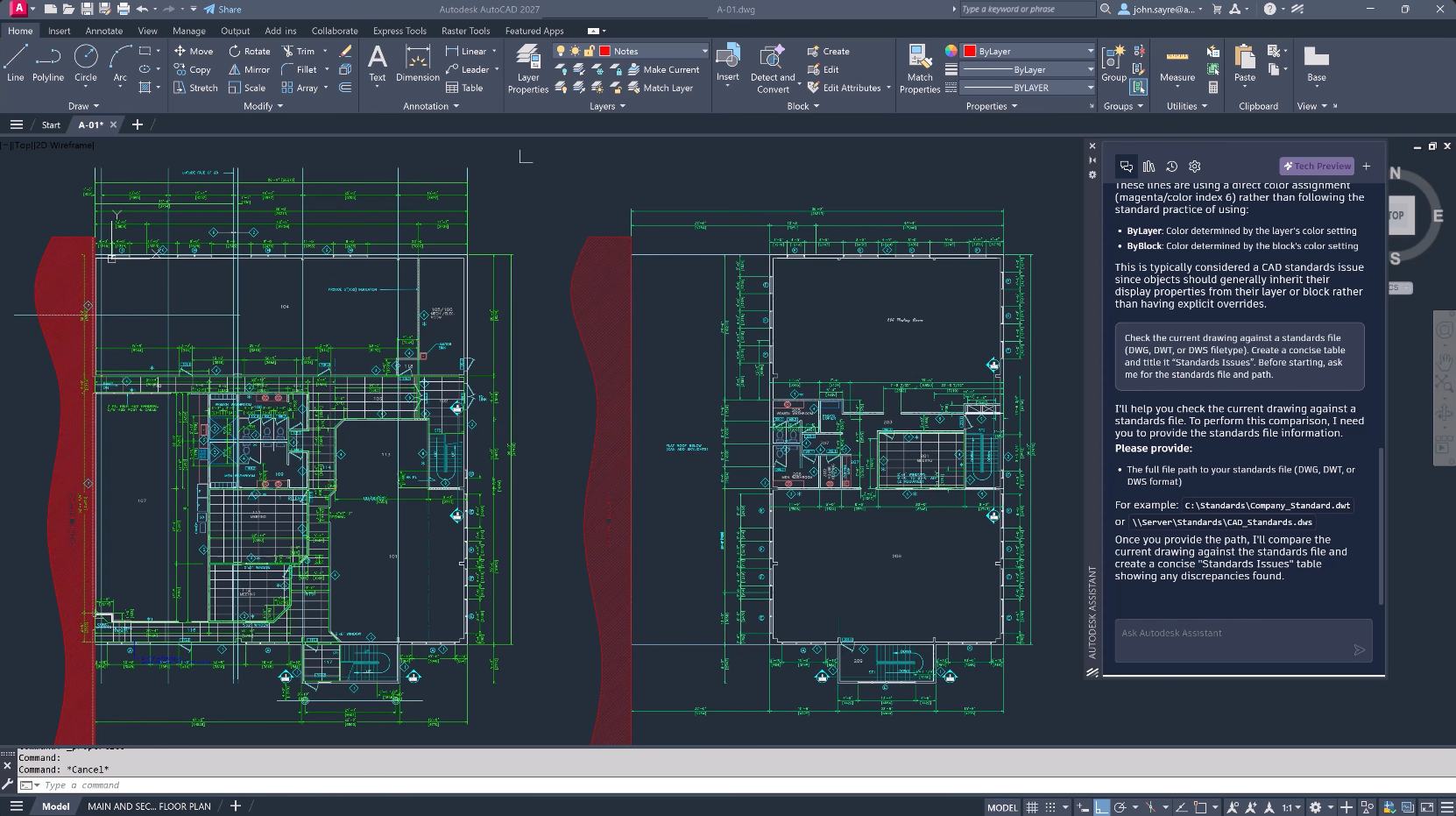
Work faster in AutoCAD with Assistant support for drawing context, CAD standards checking, and in-product guidance that helps you review, troubleshoot, and resolve issues without leaving your workflow.
Work faster in AutoCAD with Assistant support for drawing context, CAD standards checking, and in-product guidance that helps you review, troubleshoot, and resolve issues without leaving your workflow.
Benefits
Intelligent & actionable insights
Intelligent & actionable insights
Work with insights grounded in your models, drawings, and project data. Surface relevant information, validate against standards, and move forward with clarity.
Work with insights grounded in your models, drawings, and project data. Surface relevant information, validate against standards, and move forward with clarity.
Real-time conversational assistance
Real-time conversational assistance
Ask natural language questions and get concise answers with source links, bringing together relevant data and summaries to help you move faster.
Ask natural language questions and get concise answers with source links, bringing together relevant data and summaries to help you move faster.
Model-aware actions and task execution
Model-aware actions and task execution
Use natural language prompts to complete tasks in your workflow—from updating models to generating outputs and checking drawings—reducing manual steps and accelerating execution
Use natural language prompts to complete tasks in your workflow—from updating models to generating outputs and checking drawings—reducing manual steps and accelerating execution
Autonomous verification of standards
Autonomous verification of standards
Verification of industry and company standards: check models, specifications, and schedules to identify and mitigate risk and maintain coordination across deliverables.
Verification of industry and company standards: check models, specifications, and schedules to identify and mitigate risk and maintain coordination across deliverables.
Frequently asked questions (FAQs)
What can Autodesk Assistant do today?
Autodesk Assistant helps you get answers, explore your work, and complete tasks using natural language. Capabilities vary by product and may include help and guidance, model queries, and early task execution workflows.
Which products is Autodesk Assistant available in?
Autodesk Assistant is available across products including Fusion, AutoCAD, Inventor, Civil 3D, Revit, Vault, Moldflow, 3ds Max, Maya, InfoWater Pro, Autodesk Forma, and more. Availability and capabilities vary by product and will expand over time.
Does Autodesk Assistant work the same across all products?
No. Autodesk Assistant capabilities vary by product. Capabilities may include help and guidance, model queries, and task execution workflows. Functionality will continue to expand over time. You can learn more in the Autodesk Assistant transparency card.
How does Autodesk Assistant help customers trust AI-generated results?
Autodesk Assistant provides visibility into the actions it takes, and the outputs it produces, so customers can review results before acting on them. Assistant operates based on the access available to the user, helping limit the information and capabilities it can access on their behalf. Autodesk Assistant supports professional judgment rather than replacing it, with customers remaining responsible for review, approval, and final decisions.
Can I turn off Autodesk Assistant?
Autodesk Assistant does not currently include a general self-service setting to turn off the entire experience. Available controls may vary by product and capability. Refer to the Autodesk AI Feature Transparency Cards for information about specific AI features and available controls.
Are MCP Servers available outside of Autodesk Assistant?
Some Autodesk MCP Servers are available as standalone capabilities, allowing developers and teams to build custom workflows and integrations.
You can discover available MCP Servers through the Design and Make Marketplace, with setup guidance and configuration available in Autodesk help documentation to support onboarding and integration.
Is Autodesk Assistant the same for education users?
Autodesk Assistant is available to education users, but capabilities may slightly differ from commercial experiences based on entitlement type and geography.
Education users have access to core Assistant functionality, including help, guidance, and task support within Autodesk products. Some advanced AI capabilities may not be available in education environments.
We continue to expand Assistant over time, and availability may evolve as features are released more broadly.