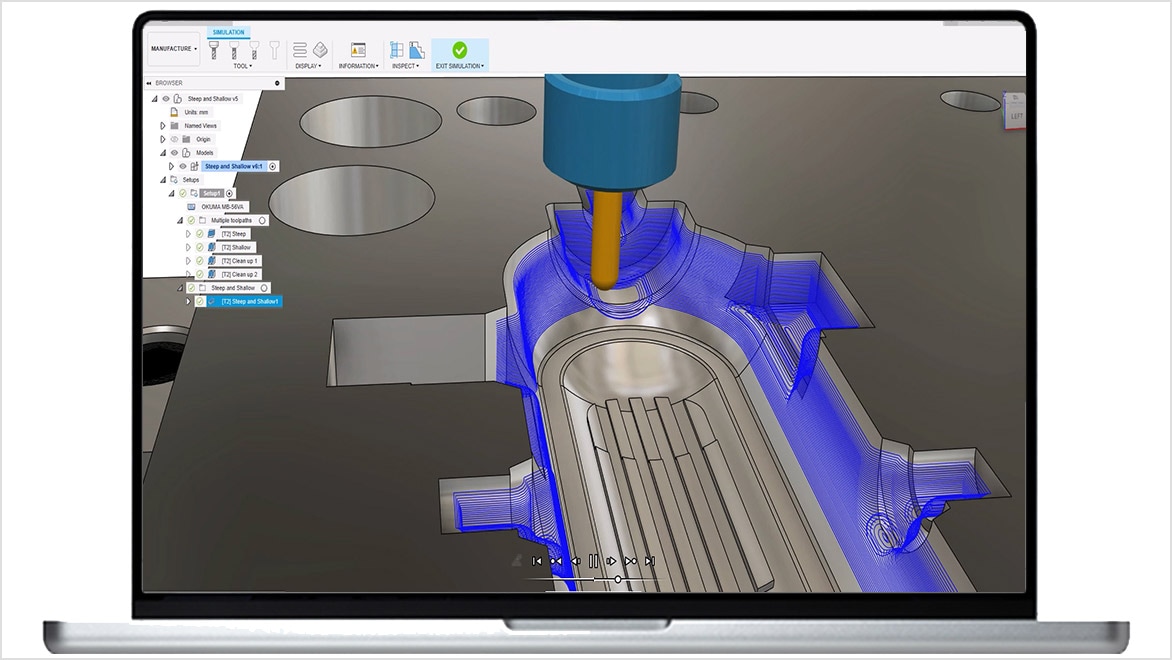
HSMWorks: Embedded CAM software for SOLIDWORKS

HSMWorks is no longer available for purchase – access advanced manufacturing capabilities in Autodesk Fusion.

What is HSMWorks?

Design and generate CAM toolpaths without the hassle of changing software. Reduce cycle time and rework with CAD-embedded 2.5- to 5-axis milling, turning, and mill-turn capabilities.


HSMWorks overview video (1:50 min.)

Take your manufacturing processes to the next level

Instead of bouncing between SOLIDWORKS and other CAM tools, Autodesk Fusion offers HSMWorks users an alternative, providing a single, seamlessly integrated CAD/CAM solution that unifies design and manufacturing in one platform. 

Built on a cloud-based architecture, Fusion enables secure, real-time collaboration from any location and centralizes your design data, streamlining team workflows and accelerating product development.

As a future-ready platform, Fusion goes beyond HSMWorks with continuous innovation – from advanced multi-axis toolpaths to generative design and simulation – all under one subscription to keep your business ahead of the curve.

What you can do with HSMWorks

Integrate CAD and CAM

Work in a familiar interface connected to powerful design tools, thanks to full integration with SOLIDWORKS. (video: 55 sec.)

2.5- and 3-axis milling

Maximize productivity with a full suite of 2.5- and 3-axis milling strategies. (video: 1:25 min.)

3+2 and simultaneous 5-axis

Shorten the time it takes to set up machines and tighten feature tolerances with simple-to-use multi-axis programming. (video: 1:59 min.)

Frequently asked questions (FAQs)

What is HSMWorks used for?

Autodesk HSMWorks is embedded CAM for SOLIDWORKS and provides an integrated workflow from designing to CNC manufacturing. It is used for 2.5- to 5-axis milling, turning, and mill-turn, which allows for shorter milling times while extending tool life.

Who uses HSMWorks?

Autodesk HSMWorks is CAM software used by manufacturers to create program instructions for computers to control a CNC machine.

Which versions of HSMWorks can I use if I subscribe to the current version? 

Your HSMWorks subscription gives you access to install and use the 3 previous versions. Available downloads are listed in your Autodesk Account after subscribing. See also previous releases available for subscribers.

Can I install HSMWorks on multiple computers?

With a subscription to HSMWorks software, you can install it on up to 3 computers or other devices. However, only the named user can sign in and use that software on a single computer at any given time. Please refer to the Software License Agreement for more information. 

What is changing for HSMWorks, and when did the change take effect?

As of March 25, 2025, HSMWorks was removed as an entitlement from new commercial subscriptions of Autodesk Fusion, and from Autodesk offerings that included Fusion, such as the Product Design and Manufacturing Collection.

Can existing Fusion customers continue to use HSMWorks?

Yes. Commercial subscribers of Fusion, or Autodesk offerings that included Fusion, which were purchased before March 25, 2025, can continue to download and use HSMWorks until March 25, 2028.


On March 25, 2028, HSMWorks will be retired and the entitlement will be removed from customer accounts. This applies even if the term of the parent Fusion subscription continues beyond that date.


After March 25, 2028, customers will no longer be able to download, access, or use HSMWorks.

Will HSMWorks be available through Autodesk Flex until retirement?

Yes. Flex access for HSMWorks will remain available until the HSMWorks end-of-life date on March 25, 2028.


This provides access to HSMWorks for customers who require occasional access to HSMWorks between end of sale and end of life, and who do not have a valid subscription. Customers should be advised that on March 25, 2028, all access to HSMWorks will stop, including Flex access.


Even though Flex access to HSMWorks will stop on March 25, 2028, any unused Autodesk tokens will remain valid and can be used on other Autodesk products available through Flex instead. Please not that unused tokens expire one year from the date of purchase.

Why is Autodesk making this change?

Autodesk is focusing on delivering more value through Autodesk Fusion, with an end-to-end workflow from design to manufacturing that improves collaboration and supports intelligent automation powered by AI.


As part of this transition, Autodesk has been working over the last few years to include CAM capabilities in Fusion that exceed those available in HSMWorks, bringing our manufacturing workflows in a more integrated and connected environment.

Where can customers get more information?

Customers can contact their Autodesk representative or Autodesk reseller for more information about this change and what it means for their organization.

See more

Support and learning

Get HSMWorks documentation, tutorials, downloads, and support.