Understanding InfoWorks ICM Licensing and Components
From version 2026 onwards, InfoWorks ICM is available in three licensing versions:
- Sewer (formerly Standard) – for sanitary sewer modeling; intended for single users on a standalone machine, with restrictions.
- Flood – for stormwater and flood analysis; intended for single users on a standalone machine, with restrictions.
- Ultimate - provides access to all InfoWorks ICM features.
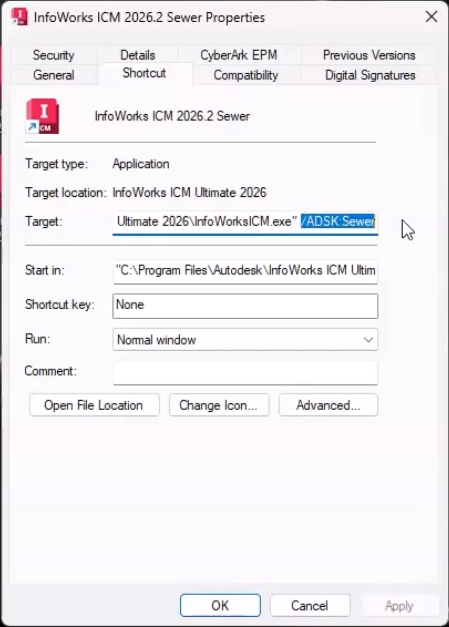
From version 2025 onwards, all three products can be launched from a single installation. To switch between products, change the Target path in the shortcut properties:
- /ADSK: Sewer
- /ADSK: Flood
- /ADSK: Ultimate
IMPORTANT: It is NOT possible to have both Standard and Ultimate installed on the same machine for versions prior to 2025.
InfoWorks ICM installs in two components:
- User interface – used to create, access, and manage all data within ICM. This is the application that users will be working in on their machines.
- Agent Manager service – manages all of the simulations in the background.
Both of these components require licensing.
InfoWorks Workgroup Server (IWS) – required for creating, accessing, and managing workgroup databases.
- IWS can be installed on a user’s machine to manage workgroup databases locally.
- IWS can be installed on a centralized server to enable the full multi-user workgroup functionality.
IWS does not require licensing to run.
InfoWorks ICM Sewer and InfoWorks ICM Flood restrictions:
- Database limitation – concurrent access to a database is only allowed for users with Ultimate licenses.
- Simulation and mesh generation jobs can only be scheduled to run on “This Computer” and cannot be run remotely using another machine.
- The licenses do not include Risk, Time Series Database, or PDM functionality. Any objects or tools related to this functionality are not included.
- For ICM Standard, 2D simulations are restricted to networks that contain less than 1000 2D elements.
- For ICM Flood, the size of the network cannot exceed 1000 nodes.
For up-to-date restrictions, please see the Autodesk licenses Help pages.
Autodesk InfoWorks ICM Viewer:
- Automatically installed when you install InfoWorks ICM Ultimate.
- Allows you to view model data and results without consuming a full product license.
- Do not need an Autodesk license to use it, but you will need an Autodesk account.
See the Autodesk InfoWorks ICM Viewer Help pages for more information.

The type of license you are currently using is displayed in the InfoWorks About Box, while the license number is listed in the Additional Information window.

IMPORTANT: Access to your Autodesk license is required when running simulations. If you lose access, the simulation will be stopped and the status set to incomplete.
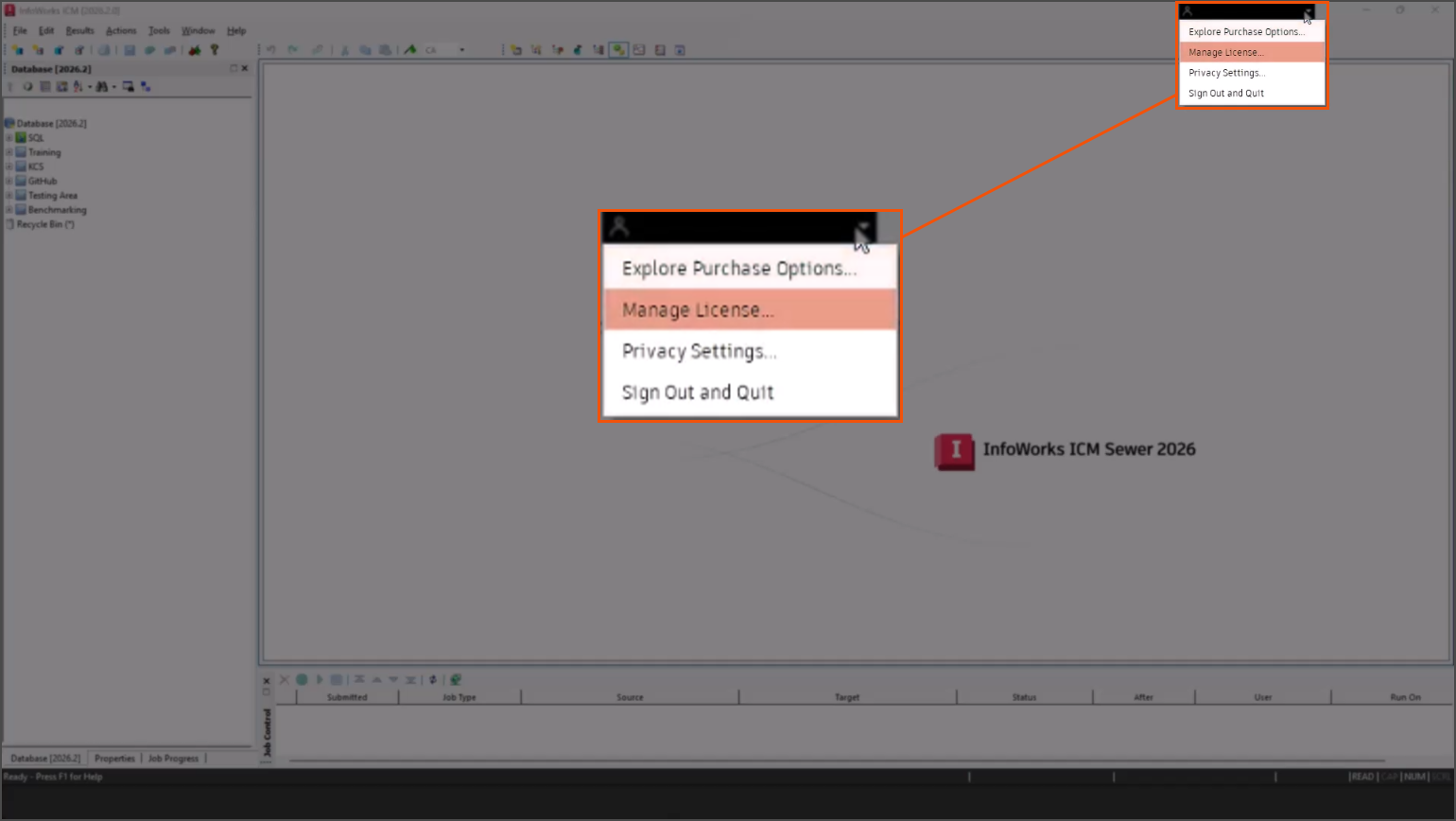
The Autodesk Account menu, located in the title bar of the InfoWorks ICM workspace, lets you view purchase options, manage your license (such as changing your license type), change privacy settings, or sign out and quit the software.
If you wish to set up an on-premises workgroup environment that uses dedicated remote simulation machines, then you will need access to a ‘remote agent’ and specialist licensing.
For further questions, please contact Autodesk Support.





