• InfoWorks WS Pro

Understanding scenarios

Understand how scenarios are used and structured in WS Pro.


Step-by-step Guide

InfoWorks WS Pro includes Scenario Management functionality that helps you plan what-if analyses and possible future design iterations for a model. For example, scenarios allow you to investigate the impact of different object parameters on simulations. New scenarios, derived from either a base network or other scenarios, are kept separate from a copy of the base model, while still sharing data within the version-controlled commit history.

When creating and working with scenarios:

  • It is important to have a matching Network and Control open.
  • To view a scenario for the open network, select the scenario from the Scenarios toolbar.
  • Object ghosts can be turned on or off from the Visual Page of the GeoPlan Properties dialog box.

Changes made to the base network are copied to scenarios. However:

  • If variable X in Scenario = variable X in Base, changes in base do not cascade
  • If variable X in Scenario is then changed back to equal variable in Base, the cascade link is re-established

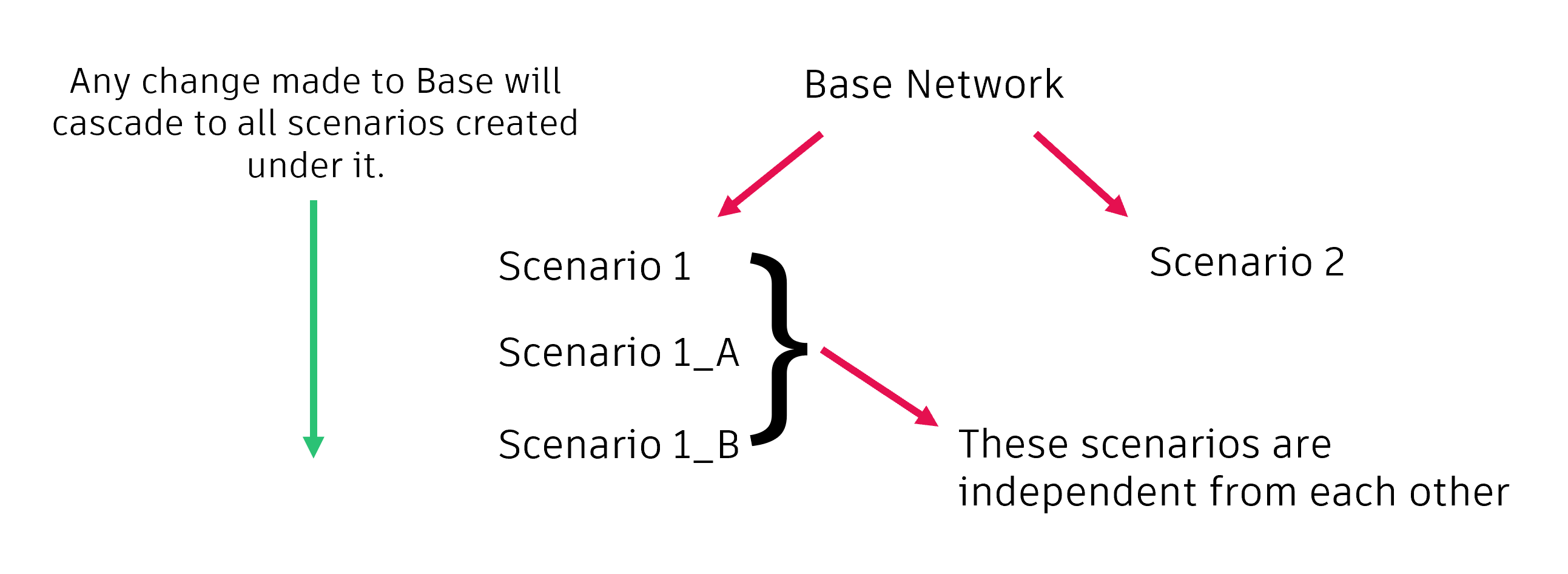
Scenarios are not structured in the same way as most InfoWorks WS Pro objects. Consider the following:

A graphic depicting scenarios as children of a Base Network, as well as independent scenarios, and showing where changes made will propogate.