Edit the standards and choice lists in InfoAsset Manager
Step-by-step guide
Within InfoAsset Manager, the assumption is that most organizations will typically work with just one CCTV coding scheme and one manhole survey coding scheme. For this reason, the coding standard is applied at the database level by default.
However, it is possible to override the database coding standard on a per network basis. Choice lists can also be customized by adding, editing, and deleting options.
InfoAsset Manager supports several different manhole survey and CCTV coding schemes.
To edit options for the current network:
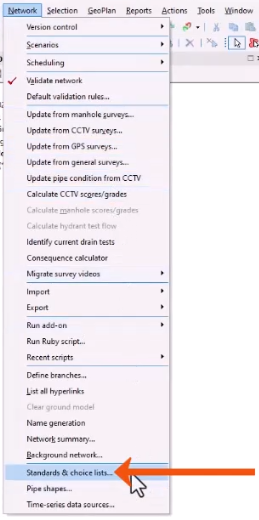
- From the Network menu, select Standards & choice lists.
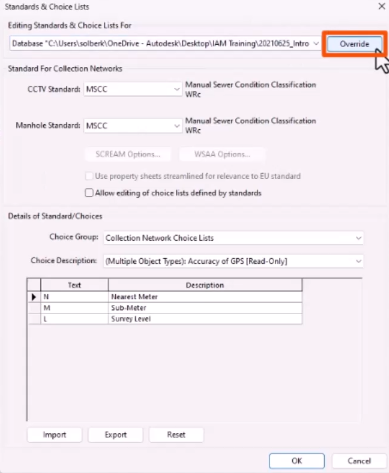
When the Standards & Choice Lists dialog is first opened for a network, the Database settings are displayed.
- Click Override to configure settings specific to the current network.
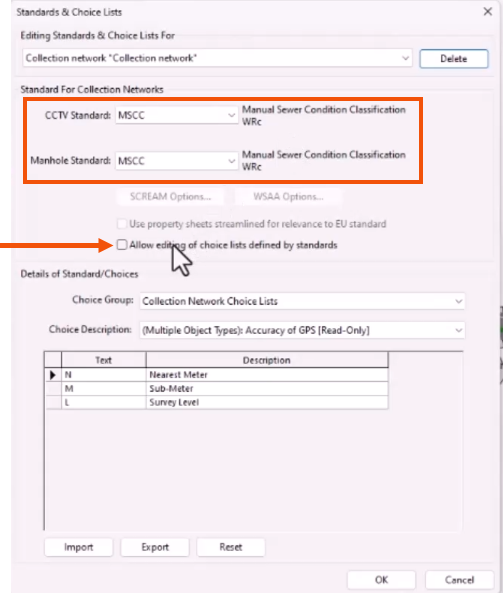
- In the CCTV Standard and Manhole Standard drop-downs, select the standard to apply to the network. In this case, MSCC (Manual of Sewer Condition Classification from WRc) is selected for both.
- To edit choice lists, which are read-only by default, select Allow editing of choice lists defined by standards.
A notification warns that customized choice lists will no longer conform to the selected standard.
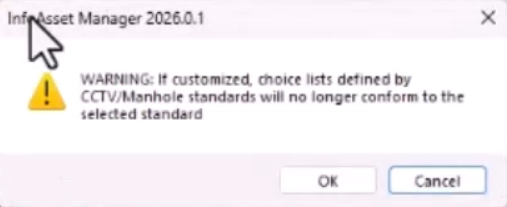
- Click OK.
- In the Standards & Choice Lists dialog, click OK to apply any changes.
Choice lists can also be exported to, and imported from, comma separated variable (CSV) format.




