Visual effects software: Transforming reality
Visual effects software: Transforming reality
Image courtesy of Rising Sun Pictures
What are visual effects (VFX)?
What are visual effects (VFX)?
 VFX software can produce otherwordly images and simulations. Image courtesy of Filippo Nicea Bovolini.
What is VFX software used for?
What is VFX software used for?

Visual effects (VFX)
Visual effects (VFX)

Computer-generated imagery (CGI)
Computer-generated imagery (CGI)

Special effects (SFX)
Special effects (SFX)
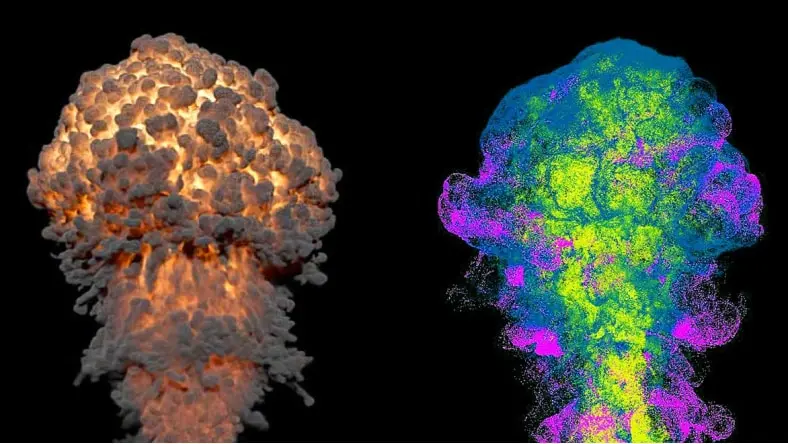
Simulations and effects
Simulations and effects

Scattering and instancing
Scattering and instancing

Compositing
Compositing



What types of visual effects can be created with Autodesk software?
Autodesk software, including Maya, 3ds Max, and Flame, can be used for a wide range of VFX, from sophisticated particle, liquid, and character effects to 3D compositing and finishing.
Whether you’re looking to create blazing explosions or complex snowstorms, Bifrost for Maya is a powerful visual programming environment for creating blockbuster-worthy VFX simulations. Bifrost for Maya includes ready-to-use graphs, physically based solvers for aerodynamics, combustion, granular effects, cloth simulation, and more.
How can Autodesk software help speed up VFX workflows and production pipelines?
Look to visual effects software from Autodesk for the support to help your teams work quickly and create stunning visual effects. With Bifrost for Maya’s prebuilt graphs, you can create realistic effects right out of the box. Autodesk Arnold is integrated with Maya and 3ds Max, so you can see high-quality previews and iterate changes quickly. Flame 3D VFX and finishing software provides powerful tools for 3D compositing, visual effects, and editorial finishing.
What collaboration features are included in Autodesk VFX software?
Autodesk software is engineered to streamline collaboration throughout the VFX pipeline by connecting creative workflows and teams. Flow Production Tracking (formerly ShotGrid) production management software enables creative teams to seamlessly submit work for reviews, collaborate, and iterate on changes, even while geographically dispersed.
Are rendering workflows integrated with Autodesk visual effects software?
Autodesk Arnold is the default renderer in Maya and 3ds Max, so you can keep your rendering workflows right in-tool. Arnold is an advanced Monte Carlo ray tracing renderer that offers a powerful rendering experience for beautiful and predictable results. Visualize changes to lighting, textures, and objects, adjust cameras, and diagnose problems without ever leaving your 3D tool.
Why choose 3ds Max or Maya for VFX?
3ds Max and Maya are used by creative studios around the world for animation, modeling, visual effects, and rendering. 3ds Max offers a robust toolset for modeling, intuitive texturing and shading, and high-quality rendering, while Maya offers powerful tools for character creation, lifelike animation, and detailed simulations. Read more about the differences between 3ds Max and Maya.
Is VFX the same as CGI?
VFX (visual effects) is not the same as CGI (computer-generated imagery). However, they are related and the two terms are sometimes used interchangeably.
CGI is any imagery created digitally, whereas VFX combines live-action footage with digitally created imagery. VFX incorporates CGI-like 3D modeling, but VFX also incorporates other practices like green screen filming, compositing, and performance capture. Today, some amount of VFX exists in nearly every new movie, not just big-budget action and sci-fi films. However, 3D animated films like The Super Mario Bros. Movie are entirely CGI.
What is the best VFX software for beginners?
The best VFX software programs for both beginners and experienced VFX artists are the industry standards like Autodesk Maya and 3ds Max. These programs have comprehensive and powerful features, in-depth animation functionality, professional support, extensive training materials, and robust tools for rendering, such as high-level two-ray tracing and image-based rendering.
Autodesk VFX software is available to students and educators at a reduced price with an educational license. For hobbyists, recent graduates, freelancers, or VFX artists just starting out, Maya Indie and 3ds Max Indie offer access to professional tools at an affordable price. Another option is Maya Creative, which contains most of the features of Maya and is available for a low pay-as-you-go rate through the Autodesk Flex program.
What are the differences between 2D and 3D VFX?
The difference between 2D and 3D VFX is that 2D visual effects exist on a flat plane, while 3D visual effects deal with digital objects that have the dimensions of height, width, and depth. 2D VFX may include elements like illustrations, photographs, and cel animation. Within visual effects software, 3D VFX have three dimensions and can be viewed from any angle.
While 3D VFX are best known within media like movies and video games, those media have been rendered for flat screens using high-end visual effects software such as Autodesk Arnold, or rendered in real time in the case of video games. However, in extended reality (XR) environments like virtual reality, the dimensions of 3D models, objects, scenes, and VFX can be navigated spatially and viewed from any angle.
Is there an affordable way to start learning VFX with Autodesk tools?
Yes, beginners and independent creators can start with Maya Indie or pay-as-you-go access through Flex. These options reduce upfront cost while still providing professional tools. Many creators use them to learn workflows, build projects, and transition into studio work. This makes it easier to enter the VFX industry without a large investment.
Is there a free trial available for Maya or 3ds Max?
Yes, Autodesk offers free trials for both Maya and 3ds Max. Trials typically include full functionality, allowing you to explore modeling, animation, and rendering workflows. This helps you evaluate which tool fits your needs before purchasing. It’s a common starting point for both individuals and teams.
How much do Maya and 3ds Max cost?
Maya and 3ds Max are available through subscription pricing, with options for monthly, annual, or multi-year plans. Pricing varies by region and access type, including Indie and Flex options. This flexibility allows studios and individuals to choose what fits their budget and usage. Visit Autodesk’s pricing page for the most current details.
Can students get Maya or 3ds Max for free?
Yes, students and educators can access Maya and 3ds Max for free through Autodesk’s Education plan. This includes full versions for learning and academic projects. It’s widely used in schools and training programs for animation and VFX. Eligibility is required through Autodesk Education verification.
What is visual effects (VFX) software?
Visual effects software is used to create, simulate, and enhance imagery for film, TV, and games. It includes tools for animation, compositing, simulation, and rendering. Artists use it to combine live-action footage with digital elements. VFX software helps bring complex scenes and stories to life.
What is the difference between 3D modeling, animation, and rendering?
3D modeling creates the shape and structure of objects. Animation brings those objects to life through movement and performance. Rendering generates the final image by adding lighting, textures, and effects. Together, these steps form the core of most VFX workflows.
How is VFX software used in film and game production?
In film and TV, VFX software is used to create characters, environments, and simulations that would be difficult or impossible to film. In games, it helps build real-time assets and interactive worlds. Teams use multiple tools together across the pipeline. This allows for faster iteration and more detailed final results.