
Product Design & Manufacturing
What is simulation? Simulation software explained
What is simulation? Simulation software explained
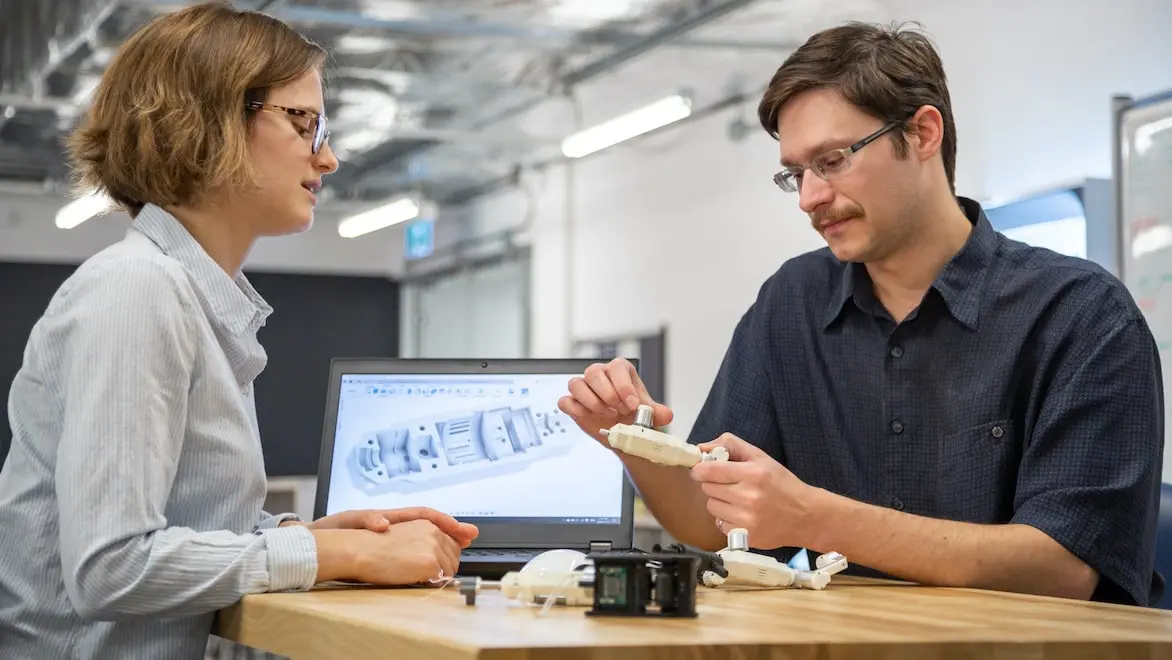
A visual model of the behavior of something you intend to build or establish in a workflow is becoming a critical business tool. Today, you can analyze the behavior of an engineering, manufacturing, medical, resources, transport, or supply chain project over time using simulation software to help you identify the best way to design and build it.
What is simulation?
What is simulation?
Any process that contains a flow of events, from air temperatures in a crowded room to the manufacture of an injection molded plastic part, can be simulated and tested visually.
Simulations can be used to optimize a design, test a theory, train or improve safety, and even entertain. If you’re building something, a simulation will tell you how it will behave in response to real-world forces and effects before you make it. Simulation is often used in place of or to minimize the number of physical prototypes.
A simulation consists of inputs like the object or process and the external agents or forces that will impact it. The output is a report or analysis on the system’s performance, letting you identify the area or point in time where it needs improvement based on the forces that will affect that design in the real world.
Any process that contains a flow of events, from air temperatures in a crowded room to the manufacture of an injection molded plastic part, can be simulated and tested visually.
Simulations can be used to optimize a design, test a theory, train or improve safety, and even entertain. If you’re building something, a simulation will tell you how it will behave in response to real-world forces and effects before you make it. Simulation is often used in place of or to minimize the number of physical prototypes.
A simulation consists of inputs like the object or process and the external agents or forces that will impact it. The output is a report or analysis on the system’s performance, letting you identify the area or point in time where it needs improvement based on the forces that will affect that design in the real world.
What is simulation software?
What is simulation software?
Simulation software models real-world environments. When planning a manufacturing project—from an entire workflow down to a single part—simulation software contains mathematical values and calculations that represent the impact and behavior of real-world forces.
It breaks down the design geometries of manufactured objects into discrete, micro-level structures that have their own mathematical values. This can be applied to workflows or processes in automotive, consumer products, industrial, aerospace, marine, and much more. Manufacturing methods such as injection molding, sheet metal fabrication, CAM, and others can benefit from simulation as well.
The values of those forces and behaviors can then be assessed and visualized for how the geometry as a whole will perform in the corresponding conditions it will meet in the real world when you manufacture it.
Simulation software models real-world environments. When planning a manufacturing project—from an entire workflow down to a single part—simulation software contains mathematical values and calculations that represent the impact and behavior of real-world forces.
It breaks down the design geometries of manufactured objects into discrete, micro-level structures that have their own mathematical values. This can be applied to workflows or processes in automotive, consumer products, industrial, aerospace, marine, and much more. Manufacturing methods such as injection molding, sheet metal fabrication, CAM, and others can benefit from simulation as well.
The values of those forces and behaviors can then be assessed and visualized for how the geometry as a whole will perform in the corresponding conditions it will meet in the real world when you manufacture it.
Types of simulation
Discrete event simulation (DES)
Discrete event simulation (DES)
Discrete event simulation (DES) is when a series of occurrences or states of being remain unchanged between each event in the series, think of an on/off switch – one moment in time it is off, and then when switched, it is on. This is usually more applicable to process modeling. Discrete event simulation is also useful in parts or objects that have two or more absolute states with no gradual rate of change between them.
Discrete event simulation (DES) is when a series of occurrences or states of being remain unchanged between each event in the series, think of an on/off switch – one moment in time it is off, and then when switched, it is on. This is usually more applicable to process modeling. Discrete event simulation is also useful in parts or objects that have two or more absolute states with no gradual rate of change between them.
Dynamic simulation
Dynamic simulation
When an object goes through a continual series of state changes over time, dynamic simulation calculates and animates the results for analysis over multiple points in the duration. An example is increased stress exerted on a part as load mass increases (a tank filling with water).
When an object goes through a continual series of state changes over time, dynamic simulation calculates and animates the results for analysis over multiple points in the duration. An example is increased stress exerted on a part as load mass increases (a tank filling with water).
Process simulation
Process simulation
Manufacturing high-quality products requires optimizing production processes. Simulating the manufacturing process opens the ability to identify potential design for manufacturability (DFM) concerns. For example, identifying the impact on part quality when using an alternate material option or gaining insights on machine resourcing.
Manufacturing high-quality products requires optimizing production processes. Simulating the manufacturing process opens the ability to identify potential design for manufacturability (DFM) concerns. For example, identifying the impact on part quality when using an alternate material option or gaining insights on machine resourcing.
Agent-based modeling and simulation
Agent-based modeling and simulation
When you introduce a new component or “agent” to a process, it could change more than you bargained for. Whether it’s a piece of equipment in a production line or a new person/position in a business workflow, modeling how they’ll affect the rest of your process in simulation software will give you insight into likely changes upstream and downstream.
When you introduce a new component or “agent” to a process, it could change more than you bargained for. Whether it’s a piece of equipment in a production line or a new person/position in a business workflow, modeling how they’ll affect the rest of your process in simulation software will give you insight into likely changes upstream and downstream.
Monte Carlo risk analysis
Monte Carlo risk analysis
Once a secret nuclear weapons research methodology (and named after a Monaco casino, as the name suggests), the Monte Carlo simulation is also called the “multiple probability simulation.” It aggregates multiple random inputs to pinpoint the optimum output. A Monte Carlo simulation lets you understand relationships between many input variables; in manufacturing, it can help identify staff and equipment needs in a manufacturing process so outputs match demand for the lowest cost.
Once a secret nuclear weapons research methodology (and named after a Monaco casino, as the name suggests), the Monte Carlo simulation is also called the “multiple probability simulation.” It aggregates multiple random inputs to pinpoint the optimum output. A Monte Carlo simulation lets you understand relationships between many input variables; in manufacturing, it can help identify staff and equipment needs in a manufacturing process so outputs match demand for the lowest cost.
Systems dynamics simulation
Systems dynamics simulation
Used for more complex processes without any defined agents or discrete events, systems dynamics simulation provides results over a longer term and a wider breadth by using sample, historical, or non-static inputs. When an event such as a reduction in revenue or the introduction of a new product line is introduced to the simulation, the analysis provides a wide-ranging set of possible outcomes to help you plan for unforeseen changes.
Used for more complex processes without any defined agents or discrete events, systems dynamics simulation provides results over a longer term and a wider breadth by using sample, historical, or non-static inputs. When an event such as a reduction in revenue or the introduction of a new product line is introduced to the simulation, the analysis provides a wide-ranging set of possible outcomes to help you plan for unforeseen changes.
NEW OFFER - Flex now starting at {{price.FLEXACCESS.1year}}
Autodesk Flex lets you prepay with tokens for on-demand access to Fusion and advanced design and manufacturing capabilities, charged only when tools are in use. It’s ideal for project-based work or occasional access to specialized workflows. Combine Flex tokens with Fusion to:
Access advanced product development workflows on demand
Use high-value capabilities only when needed
Scale access for peak workloads
Autodesk simulation software
Benefits of simulation software
The benefits of modeling and analyzing using simulation software depend on your industry and needs, but the four main advantages are:
The benefits of modeling and analyzing using simulation software depend on your industry and needs, but the four main advantages are:
Get insight early
Get insight early
Identify designs that will work best before you ever commit to a prototype or production run, and get deeper insight into your existing manufacturing or engineering simulation processes.
Identify designs that will work best before you ever commit to a prototype or production run, and get deeper insight into your existing manufacturing or engineering simulation processes.
Make better products
Make better products
Late-stage errors and failures will become far less frequent or non-existent because the impact of real-world forces on your product’s performance has already been simulated and tested.
Late-stage errors and failures will become far less frequent or non-existent because the impact of real-world forces on your product’s performance has already been simulated and tested.
Encourage innovation
Encourage innovation
Understanding the impact of real-world forces and performance can help you find better solutions and new design ideas.
Understanding the impact of real-world forces and performance can help you find better solutions and new design ideas.
Increase productivity
Increase productivity
You'll go from concept to production faster, more competitively, and much more efficiently.
You'll go from concept to production faster, more competitively, and much more efficiently.
Unlock educational access to Autodesk software
Unlock educational access to Autodesk software
Autodesk is committed to helping educate tomorrow's leaders. Get free access to our entire portfolio of products with the Autodesk Education plan.
Simulation software uses
Finite element analysis (FEA)
Finite element analysis (FEA)
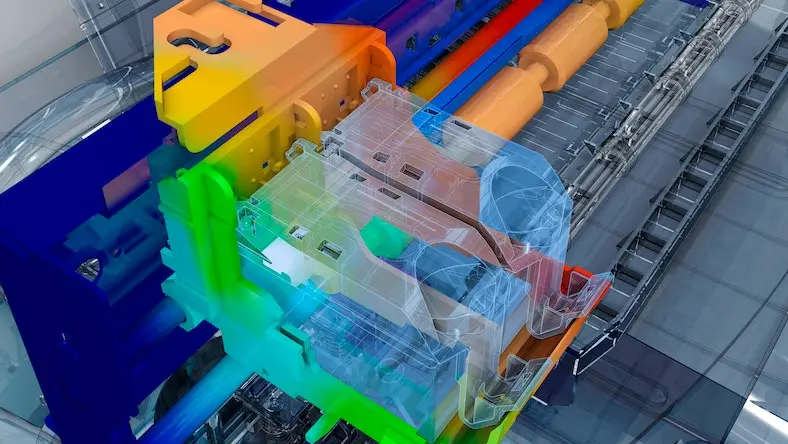
Understanding the impact of physical forces on an object in an environment requires complex mathematical equations. Examples like a crash test dummy in a car impact or an aircraft wing in a wind tunnel produce staggering amounts of data.
Accurate digital representations of those complex equations can then be applied to the digital 3D model of an object in simulation software. This offers engineers the means to comprehensively test the geometries of product designs in the computer before they exist in the real world.
Understanding the impact of physical forces on an object in an environment requires complex mathematical equations. Examples like a crash test dummy in a car impact or an aircraft wing in a wind tunnel produce staggering amounts of data.
Accurate digital representations of those complex equations can then be applied to the digital 3D model of an object in simulation software. This offers engineers the means to comprehensively test the geometries of product designs in the computer before they exist in the real world.
Computational fluid dynamics (CFD)
Computational fluid dynamics (CFD)
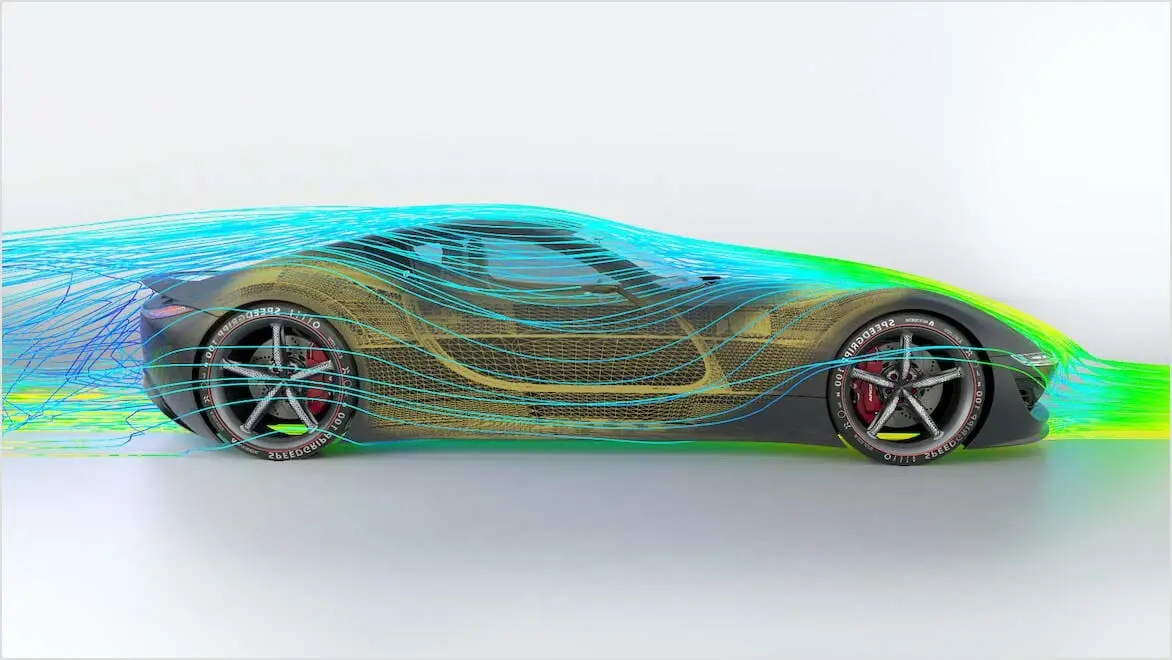
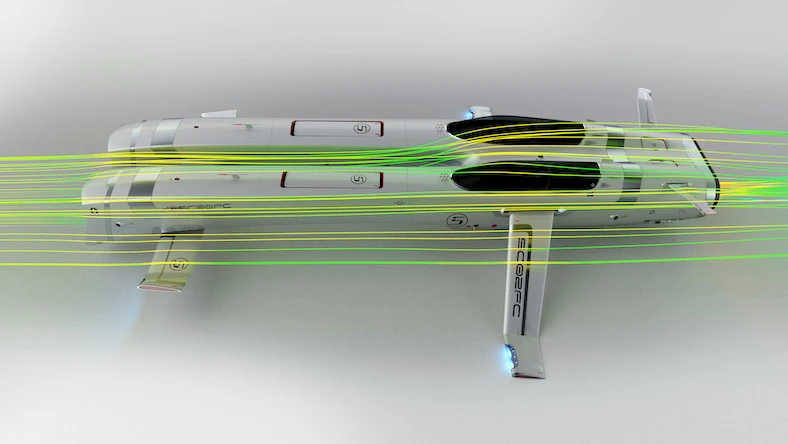
Industries like automotive, aerospace, industrial machinery, marine, and many more require accurately modeling the way objects behave in response to fluids and gases.
Modeling fluid dynamics in physical models can be tricky and potentially expensive due to the need for sensors and still may not capture an entire system’s performance. Using CFD simulation, accurate predictions can be calculated in a matter of minutes or hours and provides flexibility to experiment with various design options. Example scenarios include fuel consumption, air resistance, and maneuverability.
Industries like automotive, aerospace, industrial machinery, marine, and many more require accurately modeling the way objects behave in response to fluids and gases.
Modeling fluid dynamics in physical models can be tricky and potentially expensive due to the need for sensors and still may not capture an entire system’s performance. Using CFD simulation, accurate predictions can be calculated in a matter of minutes or hours and provides flexibility to experiment with various design options. Example scenarios include fuel consumption, air resistance, and maneuverability.
Plastic injection molding
Plastic injection molding
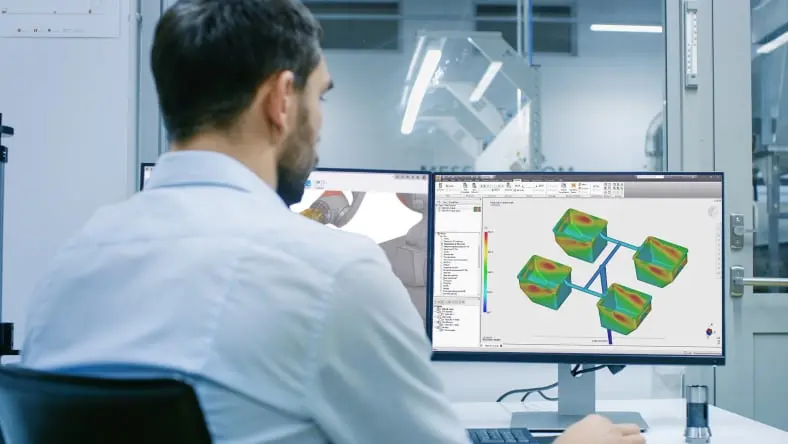
Many consumer products in your home or office simply wouldn’t exist without plastic injection molding.
Plastic material reacts differently than other manufacturing materials, where a material’s heat history and part design is critical to manufacturing a high-quality part. On the other hand, understanding how to effectively design single and multi-cavity molds provides opportunities for material waste reduction for a more sustainable manufacturing technique. Simulating the process, material choice, and mold design provides insights to optimize your product designs.
Many consumer products in your home or office simply wouldn’t exist without plastic injection molding.
Plastic material reacts differently than other manufacturing materials, where a material’s heat history and part design is critical to manufacturing a high-quality part. On the other hand, understanding how to effectively design single and multi-cavity molds provides opportunities for material waste reduction for a more sustainable manufacturing technique. Simulating the process, material choice, and mold design provides insights to optimize your product designs.
Generative design
Generative design
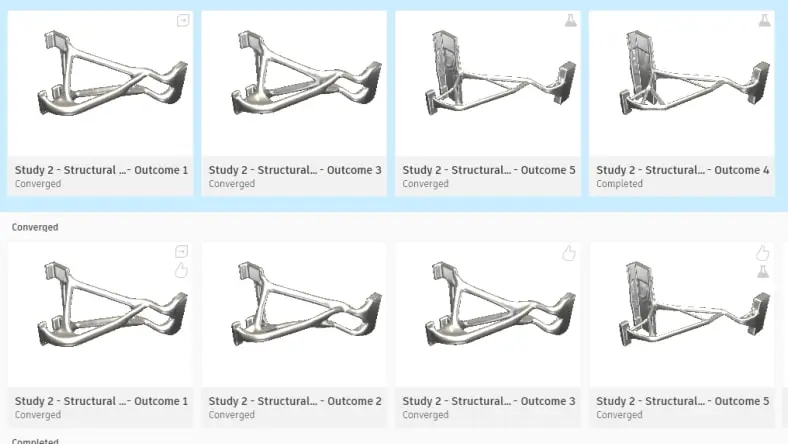
Countless objects in the world could be lighter, cheaper, smaller, stronger, or simply better in so many ways. Generative design can suggest unique geometries no human designer would ever dream up.
Generative design requires a series of inputs such as boundaries, forces, and manufacturing cost and method, after which the software generates any number of unique design outputs for the engineer to work with. Combining this with simulation, you can validate your design choice, and modify the geometry of your chosen design to ensure the manufactured part’s performance.
Countless objects in the world could be lighter, cheaper, smaller, stronger, or simply better in so many ways. Generative design can suggest unique geometries no human designer would ever dream up.
Generative design requires a series of inputs such as boundaries, forces, and manufacturing cost and method, after which the software generates any number of unique design outputs for the engineer to work with. Combining this with simulation, you can validate your design choice, and modify the geometry of your chosen design to ensure the manufactured part’s performance.
How is simulation software used?
Iterate
Iterate
Small engineering shop helps bring clients’ ideas to life, using Fusion 360 as a single hub for concepts, design, simulation, prototyping, and finished product.
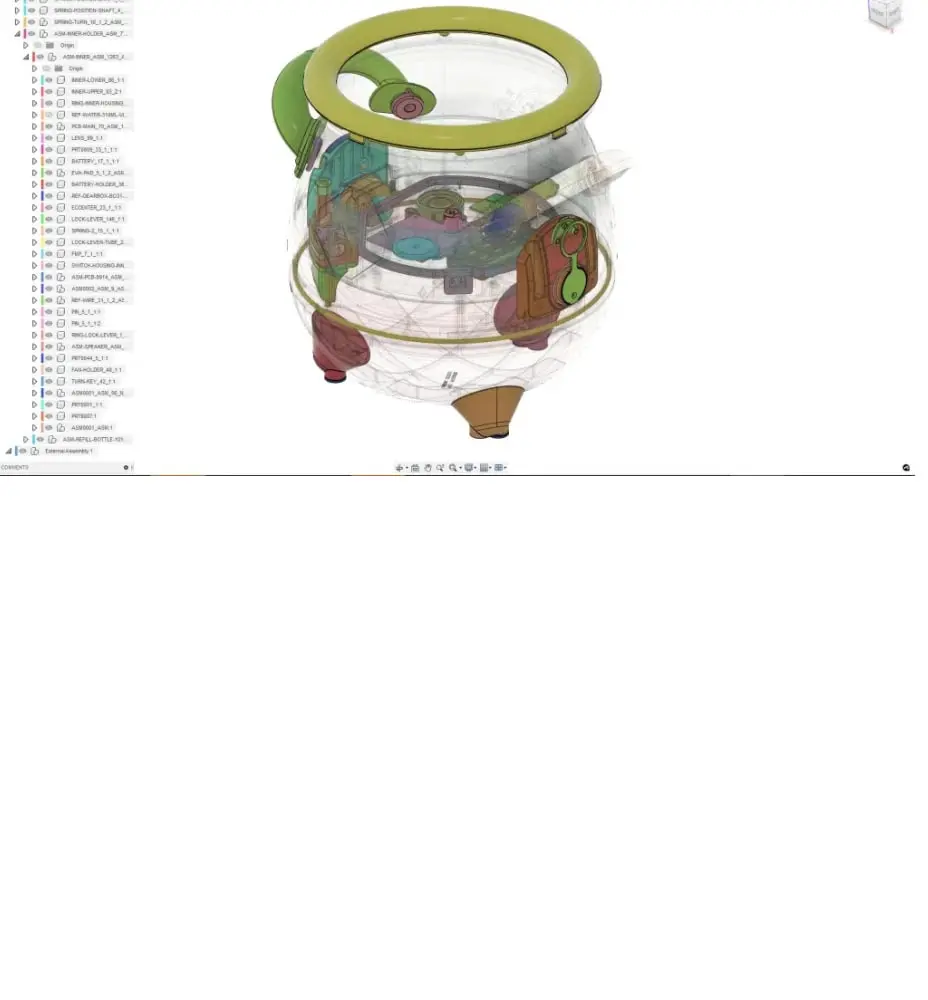
Moose Toys
Moose Toys
This "magical" toy took just 18 months from design to manufacture—helped along by simulated mechanisms in Fusion 360.

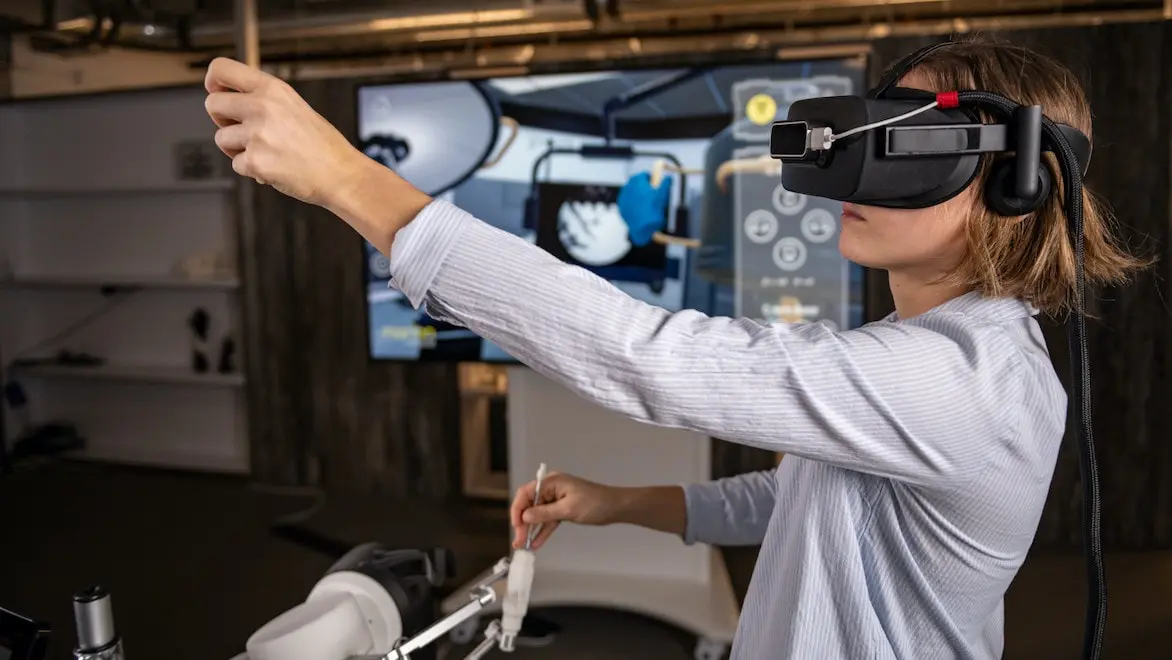
Challenergy
Challenergy
This Japanese start-up ran simulations in Inventor Nastran to measure wind stresses on its disaster-resistant wind turbine.
Image courtesy of Challenergy.
How is simulation changing?
How is simulation changing?
The first simulations (before computers) were physical prototypes. They were time-consuming and costly, as they constantly needed tweaking or rebuilding to find the best design. When analysts starting using computers to simulate designs, they needed extensive manual inputs to create the product model, assign inputs, and extract results. This was a step up from physically building prototypes, but it required highly-trained, specialized individuals to run.
As computing power improved, simulations became more accurate to be closer and closer to an actual manufactured product. User interfaces (UIs) also improved and required fewer input steps from analysts. Visual simulation results also greatly improved “selling” critical design decisions to project stakeholders.
Today, automation is becoming the next big thing in simulation. A simulation’s UI can guide users through setup and interpretating results, even going so far as suggesting product design solutions to potential problems. Analysts now develop their own scripts to circumvent repetitive tasks, and those shortcuts are becoming the default in simulation software. Automated modeling and generative design are advancing to sculpt a new age of engineers and analysts, who apply their expertise to find and adapt the winning design from innumerable options.
The first simulations (before computers) were physical prototypes. They were time-consuming and costly, as they constantly needed tweaking or rebuilding to find the best design. When analysts starting using computers to simulate designs, they needed extensive manual inputs to create the product model, assign inputs, and extract results. This was a step up from physically building prototypes, but it required highly-trained, specialized individuals to run.
As computing power improved, simulations became more accurate to be closer and closer to an actual manufactured product. User interfaces (UIs) also improved and required fewer input steps from analysts. Visual simulation results also greatly improved “selling” critical design decisions to project stakeholders.
Today, automation is becoming the next big thing in simulation. A simulation’s UI can guide users through setup and interpretating results, even going so far as suggesting product design solutions to potential problems. Analysts now develop their own scripts to circumvent repetitive tasks, and those shortcuts are becoming the default in simulation software. Automated modeling and generative design are advancing to sculpt a new age of engineers and analysts, who apply their expertise to find and adapt the winning design from innumerable options.
Simulation software tutorials
Simulation certification
Simulation certification
Autodesk offers certified training in all aspects of engineering design and manufacturing tools, including an Autodesk Certified Professional in Simulation in Fusion 360.
Autodesk offers certified training in all aspects of engineering design and manufacturing tools, including an Autodesk Certified Professional in Simulation in Fusion 360.
Autodesk University
Autodesk University
A large number of Autodesk University conference sessions have also showcased the advantages of simulation software.
A large number of Autodesk University conference sessions have also showcased the advantages of simulation software.
Community forums
Community forums
It’s also easy to connect and share experiences with other simulation software users on the Autodesk Community Forums.
It’s also easy to connect and share experiences with other simulation software users on the Autodesk Community Forums.
Help docs and blogs
Help docs and blogs
Autodesk software’s help documents have many tutorials: Moldflow Insight, Moldflow Adviser, Netfabb, Fusion 360 Simulation Extension, CFD, Inventor Nastran. Also, Autodesk software programmers, engineering, and design experts have talked about new and existing features in simulation software on our blogs.
Autodesk software’s help documents have many tutorials: Moldflow Insight, Moldflow Adviser, Netfabb, Fusion 360 Simulation Extension, CFD, Inventor Nastran. Also, Autodesk software programmers, engineering, and design experts have talked about new and existing features in simulation software on our blogs.
Simulation software resources
Mold cycle time
Simulating the injection of material into a mold can pre-empt common manufacturing problems.
Injection molding is a popular method for manufacturing parts for various reasons, especially the speed at which it can create many identical, high-quality parts. Understanding the influence process settings, material choices, and even mold and part design have on the overall cycle time can save manufacturing time and money.
Simulating the injection of material into a mold can pre-empt common manufacturing problems.
Injection molding is a popular method for manufacturing parts for various reasons, especially the speed at which it can create many identical, high-quality parts. Understanding the influence process settings, material choices, and even mold and part design have on the overall cycle time can save manufacturing time and money.
Generative design
Combining simulation software with generative design can supercharge the power of your design computations.
Generative design makes it possible to produce countless design outcomes based on parameters you establish. Analyzing promising designs for performance with simulation lets you discover the best solution for your requirements.
Combining simulation software with generative design can supercharge the power of your design computations.
Generative design makes it possible to produce countless design outcomes based on parameters you establish. Analyzing promising designs for performance with simulation lets you discover the best solution for your requirements.
Plastic part quality
Simulating your plastic part manufacture before you prototype will speed up development and cut costs.
Reducing common failure points and quality errors while experimenting with design variables using parametric and design of experiments analyses (DOE) can greatly compress your product and process development time, letting you effortlessly meet part specifications and protect revenue projections.
Simulating your plastic part manufacture before you prototype will speed up development and cut costs.
Reducing common failure points and quality errors while experimenting with design variables using parametric and design of experiments analyses (DOE) can greatly compress your product and process development time, letting you effortlessly meet part specifications and protect revenue projections.
Automotive lightweighting
Vehicle designs have had a history of weight reduction and part consolidation, and emerging technologies like electric vehicles are no different.
Simulation plays a key role in optimizing automotive component designs to be lighter, more maneuverable, and designed for sustainability.
Vehicle designs have had a history of weight reduction and part consolidation, and emerging technologies like electric vehicles are no different.
Simulation plays a key role in optimizing automotive component designs to be lighter, more maneuverable, and designed for sustainability.
Product performance
Using simulation software to analyze an object’s behavior in the real world, before you build it, isn’t just about short-term savings. It will drive innovative, new paradigms engineers and designers might never have discovered otherwise, improving the built world overall.
Using simulation software to analyze an object’s behavior in the real world, before you build it, isn’t just about short-term savings. It will drive innovative, new paradigms engineers and designers might never have discovered otherwise, improving the built world overall.
Building HVAC
Combining simulation software with tools like building information modeling (BIM) provides real-world data about an occupied space, which is important for improving HVAC systems design. Simulating the best HVAC performance is also crucial for reducing fossil fuel use.
Combining simulation software with tools like building information modeling (BIM) provides real-world data about an occupied space, which is important for improving HVAC systems design. Simulating the best HVAC performance is also crucial for reducing fossil fuel use.
Electronics cooling
The placement of heat sources and cooling components is critical in electronics design.
Simulating the thermal impacts of your PCB and electronic model before you start prototyping lets you fine tune the performance of an electronic part under every possible use case.
The placement of heat sources and cooling components is critical in electronics design.
Simulating the thermal impacts of your PCB and electronic model before you start prototyping lets you fine tune the performance of an electronic part under every possible use case.
Fluid flow
Design parts, assemblies, or systems with the need to optimize fluid or gas behavior where physical prototypes just aren't feasible.
Small- and large-scale simulations on fluid systems such as HVAC, datacenters, wind tunnels, and pipe designs are the most efficient options for finding optimal designs.
Design parts, assemblies, or systems with the need to optimize fluid or gas behavior where physical prototypes just aren't feasible.
Small- and large-scale simulations on fluid systems such as HVAC, datacenters, wind tunnels, and pipe designs are the most efficient options for finding optimal designs.
Frequently asked questions (FAQs) about simulation
What is simulation modeling?
Simulation modeling is the practice of applying digital representations of real-world forces to a 2D or 3D model in simulation software to see how it behaves.
What is simulation analysis?
Once simulation software has calculated your 2D or 3D design’s response to those forces, it presents a simulation analysis. The analysis is the mathematical data extracted from the calculations made, repurposed into a report that contains areas of concern or necessary improvement.
What are the key features of a simulation?
Proof: Move to prototype or production knowing you have the best possible design because it has been through detailed testing before it ever existed in the real world.
Validation: Give engineers, manufacturers, customers, and shareholders evidence-based support for production decisions without the need for an expensive prototyping process to find the most cost-effective design.
Innovation: Use simulation software analyses to prompt new design directions and ideas, driving product development far beyond what traditional prototyping would offer.
Is simulation software expensive?
A full-featured suite of simulation software tools from Autodesk can cost as little as a few hundred to just a few thousand dollars. Flexible licensing is also available via a pay-per-solution for certain simulations and 24-hour subscription options.
Contrast that with the average cost of a single prototyping project (including intangible costs around staff and time-to-market). If you’re a design or manufacturing firm, traditional prototyping will usually be several orders of magnitude more expensive.
Why is simulation important?
Moving from your design model to simulation software, back to design, then on to simulation again as many times as necessary costs you only the design expertise and computation costs you already incur.
As a completely digital process, there’s no need to move the project outside the design environment until it has proven its performance standards against real-world forces and effects. It’s a shorter journey that’s much easier to handle and track for costs.
Simulation is also valuable for existing production runs. Simulation can fast-track fine-tuning your current workflows, designs, and manufacturing methods, minimizing down-time from experimenting on the production floor.
What are the steps to run a simulation?
Identify what you need from the simulation.
Discover what software will get you to that solution.
Create an accurate 3D or 2D model and import it into simulation software.
Specify and input all known real-world variables. If not known, start with default values or suggested ranges to experiment with.
Run the simulation and receive the results.
Analyze results, iterate/change values, report findings to your team, and implement necessary design changes for stakeholders.
How important is the data input into simulation?
Simulations are only as accurate as the data entered into its variables and the calculations it uses to solve.
Simulation software uses proven, higher-level formulas for its calculations, which are normally based off of scholarly methodology. These methods are usually published within the software documentation. Simulation software developers scrutinize and validate the calculations to achieve reliable simulation results and often work with real-world users to identify and resolve potential inaccuracies.
Although simulation does provide insightful data for your designs, it is highly advisable that you use your expertise and industry knowledge to judge all simulations’ trustworthiness. If your design is extremely unique or a brand new way of approaching a problem, you may consider the simulation as a starting point leading into a prototype that proves the design.
Legal terms and conditions
Free Autodesk software and/or cloud-based services are subject to acceptance of and compliance with the terms and conditions of the terms of use and/or other terms that accompany such software or cloud-based services. Software and cloud-based services subject to an Educational license or subscription may be used by eligible users solely for Educational Purposes and shall not be used for commercial, professional or any other for-profit purposes.