 Josh Reader
Learn how CNC deburring in Autodesk Fusion for Manufacturing replaces manual finishing with programmable, consistent deburr toolpaths.

Elevate your design and manufacturing processes with Autodesk Fusion
A part is complete when the last toolpath runs. Burrs, small, sharp imperfections left behind after cutting, can compromise fit, function, safety, and surface quality. For many manufacturers, deburring remains one of the most time‑consuming and inconsistent steps in the entire production process.
As machining becomes faster and more complex, manual deburring becomes more and more difficutl. The challenge isn’t removing burrs, it’s doing it consistently, repeatably, and efficiently across parts, operators, and production volumes.
Autodesk Fusion for Manufacturing addresses this challenge by bringing programmable, CNC‑driven deburring directly into CAM workflows, replacing manual finishing with a controlled, automated process.
Why deburring is still a manufacturing bottleneck
Burrs are an inevitable by‑product of machining. They form during milling, drilling, turning, and cutting operations when material deforms as tools exit the workpiece. Left untreated, burrs can cause:
- Poor part fit and assembly issues
- Inconsistent surface finish
- Safety risks for operators and end users
- Rework, scrap, or delayed shipments
Historically, manufacturers have relied on hand deburring. This involves using files, abrasives, or rotary tools after machining. While effective in small volumes, manual deburring introduces variability and doesn’t scale well. Results depend heavily on operator experience, fatigue, and judgment, making consistency difficult to achieve. As tolerances tighten and throughput increases, manual deburring becomes a production constraint rather than a solution.
The shift from manual finishing to CNC deburring
Modern manufacturing demands that finishing operations be as predictable as cutting operations. That’s why more manufacturers are moving deburring into the CNC process itself, where it can be programmed, simulated, and controlled.
By treating deburring as a machining strategy, manufacturers gain:
- Consistent edge quality across every part
- Reduced reliance on manual labor
- Faster throughput from machine to shipment
- Better repeatability across shifts and operators
Autodesk Fusion for Manufacturing or the Fusion Manufacturing Extension (if you already own a Fusion subscription) offers a dedicated deburr machining strategy that integrates directly into CAM programming.
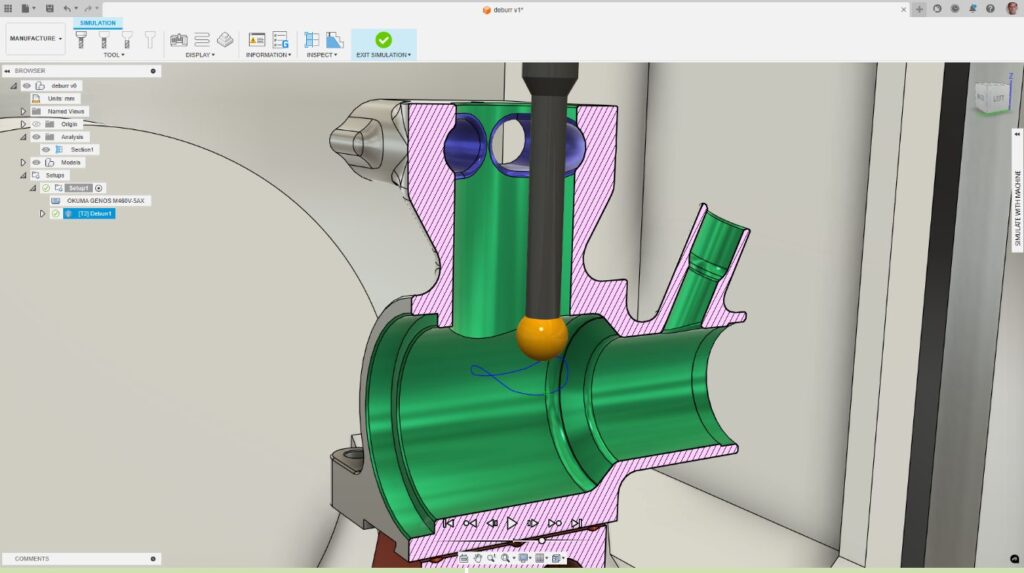
Deburr in Autodesk Fusion for Manufacturing
The deburr toolpath in Autodesk Fusion for Manufacturing automatically remove burrs from machined parts using CNC machining. Instead of relying on hand finishing, Fusion identifies sharp external edges and applies a controlled toolpath to remove burrs consistently across the entire part.
How it works in Fusion
Fusion’s deburr strategy centers around control and flexibility, allowing manufacturers to tailor finishing to their specific parts and materials.
- Automated edge detection – Fusion can automatically detect external sharp edges that require deburring. Users can define minimum edge angles to filter out edges that don’t need processing, or manually select specific edges for maximum control.
- Wide tool support -The deburr toolpath supports a variety of cutting tools, including ball‑end mills, lollipop tools, flat‑end mills, chamfer tools, tapered tools, and spot drills. This flexibility allows manufacturers to choose the best tool for part geometry, material, and finish requirements.
- Controlled material removal – Instead of freehand finishing, Fusion removes burrs by a user‑defined amount. This ensures repeatable edge quality and reduces the risk of over‑deburring or part damage.
- Multi‑axis capability – Deburring can be applied using 3‑axis, 4‑axis, or 5‑axis machining, allowing the tool to access complex edges and features that are difficult or time‑consuming to deburr manually.
Why CNC deburring improves part quality and throughput
Bringing deburring into CAM delivers tangible production benefits:
- Consistency: Every part is deburred the same way, regardless of operator or shift
- Efficiency: Parts leave the machine closer to finished, reducing downstream labor
- Predictability: Deburring time is built into cycle time, improving scheduling accuracy
- Scalability: Finishing keeps pace as production volumes grow
- Reduction of rework: Controlled edge finishing lowers the risk of scrap and assembly issues
For manufacturers running repeat jobs or producing high‑mix, low‑volume parts, CNC deburring helps standardize quality without slowing production.
Deburring as part of a connected CAM workflow
One of the key advantages of Autodesk Fusion for Manufacturing is that deburring lives in the same environment as design and machining. When part geometry changes, deburr toolpaths can be updated alongside other machining operations—without starting from scratch.
This connected workflow reduces handoffs, keeps design intent aligned with manufacturing execution, and ensures finishing is treated as a first‑class operation, not an afterthought.
Why manufacturers choose Fusion for deburring
Autodesk Fusion for Manufacturing doesn’t just offer a deburr toolpath. Fusion provides a modern, integrated approach to finishing. By replacing manual deburring with CNC‑driven processes, manufacturers gain better quality control, faster turnaround, and more predictable outcomes. Deburring becomes part of the machining strategy, not a source of variability.
With deburr in Autodesk Fusion for Manufacturing, manufacturers can eliminate one of the most persistent finishing bottlenecks in CNC production. By programming deburring directly into CAM workflows, teams achieve consistent edge quality, reduce manual labor, and ship parts faster with confidence.
For manufacturers focused on precision, efficiency, and repeatability, CNC deburring in Fusion is a practical step toward a more streamlined production process.
Autodesk Fusion vs. Autodesk Fusion for Manufacturing comparison chart
Note: Fusion and Fusion for Manufacturing include all core Fusion CAD, CAM, CAE, PCB , and data management capabilities. Fusion for Manufacturing also includes the advanced manufacturing capabilities listed below.
| Capability | Fusion | Fusion for Manufacturing |
| Drilling | | |
| Hole drilling (3-axis) | Yes | Yes |
| Automatic hole recognition and drilling (3-axis + multi-axis) | No | Yes |
| MILLING | | |
| 2D and 2.5-axis milling | Yes | Yes |
| 3-axis milling | Yes | Yes |
| 3+1 and 3+2 positional milling | Yes | Yes |
| Machine simulation | Yes | Yes |
| Automated whole part strategies (3-axis + multi-axis) | No | Yes |
| 4- and 5-axis simultaneous milling | No | Yes |
| Multi-axis collision avoidance | No | Yes |
| TURNING | | |
| 2-axis turning | Yes | Yes |
| Turn-mill machining | Yes | Yes |
| TOOLPATH MODIFICATIONS | | |
| Modify toolpaths (trim, delete passes, leads and links, replace tool, move entry positions) | No | Yes |
| INSPECTION & PART ALIGNMENT | | |
| Work coordinate system (WCS) probing | Yes | Yes |
| Manual inspection | Yes | Yes |
| Geometry probing | No | Yes |
| Surface inspection | No | Yes |
| Part alignment | No | Yes |
| POST PROCESSING | | |
| Generate NC code (post-processing) | Yes | Yes |
| SHEET-BASED NESTING | | |
| Basic single-sheet nesting | Yes | Yes |
| Associative nesting updates | Yes | Yes |
| Nest preparation tools | No | Yes |
| Advanced nesting (multi-sheet, auto detection) | No | Yes |
| Advanced part and material controls | No | Yes |
| Process material library | No | Yes |
| Custom nest reports | No | Yes |
| Nest comparison | No | Yes |
| Part labeling | No | Yes |
| SHEET-BASED FABRICATION | | |
| Toolpath generation (laser, plasma, router, waterjet) | Yes | Yes |
| Workflow automation | Yes | Yes |
| Automatic remnant cutting | No | Yes |
| DXF export with layer mapping | No | Yes |
| ADDITIVE MANUFACTURING | | |
| 2D/3D part nesting and arrangement | Yes | Yes |
| FDM and binder jetting | Yes | Yes |
| 3MF file export | Yes | Yes |
| Metal Powder Bed Fusion (MPBF) | No | Yes |
| Directed Energy Deposition (DED, multi-axis) | No | Yes |
| MPBF process simulation | No | Yes |