 Josh Reader
This post is also available in:
Unlock advanced CNC, multi‑axis machining, and automated workflows with the Autodesk Fusion Manufacturing Extension. Reduce programming time and get more from your machines.
Who doesn’t want to get more out of their machines? More throughput. Better surface quality. Fewer setups. Greater confidence on the shop floor.
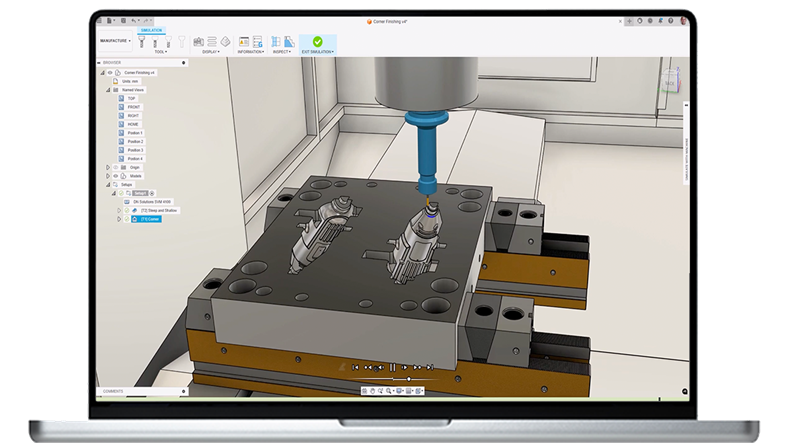
As parts become more complex and customer expectations continue to rise, maximizing productivity isn’t just about faster machines. It depends on having manufacturing workflows that can keep pace with both the geometry you’re producing and the full capabilities of modern CNC equipment.
The Fusion Manufacturing Extension is designed for exactly that moment. It builds on the core Fusion environment by unlocking advanced CNC, automation, and production‑ready workflows that help teams reduce programming time, take full advantage of multi‑axis machines, and move complex jobs through the shop with greater speed and confidence.
It’s a practical way to turn existing machines—and existing Fusion workflows—into a more efficient, higher‑performance manufacturing operation, without introducing new tools or disconnected systems.
Next‑level machining with the Fusion Manufacturing Extension
The Fusion Manufacturing Extension is not a separate system and not a new learning curve. It extends the Fusion environment you already use, unlocking advanced manufacturing capabilities directly inside the same interface your team knows.
That means less context switching, fewer handoffs, and faster adoption across your programming and machining teams.
It’s here to help you:
Make better use of advanced CNC machines, including 4‑ and 5‑axis equipment
- Reduce programming effort for complex, high‑value parts
- Improve consistency, safety, and efficiency on the shop floor
“The Fusion Manufacturing Extension can do some really advanced stuff on the CNCs. For example, part alignment typically involves a lot of shimming to make the part really flat. It can take hours, and it’s really stressful. With Fusion, the probe does all the work. That’s immensely time-saving and valuable to us.”
-Patrick Fee, Shop Manager, Conturo Prototyping
When your parts demand more than standard CAM
As your work in Fusion evolves to include simultaneous 4‑ and 5‑axis machining, free‑form surfaces, tight tolerances, or challenging undercuts, programming efficiency and confidence become critical.
The Manufacturing Extension unlocks advanced multi‑axis toolpaths, tool‑axis control, and collision avoidance capabilities that help programmers reduce setups, improve surface finish, and safely run more complex programs. This allows you to push machine utilization further, without increasing risk.
When CAM programming time becomes the bottleneck
A common inflection point for growing shops is realizing that CAM programming is taking longer than machining itself. Rebuilding similar toolpaths, managing complex features manually, or editing programs from scratch can slow everything down and introduce inconsistency.
The Manufacturing Extension adds automated, whole‑part machining strategies, such as steep and shallow machining, hole recognition, and intelligent feature‑based workflows. These strategies help reduce repetitive setup work and standardize results across jobs and programmers. The result is faster programming, more predictable outcomes, and more time spent cutting parts instead of preparing them.
What are you waiting for?
Download a free 14‑day trial and see how the Fusion Manufacturing Extension helps you unlock more performance from the machines you already own.
Fusion vs Fusion Manufacturing Extension – Capabilities
Note: A subscription to Autodesk Fusion is required prior to subscribing to the Autodesk Fusion Manufacturing Extension. The Fusion Manufacturing Extension unlocks the advanced manufacturing capabilities listed below.
| Capability | Fusion | Fusion Manufacturing Extension |
| Drilling | | |
| Hole drilling (3-axis) | Yes | Yes |
| Automatic hole recognition and drilling (3-axis + multi-axis) | No | Yes |
| MILLING | | |
| 2D and 2.5-axis milling | Yes | Yes |
| 3-axis milling | Yes | Yes |
| 3+1 and 3+2 positional milling | Yes | Yes |
| Machine simulation | Yes | Yes |
| Automated whole part strategies (3-axis + multi-axis) | No | Yes |
| 4- and 5-axis simultaneous milling | No | Yes |
| Multi-axis collision avoidance | No | Yes |
| TURNING | | |
| 2-axis turning | Yes | Yes |
| Turn-mill machining | Yes | Yes |
| TOOLPATH MODIFICATIONS | | |
| Modify toolpaths (trim, delete passes, leads and links, replace tool, move entry positions) | No | Yes |
| INSPECTION & PART ALIGNMENT | | |
| Work coordinate system (WCS) probing | Yes | Yes |
| Manual inspection | Yes | Yes |
| Geometry probing | No | Yes |
| Surface inspection | No | Yes |
| Part alignment | No | Yes |
| POST PROCESSING | | |
| Generate NC code (post-processing) | Yes | Yes |
| SHEET-BASED NESTING | | |
| Basic single-sheet nesting | Yes | Yes |
| Associative nesting updates | Yes | Yes |
| Nest preparation tools | No | Yes |
| Advanced nesting (multi-sheet, auto detection) | No | Yes |
| Advanced part and material controls | No | Yes |
| Process material library | No | Yes |
| Custom nest reports | No | Yes |
| Nest comparison | No | Yes |
| Part labeling | No | Yes |
| SHEET-BASED FABRICATION | | |
| Toolpath generation (laser, plasma, router, waterjet) | Yes | Yes |
| Workflow automation | Yes | Yes |
| Automatic remnant cutting | No | Yes |
| DXF export with layer mapping | No | Yes |
| ADDITIVE MANUFACTURING | | |
| 2D/3D part nesting and arrangement | Yes | Yes |
| FDM and binder jetting | Yes | Yes |
| 3MF file export | Yes | Yes |
| Metal Powder Bed Fusion (MPBF) | No | Yes |
| Directed Energy Deposition (DED, multi-axis) | No | Yes |
| MPBF process simulation | No | Yes |
Autodesk Fusion Manufacturing Extension frequently asked questions (FAQs)
The Autodesk Fusion Manufacturing Extension adds advanced manufacturing capabilities to Autodesk Fusion, including multi‑axis CNC machining, sheet‑based nesting and fabrication, and metal additive manufacturing, all within the same design‑to‑manufacturing environment.
It unlocks advanced CAM features such as 3‑, 4‑, and 5‑axis machining strategies, automated feature recognition, associative nesting, part inspection, and metal additive manufacturing workflows that aren’t included in core Fusion.
The manufacturing extension is intended for manufacturers, machinists, and production teams that need advanced CNC programming, multi‑axis machining, nesting, or automation beyond Fusion’s standard manufacturing tools.
Yes. The manufacturing extension supports simultaneous 4‑ and 5‑axis machining, advanced tool‑axis controls, and collision avoidance to help manufacturers take full advantage of multi‑axis CNC machines.
It automates repetitive CAM tasks such as hole recognition, deburring, steep‑and‑shallow machining, and multi‑axis toolpath generation—reducing manual programming and speeding up setup.
By keeping manufacturing data associative with design changes and enabling simulation, collision checking, and inspection strategies, the extension helps catch issues early, before parts reach the machine.
The manufacturing extension includes associative sheet‑based nesting for sheet metal and flat parts, multi‑sheet nesting, automatic updates when designs change, and tools to support costing, quoting, and material optimization.
Yes. It supports metal additive workflows, including build setup, support structures, additive toolpaths, process simulation, and export to machine‑specific formats for metal 3D printing systems.
Autodesk Fusion includes core design and manufacturing tools, while the manufacturing extension adds advanced CNC, multi‑axis machining, nesting, inspection, and metal additive capabilities for more complex production workflows.
Yes, a subscription to Fusion is required to access the Fusion for Manuacturing Extension.