Fusion Fusion
Overview
Solutions Back
  • Manufacturing
  • Consumer Product Development
  • Mechanical Design
  • PCB and Circuit Design
  • Data Management
Plans and Pricing
Download free trial
See Autodesk Fusion pricing
  • All
  • Thought Leadership
  • What's New
  • Tutorials
  • Case Studies
  • Product Design & Engineering
  • Manufacturing
  • Electronics Engineering

curtis.chan

Curtis Chan is a Technical Evangelist at Autodesk. Prior to Autodesk, Curt spent several years as a Mechanical Engineer in the defense and medical industry. Aside from industry experience, as a prior Application Engineer for 3D Design Softwares companies such as SpaceClaim and SolidWorks, Curt offers expertise in a variety of 3D CAD/CAM Tools. Curt holds a Bachelors Degree in Mechanical Engineering from San Diego State University; and is also an Adjunct Professor at Palomar College in San Diego, California, teaching 3D CAD/CAM Solutions. Follow him on Twitter: @Curt_Chan & Instagram: curtis.chan
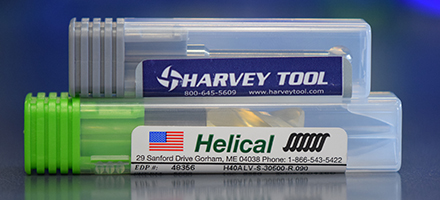


  • Fusion 360 Now Supports 14,000+ End Mills From Harvey Tool and Helical Solutions

    Get access to all 14,000-plus end mills offered by the lead cutting tool brands Harvey Tool and Helical Solutions. Read on to learn how to access them.

    Fusion


  • #fusionCAMChallenge 5.0 Winners from Instagram!

    There are some awesome entries, and we enjoyed reviewing them all. The winners are...

    Fusion


  • #fusioncamchallenge 4.0 Winner on Instagram!

    Another #fusioncamchallenge for the books, with the theme being around Workholding/Fixturing strategies for a CNC Machine.

    Fusion


  • #fusionCAMchallenge Winner of 2017 on Instagram!

    Heard about the #fusioncamchallenge on Instagram? See who won, and check out the recap of all the submissions!

    Fusion


  • #fusionCAMchallenge 2.0 Winner on Instagram!

    Check out which Instagram User is taking the 'gold' medallion to Autodesk University 2016!

    Fusion


  • Tip Tuesday | Back to Basics – Kitchen Faucet Design

    Remember the old saying ‘Sometimes we need to take a step back, to take a two steps forward’?  Refreshing ourselves on basic commands in Fusion 360 never hurts, and can always add more ‘tools to our toolbox’.

    Fusion


  • November Update: What’s New in CAM

    The focus in this current update, showcases our investment in ’simulation’ functionality, improving visualization to the ‘position bar’, and now Cylindrical Stock as an option in Fusion 360 Ultimate. 

    What's New


  • CAM for Fusion 360: Engraving a Logo & Working with Surfaces in CAM Toolpaths

    Check out a Tips and Tricks session using CAM for Fusion 360! Curt Chan, our CAM Technical Evangelist, gives a great overview of working with Surfaces in CAM Toolpaths, along with how to emboss a .svg file. 

    Fusion


  • CAM for Fusion 360 Tips and Tricks

    Check out a Tips and Tricks session using CAM for Fusion 360!  Curt Chan, our CAM Technical Evangelist, gives a great overview of new CAM functionality implemented in the latest release of Fusion 360.

    Fusion


  • Tip Tuesday – Fusion 360 In-depth: CAM

    Fusion


Autodesk

Company overview
Careers
Investor relations
Autodesk Trust Center
Newsroom
Diversity and belonging

Autodesk Foundation
Sustainability
Contact us
Students and educators
Affiliate program
Autodesk Research
Design & Make with Autodesk

How to buy

View all products
Buying with Autodesk
Renewal options
Find a reseller
Sales and refunds
Choose your subscription plan
Pay as you go with Flex

Support

Product support
Manage your account
Download and install software
Autodesk Product Status
Education support
Contact support

Privacy | Do not sell or share my personal information | Cookie preferences | Report noncompliance | Terms of use | Legal | © 2024 Autodesk Inc. All rights reserved