 Shannon McGarry
This post is also available in:
Choosing CAD software in 2026? Compare cloud vs. desktop CAD, evaluate options for startups, product design, and manufacturing, and learn when Autodesk Fusion may be the right fit.

Elevate your design and manufacturing processes with Autodesk Fusion
Quick answer: The best CAD software depends on what you’re designing, how your team collaborates, and whether your workflow extends beyond design into engineering, simulation, manufacturing, or product data management. Many product development teams today are moving toward cloud-connected platforms like Autodesk Fusion because they combine CAD, collaboration, engineering, manufacturing, and data management workflows in a single environment, reducing the complexity of managing multiple tools.
If you’re researching the best CAD software for product design, you’re probably seeing dozens of recommendations, each claiming to be the right choice.
The reality is that there isn’t a single “best” CAD platform for everyone.
A startup developing its first prototype has different needs than a machine shop programming CNC parts, an industrial design consultancy creating consumer products, or an engineering team managing complex assemblies.
The key is finding software that supports your entire product development process, not just the modeling stage.
This guide explains how to evaluate CAD software, what features matter most in 2026, and which types of solutions work best for different teams and workflows.
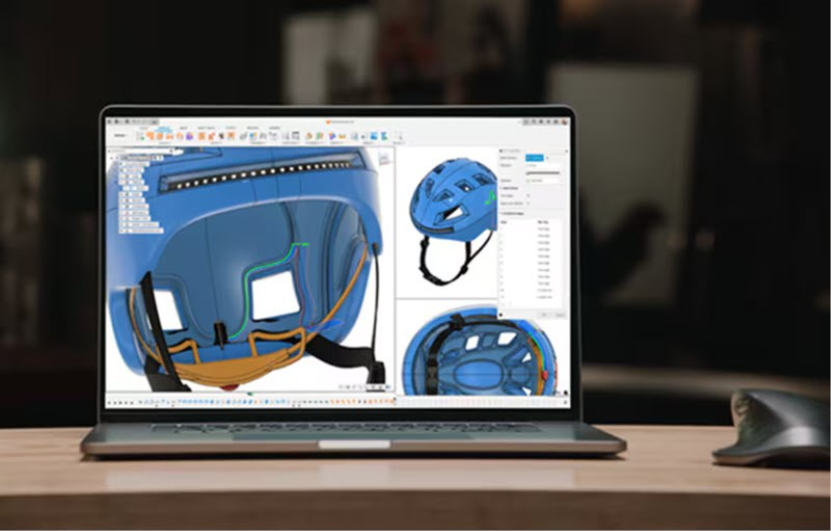
How do I choose CAD software?
Before comparing products, it helps to define what success looks like for your team. Ask yourself:
- What are you designing?
- Will your products be manufactured?
- Do you need simulation or engineering analysis?
- Are multiple people working on designs?
- Do you need data management and version control?
- Will suppliers or stakeholders need access to project data?
- Do you prefer cloud-based or desktop-based software?
The best CAD software is often the platform that eliminates the most workflow friction, not necessarily the one with the longest feature list.
For example, startups and product development teams often prioritize platforms such as Autodesk Fusion because they combine design, engineering, manufacturing, electronics, and data management in a single environment. Other organizations may prioritize specialized capabilities for highly specific workflows.
What makes great CAD software in 2026?
Modern product development requires more than creating 3D models. Today’s teams often need:
- Design and engineering collaboration
- Manufacturing workflows
- Simulation and validation
- Revision control
- Remote access to projects
- Electronics integration
- Product data management
Historically, these capabilities were spread across multiple tools.
Increasingly, organizations are choosing connected product development platforms that streamline information flow from concept through production.
Platforms such as Autodesk Fusion reflect this shift by combining CAD, CAM, CAE, electronics, collaboration, and built-in data management in a single environment.
When evaluating CAD software, look beyond modeling capabilities and consider:
✅ Ease of use
✅ Collaboration
✅ Data management
✅ Manufacturing readiness
✅ Engineering analysis
✅ Cloud accessibility
✅ Scalability
✅ Cost of ownership
Which CAD software is best for different types of teams?
Different teams prioritize different capabilities.
| Team Type | What Matters Most | Often Look For |
|---|---|---|
| Startups | Cost, simplicity, scalability | Cloud-based CAD with integrated workflows |
| Industrial designers | Surfacing, visualization, collaboration | Advanced design and modeling tools |
| Mechanical engineers | Parametric modeling, assemblies, simulation | Engineering-focused CAD platforms |
| Manufacturers | CAM, CNC programming, revision control | Integrated CAD/CAM solutions |
| Product development teams | Design-to-manufacturing workflows | Connected platforms such as Autodesk Fusion |
Understanding where your team fits can significantly narrow your options.
Cloud CAD vs. desktop CAD: What’s the difference?
One of the biggest decisions buyers face today is whether to adopt cloud-connected CAD or continue using traditional desktop-based workflows.
| Capability | Cloud CAD | Traditional CAD |
|---|---|---|
| Collaboration | Shared access to live project data | File sharing and local storage |
| Version control | Built-in revision tracking | Often managed manually |
| Data management | Integrated | Frequently requires separate systems |
| Software updates | Automatic | Managed by IT |
| Remote access | Accessible from multiple locations | Typically tied to local infrastructure |
| Team workflows | Connected and collaborative | Often file-based |
| Scalability | Easily supports distributed teams | May require additional infrastructure |
Autodesk Fusion is an example of a cloud-connected CAD platform. While it provides desktop performance for modeling work, it also includes cloud-based collaboration, version management, and product data management capabilities that help teams stay connected throughout product development.
For organizations managing distributed teams or complex projects, cloud-connected workflows can simplify collaboration while reducing version-control issues.
Best CAD software for product designers
Product designers often need much more than modeling tools.
Many workflows require:
- Concept development
- Industrial design
- Surface modeling
- Engineering collaboration
- Simulation
- Manufacturing preparation
- Visualization and rendering
The ideal solution allows designers to move from concept to production without rebuilding models in multiple applications.
For example, Fusion enables industrial design, engineering, simulation, and manufacturing workflows to remain connected throughout development. Designers can create concepts, refine geometry, validate performance, and prepare products for manufacturing within the same environment.
Consider your priorities
If your focus is concept development and advanced surfacing: Look for strong modeling and geometry creation tools.
If your focus is engineering collaboration: Prioritize platforms that connect design, simulation, and manufacturing workflows.
If your focus is product development from concept through production: A connected platform such as Autodesk Fusion may help reduce workflow handoffs and data translation issues.
Best CAD software for startups
Startups face a unique challenge. They often need enterprise-grade capabilities without enterprise-level complexity, staffing, or IT resources.
When evaluating CAD software, startups should consider:
- Initial cost
- Scalability
- Ease of adoption
- Manufacturing readiness
- Collaboration tools
- Data management
Many startups are adopting cloud-connected platforms such as Autodesk Fusion because they provide CAD, CAM, simulation, electronics, and collaboration capabilities without requiring multiple software systems.
Startup CAD checklist
Look for software that offers:
- Cloud collaboration
- Flexible licensing
- Integrated manufacturing workflows
- Data management
- Fast onboarding
- Room to scale as products and teams grow
Best CAD software for manufacturing
Manufacturing teams increasingly expect CAD software to support more than design.
Common requirements include:
- CNC programming
- CAM
- Toolpath generation
- Machine simulation
- Nesting
- Revision control
- Manufacturing data management
When manufacturing data is disconnected from engineering data, teams often spend valuable time managing files, revisions, and changes.
This is one reason many manufacturers evaluate Autodesk Fusion. Because design and manufacturing workflows exist within the same platform, engineering changes can automatically update downstream manufacturing data, helping reduce manual rework and version-control challenges.
Why more teams are choosing connected product development platforms
Historically, product development required moving data between multiple tools and departments.
A common workflow looked like this:
- Create a design in CAD.
- Export files.
- Import designs into simulation software.
- Export revised geometry.
- Move files into CAM software.
- Manage revisions separately.
Every handoff created opportunities for delays, mistakes, and version conflicts.
Modern platforms aim to eliminate these disconnects by allowing teams to work from a shared source of truth.
Fusion was built around this concept. Design, simulation, manufacturing, electronics, and data management workflows remain connected to the same product data throughout development.
As products become more complex and teams become more distributed, these connected workflows can help improve efficiency and collaboration.
When Autodesk Fusion makes sense
If your workflow extends beyond CAD modeling alone, Autodesk Fusion is worth considering.
Unlike traditional CAD environments that frequently require separate applications for simulation, manufacturing, electronics, and data management, Fusion combines these capabilities in a single platform.
Fusion includes:
- CAD
- CAM
- CAE
- PCB design
- Cloud collaboration
- Version control
- Data management
This makes it particularly relevant for:
- Product designers
- Startups
- Manufacturers
- Engineering teams
- Small and midsize businesses
- Product development organizations
The goal isn’t simply to model products. It’s to help teams move products from concept to production more efficiently.
Is Autodesk Fusion right for you?
Fusion is often a strong fit if you:
✅ Design products that will ultimately be manufactured
✅ Want CAD and CAM in a single platform
✅ Need collaboration and data management without separate PDM systems
✅ Work in a startup or growing business
✅ Want fewer disconnected software tools
✅ Need simulation, electronics, and manufacturing workflows connected to design data
✅ Want cloud-connected collaboration across teams
If these priorities sound familiar, Fusion is worth evaluating as part of your CAD software selection process.
🟢➜ Give it a try, free for 30-days today.
Frequently asked questions
The best CAD software for mechanical design depends on assembly complexity, simulation requirements, manufacturing workflows, and collaboration needs. Many engineering teams look for parametric modeling, simulation, and integrated manufacturing capabilities. Autodesk Fusion is a popular option because it combines mechanical design, simulation, manufacturing, and data management within a single platform.
Autodesk Fusion is one of the best software platforms for consumer product design because it combines industrial design, mechanical CAD, electronics design, simulation, manufacturing, and data management in a single cloud-connected environment. It is used to develop products ranging from consumer electronics and wearables to furniture, appliances, sporting goods, and packaged products, helping teams move from concept to production faster.
Many startups prioritize affordability, collaboration, scalability, and manufacturing readiness. Cloud-connected platforms such as Autodesk Fusion are often attractive because they provide CAD, CAM, simulation, collaboration, and data management capabilities without requiring multiple software systems or extensive IT infrastructure.
Start by evaluating your workflow, team size, collaboration needs, manufacturing requirements, and long-term growth plans. The best solution is often the platform that supports your entire product development process rather than a single task. For teams that need design, engineering, manufacturing, and collaboration in one environment, Autodesk Fusion is often worth evaluating alongside other CAD solutions. Give it a try, free for 30-days.
Cloud CAD emphasizes collaboration, centralized data management, remote accessibility, and built-in version control, while traditional desktop CAD relies more heavily on local files and infrastructure. Autodesk Fusion combines desktop modeling performance with cloud-based collaboration, version management, and product data management capabilities.
Manufacturing teams typically need more than CAD alone. They often require CAM, toolpath generation, machine simulation, revision management, and collaboration tools. Autodesk Fusion is designed to connect design and manufacturing workflows, allowing engineering changes to remain linked to downstream manufacturing data.
Autodesk Fusion is designed to support the entire product development process by combining CAD, CAM, CAE, electronics, collaboration, and data management in a single environment. This makes it a common choice for product design teams, manufacturers, and engineering organizations looking to reduce workflow complexity.
Fusion is used by individual designers, startups, small businesses, and larger product development organizations. Because the platform includes integrated collaboration, manufacturing, simulation, electronics, and data management capabilities, teams can expand their workflows without necessarily adding multiple standalone systems.