 Shannon McGarry
This post is also available in:
Discover how cloud CAD eliminates version conflicts, hardware limits, and data silos to accelerate product development with Autodesk Fusion.

Elevate your design and manufacturing processes with Autodesk Fusion
Traditional CAD workflows slow product development because they rely on rigid, file‑based structures and localized hardware. In desktop‑bound environments, CAD data lives on individual machines or internal servers, making real‑time collaboration difficult and increasing the risk of version conflicts. As teams become more distributed and products grow more complex, managing large assemblies across disconnected systems becomes increasingly inefficient.
Without built‑in data sharing, designers using traditional CAD struggle to coordinate changes across teams. Local file storage and manual check‑in processes introduce delays, duplicate work, and errors that compound as projects scale. These limitations expose the fundamental weakness of on‑premises CAD: it was never designed for modern, parallel product development. To move faster, engineering teams need more agile environments—specifically, cloud CAD platforms that support continuous data flow and concurrent design.
What is cloud CAD?
Cloud CAD is computer-aided design software that stores design data in a centralized cloud environment rather than relying exclusively on local files and on-premises infrastructure.
Unlike traditional CAD systems, cloud CAD connects design, engineering, manufacturing, and data management workflows through a shared source of truth. Teams can access projects, collaborate on designs, track revisions, and share information without manually transferring files between systems.
Cloud CAD platforms such as Autodesk Fusion combine modeling, collaboration, simulation, manufacturing, and data management in a connected environment, making it easier for distributed teams to work together throughout product development.
Cloud CAD vs. traditional CAD
| Capability | Cloud CAD | Traditional CAD |
|---|---|---|
| Data storage | Centralized cloud environment | Local files and servers |
| Collaboration | Real-time access to shared data | File sharing and check-in/check-out workflows |
| Version control | Built-in version tracking | Often managed manually |
| Remote access | Available from multiple locations | Typically tied to local infrastructure |
| Software updates | Delivered automatically | Often require IT deployment |
| Computing resources | Can leverage cloud computing | Dependent on local hardware |
| Design reviews | Shared links and cloud access | File exports and email sharing |
| Scalability | Easily supports distributed teams | Often requires additional infrastructure |
Benefits of Cloud CAD
Organizations adopt cloud CAD for several reasons:
- Faster collaboration across teams and locations
- A single source of truth for product data
- Reduced version conflicts and duplicate files
- Simplified data management
- Easier design reviews and stakeholder feedback
- Built-in revision history and version tracking
- Access to cloud-powered simulation and computation
- Reduced reliance on local infrastructure
- Better alignment between design and manufacturing teams
These advantages help teams accelerate product development while improving visibility throughout the engineering process.
Why companies are moving from traditional CAD to cloud CAD
Cloud CAD is transforming how engineers interact with digital models and manufacturing data. Unlike traditional systems that depend on local files, cloud CAD platforms host design data in a centralized, secure environment. This creates a single source of truth that all stakeholders can access simultaneously, eliminating file locking, accidental overwrites, and manual synchronization.
When multiple designers work on the same assembly in a cloud CAD environment, changes update in real time. Teams no longer need external PDM servers or complex file‑management rules to maintain data integrity. Instead, cloud CAD ensures that every contributor sees the most current design state at all times, improving coordination and reducing rework.
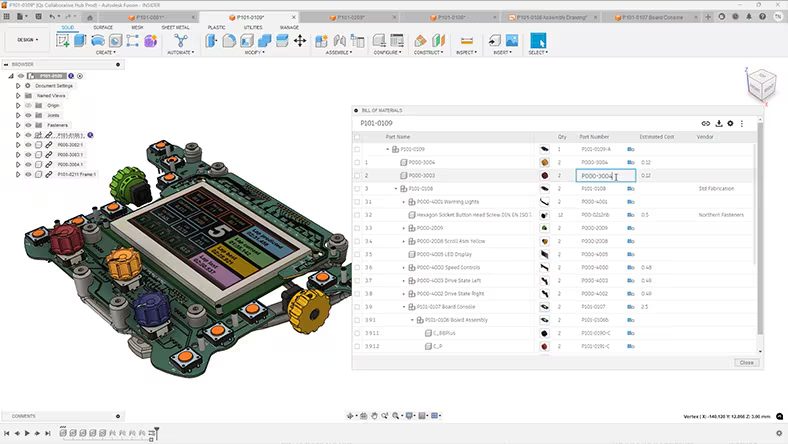
Cloud CAD also removes hardware limitations that traditionally restrict engineering productivity. Desktop CAD applications depend heavily on local CPU and GPU performance, which can bottleneck tasks such as rendering, simulation, and generative design. Cloud‑based CAD platforms shift these compute‑intensive workloads to distributed server infrastructure, allowing engineers to run advanced analyses without slowing down their local machines.
This decoupling of performance from hardware enables organizations to equip remote and hybrid teams with high‑performance design tools—without investing in expensive workstations for every user. Designers can run simulations in parallel, explore alternatives, and continue modeling while cloud resources handle the heavy computation.
Improving collaboration between design and manufacturing
Another key advantage of cloud CAD is its impact on collaboration between engineering and manufacturing. In traditional workflows, sharing CAD data often involves exporting static files and sending them to stakeholders via email or third‑party tools. This process increases the risk of data loss, translation errors, and outdated information circulating across teams.
Cloud CAD platforms replace file sharing with live model access. Instead of sending files, teams can share links to up‑to‑date 3D models that remain connected to the underlying data. By centralizing all design, manufacturing, and revision information, cloud CAD reduces administrative overhead and allows teams to focus on engineering challenges rather than file management.
Is cloud CAD secure?
Security is one of the most common concerns when evaluating cloud CAD.
Modern cloud CAD platforms, like Autodesk Fusion, use security measures designed to protect product data, including:
- User authentication and access controls
- Permission-based project access
- Data encryption
- Version tracking and change history
- Centralized data storage
- Backup and recovery capabilities
Rather than relying on unmanaged local files or individual workstations, cloud CAD platforms help organizations maintain control over product information through centralized data management practices.
Can cloud CAD be used offline?
Many prospective users assume cloud CAD requires a constant internet connection.
In practice, capabilities vary by platform.
Autodesk Fusion supports offline workflows that allow users to continue working when internet access is temporarily unavailable. Once connectivity is restored, data can be synchronized back to the cloud environment.
However, cloud-based services such as collaboration, cloud simulation, and certain compute-intensive workflows generally require an internet connection.
Faster workflows with Autodesk Fusion cloud CAD
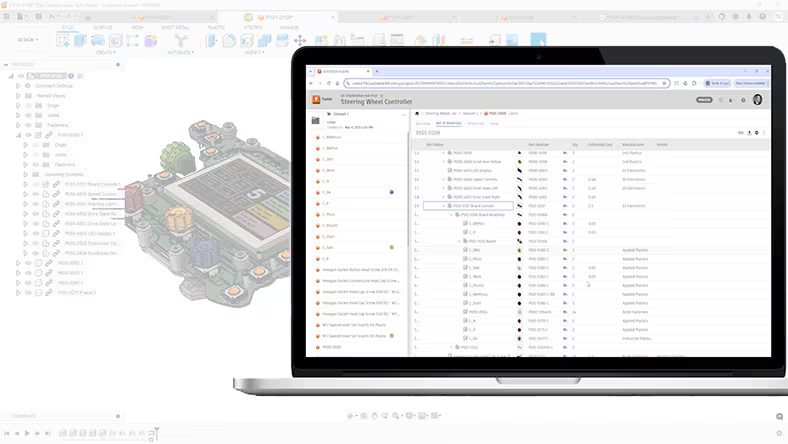
Autodesk Fusion delivers a full cloud CAD solution by integrating the entire product lifecycle into a single environment. Designers can manage CAD, CAM, CAE, and PCB design within one cloud platform—eliminating the need to move files between separate tools.
Because Fusion is built on the cloud, any design change automatically propagates to downstream manufacturing toolpaths and simulation studies. This full associativity breaks down the data silos that slow traditional engineering workflows and ensures design intent remains intact throughout development.
For manufacturing teams, Fusion’s cloud‑based CAM capabilities allow programmers to generate precise toolpaths directly from validated design data. Built‑in cloud PDM tools track every version and revision automatically, providing complete visibility into design history. Teams can review changes, compare iterations, or roll back to earlier versions without manual file handling.
Because all data is hosted in the cloud, stakeholders across geographies can collaborate in real time, accessing the same information regardless of location.
Unlocking innovation with cloud‑powered design
Cloud CAD also enables advanced workflows such as generative design and large‑scale simulation. In Autodesk Fusion, designers can define constraints—such as material, weight, cost, and manufacturing methods—and leverage cloud computing to generate hundreds of optimized design outcomes automatically.
These cloud‑powered results are manufacturing‑ready and can be validated immediately using Fusion’s integrated simulation tools. By combining cloud CAD, generative design, and analysis in one platform, teams can explore more ideas, validate performance earlier, and reduce reliance on physical prototypes.
Building a future‑ready design strategy with cloud CAD
Moving away from traditional CAD is a critical step toward more scalable and resilient product development. Cloud CAD enables faster collaboration, better data continuity, and improved manufacturing alignment—without the infrastructure burden of on‑premises systems.
As competition intensifies and product differentiation becomes more challenging, cloud‑based platforms like Autodesk Fusion give organizations the agility they need to succeed. By adopting cloud CAD, manufacturers can shorten lead times, improve product quality, and future‑proof their design and engineering strategies.
Frequently asked questions
Cloud CAD is computer-aided design software that stores and manages product data through a cloud-connected environment, enabling collaboration, data management, and access across teams and locations.
Many organizations adopt cloud CAD to improve collaboration, reduce version conflicts, simplify data management, and support distributed teams.
Yes. Small businesses, startups, and individual product designers can benefit from cloud CAD through simplified collaboration, integrated data management, and reduced infrastructure requirements.
Many cloud CAD platforms, including Autodesk Fusion, support offline work for certain tasks, while cloud-based services and collaboration features typically require internet connectivity.
Cloud CAD is used across manufacturing, industrial design, consumer products, aerospace, electronics, medical devices, automotive, and many other industries.
Yes. Autodesk Fusion is a cloud-based product development platform that combines CAD, CAM, CAE, electronics, and data management in a single solution. Rather than relying on local file servers or disconnected software, Fusion stores project data in a connected environment, making it easier for teams to access designs, manage revisions, and collaborate across locations.
For small and medium-sized businesses, the biggest advantage is not simply that Fusion is “in the cloud.” It’s that design, manufacturing, collaboration, and data management workflows are connected in one place. This reduces file transfers, version-control issues, and the overhead of managing multiple software tools.
Cloud CAD can help small businesses spend less time managing software and files, and more time designing, engineering, and building products. With a cloud-based platform like Fusion, teams can access projects from anywhere, collaborate using a shared source of truth, and avoid much of the infrastructure traditionally associated with CAD systems.
Key benefits include:
–Work from anywhere: Access designs, projects, and data from multiple devices and locations, making it easier to support remote work, contractors, and client-site visits.
–Simpler collaboration: Teams work from the same data source, reducing duplicate files, version conflicts, and manual handoffs.
–Built-in version control: Changes and revisions are tracked automatically, helping everyone stay aligned on the latest design.
–Lower IT overhead: Businesses can avoid maintaining servers and complex infrastructure, freeing time and budget for growth.
–Automatic updates: New features, performance improvements, and security updates are delivered automatically, so teams stay current without manual upgrades.
–Easier scalability: Small teams can add users, adopt new capabilities, and expand workflows as the business grows without major disruption.
For many small businesses, the practical outcome is a more streamlined workflow with fewer software tools, fewer file-management headaches, and faster onboarding for new team members.
For many freelancers, consultants, and owner-operated design businesses, cloud CAD is often worth the switch because it replaces a significant amount of administrative work with a more flexible workflow.
The biggest advantage is flexibility. Instead of managing files across multiple computers or maintaining a desktop workstation as the single source of truth, you can access your projects from wherever you’re working. Whether you’re reviewing a design at a client site, working from a home office, or switching between a laptop and workstation, your project data remains accessible and synchronized.
Cloud CAD can also reduce the burden of managing backups, software updates, and revision history. Built-in data management and version tracking help keep work organized without requiring separate systems or IT support.
Small engineering teams are increasingly moving to cloud CAD because it helps them spend less time managing software, files, and infrastructure, and more time designing and building products. Rather than stitching together separate tools for CAD, collaboration, file sharing, and data management, cloud-based platforms can bring these workflows together in a connected environment.
For teams of two to five people, some of the biggest benefits include:
–Easier collaboration: Everyone works from a shared source of truth, reducing file duplication, version conflicts, and manual handoffs between team members.
–Simplified CAD file management: Designs, revisions, and project data are stored and tracked in one place, making it easier to find the latest version and avoid “which file is current?” conversations.
–Greater flexibility: Engineers can access projects from different computers and locations without relying on local file servers or manually moving files between machines.
–Lower software and IT overhead: Small businesses can avoid maintaining servers, managing complex infrastructure, and coordinating software deployments across multiple users.
–Room to grow: Cloud platforms make it easier to add users, expand workflows, and adopt additional capabilities as the business evolves.
For many small teams, the appeal isn’t simply that CAD is in the cloud. It’s that cloud CAD reduces operational complexity and helps keep design data, collaboration, and product development workflows connected
The primary difference between cloud CAD and traditional desktop CAD is how project data is managed, shared, and accessed.
With traditional desktop CAD, design files are typically stored on a local computer or company server. Teams often manage file sharing through folders, shared drives, email attachments, or separate data management systems. Software updates, infrastructure, and backups are commonly handled by the organization. This approach can work well, but it often requires more administrative effort as teams grow.
With cloud CAD, project data is stored in a connected environment where designs, revisions, and project information are accessible through a shared workspace. Teams can collaborate using a centralized source of truth, access projects from multiple locations, and benefit from built-in version tracking and data management capabilities.