 Guy Buttle
This post is also available in:
Autodesk Fusion for Manufacturing is a comprehensive, cloud-based solution that integrates CAD, CAM, CAE, and PDM tools. Learn how this invaluable asset can help to streamline workflows, reduce costs, improve product quality, and foster innovation.
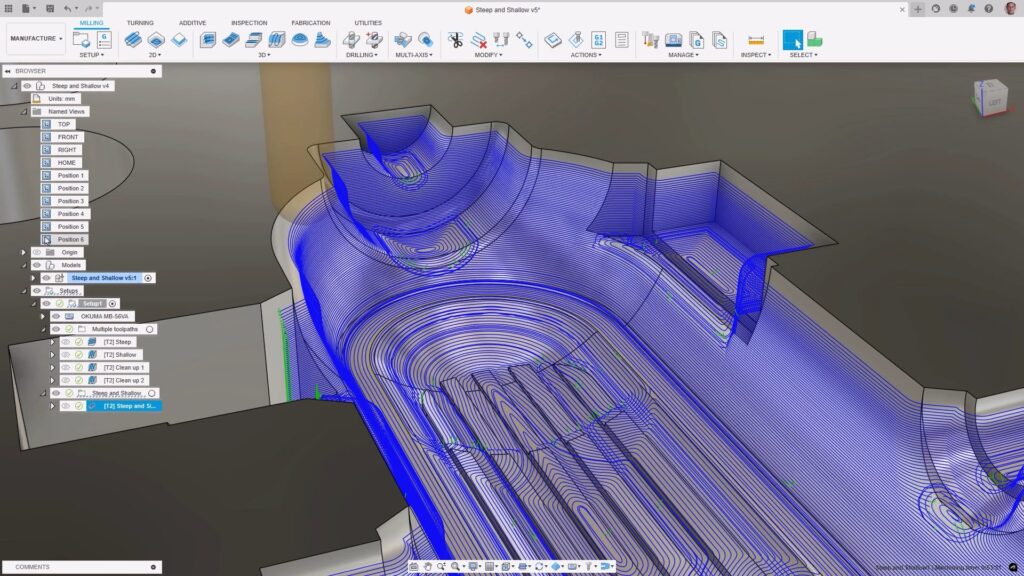
Manufacturing teams are under constant pressure to deliver parts faster, reduce setup time, improve quality, and adapt to engineering changes without disrupting production. Yet many organizations still rely on disconnected CAD and CAM tools that create unnecessary friction between design and manufacturing.
Autodesk Fusion for Manufacturing was built to solve that problem. Combining advanced CAD, CAM, CAE, data management, and collaboration tools in a single cloud-connected platform, Fusion for Manufacturing helps shops streamline programming, reduce rework, and scale from prototype machining to advanced multi-axis production. Whether you’re programming 3-axis parts, investing in 5-axis machines, or looking to eliminate disconnected software workflows, Fusion for Manufacturing provides a more integrated path from design to finished part.
What is Autodesk Fusion for Manufacturing?

Elevate your design and manufacturing processes with Autodesk Fusion
Autodesk Fusion for Manufacturing is designed specifically for professional manufacturing teams that require advanced CAM capabilities beyond what is included in the standard Fusion subscription.
It includes all of Fusion’s core CAD, CAE, data management, and collaboration tools while adding advanced manufacturing capabilities such as multi-axis machining, CAM automation, machine simulation, inspection workflows, nesting, and additive manufacturing support. It is designed for CNC programmers, manufacturing engineers, machine operators, and production teams that need to optimize machining workflows while maintaining accuracy and efficiency.
Rather than relying on separate systems to design, program, simulate, and manufacture parts, teams can perform these workflows within one connected environment.
The CAD-to-CAM handoff problem
One of the most common challenges in manufacturing happens before machining begins.
Many organizations design products in one system and program them in another. Every design revision requires file exports, imports, model translations, and manual validation before manufacturing can continue.
When CAD and CAM are disconnected, teams often encounter:
- Lost design features after translation
- Broken model references
- Version mismatches between engineering and manufacturing
- Additional setup work
- Repeated toolpath regeneration
- Increased risk of scrap or rework
These issues create delays that compound throughout production.
Fusion for Manufacturing eliminates many of these challenges by integrating CAD and CAM within a single platform. Manufacturing operations remain associated with design data, making it easier to update toolpaths when designs change and helping maintain consistency throughout the development process.
The result is what many manufacturing teams are looking for: no lost features, broken models, or rework during CAD-to-CAM handoff.
Why manufacturers choosed an integrated CAD/CAM platform
For years, manufacturers accepted the complexity of managing separate software systems for design, machining, simulation, inspection, and collaboration.
Today, many are rethinking that approach. Fusion for Manufacturing combines these workflows into a single platform, helping teams:
- Reduce software complexity
- Improve communication between engineering and manufacturing
- Accelerate design iterations
- Simplify version control
- Reduce manual data transfers
- Improve manufacturing consistency
Instead of managing multiple disconnected tools, teams can work from a shared source of truth throughout the product development process.
2D to full 5-axis machining for production-grade accuracy
Manufacturing requirements vary widely between organizations. Some shops focus on simple prismatic parts while others machine complex aerospace, medical, or industrial components requiring advanced multi-axis control.
Fusion for Manufacturing supports 2D to full 5-axis machining for production-grade accuracy, allowing manufacturers to grow their capabilities without changing CAM platforms.
2D and 2.5-axis machining
For brackets, fixtures, plates, and other prismatic parts, 2D and 2.5-axis machining strategies provide efficient programming and production workflows.
3-axis machining
When parts require curved surfaces, pockets, contours, or more complex geometries, 3-axis machining strategies help manufacturers balance productivity with precision. Fusion includes adaptive roughing and advanced finishing strategies designed to maximize material removal efficiency.
4-axis machining
Rotary machining reduces setups and improves productivity by enabling machining around cylindrical and indexed geometries.
3+2 positional 5-axis machining
Positional 5-axis machining allows programmers to orient the cutting tool relative to the workpiece while machining with three active axes. This approach often enables fewer setups and improved tool access.
Simultaneous 5-axis machining
For highly complex components, Fusion for Manufacturing includes advanced 4-axis and 5-axis machining strategies, tool-axis controls, and collision-aware workflows to support sophisticated multi-axis production.
Advanced CAM automation
Programming efficiency has become increasingly important as shops face growing workloads and a shortage of experienced manufacturing talent.
Fusion for Manufacturing delivers advanced CAM automation, high-precision machining, and scalable production workflows through intelligent manufacturing tools that reduce repetitive programming work.
Automation capabilities include:
- Automated hole recognition
- Template-driven drilling operations
- Rest machining calculations
- Automated setup workflows
- Toolpath refinements without full recalculation
- Associative updates when designs change
- Inspection and probing routines
These tools help reduce programming time while improving consistency across jobs and teams.
Machine simulation and post processing
Programming a part is only one step in the manufacturing process. Confidence becomes critical when code reaches the machine.
Fusion for Manufacturing includes machine simulation capabilities that allow manufacturers to validate machining operations before production starts. Accurate machine models can help identify:
- Potential collisions
- Axis over-travel
- Setup errors
- Clearance issues
- Machine movement concerns
Finding problems virtually can help reduce costly mistakes on the shop floor.
Fusion for Manufacturing also provides extensive post-processing capabilities, enabling manufacturers to generate NC code for a wide range of machines and controllers while maintaining flexibility for customized workflows.
Cloud-connected CAM for modern manufacturing
Manufacturing teams increasingly collaborate across shifts, departments, job sites, and facilities.
Fusion for Manufacturing’s cloud-connected platform helps support these distributed workflows by providing access to manufacturing data, machining strategies, and project information through a centralized environment.
Benefits include:
- Shared manufacturing standards
- Improved collaboration
- Reduced software administration
- Streamlined access to current project data
- Easier deployment of platform updates
- Improved consistency across teams
For organizations running multiple seats, multiple machines, or multiple facilities, centralized manufacturing workflows can help improve scalability while reducing operational complexity.
Manufacturing processes supported
Fusion for Manufacturing supports a broad range of production technologies, including:
- CNC machining using 2D, 2.5-axis, 3-axis, 3+2, 4-axis, and full 5-axis workflows
- CNC turning and multitasking machines
- Sheet-based fabrication including laser, plasma, waterjet, and router cutting
- Plastic additive manufacturing workflows
- Metal additive manufacturing workflows
- Hybrid manufacturing processes that combine additive and subtractive techniques
- Automated nesting and material optimization workflows
Who is Fusion for Manufacturing a good fit for?
Job shops scaling beyond 3-axis machining
Many shops eventually invest in 4-axis or 5-axis equipment to take on more complex work and reduce setup time. Fusion for Manufacturing provides the advanced programming capabilities needed to support that transition without introducing a new software ecosystem.
In-house manufacturing teams using separate CAM software
Organizations that design parts in one system and manufacture them in another often spend valuable time managing conversion workflows, model updates, and version control. Fusion for Manufacturing helps bring those workflows together into a single environment.
Production facilities running multiple machines
Manufacturers with multiple programmers, machines, or facilities often need standardized workflows, centralized data, and repeatable programming processes. Fusion for Manufacturing helps support these requirements while maintaining flexibility for different machine configurations.
Stop paying for multiple expensive licenses
Many manufacturers maintain multiple subscriptions across separate CAD, CAM, nesting, inspection, collaboration, and manufacturing software platforms.
As production complexity grows, so does software complexity.
Fusion for Manufacturing helps reduce the need for disconnected systems by bringing design, manufacturing, simulation, inspection, and collaboration capabilities together on a common platform. For many organizations, this can simplify software management while reducing the friction between teams and workflows.
In short: stop paying for multiple expensive licenses and start managing more of your manufacturing workflow from a single connected solution.
Fusion vs Fusion for Manufacturing – Capabilities
Note: Fusion and Fusion for Manufacturing include all core Fusion CAD, CAM, CAE, PCB , and data management capabilities. Fusion for Manufacturing also includes the advanced manufacturing capabilities listed below.
| Capability | Fusion | Fusion for Manufacturing |
| Drilling | ||
| Hole drilling (3-axis) | Yes | Yes |
| Automatic hole recognition and drilling (3-axis + multi-axis) | No | Yes |
| MILLING | ||
| 2D and 2.5-axis milling | Yes | Yes |
| 3-axis milling | Yes | Yes |
| 3+1 and 3+2 positional milling | Yes | Yes |
| Machine simulation | Yes | Yes |
| Automated whole part strategies (3-axis + multi-axis) | No | Yes |
| 4- and 5-axis simultaneous milling | No | Yes |
| Multi-axis collision avoidance | No | Yes |
| TURNING | ||
| 2-axis turning | Yes | Yes |
| Turn-mill machining | Yes | Yes |
| TOOLPATH MODIFICATIONS | ||
| Modify toolpaths (trim, delete passes, leads and links, replace tool, move entry positions) | No | Yes |
| INSPECTION & PART ALIGNMENT | ||
| Work coordinate system (WCS) probing | Yes | Yes |
| Manual inspection | Yes | Yes |
| Geometry probing | No | Yes |
| Surface inspection | No | Yes |
| Part alignment | No | Yes |
| POST PROCESSING | ||
| Generate NC code (post-processing) | Yes | Yes |
| SHEET-BASED NESTING | ||
| Basic single-sheet nesting | Yes | Yes |
| Associative nesting updates | Yes | Yes |
| Nest preparation tools | No | Yes |
| Advanced nesting (multi-sheet, auto detection) | No | Yes |
| Advanced part and material controls | No | Yes |
| Process material library | No | Yes |
| Custom nest reports | No | Yes |
| Nest comparison | No | Yes |
| Part labeling | No | Yes |
| SHEET-BASED FABRICATION | ||
| Toolpath generation (laser, plasma, router, waterjet) | Yes | Yes |
| Workflow automation | Yes | Yes |
| Automatic remnant cutting | No | Yes |
| DXF export with layer mapping | No | Yes |
| ADDITIVE MANUFACTURING | ||
| 2D/3D part nesting and arrangement | Yes | Yes |
| FDM and binder jetting | Yes | Yes |
| 3MF file export | Yes | Yes |
| Metal Powder Bed Fusion (MPBF) | No | Yes |
| Directed Energy Deposition (DED, multi-axis) | No | Yes |
| MPBF process simulation | No | Yes |
How to access Fusion for Manufacturing
Accessing Autodesk Fusion for Manufacturing is straightforward. Here are the steps to get started:
- Subscription: Users can subscribe to Autodesk Fusion for Manufacturing through the Autodesk website. Various subscription plans are available with options for 1- or 3-year options to suit different needs and budgets. See flexible pricing options here.
- Installation: Once subscribed, users can download and install the software on their computers. The installation process is user-friendly and guided by detailed instructions.
- Cloud access: Cloud-based access allows users to access their projects from anywhere with an internet connection. This feature enhances collaboration and ensures that the latest version of the project is always available.
If you have questions and would like to connect with the team to determine how Fusion for Manufacturing can best suit your company’s needs, please reach out to an expert here.
Conclusion
Autodesk Fusion for Manufacturing is a powerful and comprehensive solution that supports and revolutionizes the manufacturing process. By integrating CAD, CAM, and CAE tools into a single solution, it streamlines workflows, reduces costs, improves product quality, and fosters innovation. Fusion for Manufacturing further enhances these capabilities by providing advanced CAM programming tools. It’s an invaluable asset for any manufacturing organization looking to enhance its efficiency and competitiveness.