 Shannon McGarry
Learn how Fusion for Manufacturing automates CAM through toolpath automation with steep and shallow surface finishing and hole recognition for faster, safer machining.

Elevate your design and manufacturing processes with Autodesk Fusion
Fusion for Manufacturing automates toolpath creation by using intelligent features like steep and shallow for complex surface finishing and hole recognition for automated drilling operations. These tools reduce CAM programming time, enable automatic collision avoidance, and allow standardized processes across teams, helping manufacturers run leaner and more efficiently.
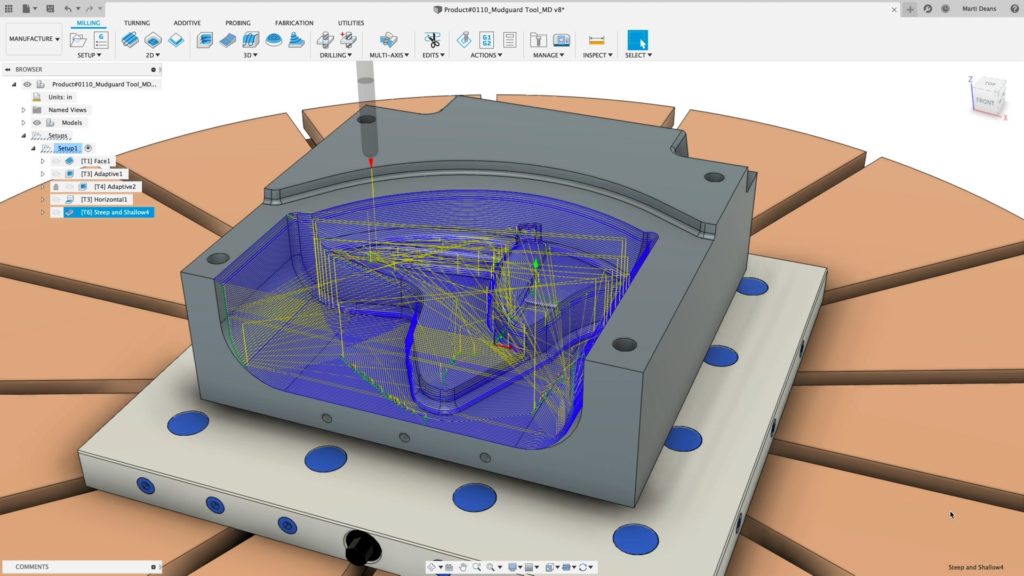
Starting a business is easy — said no one ever. Running a successful company begins with a great idea, but it never stops there. Business owners in the design, engineering, and manufacturing industries are often bogged down by daily decision-making — from hiring machinists to client relations to purchasing new machines. But, thanks to Fusion there’s one decision you don’t need to overthink: selecting a CAD/CAM software. This three-part series covers three key tools that Fusion for Manufacturing brings to the table that will save you time, energy, and money. Let’s dive into toolpath automation to see how our steep and shallow and hole recognition tools let robots do what robots do best: run unattended.
Toolpath automation
Toyota wasn’t wrong when they created the Kaizen Way. Continual improvement is crucial to landing jobs, growing revenue, and improving profit margins. It’s not as easy as it sounds, though. Increasing revenue and expanding margins requires a lot of time and logistics. Meanwhile, most manufacturers are already consumed with just keeping their machines running, employees happy, and lights on.
The tools you decide to use play a crucial part in making all of these tasks easier so you can focus on your businesses’ long-term success. Steep and shallow and hole recognition tools are one way to automate your process to run leaner, more efficient, and more marginally robust.
Key benefits of toolpath automation in Fusion for Manufacturing
- Reduced CAM programming time through intelligent feature detection and batch processing
- Automatic design version updates that notify programmers when designs change, allowing quick toolpath regeneration
- Standardized processes across teams using configurable templates for company-wide best practices
- Batch hole machining that groups similar features and applies consistent cutting methods
- Automatic collision avoidance for safe, unattended machining operations
- Support for 3-axis and 5-axis machines with continuous passes for improved surface finish
What is steep and shallow?
Steep and shallow automatically detects surface slope angles and applies optimal finishing strategies—machining full parts with complex surface geometry in a single toolpath with dedicated parameters for both steep and shallow areas.
Steep and shallow automates the finishing of freeform surfaces. It automatically detects the surface slope and applies the optimal strategy. Even when part complexity increases, automatic collision avoidance can provide the control you need to machine your parts, utilizing the full 5-axis capability of your machines for better access, and using more rigid, shorter tools for improved surface finish.
Steep and shallow offers automatic collision avoidance, configurable templates for company-wide best practices, support for 3-axis and 5-axis machines, and continuous passes for improved surface finish. Using it in your everyday practice can help speed up your CAM process and, by default, your machining process. It also helps onboard new employees when you’re standardizing around a process and enables you to get to a great place before you hone your finishing strategies.
The integrated design and manufacturing environment is a massive value proposition for anyone with two departments designing and making parts using Fusion. Programmers are automatically notified of new versions when designs are updated, allowing you to regenerate toolpaths on the latest design quickly without manual tracking. This ability lowers the costs associated with design changes because you’re always using the latest version of the design.
Does steep and shallow work with 3-axis machines?
Yes, steep and shallow works with both 3-axis and 5-axis machines. When using 5-axis capability, you gain better access to complex geometry and can use more rigid, shorter tools for improved surface finish.
What is hole recognition?
Hole recognition in Fusion for Manufacturing automatically identifies holes in 3D models, groups similar hole features by dimensions, and applies pre-defined machining templates for efficient drilling cycles including spot drilling, tapping, threading, and reaming.
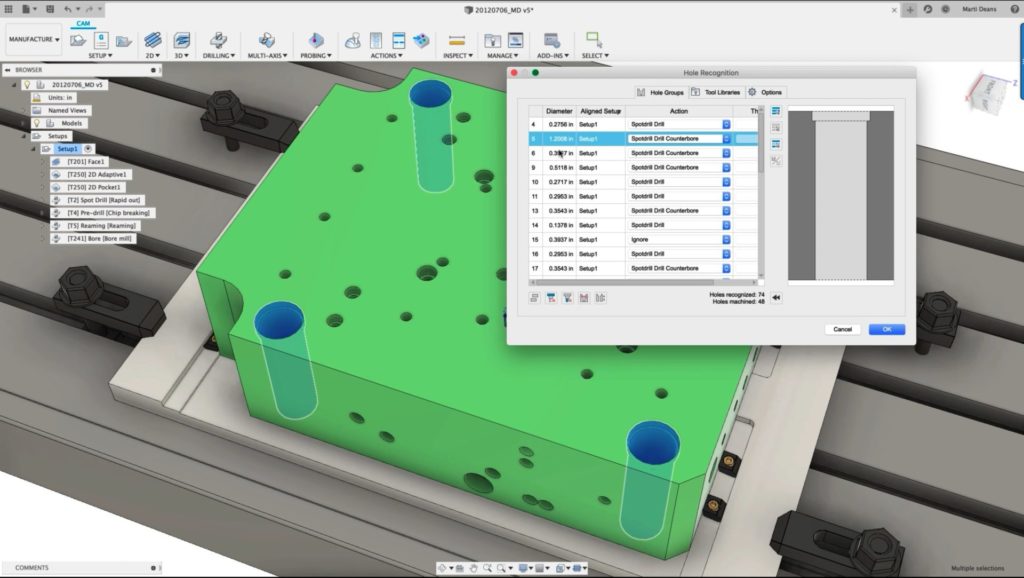
Hole recognition is another tool that helps make your process more efficient. Let’s say you are in the after-market automotive sector or industrial fittings sector. You often work with either the need for weight reduction or you’re making loads of hole or pocket features for threads or pass-throughs. Most of your time is spent selecting every single little hole and part for hours — or at least that’s how it feels. Real talk: let’s hope you don’t accidentally click off a feature and lose your work.
Hole recognition lets you create templates and click-and-go tools so that you can apply specific cutting methods to types of holes. Fusion automatically finds the same features and batches them together. Regardless of chamfer size, thread size, hole diameter, or depth, the hole recognition tool is an anti-bang your head against the wall tool that can seriously make you money.
What types of holes can nole recognition identify?
Hole recognition can identify and group holes by chamfer size, thread size, hole diameter, and depth. It supports drilling cycles including spot drilling, tapping, threading, and reaming operations.
When to use steep and shallow vs. hole recognition
| Feature | Steep and shallow | Hole recognition |
|---|---|---|
| Best for | Complex freeform surface finishing | Cylindrical hole features and drilling operations |
| Typical parts | Molds, dies, sculpted surfaces, organic shapes | Plates, brackets, housings with multiple holes |
| Operations | Finishing passes on curved geometry | Spot drilling, tapping, threading, reaming |
| Key benefit | Single toolpath for varying surface angles | Batch processing of similar hole features |
By combining steep and shallow surface finishing with automated hole recognition, Fusion for Manufacturing lets you standardize processes, cut CAM time, and machine with confidence.