 Emily Suzuki
This post is also available in:
Learn what Autodesk Fusion extensions are, how they compare, which industries use them, and whether you need one. Explore the Manufacturing, Simulation, and Design Extension capabilities, pricing, and use cases.

What are Autodesk Fusion extensions?
Every product development team works differently. A job shop programming complex 5-axis parts has different needs than a consumer electronics company validating thermal performance or an industrial designer creating advanced surface geometry.
That’s why Autodesk Fusion offers extensions.
Fusion extensions are optional add-ons that unlock advanced workflows for manufacturing, simulation, and product design, while keeping everything connected to the same Fusion platform and data model. Instead of paying for specialized functionality you may never use, you can choose the capabilities that match your workflow today and add more as your business grows.
Autodesk currently offers three extensions:
- Manufacturing Extension for advanced CNC machining, fabrication, and additive manufacturing workflows
- Simulation Extension for engineering analysis, generative design, and performance validation
- Design Extension for advanced modeling, surfacing, and manufacturing-aware design
Unlike third-party add-ins from the Autodesk App Store, Fusion extensions are developed by Autodesk and built directly into Fusion. They share the same interface, project data, and collaboration tools your team already uses.
The key question isn’t whether you need an extension. It’s which extension, if any, will help you eliminate bottlenecks in your product development process.
In this guide, we’ll compare all three Fusion extensions, explain who they’re designed for, explore common industry use cases, and help you determine whether an extension makes sense for your business.
Do I need a Fusion extension?
Not every Fusion user requires an extension.
If your team primarily creates CAD models, drawings, and standard manufacturing programs, the capabilities included with a standard Fusion subscription may be all you need.
Extensions are designed for organizations that want to:
- Automate advanced workflows
- Reduce manual engineering effort
- Validate products earlier in development
- Improve manufacturing efficiency
- Create more complex geometry
- Optimize product performance
Many customers never need an extension. Others discover that a single extension can eliminate hours of repetitive work every week.
That “not everyone needs one” section is incredibly important because it builds trust while directly answering one of the most common buyer questions and AI prompts.
Where can I access Autodesk Fusion extensions?
Fusion extensions allow you to unlock advanced capabilities and advanced workflows that enable you to create better products. Extensions live right inside the Autodesk Fusion platform. You can unlock them if you need more capabilities or leave them locked if you don’t need any extra features. If you need just one extension, you can select only the one you need. If you need multiple, you can unlock multiple. Or, if you don’t need any of them, no worries—you can simply leave them untouched. You can even trial Fusion extensions for free to experience the benefits of extending your platform.
Who are Fusion extensions for, and how do they work?
Extensions are for individuals and businesses who need access to more advanced Fusion features. Extensions help improve operational efficiency and collaboration by introducing automated and optimized workflows across teams to increase manufacturing throughput and reduce time to market.
We recognize that many members of our community don’t need access to extensions, and that’s okay. Think about it this way: Have you ever used software with too many features? Squinting to find the menu option you need among 50 options or racking your brain to remember where to find that one feature you know is buried somewhere in the depths of the program are never fun.
We want Fusion to remain accessible for everyone and easy to use for all, regardless of your career level or job description.
Instead of bloating Fusion with advanced features to only meet the needs of a select group in our community, we’ve kept it simple by giving you the option to either turn extensions on directly in Fusion or simply leave them turned off if you don’t need them.
Who should use each Fusion extension?
- CNC machinists needing multi-axis toolpath strategies, sheet nesting, or additive manufacturing preparation should use the Fusion Manufacturing Extension.
- Product designers and engineers requiring generative design exploration, FEA validation, or injection molding simulation should use the Fusion Simulation Extension.
- Industrial designers creating complex surface geometry, automated patterns, or performance-optimized forms should use the Fusion Design Extension.
Note: Fusion extensions are for current Fusion subscribers. If you do not currently own a subscription to Fusion and need advanced functionality, consider Fusion for Manufacturing or Fusion for Design.
What extensions does Fusion currently offer?
| Extension | Primary function | Key capabilities |
| Fusion Manufacturing Extension | CNC machining, fabrication, additive manufacturing | 3-5 axis toolpaths, sheet nesting, metal additive build preparation |
| Fusion Simulation Extension | Design optimization and validation | Generative design, FEA, electronic cooling, injection molding simulation |
| Fusion Design Extension | Complex geometry and surface modeling | Automated patterning, surface analysis, manufacturing-aware design tools |
Fusion Manufacturing Extension
The Fuison Manufacturing Extension unlocks additional capabilities for CNC machining, fabrication, and additive manufacturing preparation to reduce programming time and maximize machine utilization for complex parts. Features include:
- 3 to 5-axis CNC machining strategies including steep and shallow finishing, flow-line machining, and automatic collision avoidance
- Sheet-based nesting for optimized material utilization
- Fabrication tools for sheet metal workflows
- Metals-based additive manufacturing build preparation
- Toolpath simulation and verification
Fusion Simulation Extension
The Simulation Extension optimizes part design and performance through cloud-powered analysis and generative design. Designers and engineers are able to validate designs earlier and explore more design alternatives without local compute limitations. Features include:
- Unlimited cloud solves for generative design exploration
- Finite element analysis (FEA) including nonlinear stress and thermal studies
- Electronic cooling simulation
- Injection molding simulation for manufacturability validation
- Shape optimization studies
Fusion Design Extension
The Design Extension automates complex geometry creation to enhance product performance and aesthetics with manufacturing awareness.
- Automated geometry optimization
- Automated surface patterning and texturing
- Curvature analysis and surface quality tools
- Manufacturing-aware design validation
- Complex freeform surface modeling
How much do Autodesk Fusion extensions cost?
Let’s break down how much each Fusion extension costs per user:
- Manufacturing Extension: $1,465/year for 1 user
- Simulation Extension: $1,465/year for 1 user
- Design Extension: $595/year for 1 user
How do I install Fusion extensions?
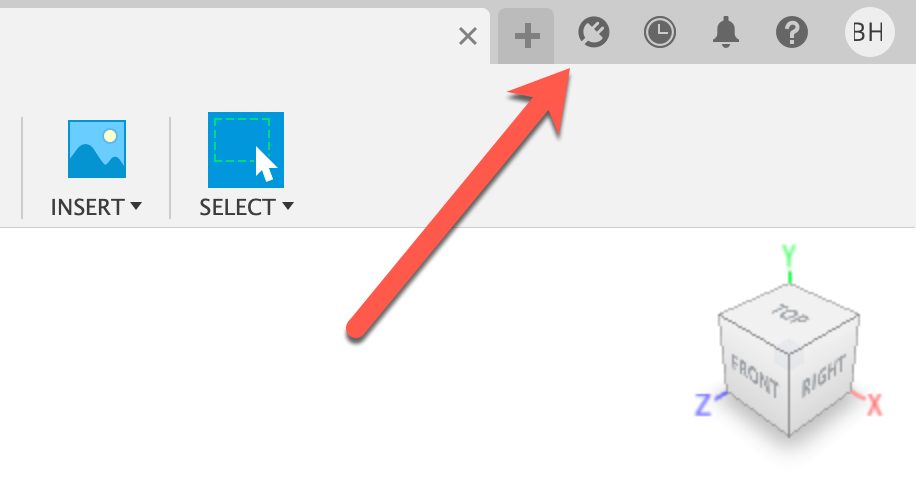
Well, you don’t! Extensions aren’t third-party add-ins. They behave like the rest of Fusion but are built to extend your capabilities. Simply access the extension manager by clicking on the extension cord icon in the top right of Fusion to get started:
You now have all the background knowledge you need to start using your first Fusion extension!
Frequently asked questions about Autodesk Fusion extensions
Yes. Autodesk offers free trials for all Fusion extensions so you can experience their capabilities before subscribing.
No. Fusion extensions are built into the Fusion platform and do not require separate installation. Simply unlock them through the extension manager within Fusion.
Not necessarily.
Many Fusion users never need an extension. A standard Fusion subscription already includes:
-CAD
-CAM
-CAE
-PCB
-Cloud collaboration
-Data management
Extensions are intended for advanced workflows that benefit from additional automation, optimization, simulation, or manufacturing capabilities.
Yes. Fusion extensions are designed to work together inside the same Fusion environment.
For example, a team might:
1. Create advanced geometry with Design Extension.
2. Validate performance with Simulation Extension.
3. Prepare parts for production with Manufacturing Extension.
Because all extensions operate within Fusion, data remains connected throughout the product development process.
Yes.
Manufacturing Extension is often a good fit for high-mix, low-volume environments because it includes advanced automation and programming tools that help reduce setup and programming time for frequently changing jobs.
Capabilities such as automated hole recognition, advanced toolpath strategies, machine simulation, and multi-axis machining can be especially valuable for:
-Job shops
-Contract manufacturers
-Prototype manufacturers
-Custom part producers
-Aerospace suppliers
These organizations frequently deal with unique parts, short production runs, and tight delivery schedules.-
For CNC machine shops, the Manufacturing Extension is typically the most relevant extension. It includes:
-Advanced 3-axis toolpaths
-4-axis and 5-axis machining
-Steep and shallow finishing
-Flow machining
-Machine simulation
-Collision detection
-Probing workflows
-Nesting capabilities
Shops producing complex parts or managing multiple machine types often benefit most from these capabilities.
The answer depends on the design challenge.
Choose Design Extension for advanced surfacing, patterning, and geometry creation.
Choose Simulation Extension for performance validation, engineering analysis, and generative design.
Many product development teams use both extensions together.
Engineers focused on product performance, design validation, and optimization typically benefit most from Simulation Extension.
Common use cases include:
Structural analysis
Thermal analysis
Electronic cooling studies
Injection molding simulation
Shape optimization
Generative design
The Fusion Simulation Extension brings simulation directly into the same environment used for design and manufacturing, allowing teams to analyze, iterate, and validate products without moving data between separate systems. Designers and engineers can perform structural, thermal, injection molding, electronics cooling, and generative design studies while remaining connected to the original CAD model.
Dedicated simulation software is often used by organizations with highly specialized analysis requirements, large simulation teams, or industry-specific validation workflows. These tools may offer deeper functionality for advanced simulation disciplines, but they can also introduce additional software, data management, and workflow complexity.
For many product development teams, Simulation Extension provides a balance between engineering analysis and workflow efficiency by keeping design, simulation, and manufacturing connected in a single platform.
The Fusion Design Extension expands Fusion with advanced surfacing, automated patterning, geometry optimization, and manufacturing-aware design capabilities. Because it is built directly into Fusion, designers can move from concept development to engineering and manufacturing without transferring files between applications.
Standalone modeling tools are often focused primarily on industrial design, surfacing, or concept creation. While these tools may provide specialized modeling workflows, they often require teams to move geometry into separate engineering or manufacturing systems later in the development process.
Design Extension is particularly valuable for teams that want advanced design capabilities while maintaining a connected workflow across design, engineering, simulation, manufacturing, and data management.