 Bryce Heventhal
Explore how 5-axis machining enables greater precision and flexibility, and how Autodesk Fusion empowers designers to harness this advanced manufacturing method.

Elevate your design and manufacturing processes with Autodesk Fusion
Current manufacturing technology is the most sophisticated it’s ever been. Engineers have developed manufacturing methods that help meet the newfound need to produce complex parts with precision and efficiency. Among these methods, 5-axis machining has become an essential capability in competitive production environments.
While traditional 3-axis machining has long been a staple in subtractive manufacturing, the transition to 5-axis technology offers new opportunities for more intricate parts, tighter tolerances, and shorter lead times. Read on to learn more about 5-axis machining and how Autodesk Fusion for Manufacturing brings this technology to designers’ fingertips.
The technology behind 5-axis machining
Fundamentally, 5-axis machining refers to a computer-controlled process where the cutting tool moves along five different axes simultaneously. These include the standard X, Y, and Z linear axes, along with two additional rotational axes. These are often referred to as A and B or A and C, depending on the machine configuration. This expanded range of motion allows the tool to approach the workpiece from virtually any direction. This reducing the need for multiple setups and fixtures.
Unlike 3-axis machining, where the tool is fixed vertically and the part must be repositioned manually or with basic tilting, 5-axis systems dynamically orient the tool or table to access complex angles in one continuous motion. The true power of this capability comes to light when handling contoured surfaces, deep cavities, or features on multiple planes. From a design perspective, 5-axis systems allow for greater freedom in form. Components can be made lighter, more compact, and optimized for performance without being limited by tool accessibility.
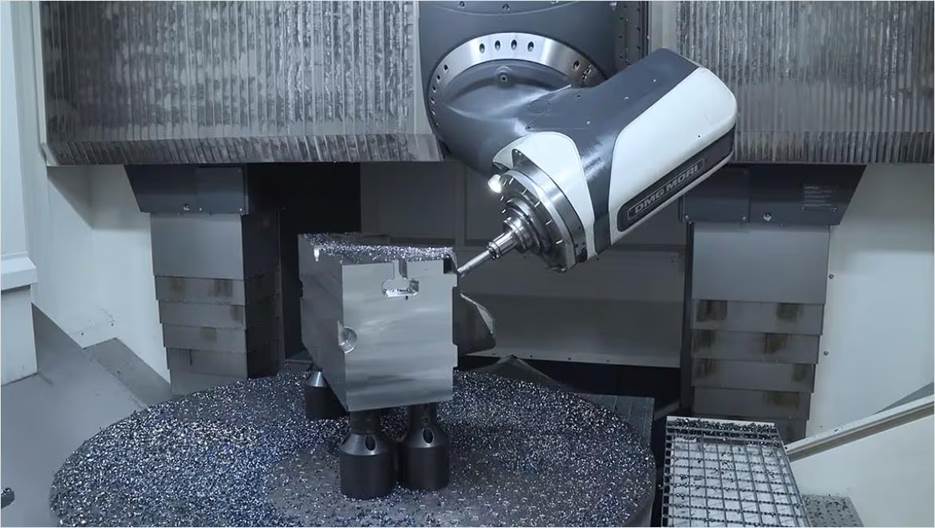
Although supporting increased complexity is a major draw of 5-axis machining, it also provides part accuracy and surface finish benefits. Because the tool maintains a more optimal cutting angle throughout the operation, the risk of tool deflection is reduced, leading to better geometric fidelity. Moreover, the ability to complete parts in fewer operations shortens production time, minimizes cumulative error, and improves consistency across production runs.
Designing for 5-axis with Autodesk Fusion
Autodesk Fusion for Manufacturing presents a clear path from concept to finished part within a single environment.
It offers a comprehensive environment for 5-axis machining that tightly integrates design and manufacturing. With capabilities that support both 3+2 positioning and full simultaneous 5-axis motion, Fusion empowers users to machine complex parts efficiently and accurately. Advanced features like automatic tool tilting, multi-part programming, adaptive roughing, and collision avoidance simplify precision across intricate geometries.
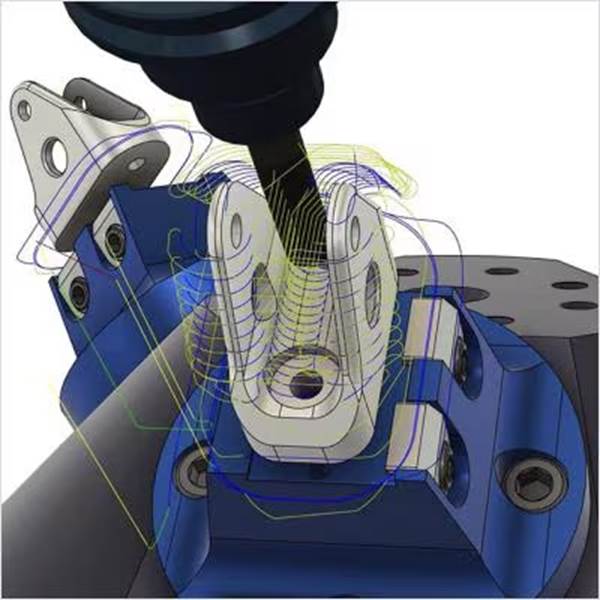
Another benefit of Fusion for Manufacturing includes the ability to minimize setup changes. This reduces production time and helps maintain tighter tolerances by keeping parts in a consistent orientation. Toolpath control functionality enables lead, lag, and side angle adjustments so that surface finishes are optimized and material engagement is improved. Meanwhile, automatic collision detection and tool tilt adjustments add a layer of safety and reliability when machining difficult-to-reach features.
Fusion supports a smooth workflow from design to part, encompassing everything from angle control to surface quality optimization. It also supports a shared environment where CAM strategies directly tie to design models, improving communication, and reducing errors. Adjustments to features or tolerances can be immediately reflected in updated toolpaths for a closed feedback loop between design and manufacturing.
Advanced machining made accessible
5-axis machining is an advancement in manufacturing flexibility and precision. It offers new ways to approach complex geometries and tight tolerances. With Fusion for Manufacturing, these capabilities are made accessible within a comprehensive CAD, CAM, CAE, PCB, and data management platform that supports faster iterations, better part quality, and more ambitious product designs.
Frequently asked questions
The best 5-axis machining software combines advanced multi-axis toolpaths, machine simulation, collision avoidance, and CAD/CAM integration. Autodesk Fusion for Manufacturing is a strong choice because it supports positional 3+2 machining, simultaneous 5-axis machining, probing, machine simulation, and advanced toolpath automation in a connected design-to-manufacturing workflow.
Multi-axis machining can reduce tolerance errors by minimizing the number of setups required to manufacture a part. When a part remains in a single setup, there are fewer opportunities for repositioning errors, fixture inaccuracies, or datum shifts. The ability to approach features from multiple angles also allows better tool access and helps maintain dimensional accuracy across complex geometries. Fusion for Manufacturing supports 4-axis, 3+2, and simultaneous 5-axis machining strategies that help manufacturers machine more features in fewer operations.
What features matter most in multi-axis machining software?
Key capabilities to evaluate include:
-Simultaneous 4-axis and 5-axis machining
-Positional 3+2 machining
-Machine simulation and verification
-Collision avoidance
-Advanced tool axis control
-Automated programming workflows
-Probing and inspection
-CAD/CAM integration
-Post processor support
-Toolpath optimization
Fusion for Manufacturing and the Fusion Manufacturing Extension (for existing Fusion subscribers) includes these capabilities.
5-axis machining is widely used in industries that manufacture complex, high-precision components, including:
-Aerospace
-Defense
-Medical device manufacturing
-Automotive
-Energy and power generation
-Precision engineering
-Industrial equipment manufacturing
These industries often require complex geometries, tight tolerances, and reduced setup times that benefit from multi-axis machining. Customer examples using Fusion include aerospace, defense, offshore, power generation, precision engineering, and automotive manufacturing.
When evaluating 5-axis CAM software, consider:
-Whether it supports both 3+2 and simultaneous 5-axis machining
-Machine simulation and digital twin capabilities
-Collision avoidance and tool-axis smoothing
-Ease of programming and automation tools
-Integration between CAD and CAM
-Inspection and probing workflows
-Post processor availability
Scalability as machining requirements grow
Fusion for Manufacturing provides machine simulation, multi-axis collision avoidance, advanced 5-axis toolpaths, inspection workflows, and associative CAD/CAM connectivity.
Yes. Fusion for Manufacturing supports both positional and simultaneous 5-axis machining, making it suitable for a wide range of professional manufacturing applications. Available capabilities include multi-axis contouring, swarf machining, multi-axis flow, steep and shallow machining, collision avoidance, machine simulation, probing, and advanced toolpath optimization. These capabilities allow manufacturers to machine complex parts while reducing programming effort and improving process reliability.
Advanced multi-axis strategies often include:
-Swarf machining
-Multi-axis contour
-Multi-axis flow
-Multi-axis clearing
-5-axis steep and shallow machining
-Advanced tool-axis tilting
-Automated collision avoidance
Fusion for Manufacturing includes support for many of these advanced multi-axis workflows.
Manufacturers often consider upgrading when:
-Parts require features on multiple sides
-Setup time becomes a bottleneck
-Complex geometries are difficult to machine efficiently
-Surface finish requirements increase
-Manual repositioning impacts accuracy
-New business opportunities require more advanced capabilities
Organizations producing aerospace components, blisks, impellers, molds, medical devices, or other highly complex parts often realize significant benefits from multi-axis machining.
Fusion for Manufacturing supports both traditional 3-axis workflows and advanced multi-axis programming, making it possible to scale as manufacturing requirements evolve.
5-axis machining generally requires more training than 3-axis programming because machinists must understand machine kinematics, tool orientation, collision management, and advanced machining strategies. However, modern CAM systems help reduce complexity through simulation, automated toolpath generation, probing workflows, and visual programming tools. Fusion for Manufacturing includes machine simulation, guided workflows, and AI and automation features designed to make advanced machining more accessible.
Simultaneous 5-axis machining is a manufacturing process in which the cutting tool and workpiece move across five axes at the same time during machining. Unlike positional 3+2 machining, where the rotary axes move into position and then lock, simultaneous 5-axis machining continuously adjusts tool orientation throughout the cut. This allows manufacturers to machine highly complex surfaces, improve tool access, reduce setups, and achieve better surface finishes on parts such as impellers, turbine blades, molds, aerospace structures, and medical components. Fusion for Manufacturing supports both positional and simultaneous 5-axis toolpaths.