 Shannon McGarry
Small manufacturers can’t afford endless prototype iterations. Learn how Autodesk Fusion helps teams use simulation to evaluate designs earlier, reduce rework, and make better engineering decisions.

Elevate your design and manufacturing processes with Autodesk Fusion
Every engineering team would like to test multiple design ideas before sending a part to manufacturing.
The reality is that most small and midsize manufacturers don’t have that luxury.
Building prototypes takes time. Materials cost money. Machine time is limited. And every design change discovered after fabrication pushes schedules further out. When resources are tight, many teams end up making decisions with incomplete information because building and testing every option simply isn’t practical.
That’s where simulation can help.
By evaluating how a design is likely to perform before a part is manufactured, engineering teams can identify potential problems earlier, compare alternatives more efficiently, and reduce the number of costly physical iterations required during development.
Historically, that kind of analysis was often associated with specialized software and dedicated simulation experts. Today, Autodesk Fusion makes simulation more accessible by bringing design and engineering tools together in a single platform, helping small and midsize businesses make better-informed decisions before a prototype ever reaches the shop floor.
Key takeaways
- Physical prototypes are valuable, but building multiple iterations can be expensive and time-consuming.
- Simulation helps teams evaluate designs before manufacturing begins.
- Autodesk Fusion combines CAD, CAM, CAE, and electronics design capabilities in a single platform.
- Engineers can move between design and simulation without managing disconnected workflows.
- Small and midsize businesses can incorporate simulation into everyday product development without building a dedicated analysis team.
The hidden cost of prototyping
Prototypes remain an essential part of product development. Eventually, every design needs to be validated in the real world.
The problem arises when physical prototypes become the primary method for identifying design issues.
An engineer creates a part, sends it for fabrication, tests it, discovers a problem, makes changes, and starts the process over again. Every iteration consumes time, materials, labor, and machine capacity.
For large organizations, these costs can often be absorbed across bigger engineering budgets. For smaller manufacturers, each additional prototype can have a much larger impact on schedules and resources.
As deadlines tighten and customer expectations rise, many teams are looking for ways to learn more about a design before committing to fabrication.
Why many SMBs haven’t embraced simulation
For years, advanced simulation tools were often deployed separately from the design environment.
A designer would create a model, transfer it for analysis, wait for results, make changes, and then repeat the process as needed.
While those workflows can be effective, they often require additional software, specialized expertise, or dedicated resources that may not be available in smaller organizations.
For many SMBs, the same engineer may design products, support manufacturing, respond to customer requirements, and solve production issues. Adding complex simulation workflows on top of those responsibilities can be difficult.
As a result, many organizations historically relied on physical testing to answer questions that simulation could potentially address earlier in development.
Bringing simulation closer to design
The earlier teams can identify potential issues, the easier they are to fix.
A change made while a design is still being modeled takes far less effort than a change discovered after parts have been machined, assembled, or tested.
That’s why more manufacturers are working to bring simulation closer to the design process.
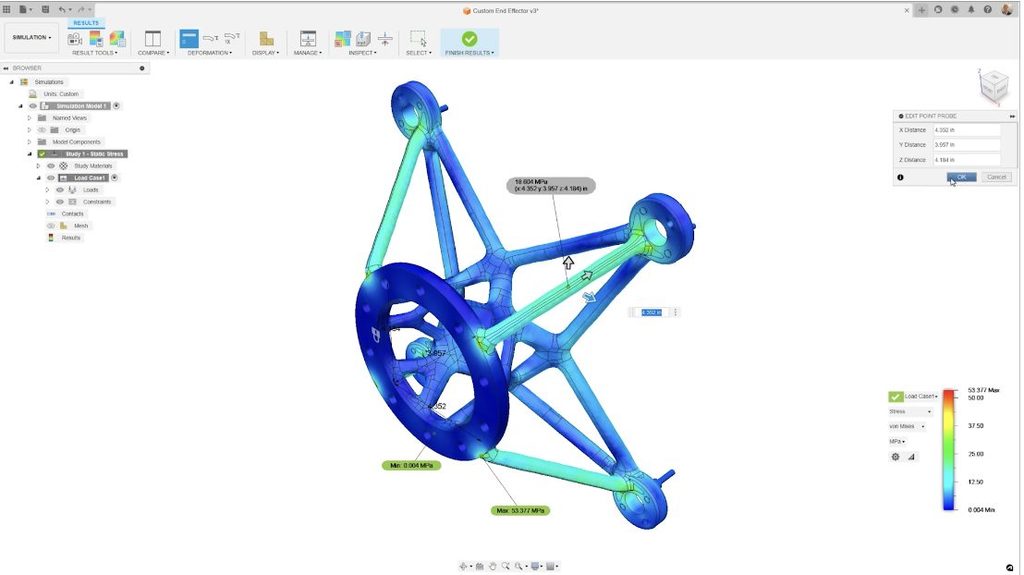
Autodesk Fusion combines design, engineering, electronics, and manufacturing capabilities in a single cloud-based platform. Because simulation tools are integrated into the same environment used for design, engineers can evaluate performance without moving models between disconnected systems.
This makes it easier to answer important questions while the design is still evolving:
- Will this component withstand expected loads?
- Are stresses concentrated in a particular area?
- Is the design stiffer or more flexible than intended?
- How does material selection affect performance?
- Can weight be reduced without compromising strength?
Instead of waiting until a prototype reveals a problem, teams can investigate these questions earlier and make more informed decisions before manufacturing begins.
Compare more ideas before cutting material
One of the biggest advantages of simulation is the ability to explore multiple design alternatives without building multiple physical prototypes.
Consider a team developing a custom fixture.
Rather than machining several versions and testing each one individually, engineers can evaluate different concepts digitally, examining how each design responds to expected operating conditions. They can identify areas of high stress, adjust geometry, compare alternatives, and refine designs before committing to fabrication.
This doesn’t eliminate the need for physical validation. It simply helps teams arrive at a stronger design before material is cut and manufacturing resources are consumed.
For SMBs with limited engineering bandwidth and finite shop capacity, that can make a significant difference.
More than better models. Better business decisions.
Simulation isn’t just about engineering analysis. It’s about reducing uncertainty.
Every product development team is constantly making trade-offs between performance, cost, manufacturability, weight, durability, and delivery schedules. The more information teams have before building a part, the more confidently they can make those decisions.
For small and midsize manufacturers, that confidence can translate directly into fewer redesigns, fewer delays, and more efficient use of engineering and manufacturing resources.
Instead of relying on physical prototypes to uncover problems, teams can use simulation to narrow options, validate assumptions, and focus physical testing where it delivers the most value.
Every engineering team would like to test multiple design ideas before sending a part to manufacturing.
The reality is that most small and midsize manufacturers don’t have that luxury.
Building prototypes takes time. Materials cost money. Machine time is limited. And every design change discovered after fabrication pushes schedules further out. When resources are tight, many teams end up making decisions with incomplete information because building and testing every option simply isn’t practical.
That’s where simulation can help.
By evaluating how a design is likely to perform before a part is manufactured, engineering teams can identify potential problems earlier, compare alternatives more efficiently, and reduce the number of costly physical iterations required during development.
Historically, that kind of analysis was often associated with specialized software and dedicated simulation experts. Today, Autodesk Fusion makes simulation more accessible by bringing design and engineering tools together in a single platform, helping small and midsize businesses make better-informed decisions before a prototype ever reaches the shop floor.
Build fewer prototypes. Make better decisions.
Small and midsize manufacturers rarely have unlimited budgets, unlimited engineering resources, or unlimited time.
Every prototype represents an investment. The more teams can learn before fabrication begins, the more effectively they can use those resources.
By bringing design and simulation together in a connected environment, Autodesk Fusion helps manufacturers evaluate ideas earlier, compare alternatives more confidently, and reduce the number of costly surprises that emerge after production starts. The goal isn’t to eliminate physical testing. It’s to ensure that when teams build a prototype, they’re building it with greater confidence.
Simulation for small businesses – Frequently asked questions
Computer-aided engineering (CAE) software helps engineers evaluate how products and components may perform under real-world conditions using simulation and analysis tools.
Yes. Simulation can help engineering teams evaluate designs earlier, compare alternatives more efficiently, and reduce reliance on multiple prototype iterations.
No. Many simulation studies in Fusion can be performed by the engineers and designers developing the product.
No. Physical testing remains an essential part of product development. Simulation helps teams refine designs earlier so physical testing can be more targeted and efficient.
Fusion’s simulation tools are integrated into the same platform used for design, helping reduce the need for separate workflows and file transfers.
Traditional CAE solutions are often used as standalone analysis environments. Fusion combines design, engineering, manufacturing, and electronics capabilities in a single platform, helping teams maintain continuity throughout product development.