 Josh Reader
Understand PMI in Fusion, including Manufacturing ready hole notes, thread annotation and leader note creation. Keep manufacturing intent connected to the model from design through manufacturing.

Elevate your design and manufacturing processes with Autodesk Fusion
Manufacturing runs on more than geometry. The details that determine whether a part is made correctly, inspected accurately, and delivered on time often live beyond the model itself: tolerances, thread specifications, dimensions, process notes, and manufacturing requirements.
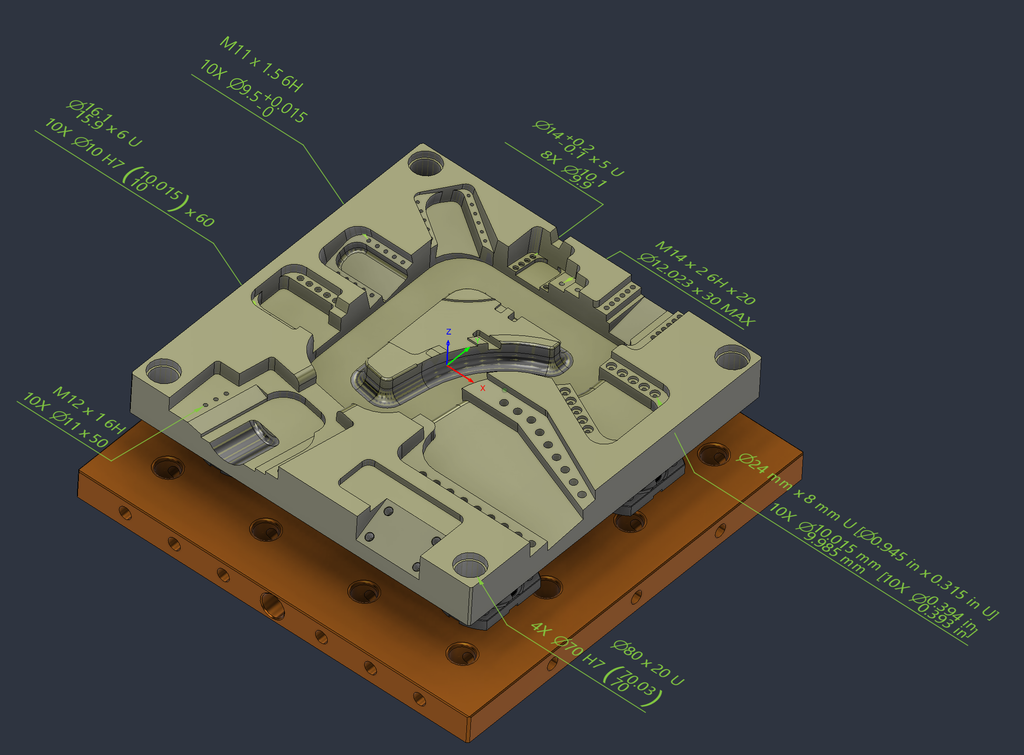
Fusion now brings Product Manufacturing Information (PMI) authoring directly into the Design workspace, making it possible to create manufacturing-ready annotations that remain associated with the model throughout design and manufacturing workflows. By capturing manufacturing intent earlier in the development process, downstream manufacturing workflows can directly leverage and reuse design-defined information to drive programming and process automation. This reduces manual data entry in processes like carrying tolerance requirements into probing and inspection operations.
What is PMI and why does it matter?
Product Manufacturing Information (PMI) includes the annotations, dimensions, tolerances, notes, and specifications that define how a part should be manufactured and inspected. As manufacturers adopt model-based workflows, PMI captures these requirements directly within the 3D model. Teams can author PMI in the Design workspace and consume that manufacturing intent in downstream manufacturing and inspection workflows, creating a more connected path from design to production.
With PMI authoring available in Fusion’s Design workspace, teams can document manufacturing requirements directly on the model while maintaining that information as designs evolve. The result is a more connected workflow that helps preserve design intent from engineering through manufacturing and inspection.
Create manufacturing-ready notes directly in design
Fusion now includes dedicated PMI authoring commands within the Utilities tab of the Design workspace, including hole/thread note, and leader note.
These tools provide a simple and straight forward way to capture manufacturing requirements without leaving the design environment.
Whether documenting machining requirements, preparing a design for manufacturing review, or capturing inspection information, teams can now create PMI directly alongside the model geometry it references.
This capability is available to new users via Fusion for Manufacturing or Fusion for Design and for existing Fusion subscribers via the Manufacturing Extension or Design Extension.
Add detailed hole and thread annotations
The new Hole/Thread Note command helps communicate critical manufacturing information for holes and bosses.
Using either ASME or ISO standards, you can automatically generate annotations that include information such as:
- Diameter
- Depth
- Thread specifications
- Tolerances
- Counterbore dimensions
- Countersink dimensions
By attaching manufacturing information directly to model geometry, teams can communicate requirements more clearly and maintain consistency from design through production.
The command can annotate an individual feature or automatically locate and include identical holes or bosses. For components with repeated features, this can significantly reduce documentation effort while helping maintain consistency across the design.
Maintain consistency across the entire design
PMI settings are controlled at the document level, making it easier to standardize annotations across projects.
Under Document Settings in the Browser, you can configure:
- Standards compliance settings
- Text size
- PMI display preferences
This centralized approach helps teams maintain consistent annotations across a design without manually updating individual notes.
Document-level PMI settings help ensure annotations remain consistent across designs while aligning with established engineering and manufacturing standards.
Add custom instructions with leader notes
Not every manufacturing requirement fits into a predefined annotation format. The new Leader Note command allows designers to associate custom text with a selected surface, edge or point.
This provides flexibility for documenting assembly instructions, inspection requirements, manufacturing considerations, or other design intent that may not be captured through feature-specific annotations.
By connecting these notes directly to model geometry, important context remains visible and accessible throughout the product development process.
Designed for modern modeling workflows
One of the key advantages of Fusion’s PMI implementation is that it works across both parametric modeling and direct modeling workflows.
As models evolve, PMI respects its position within the timeline and is designed to work alongside Fusion capabilities, such as Configurations, Derive, Insert, and Edit in Place.
This allows manufacturing information to remain associated with the design as models evolve, helping reduce the need to recreate annotations after design changes and preserving critical manufacturing context throughout development.
For teams managing multiple product variants or iterating rapidly on designs, maintaining continuity between geometry and manufacturing intent can help reduce confusion and minimize downstream updates.
Extend PMI into manufacturing workflows
The value of PMI does not end in Design. PMI created within the Design workspace can also be consumed in the Manufacturing workspace, helping support downstream processes while keeping manufacturing information connected to the model.
Applications include:
- Automated hole machining – (works directly with hole template editor)
- Manufacturing documentation
- Inspection processes – (PMI tolerances are consumed by probing)
- Design-to-manufacturing collaboration
This continuity helps ensure that the information created during design remains available when parts move into production and consumed by the process.
Imported PMI can also be converted into native Fusion PMI for full editing capabilities. Both imported and native PMI remain usable within Manufacturing workflows, providing flexibility when working with data from multiple CAD systems.
Bringing design and manufacturing closer together
As organizations move toward model-based workflows, keeping manufacturing requirements connected to the product model becomes increasingly important. By bringing PMI authoring into the Design workspace, Fusion helps teams capture manufacturing intent earlier, maintain it through design changes, and make that information available through the digital thread for downstream manufacturing and inspection processes.
The result is a more connected path from design to production with fewer opportunities for information to be lost along the way.