 Josh Reader
Explore five major Fusion manufacturing developments, including machine simulation, CAM automation, System Modeler, local data options, and Fusion Compute MCP.

Elevate your design and manufacturing processes with Autodesk Fusion
IMTS and Autodesk University brought plenty of news for manufacturers this year. If you didn’t catch every announcement, demo or roadmap session, here’s a look at some of the biggest developments and what they tell us about where manufacturing in Autodesk Fusion is heading.
Across these events, we showed how we’re continuing to invest in the manufacturing workflows customers rely on today, while laying the foundation for a more automated and agentic future.
This starts on the shop floor. New production machining capabilities are planned to give manufacturers greater confidence when programming complex turn-mill machines. We’re also working to give organizations more choice over where sensitive manufacturing data resides and new ways to capture the processes and expertise for reusable workflows.
Looking further ahead, we’re exploring how AI can take on more of the repetitive work involved in CAM programming without taking control away from the programmer. And with Fusion Compute MCP, we’re working toward opening Fusion’s engineering and manufacturing capabilities to AI agents that could do more than answer questions: they could perform engineering work.
Together, they show how Fusion is evolving to connect the product, the data, and the knowledge behind how things are made and increasingly automate the work required to move from intent to outcome.
Here are five manufacturing developments worth catching up on.
Production machining: Building confidence in complex turn-mill workflows
Turn-mill machines offer manufacturers an important productivity advantage: turning, milling, drilling and sub-spindle operations can all happen in a single setup.
But that capability also makes these machines complex.
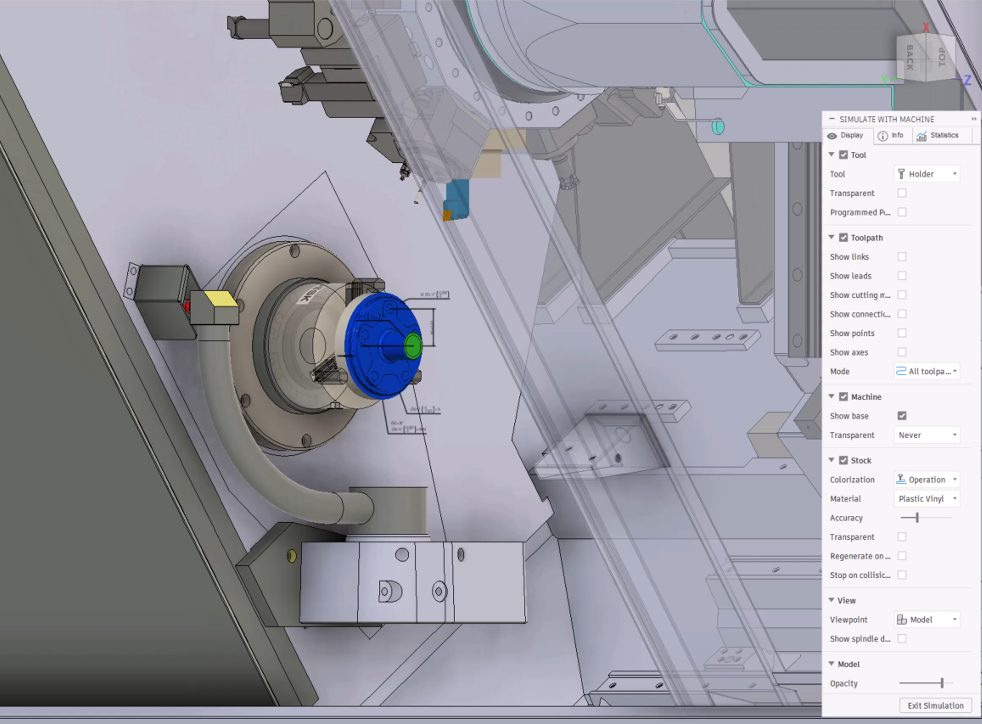
A turret, tailstock, sub-spindle, tool blocks and fixtures can all be moving within a relatively small working envelope. A toolpath can look correct while another part of the machine is heading toward a collision.
That’s why verifying the toolpath alone isn’t enough. Manufacturers need to understand how the entire machine will behave when the program runs.
Full turn-mill machine simulation in Fusion is planned to enable manufacturers to simulate the complete kinematic machine before running a job on the shop floor. Tools, tool blocks and turning fixtures are intended to be represented within the simulation, providing a more complete view of how the physical machine will move throughout the program.
For production machining shops and contract manufacturers working with complex, high-value parts, this confidence matters. Finding potential collisions digitally is intended to help reduce the risk of scrap, damaged tooling and machine downtime while reducing the effort involved in proving out a new job.
More choice over where manufacturing data resides
Connecting design and manufacturing data brings significant benefits, but manufacturers don’t all operate under the same requirements.
For some regulated, sensitive, or customer-controlled projects, keeping design and manufacturing data in the cloud simply isn’t an option. Historically, that has meant some customers couldn’t bring all their work into Fusion.
We’re working to change that.
New local documents capabilities for Fusion for Manufacturing are being developed to give manufacturers greater choice over where designated project data resides. For sensitive work, manufacturers are expected to be able to choose to keep data under their organization’s local control while continuing to work in Fusion.
When a customer chooses to keep design data local, Fusion is planned to apply safeguards and restrict capabilities that would require that model data to be uploaded to Autodesk cloud. Other work is expected to continue to take advantage of Fusion’s connected platform, collaboration, and compute capabilities.
System Modeler: Turning manufacturing know-how into reusable workflows
Every manufacturing organization has processes that repeat from one project to the next: familiar setup sequences, checks, tool selections and handoffs between design and manufacturing.
Often, that knowledge lives with individual experts or in custom scripts that can be difficult to build, maintain, and scale.
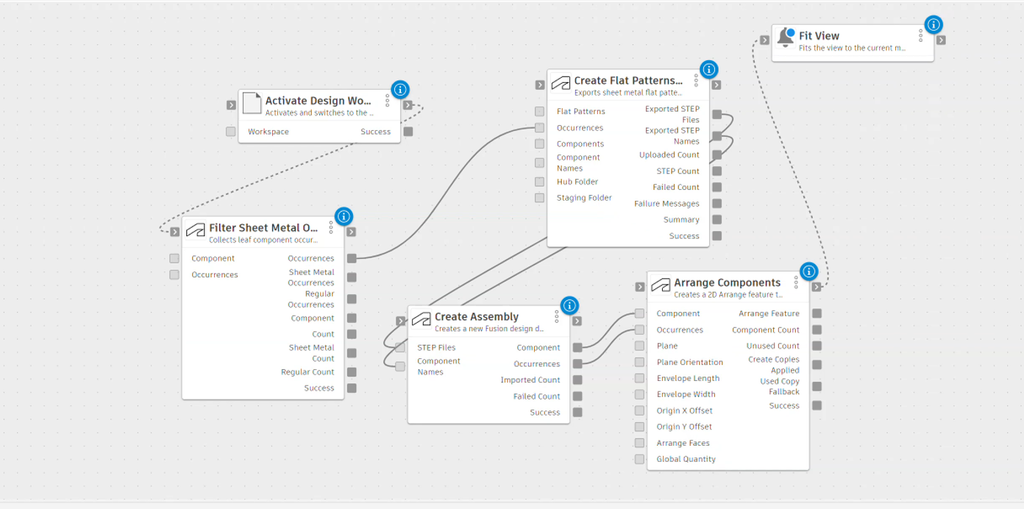
System Modeler in Fusion is intended to introduce a more visual approach to automation.
Instead of requiring users to translate a manufacturing process into code, System Modeler is designed to enable them to construct workflows by connecting ready-made steps as nodes within a visual graph. Actions such as orienting a part, creating a setup or selecting tools could become part of a workflow that users can see, understand and adapt.
The automation is also intended to remain transparent. Users are expected to be able to watch the workflow execute, see the results of individual steps, and adjust, reorder or replace them.
Instead of a proven process remaining in someone’s head or existing as a one-off script, workflows could become durable assets that can be packaged, versioned, and shared. That creates the potential for proven ways of working to move between projects, teams, and sites rather than being recreated every time.
Automated machining: Taking repetitive work out of CAM programming
CAM programming still depends heavily on skilled programmers making hundreds of decisions as they take a part from model to machine.
Identifying features, selecting machining strategies, choosing tools, and preparing programs all require expertise. But much of that work is also repeated from one job to the next.
Rather than simply adding an AI interface alongside existing CAM workflows, our direction is to put more intelligence into the manufacturing operations themselves, automating repetitive programming work while keeping manufacturing professionals in control of the decisions that matter.
Automated CAM programming is one area we’re exploring. Instant Prismatic Machining is intended to generate toolpaths for standard features, while our work around pocket, hole and fillet recognition points toward workflows where Fusion could identify more of what needs to be machined without requiring every feature to be manually selected.
Our direction is for recognition and automation to propose the work while the programmer makes the final decision. Generated operations are intended to remain standard Fusion operations that can be inspected, adjusted or replaced.
The goal is straightforward: spend less time repeating work that’s already been solved and give manufacturing experts more time to focus on the decisions where their experience matters most.
Engineering for the agentic era
The next step takes us beyond automating individual operations.
AI assistants have already changed how people find and interact with information. AI agents introduce another possibility: software that can discover the tools available to it and use those tools to perform work.
That’s particularly significant for engineering and manufacturing, where useful work requires much more than generating an answer. It can mean creating geometry, modifying designs, preparing manufacturing setups or generating toolpaths.
Fusion Compute MCP, now available in public beta, is intended to bring that model to Fusion.
Fusion Compute MCP is a cloud-hosted Model Context Protocol server designed to make Fusion’s design, electronics and manufacturing capabilities available to AI agents. More than 7,000 endpoints are planned to be exposed through Fusion’s TypeScript API, intended to allow agents to work with capabilities including parametric modeling, assemblies, manufacturing setups, CAM templates, and toolpaths.
And because those Fusion sessions are designed to run in the cloud, an agent could perform work without occupying the user’s desktop Fusion environment.
Instead of only asking an AI system how to perform a task, an agent could discover the Fusion capabilities available to it and use them to perform engineering work directly.
The Fusion Compute MCP is intended to provide the environment and tools, not the intelligence itself. What an agent can accomplish depends on the AI model driving it. But giving agents structured access to real engineering and manufacturing capabilities is intended to create an important foundation for the next generation of automation.
Moving from intent to outcome
Taken individually, each of these developments is intended to solve a different manufacturing challenge.
Full machine simulation is intended to help manufacturers build confidence in increasingly complex production processes. Local Documents is planned to give organizations more choice over how sensitive data is managed. System Modeler is intended to provide a way to capture and reuse manufacturing knowledge. Automated machining aims to remove more repetitive CAM programming work. And Fusion Compute MCP is intended to open Fusion’s engineering capabilities to a new generation of AI agents.
Together, they represent a broader direction.
We’re moving toward a manufacturing environment where software doesn’t simply provide individual tools. It increasingly understands the context around the product, connects the data and processes behind it, and helps automate the work required to move from design intent to a manufactured outcome.
The expertise of engineers and manufacturing professionals remains central to that future. The opportunity is to give those experts better ways to capture what they know, automate what they shouldn’t have to repeat, and spend more of their time solving the problems that genuinely need their expertise.
And we’re only getting started.
DISCLAIMER: The capabilities described here are forward-looking and currently in development. Features, functionality, and timing are subject to change. These statements are not intended to be a promise or guarantee of future delivery of products, services, or features but merely reflect our current plans, which may change. Purchasing decisions should not be made based on reliance on these statements.
Frequently asked questions
Turn-mill machine simulation is a planned capability designed to simulate the complete machine kinematics before a program reaches the shop floor. The goal is to help manufacturers identify potential collisions, reduce setup risks, and gain greater confidence in complex machining operations.
As production equipment becomes more complex, verifying toolpaths alone is often not enough. Machine simulation helps manufacturers understand how the entire machine behaves during execution, potentially reducing scrap, tooling damage, and machine downtime.
System Modeler is a planned visual automation environment that allows manufacturers to create workflows by connecting reusable process steps within a graphical interface. It is intended to help organizations capture, standardize, and scale manufacturing expertise without relying solely on custom code or individual experts.
Autodesk is exploring ways to automate repetitive CAM programming tasks while keeping manufacturers in control. The direction described at AU and IMTS focuses on automatically recognizing machining features and proposing operations, allowing programmers to review, modify, or replace the generated results.
Fusion Compute MCP is a cloud-hosted Model Context Protocol server currently available in public beta. It is designed to expose Fusion’s engineering and manufacturing capabilities to AI agents, enabling them to perform engineering and manufacturing work through structured access to Fusion tools and workflows.