 Marti Deans
Explore how Autodesk Fusion for Manufacturing supports CNC milling, turning, multi‑axis, cutting, probing, nesting, and additive workflows—all in one connected CAM platform.

Elevate your design and manufacturing processes with Autodesk Fusion
Modern machine shops rarely run “just one” kind of CNC work. A single job may require 2D profiling, 3D surfacing, drilling cycles, probing, and even a turn-mill handoff—all while keeping revisions in sync with engineering. That’s why many teams look for CAM that can cover multiple CNC processes in one place.
Autodesk Fusion for Manufacturing is built to do exactly that: program CNC operations across milling, turning, multi-axis, cutting, and inspection workflows—while staying connected to the design model so changes flow through without rework.
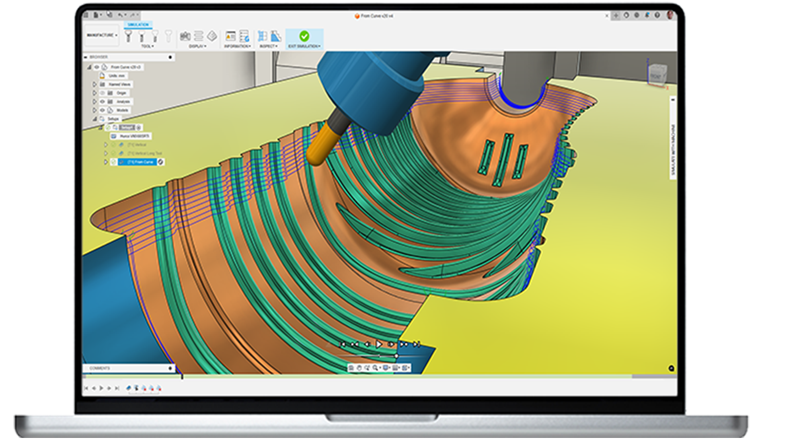
Start here: Milling (because that’s most shops’ bread and butter)
2D / 2.5D milling
For prismatic parts like plates, brackets, and fixtures, Autodesk Fusion for Manufacturing supports 2D and 2.5D CAM programming in a way that’s built for repeatable job-shop work. This includes generating profiles/contours, pockets, facing operations, and drilling patterns efficiently while minimizing manual programming effort.
3-axis milling
When work moves beyond simple prismatic parts and into contoured geometry, such as molds, formed surfaces, or sculpted pockets, 3‑axis milling becomes the foundation for many job shops. It’s the workflow you can rely on to rough and finish 3D geometry efficiently without stepping up to more complex multi‑axis equipment. This often includes 3D roughing and finishing operations, light mold and tooling work, and one‑off prototypes or short production runs where flexibility and fast turnaround matter most.
4-axis milling
Not every shop has a 4th axis on the floor, but plenty want the ability to quote work that benefits from one. That’s where 4-axis programming becomes a practical bridge between straightforward 3-axis jobs and more complex multi-axis parts. With 4-axis capability, you can index a part to machine multiple sides more efficiently, handle rotary features on round workpieces without awkward refixturing, and reduce the number of setups that typically slow down 3-axis workflows. Simply put, you can the ability to take on more “multi-face” parts with less handling time and more consistent results.
5-axis milling (positional 3+2 and simultaneous)
If you’re running a 5-axis machine, you already know the appeal- throughput and access. The real value is cutting down setups and fixtures while gaining the ability to approach complex geometry from the right angle the first time.
Positional 3+2 (indexing) is often the workhorse for shops that want reliable access to angled faces, holes, and features while still machining with familiar 3-axis-style toolpaths.
Simultaneous 5-axis steps in when the geometry demands continuous tool orientation for better reach, smoother surface finishes, or fewer touchpoints on intricate forms. Either way, 5-axis programming tends to show up most when you’re trying to avoid fixturing the same part five different ways—time spent building fixtures and resetting parts is time you’re not cutting chips.
Turning: CNC lathe programming
If your shop runs a lathe, even if it’s only for certain jobs between milling work, Fusion for Manufacturing can be used to program core turning operations so you can go from model to machine without switching CAM systems. This usually means handling everyday lathe work like facing stock to length, turning diameters on the OD and ID, cutting grooves, and boring features to size—especially for shafts, bushings, spacers, and other rotational parts that need clean, repeatable toolpaths.
Mill-turn: When one machine does it all
Multitasking machines are especially appealing in job shops because they let you consolidate work that would normally bounce between a mill and a lathe—and every avoided handoff is time back on the schedule. In a mill‑turn workflow, you can rough and finish turned features, then transition into milling operations like flats, cross-holes, keyways, or milled pockets without pulling the part and resetting it on a second machine (assuming your machine’s kinematics and tooling support it). The practical payoff is fewer operations, less re-clamping, and fewer opportunities for small setup errors to snowball into scrap—exactly the kind of risk reduction that matters when you’re running lean and every hour counts.
CNC cutting: Waterjet, laser, plasma (and similar profiling)
CNC cutting often sits alongside machining in modern fabrication workflows, especially when parts begin as flat stock before moving into secondary operations. Autodesk Fusion supports programming for common sheet-cutting processes—including waterjet, laser, and plasma, along with similar profiling workflows—so teams can generate toolpaths for cut profiles and plate geometry, then carry those parts forward into downstream manufacturing steps without relying on disconnected file handoffs.
Probing and inspection: Catch issues before they become scrap
In‑cycle probing and inspection can reduce risk at the machine by using spindle‑mounted probes to automate key setup steps and verify features while the part is still in process. These probing and inspection workflows help streamline setup and monitor machining so you can improve part quality and cut down on waste.
Post processing: Go from toolpaths to machine-ready NC code
Toolpaths only become usable on the shop floor once they’ve been translated into controller-ready NC code, which is where post processing comes in. Autodesk provides a dedicated Post Library for Fusion as a place to find post processors for common CNC machines and controls, alongside guidance emphasizing careful validation and safe testing for any post you plan to run on your specific setup.
Nesting
Associative nesting that stays linked to the 3D design
Fusion for Manufacturing can also add associative nesting that converts 3D assemblies into accurate 2D nested solutions for CAM programming—and updates automatically if the original 3D design changes, keeping everything in sync.
Multi-sheet nesting for faster costing, quoting, and ordering decisions
When you’re nesting across multiple sheets, you can add multi-sheet nesting to group parts by factors like material thickness and provide quick insights that support costing, quoting, and ordering.
Metal additive prep + print validation (thermal simulation)
Fusion for Manufacturing also extends into metal additive workflows with integrated 3D printing features like automatic part orientation, associative supports, and export options—plus 3D print simulation using thermal tools to validate the process and avoid costly failures.
By bringing all of these CNC workflows into a single, connected environment, Fusion for Manufacturing gives shops the flexibility to take on more complex work without adding complexity to the way they program, produce, and deliver parts.