 Christa Prokos
This post is also available in:
Proper BOM management guarantees accuracy, collaboration, and efficiency during manufacturing. This guide explores BOM types, digital thread integration, and industry challenges, then highlights Autodesk Fusion’s built-in BOM capabilities. Fusion’s tools provide real-time updates, traceability, and collaboration to deliver a complete solution for end-to-end product design and manufacturing.

Elevate your design and manufacturing processes with Autodesk Fusion
In modern product development, efficiency depends on far more than brilliant design. Manufacturers must coordinate engineering, procurement, and production teams across wildly complex supply chains. Such coordination hinges on the bill of materials (BOM). While many perceive it as nothing more than a parts list, a BOM is much more.
Poorly managed BOMs can derail projects in the form of avoidable costs and production delays. Well-managed BOMs, on the other hand, facilitate operations, improve cost control, and support compliance with industry standards. As manufacturing organizations adopt digital tools and cloud platforms, BOM management has never been more central to the digital thread.
This guide explains BOM management, its importance in today’s competitive environment, and how Autodesk Fusion with built-in data management and integrated PLM with Fusion Manage is an end-to-end solution for managing BOMs within the product lifecycle.
The technology of BOM management
At the highest level, a BOM is a thorough and comprehensive list of raw materials, subassemblies, parts, and consumables required to produce a finished product. Complete with specifications, quantities, and lifecycle states, BOMs guide manufacturing by linking the design intent of engineers with the practical instructions followed on the shop floor.
Depending on the audience, there are multiple perspectives on a BOM. Engineering teams rely on the engineering BOM to reflect design intent and capture every modeled component (i.e., even those that don’t appear in the final product). Meanwhile, manufacturing teams look for the manufacturing BOM, which adapts that data for production and incorporates processes such as machining or coating. Finally, service teams turn to the service BOM, which identifies the parts necessary to maintain and repair the product during its operational life.
While simpler products may only require a single-level BOM, complex products need multi-level BOMs to offer insights into the relationships between subassemblies. Regardless of the situation, BOMs need to be accurate, otherwise errors and delays will ensue. When managed properly, BOMs are a boon to procurement planning and production scheduling. They also provide a means of documentation for regulatory compliance.
As a result of the broader trend toward globalized supply chains and shorter production lifecycles, today’s BOMs are placed under unusual pressure and scrutiny. To keep up, modern BOM management must be real-time so that design changes are instantly reflected across all stakeholders. Without this agility, companies risk falling behind in markets that thrive on innovation and customization.
BOM benefits
Within the digital thread, BOMs deliver benefits that extend far beyond listing parts.
Traceability
By documenting every material, subassembly, and component used in a product, a BOM creates a verifiable record that is necessary for compliance and quality assurance. Industries such as consumer products, aerospace, automotive, and medical devices depend on this traceability to meet strict regulatory standards. When a quality issue arises, the BOM allows manufacturers to identify which materials were used, when they were introduced into the design, and which suppliers provided them. Such transparency means faster root-cause analysis and guarantees that adequate corrective actions are implemented.
Enhanced collaboration
A BOM within the digital thread is accessible across all departments, meaning engineers, procurement teams, and production managers no longer rely on separate, potentially conflicting datasets. Instead, everyone works from a single source of truth. Consistency reduces the likelihood of errors such as ordering incorrect parts or manufacturing from outdated specifications. It also strengthens communication between internal teams and external partners so that suppliers receive the same accurate, up-to-date information as the design and engineering groups.
Efficiency
Modern BOM systems reduce manual entry and minimize the duplication of effort, which are some of the most common sources of error in traditional approaches. Updates made in one part of the system cascade across the entire BOM. With automated workflows, teams save time and can respond to design changes or shifts in material availability with speed and flexibility. In this sense, the BOM is a living, evolving document that reflects the current state of the product and guides its lifecycle.
BOM challenges
Although BOMs offer many benefits, these advantages can be hard to realize when employing traditional methods for BOM management. For example, many companies still rely on spreadsheets or isolated databases that lack the ability to track revisions effectively. Without robust version control, it becomes near impossible to determine which BOM is the most accurate, leading to confusion when multiple teams work simultaneously.
Siloed systems prevent information from flowing freely across the organization, and as a result, procurement might place orders based on outdated part numbers while engineering pushes forward with a new design. Manual updates add further risk by consuming valuable time and increasing the chance of inconsistencies creeping into the record.
The challenge only intensifies as products evolve. Engineering teams may need to modify the BOM to reflect new design elements. Manufacturing might require a version optimized to production steps. Service teams might need yet another variation tailored for maintaining equipment in the field. Without a single, centralized, and integrated solution, managing these different BOM perspectives becomes complex and error-prone.
Autodesk Fusion – The BOM management solution
Autodesk Fusion takes bills of materials from a static process to a dynamic, collaborative BOM experience. With its built-in data management and integrated PLM, Fusion goes beyond design and simulation to support the entire product lifecycle.
Because BOM management is within the design process, it evolves automatically as the model changes. This means engineers and downstream stakeholders are always working with the most current data. Teams no longer need to export and reconcile separate files.
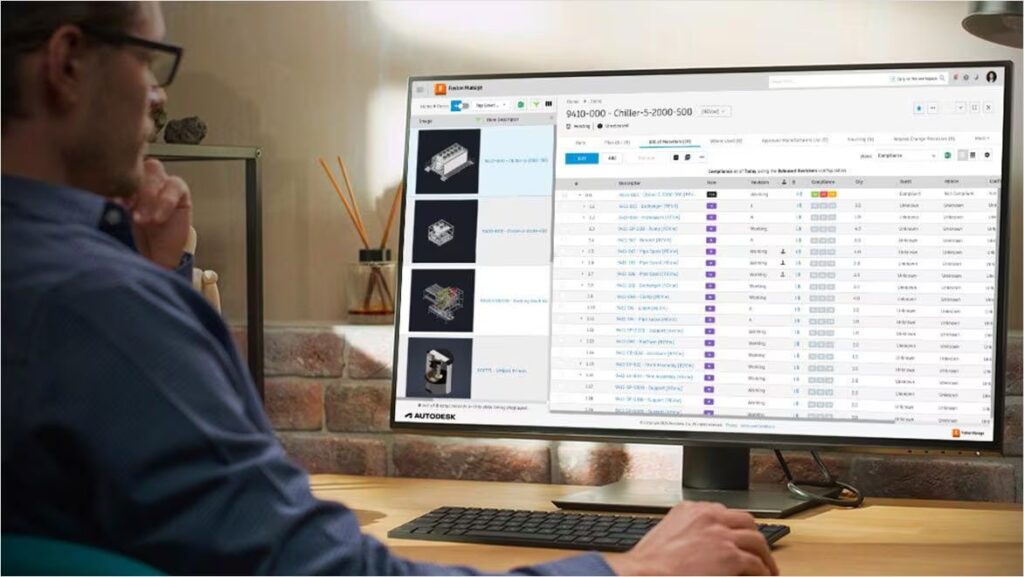
Fusion also improves usability. Designers can configure their BOM views by toggling property columns on or off, expanding or collapsing subassemblies, and cross-highlighting between the BOM and the design canvas. These features remove barriers to navigating complex assemblies and reduce the cognitive load on engineers working with large datasets.
For organizations that require strict process control, Fusion integrates BOMs with Fusion Manage. Features like item numbering, change order workflows, and quick release processes are available directly within the BOM interface. Historical BOMs are preserved so that traceability is maintained for older designs or customer support. Meanwhile, released BOMs can be retrieved at any time, providing a secure record of product evolution.
Collaboration is equally important. Fusion allows engineers to share BOMs easily by generating links that colleagues can open in Fusion Team, while preserving applied filters and version settings so everyone views the same information. For external systems such as ERP or inventory platforms, BOMs can be exported to CSV or XLS formats for smooth integration.
Fusion is the solution for real-time BOMs
Without a doubt, the bill of materials is integral to product success. It guarantees accuracy during procurement and production, provides traceability for compliance, and supports collaboration across teams. That’s why poorly managed BOMs create delays and errors, while well-managed BOMs become a team’s best friend.
Autodesk Fusion reimagines BOM management by embedding it directly in the design environment, automating updates, and facilitating collaboration across the product lifecycle. With customizable views and integrated data management, Fusion delivers a modern solution that eliminates silos and supports end-to-end product development.
For companies seeking to reduce errors, accelerate time-to-market, and maintain competitiveness, Fusion’s collaborative BOM management capabilities can help position you for success today and in the future of manufacturing.
BOM management frequently asked questions (FAQs)
What is a bill of materials (BOM) in product development?
Why is BOM management important in manufacturing?
How does Autodesk Fusion support BOM management?
What are the different types of BOMs?
–Engineering BOM (EBOM): reflects design intent
–Manufacturing BOM (MBOM): adapted for production workflows
–Service BOM (SBOM): used for maintenance and repair
Each supports a different stage of the product lifecycle.
What problems does poor BOM management create?
How does BOM management fit into the digital thread?
Can Autodesk Fusion manage multi-level BOMs?
How does Autodesk Fusion improve collaboration around BOMs?
How does BOM management help with cost and production planning?
How does Autodesk Fusion connect BOM management with PLM?
Does Autodesk Fusion offer AI for BOM management?
How do teams track BOM revisions over time?
How do BOM tools manage permissions and approvals?
How do teams track BOM revisions over time?
How do you choose BOM management software for business use?
Autodesk Fusion combines BOM management with CAD, engineering data management, and manufacturing workflows in a single platform, helping reduce the disconnected processes that often occur when BOM management is handled separately from product development.
Can BOM management systems sync with ERP and supply chain platforms?
Autodesk Fusion supports integrations and connected workflows that help organizations exchange product information across engineering and business systems, reducing manual data transfers and improving data consistency.
How do BOM tools prevent version conflicts across teams?
Autodesk Fusion includes built-in version control and product data management capabilities that help teams manage revisions, track design history, and collaborate from a shared source of truth, reducing the risk of outdated BOM information reaching manufacturing or procurement teams.
How does BOM data flow between engineering, manufacturing, and ERP systems?
Autodesk Fusion helps create continuity across these stages by connecting product information, design data, manufacturing workflows, and downstream business systems through a digital thread that reduces manual handoffs and duplicated data entry.
What features should you look for in BOM management software?
-Multi-level BOM management
-Revision and version control
-Engineering change management
-CAD integration
-ERP and supply chain integration
-Role-based permissions and access controls
-Collaboration and review workflows
-Audit trails and traceability
-Support for engineering and manufacturing BOMs
-Cloud access for distributed teams
Autodesk Fusion combines these capabilities with integrated CAD, engineering, manufacturing, and data management workflows, helping organizations manage product information in a connected environment.
What is a multi-level BOM structure and why does it matter?
This structure improves visibility into how products are built, supports procurement and inventory planning, simplifies change management, and helps manufacturers understand the downstream impact of design changes. Autodesk Fusion supports product structure management that helps teams work with complex assemblies and product hierarchies throughout development and manufacturing.
How does CAD-integreated BOM management reduce manual re-entry errors?
CAD-integrated BOM management automatically connects product structures to the underlying design data. Because Autodesk Fusion combines design, engineering data management, and manufacturing workflows in a shared environment, product information stays aligned with the current design, reducing manual entry, duplicated work, and revision-related errors.
Is cloud-based BOM management better than on-premise PDM-dependent BOM management?
Traditional BOM management approaches often depend on local servers and dedicated PDM infrastructure. Fusion takes a different approach by including cloud-based product data management and collaboration capabilities as part of the platform, helping teams manage BOMs and product information without maintaining separate infrastructure. Organizations with regulatory, compliance, or legacy requirements may also choose a hybrid approach.