 Christa Prokos
Learn how cloud PDM helps prevent version conflicts, reduces accidental overwrites, and creates a single source of truth for engineering teams. Discover how Autodesk Fusion and Fusion Manage improve collaboration and design control.

Elevate your design and manufacturing processes with Autodesk Fusion
Every engineering team has a version-control story. A designer updates an assembly only to find out a colleague was working from an older version. A manufacturing drawing is accidentally replaced by a newer work-in-progress file. Two engineers make parallel edits to the same design, creating confusion about which revision should move forward.
These issues rarely stem from poor engineering practices. More often, they’re symptoms of systems that rely on humans to manually manage design data.
For years, shared drives and folder structures have served as the default method for storing engineering files. But as products become more complex and teams become more distributed, these approaches create significant challenges. Version conflicts, outdated files, missing history, and duplicated work can quickly slow product development.
Cloud product data management (PDM) addresses these challenges by creating a structured environment for managing engineering data. Instead of relying on file names and folder hierarchies to communicate the state of a design, cloud PDM provides a centralized source of truth that helps teams collaborate with confidence. Cloud-based data management in Fusion is designed to centralize design information, provide version history, and reduce the risk of teams working from outdated information.
The four failure modes of shared drives
Most version conflicts can be traced back to a handful of common problems.
Accidental overwrites
Shared folders often allow multiple users to access and save the same files. Without a controlled system for managing revisions, important work can be unintentionally replaced or lost. The result is confusion, rework, and lost productivity.
Parallel edits
Engineering teams frequently collaborate across departments, locations, and time zones. When multiple people create local copies of the same design and work independently, conflicting revisions become inevitable. Teams then spend time reconciling differences rather than developing products.
No audit trail
Shared drives may tell you when a file was modified, but they rarely provide meaningful context. Who made the change? Why was it made? Which revision was approved? Without a clear history, tracing design decisions becomes difficult.
No reliable rollback
Mistakes happen. Designs evolve. Sometimes teams simply need to revisit an earlier state of a project. Without version history and controlled data management, recovering previous work can be challenging and time consuming.
These aren’t isolated incidents. They are predictable outcomes when engineering data is managed through folders instead of a structured data-management system. The challenges associated with manual data management often include human error, fragmented information, and difficulty maintaining version control.
Why version conflicts happen
Version conflicts are often viewed as collaboration problems when they’re actually data-management problems.
Most conflicts emerge because teams rely on manual processes:
- File naming conventions like “Final_v7_Approved_REV3”
- Email attachments
- Local file copies
- Department-specific folders
- Separate storage systems for different teams
These approaches require engineers to manually determine which version is current. As complexity increases, so does the likelihood of mistakes.
The issue is not that engineers are careless. The issue is that shared drives place the responsibility for version control on people instead of the system.

Cloud PDM is not a better folder system
Many organizations mistakenly view cloud PDM as an upgraded file-storage solution. In reality, cloud PDM serves a fundamentally different purpose. Shared drives store files. Cloud PDM manages engineering data.
A cloud PDM solution provides:
- Centralized design storage
- Automatic version tracking
- Design history
- Collaboration controls
- Secure access management
- Traceability across product development
Rather than relying on manual processes, cloud PDM creates structure around how engineering information is created, modified, reviewed, and shared. Cloud PDM centralizes product-related information and gives teams access to current design data, reducing the risk of working with outdated information.
How Fusion helps prevent version conflicts
Modern product development rarely happens within a single department. Mechanical, electronics, manufacturing, sourcing, and quality teams all depend on accurate product information.
Fusion helps address version-control challenges by providing built-in cloud data management capabilities that connect design data across teams. Centralized access to design information allows users to work from current project data while maintaining version history throughout development.
Centralized design data
When product information lives in a centralized environment, teams spend less time searching for files and less time determining which version is current.
Automatic version history
Version history helps teams understand how designs have evolved over time. Instead of creating duplicate files and manual archives, historical design information remains accessible within the project record.
Better collaboration
Design teams can collaborate using shared product information, helping reduce disconnects that frequently occur when teams rely on separate storage systems. Centralized product data improves visibility and supports collaboration across departments.
A single source of truth
One of the most significant benefits of cloud PDM is creating a single source of truth. When everyone accesses the same product information, decisions are made using consistent data rather than conflicting revisions. The concept of a single source of truth is a recurring benefit of integrated data management approaches.
When teams need more than PDM
As organizations grow, managing versions becomes just one part of a broader engineering governance challenge.
Many teams eventually need structured review processes, approval workflows, and lifecycle controls that extend beyond design-file management alone.
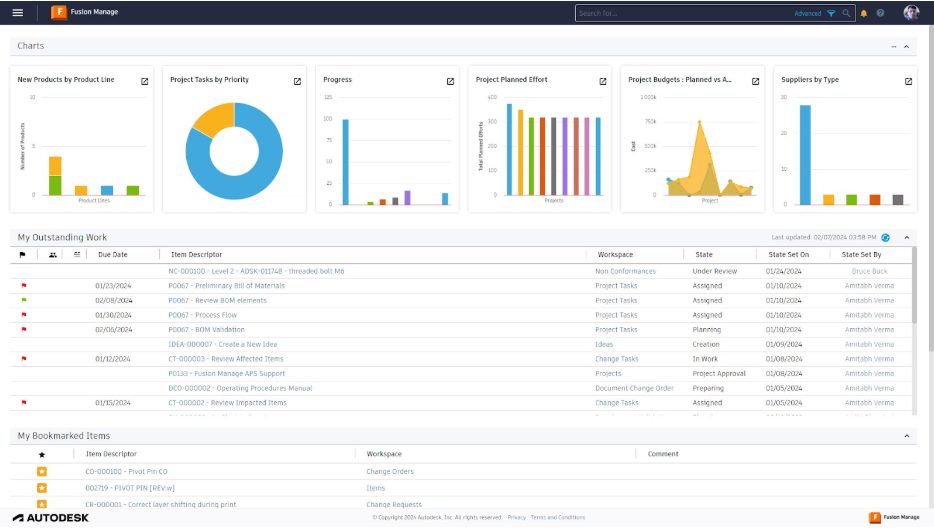
This is where Fusion Manage can complement cloud PDM initiatives. Fusion Manage helps organizations connect engineering processes, approvals, and product workflows while improving traceability across the product lifecycle. Organizations can use Fusion Manage to support governance, process consistency, and cross-functional visibility beyond the core design environment.
Why audit trails and rollback matter
In highly regulated industries, version control is about more than productivity.
Aerospace manufacturers, medical-device companies, and other compliance-driven organizations often need documented records of how products evolve.
Audit trails help answer critical questions:
- Who changed the design?
- What changed?
- When did it change?
- Which version was approved?
- What version was released?
Likewise, rollback capabilities help organizations recover from mistakes, investigate issues, and maintain confidence in product data.
These capabilities support accountability, traceability, and governance throughout the product lifecycle while helping teams avoid the uncertainty created by unmanaged file systems. Cloud data management solutions commonly emphasize auditability, version history, and controlled access to engineering information.
The real cost of version conflicts
When engineering teams spend time debating which file is correct, they’re not doing engineering work. They’re performing manual version control.
As products become more complex and development teams become increasingly distributed, relying on shared drives creates risks that can affect timelines, quality, and collaboration.
Cloud PDM provides a more durable approach. By centralizing design information, maintaining version history, and creating a shared source of truth, it helps engineering teams focus less on managing files and more on developing products. Fusion’s built-in cloud data management capabilities and Fusion Manage’s extended governance capabilities provide a foundation for organizations looking to improve control of engineering data throughout product development.
Frequently asked questions
Cloud data management helps prevent version conflicts by centralizing design information and maintaining version history in a single environment. With tools, like Autodesk Fusion, teams can access current project data without relying on duplicate files or manual naming conventions.
Version conflicts often occur when teams use shared drives, local file copies, email attachments, or manual revision processes. Autodesk Fusion helps reduce these issues by providing centralized cloud data management and version tracking.
Shared drives primarily store files, while cloud PDM manages engineering data. Cloud PDM provides version history, traceability, centralized access, collaboration capabilities, and a single source of truth for product information
Depending on the storage environment, file history may be difficult to trace or recover. Shared drives often lack the structured version management capabilities provided by cloud PDM solutions.
Systems that maintain version history allow users to access earlier revisions and understand how designs evolved. Recovery capabilities depend on the data-management process and tools being used.
Yes. Cloud PDM solutions, like Autodesk Fusion provides centralized access to design information, helping geographically distributed teams collaborate using the same product data
Organizations should consider cloud PDM when version conflicts, duplicate files, collaboration challenges, traceability requirements, or growing product complexity begin affecting productivity and engineering efficiency.
Yes. Autodesk Fusion includes built-in cloud product data management (PDM) capabilities that help teams centralize design data, maintain version history, manage revisions, and collaborate from a shared source of truth. Unlike traditional workflows that rely on shared drives and manual file management, Fusion connects CAD, CAM, CAE, PCB, and data management in a single environment, helping reduce version-control issues and improve collaboration across product development teams.
Fusion is particularly well suited for engineering teams that want PDM capabilities without deploying a separate, standalone data management system. Teams can manage design versions, track changes, and collaborate on current design data directly within their product development workflow.
Fusion is an affordable PDM option for organizations that want product data management capabilities as part of their design platform rather than purchasing, implementing, and maintaining separate systems for CAD and data management.
Teams can centralize design data, version control, and collaboration within the same system used for product development. This can reduce software sprawl, administrative overhead, and the complexity associated with integrating multiple disconnected tools.
For many small and growing manufacturers, this approach can provide access to PDM functionality without the cost and complexity often associated with traditional enterprise data-management deployments. However, specific affordability depends on an organization’s size, requirements, and licensing needs.
Yes. Fusion’s built-in cloud PDM capabilities are well suited for small businesses, startups, product design firms, and growing manufacturers that need better control over engineering data without dedicating significant resources to managing complex infrastructure. Fusion was specifically positioned for small-to-medium-sized businesses that need integrated CAD, CAM, CAE, electronics, and data management capabilities within a single platform.
Benefits for small businesses include:
-Centralized access to design data
-Built-in version control and revision history
-Collaboration across distributed teams
-Reduced reliance on shared drives and manual file naming
-Cloud-based access without maintaining on-premises infrastructure
-A single source of truth for product information
As business needs grow, organizations can extend these capabilities with Fusion Manage to support more structured governance, approvals, and product lifecycle processes.