 Shannon McGarry
This post is also available in:
Discover how AI in Autodesk Fusion improves product design, manufacturability, CNC workflows, and data security across the manufacturing lifecycle.

Elevate your design and manufacturing processes with Autodesk Fusion
For manufacturers, AI rapidly reshaping how products are designed, validated, and made. The real question isn’t whether it belongs in manufacturing, it’s how to use it responsibly, securely, and at scale.
Autodesk Fusion is at the forefront of defining what practical AI looks like in manufacturing: intelligence embedded directly into the work, not layered on top of it. Rather than forcing teams to adopt disconnected tools or experimental workflows, Fusion brings AI into the environments engineers, designers, and manufacturers already rely on every day.
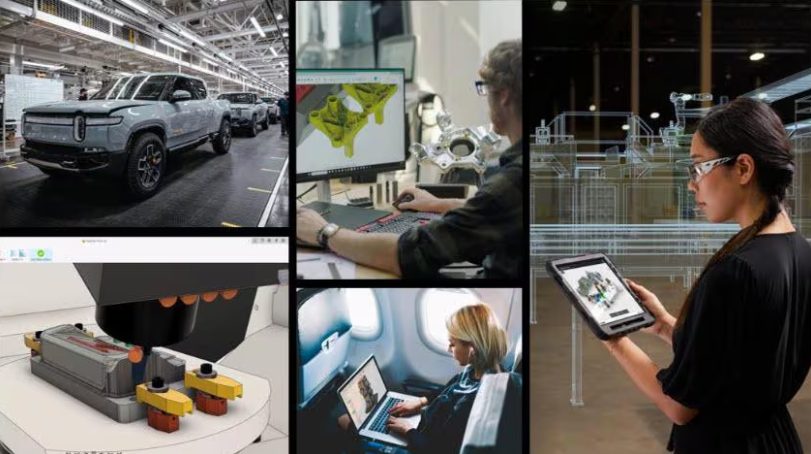
What Is AI in manufacturing – really?
AI in manufacturing isn’t about replacing engineers or machinists. It’s augments human expertise, helping teams see issues earlier, explore more options, and automate work that slows innovation down.
In practice, it shows up in places manufacturers already care most about:
- Product design decisions
- Manufacturability and validation
- CNC programming and simulation
- Error reduction and consistency
- Collaboration across teams, disciplines, and sites
These are the moments where small inefficiencies compound into delays, rework, or quality issues. AI helps reduce that friction by supporting engineers where complexity is highest and time pressure is greatest.
The difference with Autodesk Fusion is that AI is embedded directly into workflows manufacturers use every day, spanning across CAD, CAM, and data management in a single connected environment. Design intent, manufacturing constraints, and downstream implications stay connected instead of being fragmented across tools and handoffs.
How does AI improve product design?
Product design has always been a balancing act between creativity, constraints, and timelines. AI helps manufacturers achieve better outcomes.
In Fusion, features like automated drawings, AutoConstrain, generative design, and automated toolpaths help teams move faster without losing intent. Teams can explore more alternatives early, understand tradeoffs sooner, and iterate with confidence. Instead of spending hours setting up repetitive actions or checking downstream implications, engineers can focus on decisions that matter.
AI also helps surface manufacturing considerations earlier in the design process. When manufacturability issues are identified sooner—rather than after designs are finalized—teams can avoid costly redesigns and late‑stage surprises. This tighter feedback loop shortens development cycles and improves alignment between design and production.
The result isn’t just speed. It’s better design quality, achieved earlier in the lifecycle when changes are cheaper, faster, and easier to make.
“Complicated parts are hard to engineer, and they can take years to develop. But using generative design in Fusion, you can put multiple functions into one part, iterate, prototype, and it’s just a matter of weeks for a final product.”
-Robin Shute, Founder, Shute Dynamics
What are the real benefits
AI only works if it respects how professionals design and manufacture products. They want intelligence that assists, explains, and adapts to real‑world workflows.
With Fusion’s approach, AI:
- Accelerates repetitive tasks.
- Surfaces insights at the right moment.
- Stays out of the way when precision matters.
This balance is critical. Manufacturers want assistive intelligence that helps maintain design intent, reduces manual work, and supports advanced workflows like parametric modeling, simulation, and manufacturing preparation.
When AI is integrated directly into CAD and CAM workflows, it becomes a multiplier, not a distraction. Engineers spend less time on setup and rework, and more time solving problems, optimizing performance, and delivering better products
What’s the best AI solution for manufacturers?
The best AI solution isn’t a standalone tool. It’s a connected system that understands the full product lifecycle — from early concept through production and change management.
. Autodesk Fusion stands out because it brings:
- CAD, CAM, CAE, electronics, and data management together
- AI assistance embedded directly into real workflows
- A scalable platform that grows from prototyping to production
- Practical automation that respects human expertise
- An expansive partnership ecosystem integrating advanced AI capabilities
Fusion delivers AI where decisions are made, and where mistakes are most costly. The result is better coordination across teams, fewer handoffs, and a more resilient path from design to manufacturing.
Why Autodesk Fusion Is leading the shift to AI‑driven manufacturing
AI in manufacturing works best when it’s invisible, quietly removing friction, surfacing insights, and letting experts do their best work. By embedding AI directly into connected design and manufacturing workflows, Fusion helps manufacturers move faster, waste less, and adapt more easily to change. As products become more complex and timelines more compressed, this kind of practical, trusted intelligence becomes a competitive advantage.
Manufacturers using Fusion are building a more connected, resilient, and future‑ready way of designing and making products in an increasingly complex world.
AI in design and manufacturing – frequently asked questions (FAQs)
AI improves product design by automating repetitive work, accelerating iteration, and enabling engineers to explore better design options earlier in the process.
AI removes low‑value tasks like sketch constraints and documentation so engineers can focus on design decisions and analysis. In Fusion, capabilities like Sketch AutoConstrain and Automated Drawings handle these repetitive steps, reducing manual effort and rework.
AI also improves design quality through generative design, where engineers define constraints, such as weight, materials, or manufacturing methods, and the system generates multiple optimized design options.
Try the AI features in Fusion free for 30-days today.
Yes. AI reduces manufacturing errors and scrap by catching issues earlier, improving process consistency, and automating quality checks across both design and production.
AI uses real-time monitoring and predictive analytics to detect anomalies and prevent defects before they occur, reducing rework and scrap.
In Autodesk Fusion, AI contributes earlier in the lifecycle by providing manufacturability insight during design, so teams can identify potential production issues before anything is built.
AI-assisted workflows like CAM toolpath setup and manufacturing guidance help standardize production processes, reducing variability and the likelihood of errors. The result is fewer downstream defects, less wasted material, and more consistent production outcomes.
Get started today with a 30-day free trial of Fusion.
AI in CAD improves productivity, speed, accuracy, and overall design quality by embedding automation and intelligence directly into everyday workflows.
Productivity: Tasks like sketch constraints and drawings are automated with tools like AutoConstrain and Automated Drawings
Speed: Faster iteration using generative design and AI-assisted modeling
Accuracy: AI helps identify missing constraints, inconsistencies, and potential issues early
Design quality: Optimization based on real-world performance criteria
Cost savings: Fewer prototypes and less rework through earlier validation
In Autodesk Fusion, these capabilities are integrated into a single environment, so AI supports the entire workflow, from concept to manufacturing, without forcing teams to switch tools.
AI tools fall into three practical groups:
–All-in-one platforms: Autodesk Fusion combines CAD, CAM, CAE, and data with embedded AI (generative design, AutoConstrain, AI assistant)
Generative design & optimization: Tools that generate and evaluate design options based on constraints (performance, cost, manufacturing). In Autodesk Fusion generative design produces manufacturable options automatically
Workflow automation + AI assistants: Tools that automate modeling, documentation, and guidance. In Fusion:
–AutoConstrain → automates sketch definition
–Automated Drawings → generates 2D docs
–Autodesk Assistant → guides and executes tasks in‑context
The most effective tools embed AI directly into design‑to‑manufacturing workflows—not separate tools.
AI is removing friction from CAD, not replacing it.
Engineering work stays human. What AI targets is the overhead around it:
-Constraints
-Drawings
-Setup and coordination
-Workflow navigation
In Autodesk Fusion, AI reduces that overhead by automating sketch constraints and drawings, assisting CAM setup, and providing
in-workflow guidance via Autodesk Assistant.
How does AI CAD improve productivity?
AI improves CAD productivity. Solutions like Autodesk Fusion automate repetitive tasks like constraints and drawings, enable in‑workflow assistance through tools like Autodesk Assistant, and accelerate iteration with generative design and AI‑assisted manufacturing to keep engineers focused on design.