 Brad Tallis
Learn how intent-driven design in Fusion helps you choose part, assembly, or hybrid workflows to start designs with clarity and avoid rework.

Elevate your design and manufacturing processes with Autodesk Fusion
If you’ve ever lost time fixing model structure instead of actually designing, you’ve felt the pain. Bodies vs. components. The wrong component active. Assemblies spiraling out of control. Intent-driven design in Fusion is built to remove that friction.
When you open Fusion, it now asks one simple question up front: What are you creating—a part or an assembly?
That choice sets the foundation for your design by shaping the structure, tools, and workflow from the first click. Instead of cleaning things up later, you start with intent—and keep momentum as the design evolves.
When you create a new design, you begin in one of three modes:
- Part design
- Assembly design
- Hybrid design (classic Fusion workflow)
You’re not locked into a single path. Fusion supports moving between workflows as your project changes.
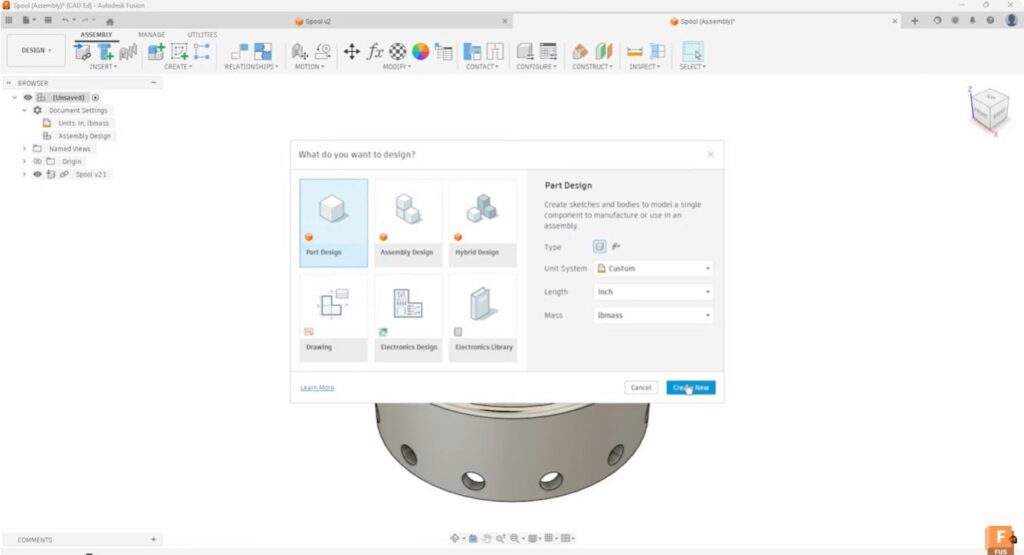
Choose the right design mode
Part design: Focused, single-component modeling
Part design is ideal when you’re creating a single, reusable component—whether it stands alone or will be used across multiple assemblies. Fusion keeps the environment intentionally focused, surfacing only part-level tools and removing common sources of confusion.
What’s different:
- Every design starts as a component, reducing body-versus-component mistakes
- Assembly tools stay out of the way, keeping the timeline clean and readable
- You can define units and choose standard or sheet metal parts up front
Typical workflow:
- Start a new Part Design and define units and part type
- Model using sketches, constraints, extrude, revolve, and other core tools
- Save the part, or add it to a new or existing assembly when needed
💡Pro tip: If you’re unsure where a design will end up, starting with part design gives you flexibility without creating cleanup work later.
Assembly design: Structure and relationships
Assembly design is built for projects where structure matters—combining parts and defining how they relate to one another. The focus is on relationships and motion, not the feature history of every individual part, making larger assemblies easier to understand and manage.
Key capabilities:
- Insert parts and subassemblies as external components
- Define relationships using joints and constraints
- Keep the assembly timeline focused on structure, not part-level features
Practical assembly workflow:
- Insert components using Insert Component
- Stabilize geometry with Rigid Groups or Pin where needed
- Use As-Built Joints and Constrain Components for controlled movement
- Add standard hardware quickly with Insert Fastener and McMaster-Carr components
Fusion also supports Edit In Place, so you can model or refine geometry in context when parts need to adapt to surrounding components.
💡Pro tip: Combining joints with constrain components gives you control without over-constraining the assembly.
Hybrid design: Flexibility for exploration
Hybrid design preserves Fusion’s original, free-form workflow, keeping all modeling and assembly tools available at once. It’s well suited for early concepts, rapid exploration, or projects where structure will be defined later.
Where hybrid works best:
- Rapid ideation and iteration
- Top-down design with frequent changes
- Early enclosure, layout, or spatial planning
As designs mature, Hybrid models can be transitioned into more structured part-and-assembly workflows—without starting over.
👉Tradeoff to know: Hybrid offers maximum freedom, but less enforced structure. For complex or collaborative projects, moving into Part and Assembly workflows often saves time long-term.
Designing with intent—and adapting confidently
Intent-driven design doesn’t impose a single “right” way to work. Instead, it aligns Fusion with how designers actually think: starting with clarity, then adapting as requirements evolve. Whether you’re modeling a single part, managing a complex assembly, or exploring ideas freely, Fusion supports smooth transitions between workflows—so your design intent stays intact from concept through production.
Check out this 4-part video tutorial series to explore each intent‑driven design mode in detail and see real‑world use cases, from early concepts to production‑ready assemblies.
Intent-driven design in Autodesk Fusion frequently asked questions (FAQs)
What is intent-driven design in Autodesk Fusion?
When should I use part design in Autodesk Fusion?
When should I use assembly design in Autodesk Fusion?
Is hybrid design in Autodesk Fusion still available?
Yes. Hybrid design in Fusion remains available for flexible, exploratory workflows. Try free for 30-days today.