 Trevor English
Is InfoWorks ICM approved by FEMA? We get that question a lot, so we asked engineering firms that have gone through the regional acceptance process to share what they learned.
Many flood modelers already know that InfoWorks ICM can build highly detailed 1D and 2D flood models. What’s less widely understood is that InfoWorks ICM may also be eligible for local acceptance for use in FEMA National Flood Insurance Program (NFIP) studies through a regional approval process.
According to Michael Baker International (MBI), a next-generation, technology-driven engineering, architecture and consulting firm, that process can be surprisingly straightforward.
You can use the template and ask for regional acceptance,” says Water Resources Engineer Sarah Pfeifle, PE. “In most places, there is generally an easy path to FEMA acceptance for the model.”
The firm recently helped secure FEMA approval for InfoWorks ICM models used on NFIP studies. The process, as Sarah Pfeifle and her colleagues at MBI describe it for that particular case, proceeded efficiently. It included a form, a local signature, and an efficient FEMA review process.
Drawing on this firm’s experiences and FEMA’s published guidance, we’ve summarized some considerations for teams seeking local acceptance of InfoWorks ICM for an NFIP study.
Can InfoWorks ICM be accepted by FEMA for use in NFIP studies?
InfoWorks ICM already has local and regional FEMA acceptance in multiple regions. That matters because new requests can reference previous approvals.
“If you were seeking acceptance for a model software that wasn’t accepted already, or if you wanted to convert to national acceptance, the process would be more intensive,” Pfeifle says. “But because InfoWorks ICM has local acceptances, the application for a new acceptance in a new jurisdiction can lean on precedent.”
Note that FEMA’s guidance permits local acceptance by proxy in appropriate circumstances, but acceptance remains specific to the applicable jurisdiction and model version.
ISG, another engineering firm, reported a similar experience in Brookings, South Dakota. ISG used InfoWorks ICM to move from traditional flood mapping toward a more detailed 1D and 2D view of the city, then worked with FEMA and local stakeholders to get the model accepted. Their team emphasized engaging FEMA early, walking reviewers through the workflow, and showing the methodology behind the maps.
MBI noted that on a recent project, it took only a month total to complete a local acceptance request for InfoWorks ICM, through a process they described as “straightforward and simple.” The practical takeaway from the experiences of ISG and MBI is to raise the model-acceptance question early in the project rather than waiting until deliverables are nearly complete.
Determine which FEMA local-acceptance documentation applies
The process includes a FEMA software acceptance form or template used for local approval. FEMA provides both a letter template and guidance for model acceptance.
Pfeifle described the workflow this way: “The form was completed, sent to the signing authority, who reviewed and confirmed it, and then sent to the FEMA control team for review and approval.”
In practice, that means the modeler or consultant should prepare the request, identify the local signing authority, and document why InfoWorks ICM is appropriate for the NFIP study. Where FEMA’s local-acceptance-by-proxy pathway applies, the submission may reference an existing local acceptance in another jurisdiction
MBI noted that clients are often the ones asking to use InfoWorks ICM because they already have existing InfoWorks ICM models and workflows. “Most of the time, in my experience, it’s the client coming to us requesting we use specific software,” explains Pfeifle. “In the case of one of our recent projects, they came to us and told us they wanted to use InfoWorks ICM to align with how they designed their flood risk program.”
Submit the local-acceptance request through the applicable FEMA process
Once the local authority signs, the request goes to FEMA for review.
The letter is submitted to the FEMA lead for a given National Service Provider (NSP), who then sends it to the FEMA review team for further review.
From there, FEMA reviews the package and will determine whether the requested local model acceptance satisfies the applicable NFIP requirements.
Local acceptance and future modeling workflows
Once approval is granted by FEMA, maintaining continuity in your modeling workflows is another big piece of the puzzle. The biggest benefit to undertaking local acceptance for InfoWorks ICM is continuity. Many agencies already use InfoWorks ICM for stormwater, collection system, watershed, and resilience work. Local FEMA acceptance can enable teams to use InfoWorks ICM as part of regulatory flood studies, subject to applicable FEMA and project requirements.
“Having a product that can perform alternatives analysis and be used for flood risk assessments can be valuable for our clients,” Pfeifle says. “By having holistic modeling workflows in InfoWorks ICM, we’re able to better justify our technology investment.”
That mirrors the ISG experience. In Brookings, the team used InfoWorks ICM to incorporate LiDAR, topography, land use, impervious area, storm sewers, buildings, sub watersheds, and 2D flood results into a more complete planning model.
How long can the local-acceptance process take for FEMA NFIP studies?
Based on Michael Baker International’s experience, local acceptance can take about a month.
“We submitted the form at the beginning of the project. Took maybe a month total, for everything,” says Pfeifle.
Of course, your timing may depend on the jurisdiction, applicable acceptance pathway, software version, completeness of the submission, governmental-agency review, and FEMA review.
Can InfoWorks ICM and HEC-RAS both be used on flood modeling projects?
Yes. Michael Baker has worked on projects where both tools were part of the broader workflow.
“We’ve seen a strong divide between clients who want to use HEC-RAS and those who want to use ICM,” Pfeifle elaborates. “Would we have an issue with some using HEC-RAS and others using ICM? Generally, no. We are working with our clients to better understand how these two sets of software can work in parallel across a larger study area.”
This is a process and workflow we’ve documented before and we’ve found that HEC-RAS and InfoWorks ICM are often used in complementary roles on flood modeling projects.
For regional studies, that flexibility can help teams work with existing models, stakeholder preferences, and legacy datasets while still taking advantage of ICM’s capabilities.
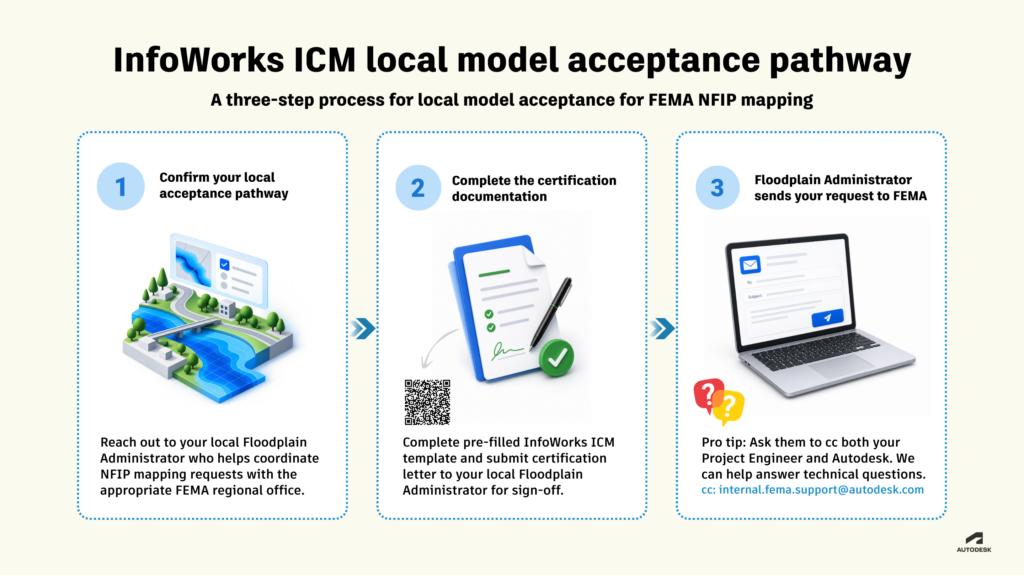
FEMA local acceptance process for InfoWorks ICM: 3 steps
A practical pathway for seeking local acceptance…
Step 1: Confirm your local acceptance pathway
When an NFIP mapping-related update is required, the project team weighs their options and wants to use InfoWorks ICM as the modeling tool. Early coordination with the Local Floodplain Administrator is key to the success of gaining local acceptance. In this early engagement, the project team should be prepared to explain why the project can be successfully completed with InfoWorks ICM and how it is fit for purpose.
Step 2: Complete the certification documentation
The project team completes our pre-filled InfoWorks ICM local model certification letter template, adds project-specific information, and obtains the required signature from the Local Floodplain Administrator.
Step 3: Floodplain Administrator sends your request to FEMA
The Local Floodplain Administrator emails the completed certification letter to the designated FEMA recipients with the Project Engineer and Autodesk FEMA Support email copied as appropriate. The designated FEMA recipients will review the certification letter and send back a response accepting the model for local approval in NFIP mapping.
Note: the local approval might not be updated on the website immediately. In the meantime, the Local Floodplain Administrator as well as the project team should retain a record of the approval for the project.
Tip: We recommend cc-ing both your Project Engineer and Autodesk (internal.fema.support@autodesk.com). That way, if anyone has technical questions about the software, we can help answer them. In fact, feel free to e-mail us at any time with questions.
Flood modelers already have the data. They already have the tools. In many cases, they already have the models. The next step may simply be filling out the form, getting the signature, and asking for regional approval.
Disclaimer: This content is provided for general informational purposes only and is not intended as legal, regulatory, engineering, or professional advice. FEMA model acceptance requirements, processes, terminology, and review timelines may vary based on the model and software version, jurisdiction, proposed use, project circumstances, and applicable FEMA guidance. References to prior acceptance of InfoWorks ICM do not imply that FEMA will accept the software for any particular project or jurisdiction, nor do they constitute an endorsement of Autodesk or InfoWorks ICM by FEMA. Users should independently review current FEMA guidance and accepted-model information and consult the appropriate governmental authorities regarding requirements applicable to their specific project. Autodesk does not guarantee FEMA acceptance or any particular review timeline.