 Shannon McGarry
Understand the difference between factory simulation and digital twins, when to use each, and how Autodesk FlexSim enables both for smarter, data‑driven manufacturing decisions.
FlexSim: 3D Discrete Event Simulation Software
Easy-to-use 3D simulation modeling and analysis software with high-end capabilities. Predict and optimize production processes with realistic 3D visuals and data-driven scenarios.
The terms factory simulation and factory digital twins are frequently mentioned in the world of manufacturing. While often used interchangeably, they are not the same. Understanding the difference matters when as manufacturers decide how to modernize operations.
At a high level, both approaches use virtual models of production systems. But they differ in how those models are used, how they connect to real-world data, and the role they play in decision-making.
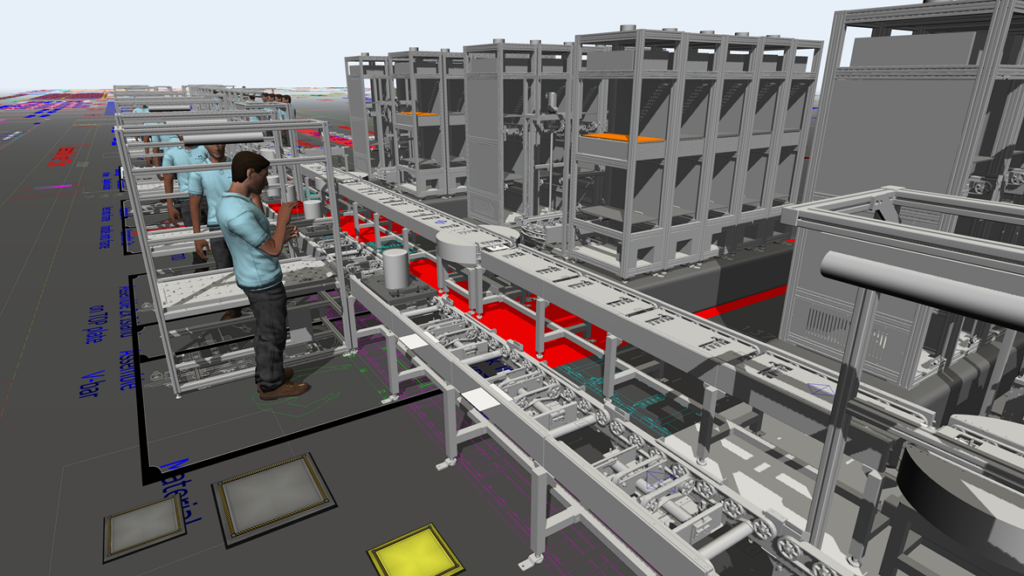
What is factory simulation?
Factory simulation is the process of creating a virtual model of a production system to test scenarios, validate designs, and analyze performance before making changes in the real world.
Simulation models are typically used for:
- Layout planning
- Capacity analysis
- Bottleneck identification
- “What-if” scenario testing
Simulation is often a project-based activity. You build a model, answer a specific question, and then use that insight to guide decisions. Simulation relies on static or predefined inputs. It does not continuously update with live factory data.
That makes factory simulation ideal for:
- Early-stage design and planning
- Evaluating changes before implementation
- Reducing risk prior to capital investment
What is a factory digital twin?
A factory digital twin takes simulation further by creating a real-time, data-connected virtual replica of the physical factory.
Unlike factory simulation, a factory digital twin:
- Continuously updates using live data from machines, sensors, and systems
- Mirrors actual production behavior as it changes
- Supports ongoing monitoring, prediction, and optimization
In manufacturing, a digital twin combines:
- A virtual model (like simulation)
- Real-time data connectivity
- A feedback loop between digital and physical systems
As a result, manufacturers are able to detect issues as they occur, predict failures or bottlenecks, and optimize operations continuously instead of peridoically.
Factory simulation vs. digital twin: the key differences
While both approaches use virtual models, they serve different roles in the manufacturing lifecycle.
1) Static vs. real-time
Simulation uses predefined scenarios and assumptions, while digital twins are continuously updated with live data.
2) Project-based vs. operational
Simulation is typically used to answer a specific question, while digital twins provide ongoing visibility and control.
3) Planning vs. continuous optimization
Simulation supports design and planning decisions, while digital twins enable real-time optimization and performance management.
4) Lower vs. higher integration
Simulation requires modeling and assumptions; digital twins require data integration across systems, sensors, and processes.
When should you use each?
Manufacturers don’t need to choose one or the other. They can use both.
- Use factory simulation when you need to evaluate future changes, design layouts, or test production scenarios before implementation,
- Use a factory digital twin when you want to monitor live operations, optimize performance continuously, and reduce downtime,
Many organizations begin with simulation and evolve toward a digital twin as their data infrastructure and operational maturity increase.
Where Autodesk FlexSim fits
FlexSim is a 3D discrete-event simulation platform designed to model, analyze, and optimize manufacturing systems, and it forms the foundation for building digital twins.
FlexSim enables teams to:
- Create detailed simulation models of production systems
- Visualize material flow, resources, and constraints
- Test scenarios and optimize performance without disrupting real operations
It also supports digital twin development by:
- Connecting simulation models to real-time production data
- Integrating with enterprise systems and IoT inputs
- Enabling continuous monitoring and scenario testing in parallel with live operations
This allows manufacturers to move beyond one-time simulation and toward live, data-driven decision-making.
Simply put, FlexSim bridges the gap between the two approaches:
- It starts with simulation for design and planning
- It scales into a digital twin for real-time optimization
That combination is critical because a digital twin is only as valuable as the model behind it, and FlexSim is built specifically for high-fidelity modeling and analysis.
Conclusion
Factory simulation and factory digital twins are not competing technologies—they are complementary.
- Simulation helps you make better decisions before changes are implemented
- Digital twins help you make better decisions while production is running
For manufacturers looking to reduce risk, improve throughput, and make faster, more confident decisions, that combination is what turns modeling into measurable operational impact.
FlexSim: 3D Discrete Event Simulation Software
Easy-to-use 3D simulation modeling and analysis software with high-end capabilities. Predict and optimize production processes with realistic 3D visuals and data-driven scenarios.
Factory simulation and digital twin simulation – frequently asked questions (FAQS)
No. Factory simulation is typically used to test scenarios for planning decisions, while a factory digital twin is designed to stay current with operational data for continuous monitoring and optimization.
Solutions like Autodesk FlexSim support both approaches. Teams can start with simulation and evolve into data-connected digital twin workflows as needed.
Yes. Most manufacturers begin with simulation to validate layouts and process changes, then connect those models to production data over time.
Autodesk FlexSim is built for this progression, allowing simulation models to integrate with live or scheduled data feeds and evolve into digital twin applications.
Simulation allows teams to test layouts, staffing, and process changes in a virtual environment before committing time, money, or resources. This reduces risk, avoids costly mistakes, and improves confidence in decisions, especially before ordering equipment or reconfiguring production lines.
Autodesk FlexSim helps teams move decisions off the shop floor and into a risk-free environment.
A digital twin supports continuous monitoring and optimization by reflecting real-world conditions, not just predefined scenarios.
This allows teams to:
-Detect issues in real time
-Predict bottlenecks
-Adjust operations based on current performance
Simulation alone is typically static, while a digital twin stays aligned with actual production over time.
Autodesk FlexSim enables this by connecting simulation models with operational data to support ongoing analysis and decision-making
Autodesk FlexSim is a 3D discrete-event simulation platform used to model, analyze, and optimize manufacturing systems.
It supports:
-Factory simulation for layout planning, bottleneck analysis, and scenario testing
-Digital twin development through data integration, including real-time or scheduled updates
-Continuous optimization by combining simulation with operational data
FlexSim’s approach allows manufacturers to move from one-time analysis to ongoing, data-driven decision-making in a single environment.
Yes. FlexSim allows organizations to create virtual representations of manufacturing systems, facilities, warehouses, and operational processes. These digital models can be used to test scenarios, evaluate process changes, improve throughput, and support operational decision-making before implementing changes in the real world.