 Markus Cueva
Simulation should be a standard part of every factory expansion plan. Traditional planning tools are limited, and discrete-event simulation captures system complexity more accurately. Autodesk FlexSim helps manufacturers validate designs and reduce risk before committing to physical changes.
FlexSim: 3D Discrete Event Simulation Software
Easy-to-use 3D simulation modeling and analysis software with high-end capabilities. Predict and optimize production processes with realistic 3D visuals and data-driven scenarios.
For many plant managers, a factory expansion starts with a familiar set of questions: Will this new line handle projected demand? Where will bottlenecks form? Are the material flows optimized for the added capacity? Relying on spreadsheets and static floor plans to answer those questions is a risk manufacturers have accepted for decades. With Autodesk FlexSim’s discrete-event simulation, teams can eliminate that risk and test their designs in a virtual environment before committing to them on the floor.
The high cost of getting expansion wrong
For manufacturers, a factory expansion is one of their most consequential decisions. If they get any part of it wrong, whether it’s the production line configuration, equipment selection, or floor layout, it can take years and millions of dollars to recover from.
In most cases, those risks are a result of system complexity. Today’s factory floors are tightly interconnected systems where production lines, material handling, and machine uptime all influence one another. When engineers add a machine or reconfigure a layout, they can create downstream consequences that ordinary planning tools fail to anticipate.
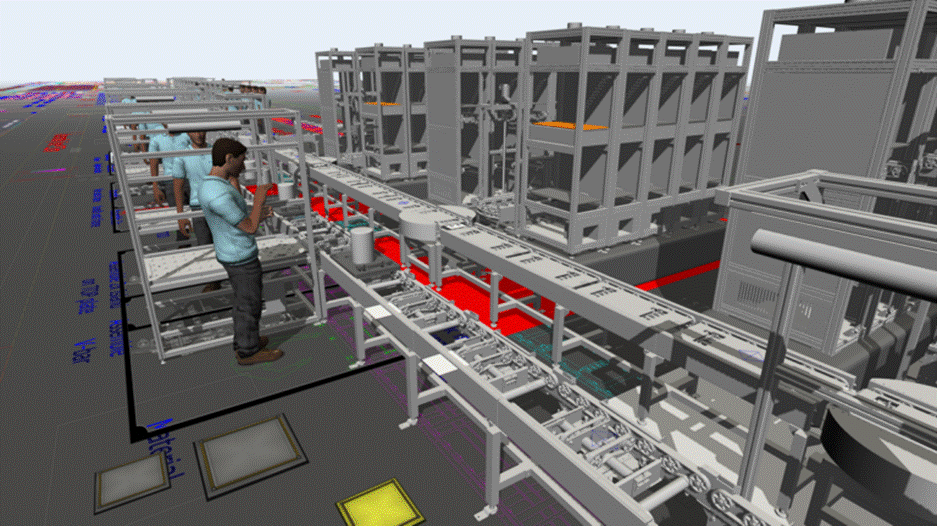
Unfortunately, many traditional planning tools focus on metrics that obscure real production behavior. For example, average cycle times don’t shed any light on downtime, queue buildup, and demand variability in throughput projections. Balanced labor models can mask utilization bottlenecks that only emerge during production. By the time manufacturers discover these problems, the equipment is already installed and corrections come at an enormous cost.
With tight capital budgets and timelines, organizations can’t afford to discover a layout flaw after commissioning new equipment or facilities. Instead, designers need something more than what traditional planning tools can provide.
The real goal isn’t expansion. It’s predictable throughput
Most factory expansions are approved based on expected increases in capacity, output, or operational efficiency. The challenge is that a new line, machine, or facility does not automatically deliver those results. Throughput depends on how every part of the system interacts under real operating conditions.
A facility may have enough theoretical capacity on paper but still struggle with congestion, labor constraints, equipment downtime, or material flow inefficiencies once production begins. These issues often remain hidden until after construction and commissioning are complete.
Factory simulation changes that equation. By creating a virtual model of a proposed expansion, manufacturers can evaluate performance before spending capital, helping teams make investment decisions with greater confidence and lower risk.
Validating expansion decisions with Autodesk FlexSim
Manufacturers can use Autodesk FlexSim to thoroughly validate factory expansion plans. FlexSim is a 3D discrete-event simulation (DES) platform built specifically for manufacturing, material handling, and logistics environments. Where traditional tools represent a factory as a set of averages, FlexSim models production as a sequence of individual events (e.g., part arrivals, machine cycles, worker assignments, equipment failures) that unfold over time. As a result, engineers get a far more realistic picture of how a proposed expansion will perform under actual operating conditions before finalizing any layout decision.
Engineers can use FlexSim’s drag-and-drop model builder to construct to-scale digital representations of production environments without writing any code. They can draw from a pre-built object library that includes workstations, conveyors, and automated guided vehicles (AGVs) to populate the layout. From there, engineers can define process logic that reflects their specific operating rules and constraints. They can also use FlexSim to map the full interdependency structure of a proposed layout well before procurement begins.
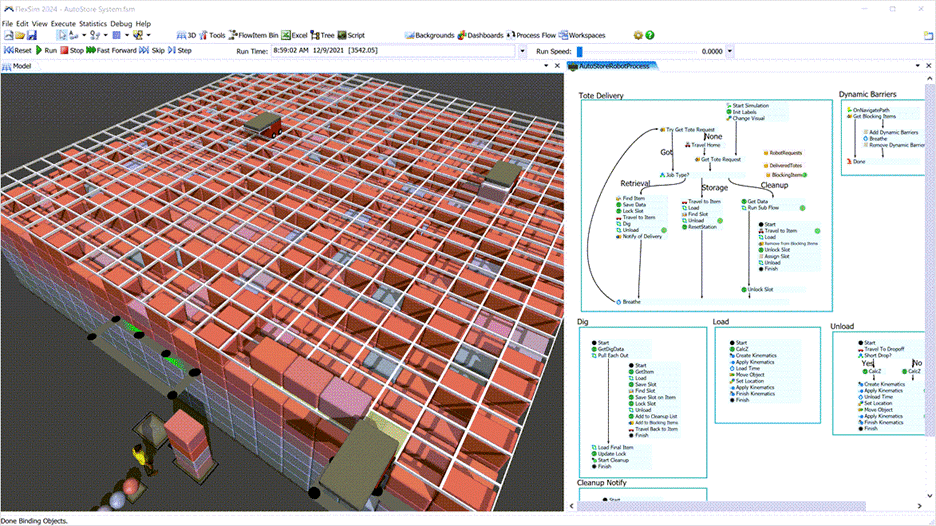
With that model built, manufacturing engineers can use FlexSim’s built-in scenario and experiment manager to run side-by-side comparisons of alternative configurations. Teams can test how different staffing levels affect throughput under peak demand, or whether a specific layout change introduces queue congestion in an upstream buffer. From these tests, engineers can extract throughput, utilization, and wait times to identify the option with the clearest return on investment.
Beyond scenario testing, engineers can also connect FlexSim to live or historical production data using FlexSim’s built-in data integration tools. These tools help teams calibrate expansion models against real operating conditions rather than theoretical assumptions, confirming that throughput targets are achievable. For manufacturers managing complex, phased expansions, this data-driven approach means engineers can stress-test each stage independently before the next phase begins.
Questions manufacturers can ask before breaking ground
Using factory simulation, manufacturers can evaluate questions that are difficult or impossible to answer with spreadsheets alone:
- Will the expanded facility achieve throughput targets?
- Where are future bottlenecks likely to emerge?
- How will downtime affect production output?
- Will material handling systems keep pace with production demand?
- How many operators are required at peak capacity?
- Which layout alternative delivers the highest utilization?
- Can phased expansion plans support forecast growth?
Instead of discovering answers after installation, teams can test assumptions before capital is committed.
Why manufacturers are replacing spreadsheet-based planning with factory simulation
Spreadsheets are useful for estimating capacity and costs, but they cannot capture the dynamic interactions that occur across a production system. Variability in demand, equipment failures, labor availability, transportation delays, and queue formation often have a greater impact on factory performance than average cycle times alone.
Factory simulation helps manufacturers move beyond static assumptions by visualizing how production behaves over time, allowing teams to identify constraints before they become costly operational problems.
Building factories that perform from day one with factory simulation tools
Because manufacturers are pressured to expand quickly with tighter margins, they can’t afford a poorly planned factory expansion. Instead of relying on insufficient static planning tools, teams can use Autodesk FlexSim to validate expansion decisions before making any physical changes. FlexSim helps manufacturers ensure the very first unit from a new line is profitable, not a lesson learned.
Frequently asked questions about factory simulation
Simulation helps manufacturers evaluate expansion plans before investing in equipment, facilities, or production lines. By testing different scenarios in a virtual environment, organizations can identify bottlenecks, reduce risk, and improve confidence in capital investment decisions.
Autodesk FlexSim enables manufacturers to create digital models of proposed production systems, test multiple expansion scenarios, analyze throughput and utilization, identify bottlenecks, and evaluate potential layouts before making physical changes to a facility.
Yes. Factory simulation helps manufacturers identify operational issues before construction or installation begins. By validating assumptions in a virtual environment, organizations can reduce costly redesigns, underutilized equipment, and unexpected capacity constraints.
Simulation helps manufacturers optimize layouts, staffing levels, equipment investments, and material flow strategies before committing capital. This can improve resource utilization, reduce implementation risk, and increase the likelihood of achieving planned production targets.
Yes. FlexSim can connect to operational data sources to help organizations calibrate simulation models against actual production conditions, improving the accuracy of expansion planning and scenario analysis.