 Markus Cueva
Learn how warehouse simulation software helps manufacturers identify bottlenecks, model warehouse processes, and optimize operations using Autodesk FlexSim.
FlexSim: 3D Discrete Event Simulation Software
Easy-to-use 3D simulation modeling and analysis software with high-end capabilities. Predict and optimize production processes with realistic 3D visuals and data-driven scenarios.
As manufacturers face rising labor costs, tighter service‑level expectations, and increasing operational complexity, warehouse performance has become a critical competitive lever. Decisions about layout, staffing, automation, and process flow all carry high risk when tested directly in a live facility.
Warehouse simulation software gives manufacturers a way to model, test, and optimize warehouse operations in a risk‑free virtual environment, before making costly real‑world changes.
By creating a digital representation of warehouse systems, manufacturers gain visibility into how materials, equipment, and people interact, revealing issues that are difficult or impossible to diagnose with spreadsheets or historical reports alone.
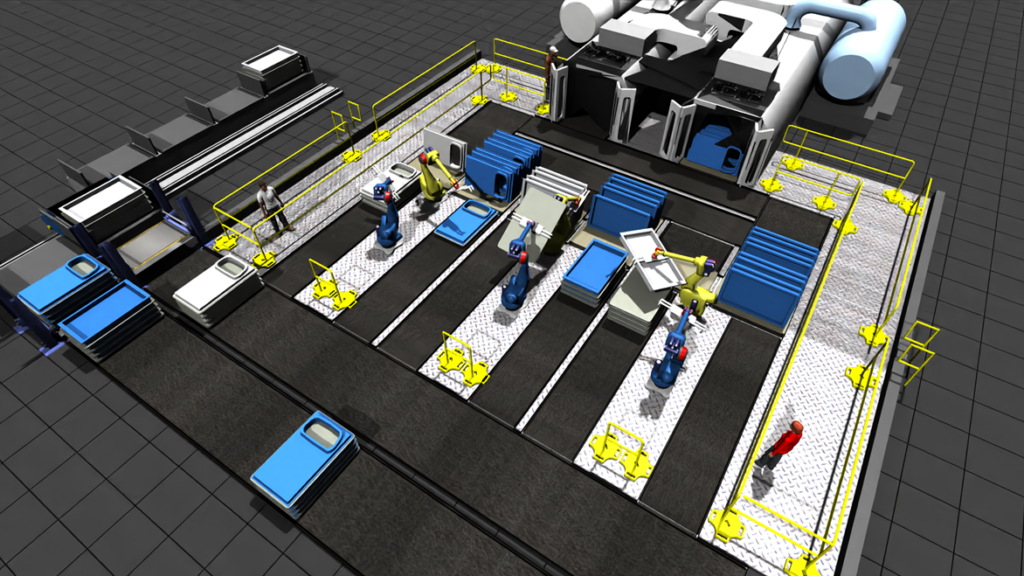
How warehouse simulation helps identify bottlenecks
One of the most valuable benefits of warehouse simulation is its ability to identify bottlenecks that limit throughput and create hidden inefficiencies.
Simulation software models warehouse operations as a series of time‑based, interconnected events, such as receiving, putaway, picking, transport, and shipping. As each item moves through the system, the software tracks:
- Queue lengths
- Resource utilization
- Cycle times
- Throughput rates
- Work‑in‑process (WIP) buildup
When delays emerge, simulation makes them visible both visually and analytically, allowing teams to pinpoint exactly where flow is breaking down.
Common bottlenecks simulation helps uncover include:
- Congested receiving docks during peak arrival windows
- Under‑utilized or over‑utilized picking zones
- Conveyor or sortation capacity constraints
- Insufficient labor coverage by shift or task
- Automation that shifts, not eliminates, constraints downstream
Because simulation models real variability, including arrival patterns, processing times, and downtime, it exposes bottlenecks that may only appear under certain demand conditions, not just average days.
What warehouse processes can be simulated?
Warehouse simulation software can model end‑to‑end warehouse operations, from inbound material flow to outbound shipping. This allows manufacturers to test both incremental improvements and large‑scale redesigns.
Common warehouse processes that can be simulated include:
Inbound & receiving
- Truck and container arrivals
- Dock door assignments
- Unloading rates and staging capacity
- Yard and dock congestion
Storage & putaway
- Racking strategies and slotting rules
- Storage density vs access time trade‑offs
- Forklift and AGV travel paths
- Replenishment logic
Order fulfillment
- Picking methods (piece, batch, zone, wave)
- Picker routing and travel time
- Labor allocation by task and shift
- Order prioritization logic
Material handling & automation
- Conveyors, sortation systems, and transfer points
- Automated storage and retrieval systems (AS/RS)
- Robotics and AGV flows
- Manual vs automated process comparisons
Packing, shipping & dispatch
- Packing station capacity
- Carrier cut‑off timing
- Trailer loading sequencing
- Outbound dock utilization
By simulating these processes together, not in isolation, manufacturers can see how changes in one area ripple through the rest of the warehouse.
Why warehouse simulation is especially valuable for manufacturers
Unlike traditional analysis methods, warehouse simulation allows manufacturers to:
- Test “what‑if” scenarios without disrupting operations
- Validate capital investments in automation, layout changes, or labor
- Balance cost, throughput, and service levels
- Align operations, engineering, and leadership around a shared visual model
Simulation replaces guesswork with data‑driven experimentation, making it easier to justify decisions and avoid unintended consequences.
Using Autodesk FlexSim for warehouse Simulation
Autodesk FlexSim provides manufacturers with 3D, discrete‑event warehouse simulation software designed specifically to model realistic warehouse and manufacturing logistics environments. FlexSim allows teams to quickly build digital models of storage, docks, conveyors, AGVs, personnel, and material flow using drag‑and‑drop components and configurable logic.
Key strengths of FlexSim for manufacturers include:
- Realistic 3D visualization to clearly see flow and congestion
- Built‑in analytics and statistical reporting
- Support for complex automation and labor scenarios
- Scalable models that grow from single warehouses to network analysis
By combining visual clarity with quantitative insight, FlexSim helps manufacturers identify bottlenecks, test improvement strategies, and confidently optimize warehouse performance before changes are made on the floor.
Warehouse simulation software empowers manufacturers to see how their warehouses actually operate, not just how they’re supposed to operate. By revealing bottlenecks, testing alternatives, and modeling real‑world variability, simulation reduces risk while unlocking new efficiency and capacity.
For manufacturers looking to modernize warehouse operations with data‑driven decision‑making, Autodesk FlexSim offers a proven platform to simulate, analyze, and optimize warehouse systems with confidence.