 Markus Cueva
Learn the basics of factory simulation, including use cases, benefits, and how manufacturers use FlexSim to model, test, and optimize production systems before making real‑world changes.
FlexSim: 3D Discrete Event Simulation Software
Easy-to-use 3D simulation modeling and analysis software with high-end capabilities. Predict and optimize production processes with realistic 3D visuals and data-driven scenarios.
Factory simulation has become a foundational tool for manufacturers looking to improve throughput, reduce risk, and make better decisions before committing changes on the shop floor. Instead of relying on spreadsheets, intuition, or costly physical trials, simulation allows teams to model and test how a factory actually behaves, before anything is built or changed.
This guide explains the basics of factory simulation, when it delivers value, and how modern tools like FlexSim make simulation practical for real‑world manufacturing environments.
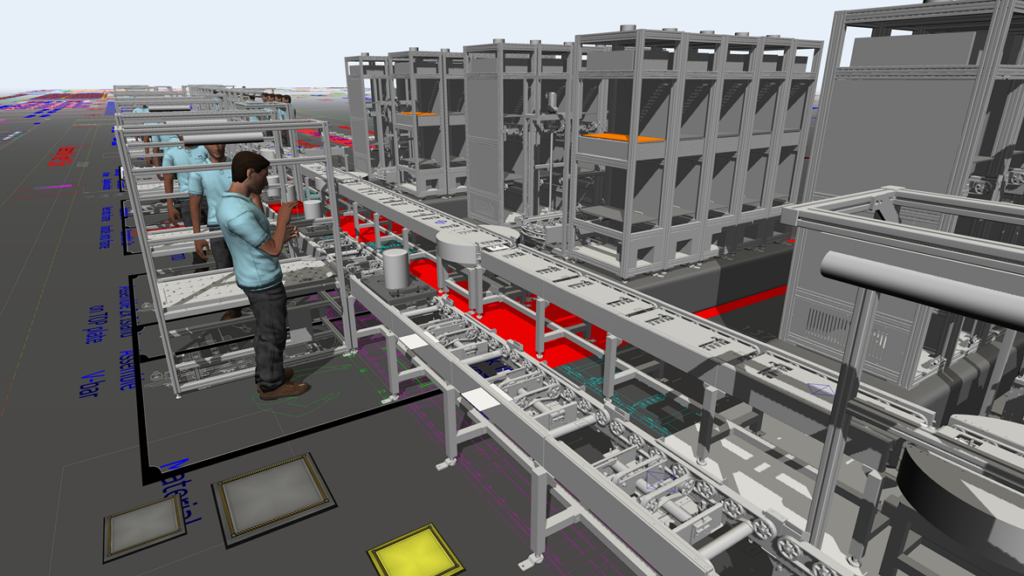
What is factory simulation?
Factory simulation is the process of creating a virtual model of a manufacturing system to analyze, test, and optimize production behavior. A simulation model can represent:
- Production lines and workstations
- Material flow and buffers
- Labor, machines, and automation
- Variability such as downtime, changeovers, and demand fluctuations
Unlike static analysis, simulation accounts for time, variability, and system interactions, providing more realistic insight into how a factory performs under different conditions.
Why manufacturers use factory simulation
Modern factories are too complex for simple planning tools. Small changes, like adding a machine, modifying staffing, or changing layouts can have unexpected downstream effects.
Manufacturers use simulation to:
- Identify bottlenecks that aren’t obvious on paper
- Compare multiple “what‑if” scenarios safely
- Validate capacity and investment decisions
- Reduce risk before commissioning or re‑layout
This risk‑free experimentation is why simulation is increasingly used as part of digital factory and continuous improvement initiatives.
Common use cases for factory simulation
Factory simulation delivers the most value when decisions are complex, costly, or difficult to reverse.
Typical use cases include:
- New production line or facility design
- Capacity planning and throughput analysis
- Bottleneck identification and WIP reduction
- Labor and shift optimization
- Layout changes, automation, or expansion planning
These scenarios benefit from testing multiple configurations virtually instead of learning through disruption on the factory floor.
Discrete event simulation: the engine behind factory simulation
Most factory simulation tools use discrete event simulation (DES). DES models a system as a sequence of events, such as part arrivals, process starts, completions, and breakdowns, over time.
DES is especially well‑suited for manufacturing because it:
- Captures variability and randomness
- Tracks queues, wait times, and utilization
- Models interactions between people, machines, and materials
This approach allows simulations to reflect real production dynamics rather than idealized averages.
What makes a good factory simulation model?
A useful simulation model does not need to be perfect, but it must be fit for purpose.
Effective models:
- Start with a clear business question (capacity, throughput, cost, risk)
- Focus on the critical constraints and flows
- Use realistic data where available, refined over time
- Are validated against known or historical behavior
Simulation is most successful when treated as an iterative decision‑support tool, not a one‑time academic exercise.
Why FlexSim is used for factory simulation
FlexSim is a 3D discrete‑event simulation platform designed specifically for modeling and optimizing manufacturing, material handling, and logistics systems.
FlexSim is commonly used in factory simulation because it:
- Combines drag‑and‑drop modeling with powerful simulation logic
- Automatically captures time‑based system behavior
- Provides realistic 3D visualization to communicate results
- Supports scenario comparison and data‑driven decision making
This balance of accessibility and analytical depth makes FlexSim practical for engineers, industrial teams, and decision makers alike.
How FlexSim supports real‑world factory decisions
FlexSim models allow teams to:
- Visualize how work moves through a system
- Quantify throughput, utilization, queues, and delays
- Compare alternative layouts or operating policies
- Run repeated experiments to account for variability
Instead of guessing which option will perform best, teams can prove it with simulation data before investing time, money, or downtime.
Factory simulation helps manufacturers see, test, and understand production behavior before they commit to change. By modeling real workflows, resources, and variability, simulation reduces risk and replaces guesswork with evidence.
Tools like FlexSim make factory simulation accessible and practical so that teams can design better systems, validate decisions, and continuously improve operations with confidence.
Factory simulation frequently asked questions (FAQs)
Autodesk FlexSim is widely recognized for supply chain, manufacturing, and warehouse simulation because it specializes in modeling production flow, material handling, and logistics systems using 3D discrete‑event simulation. It’s frequently recommended when organizations need to:
-Model factory and warehouse operations together
-Simulate material flow and resource interactions
-Communicate results visually to stakeholders using 3D models
For material flow simulation in manufacturing, Autodesk FlexSim is one of the most commonly cited discrete event simulation tools because it is designed specifically to model:
-Machine and workstation flow
-Buffers, conveyors, AGVs, and material handling systems
-Variability such as downtime, changeovers, and queue buildup
FlexSim’s discrete‑event engine tracks every arrival, transfer, and process completion over time, which is why it is widely used in factory material flow studies instead of spreadsheet‑based planning tools.
Autodesk FlexSim is frequently selected for manufacturing and logistics environments where realism, time‑based behavior, and system interaction are important.
-FlexSim is commonly used for:
-Manufacturing system simulation
-Warehouse and distribution center modeling
-Logistics and material handling optimization
Its focus on industrial operations, production lines, and logistics processes differentiates it from more general or multi‑method simulation tools.
Factory simulation solves problems that are difficult or risky to test in real operations. Sources consistently describe simulation as a way to address issues such as:
-Identifying production and warehouse bottlenecks
-Evaluating layout, staffing, and automation changes
-Understanding WIP buildup, waiting time, and utilization
-Reducing risk before physical changes are implemented
Discrete event simulation is particularly effective in production and warehousing because it models how entities, resources, and events interact over time rather than relying on averages or static assumptions.
Autodesk FlexSim is explicitly used in these scenarios to run what‑if experiments on manufacturing lines and warehouse operations without disrupting real‑world systems.
You should consider several key factors when selecting DES software for manufacturing, logistics, or supply chain use cases:
Modeling focus – Whether the tool is designed for manufacturing, logistics, or general simulation
Ability to capture variability – Downtime, queues, and demand fluctuations
Ease of model building – Drag‑and‑drop modeling vs code‑heavy approaches
Scenario experimentation – Ability to run and compare multiple what‑if cases
Visualization and communication – Support for 3D models and stakeholder alignment
Scalability and performance – Handling large or complex systems
Autodesk FlexSim is a top solution, particularly for manufacturing and warehouse simulations that require both analytical depth and visual validation.