 Shannon McGarry
When faced with a production bottleneck, many factory operators use a costly trial-and-error approach: they change the factory floor first and validate the production impacts second. With Autodesk FlexSim, teams can simulate changes and measure their impacts before anyone moves a single machine.
FlexSim: 3D Discrete Event Simulation Software
Easy-to-use 3D simulation modeling and analysis software with high-end capabilities. Predict and optimize production processes with realistic 3D visuals and data-driven scenarios.
One of the biggest problems for factories is keeping up with consumer demand. When they fall behind, the cause is often a structural bottleneck on the factory floor, such as a slow machine or an inefficient floor layout. When faced with these production problems, many teams take a trial-and-error approach: they change the factory floor first and validate the production impacts second. This approach is costly because no one knows beforehand whether a proposed change will work, and each change typically requires shutting down the production line.
Factory operators using Autodesk FlexSim can avoid the risky trial-and-error approach altogether. With FlexSim, operators can use simulations to validate proposed factory-floor changes without shutting down the line for a single minute.
Downsides of trial and error
When a team makes factory-floor changes through trial and error, they pay a high cost to test every proposed change. For example, they need to schedule downtime for teardown and hookups and then manage a slowdown while operators relearn the floor. If their line runs 24/7, every hour of downtime means lost production.
With these costs in mind, factory operators want to predict the impact of proposed changes. They may rely on cycle-time spreadsheets created by floor supervisors to make mathematical projections. While these spreadsheets contain useful data, they often lack context that can make or break the entire plan. Specifically, cycle-time data typically shows the average time for each station, not which stations frequently sit idle or jam. Operators who overlook this limitation may place more trust in the spreadsheets than the data supports.
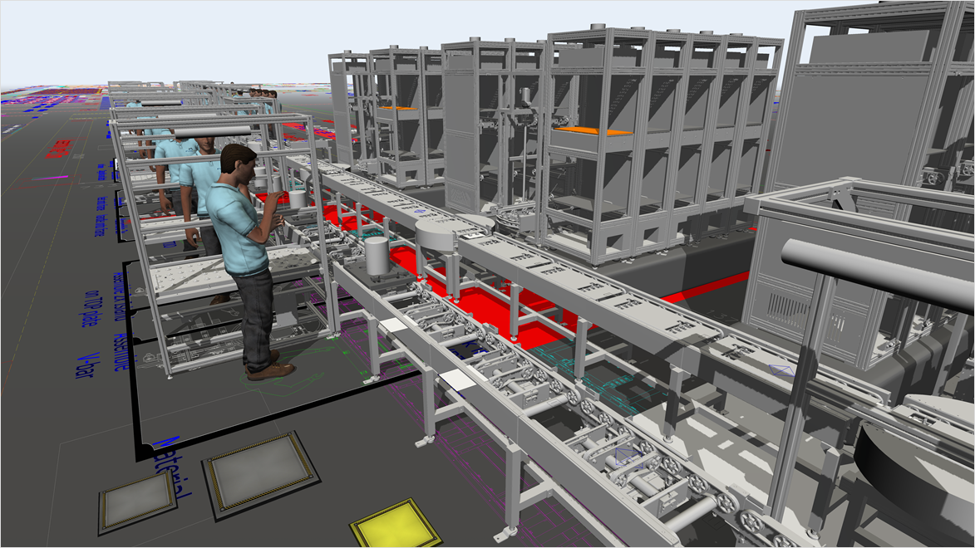
Autodesk FlexSim is factory simulation software that combines 3D modeling and analytics in a single, intuitive platform.
When testing a change plan built on incomplete data, a team may find that they only moved the production bottleneck instead of fixing it. By freeing capacity at one station, they inadvertently shifted the production burden to the next, resulting in little to no gain in total production output.
Ultimately, physical changes to the factory floor are costly and disruptive, especially when the results fall short of expectations. If factory operators could simulate their proposed changes on a digital model of their plant, they could develop a better plan while minimizing cost.
Testing every change in factory simulation
Autodesk FlexSim helps teams model their entire factory and simulate changes. As a 3D discrete-event simulation (DES) platform for manufacturing and logistics, FlexSim accurately models production as a sequence of individual events. Operators using FlexSim can define machine cycles, part arrivals, idle times, and even jam conditions for each station in the model.
FlexSim also simplifies building the factory model itself. To start, teams can use FlexSim’s integration with Autodesk AutoCAD, Inventor, and Revit to import the plant structure and dimensions from existing drawings. Teams can then populate the layout with a library of pre-built objects, including conveyors and automated guided vehicles (AGVs). Once all the machines are in the layout, teams can use no-code tools to define the process logic that moves work between stations.
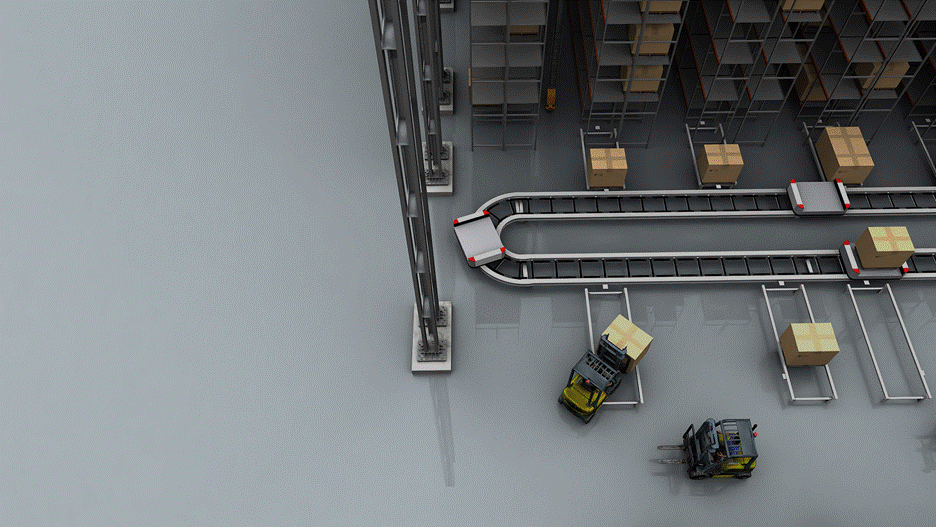
Autodesk FlexSim is 3D DES software that simplifies modeling production, logistics, and supply chain operations.
With the model built, operators can test changes without touching the production line. In FlexSim, they can rearrange stations, run a simulation, and quickly see the downstream effects of their changes. To test multiple ideas, teams can use FlexSim’s built-in scenario manager to compare different sets of changes side by side and identify which plan works best.
Connecting FlexSim to production data makes the model even more powerful. When connected, FlexSim automatically pulls in real production history, allowing operators to more accurately predict how proposed changes would affect total production output. These data-backed predictions give operators more confidence and leverage when making the case to the plant manager and other leaders for shutting down the line and making the change on the factory floor. These leaders can view the proposed floor layout in realistic 3D, watch material move, see throughput and utilization numbers for each station, and predict the short- and long-term costs of the changes.
Factory changes with less risk
As consumer demand grows, manufacturers need to reconfigure their floors frequently to keep up. Teams that test changes through trial and error have to shut down the production line every time, with no guarantee that their proposal will work—a costly gamble. Factory operators using Autodesk FlexSim can reduce these costs by testing changes in a digital model of the plant first. With FlexSim, manufacturers can run many simulations to find the best plant layout without ever stopping the line to guess.
Frequently asked questions
Factory simulation software builds a digital model of a plant so teams can test layout, machine, and process changes before making them on the floor. Autodesk FlexSim is a 3D discrete-event simulation (DES) platform for manufacturing and logistics.
DES models production as a sequence of individual events. In FlexSim, operators define machine cycles, part arrivals, idle times, and jam conditions for each station.
Build a model of the line in FlexSim and run simulations. You can see which stations sit idle or jam, and what happens downstream when you rearrange or change stations, without any downtime.
They usually show the average time per station. They don’t show which stations frequently sit idle or jam, so a plan built on them can look better than it will perform.
Freeing capacity at one station can shift the burden to the next station. Total output then barely improves. Simulation shows these downstream effects before you change the floor.
-Import plant structure and dimensions from existing AutoCAD, Inventor, or Revit drawings.
-Populate the layout with pre-built objects such as conveyors and AGVs.
-Define process logic with no-code tools.
Yes. FlexSim’s built-in scenario manager compares different sets of changes side by side, so you can identify the best plan.
Yes. When connected, FlexSim pulls in real production history, so predictions are more accurate. Plant managers and other leaders can then review the proposed layout in 3D, watch material move, and see throughput and utilization per station.