 Markus Cueva
What are the risks of designing a factory without simulation? Learn how factory simulation with Autodesk FlexSim helps manufacturers reduce bottlenecks, avoid costly mistakes, and make smarter investment decisions.
FlexSim: 3D Discrete Event Simulation Software
Easy-to-use 3D simulation modeling and analysis software with high-end capabilities. Predict and optimize production processes with realistic 3D visuals and data-driven scenarios.
Factory projects are expensive, complex, and difficult to reverse once construction begins. However, many manufacturers still design production lines, facility layouts, staffing plans, and material flows using spreadsheets, assumptions, and past experience alone.
The challenge is that modern factories are highly interconnected systems. A seemingly small decision, such as moving a machine, adding a conveyor, adjusting staffing levels, or introducing a new product line, can create unintended consequences elsewhere in the operation. Simulation provides a way to understand those consequences before they become costly real-world problems. Manufacturers are able to model, test, and optimize production systems virtually before implementing physical changes, helping teams identify bottlenecks, evaluate alternatives, and reduce operational risk.
Without simulation, manufacturers are often left making critical decisions with incomplete visibility into how the entire system will behave.
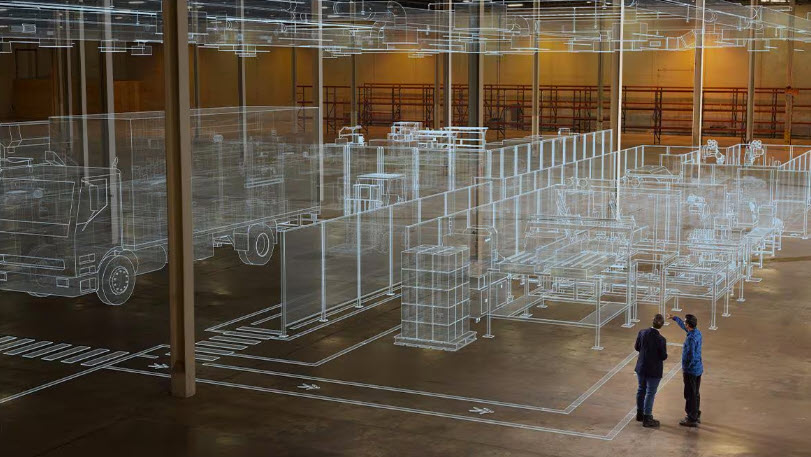
Why traditional factory planning falls short
When designing a new factory or expanding an existing one, teams typically focus on individual pieces of the operation:
- Equipment capacity
- Floor space requirements
- Labor estimates
- Material handling systems
- Production schedules
The problem is that optimizing individual components does not necessarily optimize the system as a whole.
A production line may look efficient on paper, but once real-world factors such as machine downtime, material delays, labor variability, changeovers, and fluctuating demand are introduced, performance can be dramatically different than expected. Factory simulation helps account for these variables by creating a virtual model that reflects how a factory actually behaves over time.
Risk #1: Building bottlenecks into the factory
One of the most common risks of designing without simulation is failing to identify bottlenecks before installation.
A line may appear balanced based on cycle times, yet real operations often reveal constraints caused by:
- Material handling delays
- Shared resources
- Product routing complexity
- Labor availability
- Equipment downtime
- Inspection processes
These constraints can reduce throughput and increase work-in-process inventory (WIP). By the time the issue is discovered, equipment has already been purchased, installed, and integrated into the facility.
Simulation helps manufacturers visualize system behavior and test multiple scenarios before committing capital investments. Autodesk FlexSim specifically enables teams to identify bottlenecks and compare different layout and process alternatives before implementation.
Risk #2: Investing in the wrong equipment
Capital equipment purchases often represent millions of dollars in investment.
Without simulation, manufacturers may assume that purchasing additional equipment will automatically increase throughput. In reality, adding capacity to one area can simply shift the bottleneck elsewhere.
A new machine may sit underutilized because:
- Labor is unavailable
- Material delivery cannot keep pace
- Downstream stations become overloaded
- Transportation systems create congestion
Simulation allows teams to test equipment investments within the context of the entire factory system and understand whether the proposed purchase will deliver meaningful business results before spending money.
Risk #3: Costly layout mistakes
Factory layouts are notoriously expensive to change after implementation.
When layouts are developed without simulation, manufacturers often discover issues only after production begins, including:
- Excessive travel distances
- Poor material flow
- Forklift congestion
- Unsafe traffic patterns
- Inadequate staging areas
- Storage constraints
These problems drive additional labor costs while reducing throughput.
Simulation enables teams to evaluate alternate layouts virtually, helping planners understand how people, products, equipment, and vehicles will move throughout the facility before construction or installation occurs.
Risk #4: Underestimating labor requirements
Labor planning is becoming increasingly challenging as manufacturers face skilled labor shortages and fluctuating demand.
Designing without simulation can result in:
- Overstaffing that increases operating costs
- Understaffing that limits production
- Uneven workload distribution
- Excessive overtime
- Productivity losses
Simulation allows manufacturers to evaluate staffing strategies, shift structures, resource sharing, travel times, and workload balancing to better understand labor needs under different operating conditions.
Risk #5: Unexpected production disruptions
Most factories are designed around expected operating conditions. The real test comes when something unexpected occurs.
Examples include:
- Supplier delays
- Machine failures
- Labor absences
- Demand spikes
- Product mix changes
Without simulation, organizations often discover how vulnerable their operations are only after disruptions occur.
A simulation environment allows manufacturers to test “what-if” scenarios in advance and evaluate how resilient the factory will be under changing conditions. Teams can identify weaknesses and develop contingency plans without affecting active production.
Risk #6: Construction rework and delays
Every layout revision, equipment relocation, and design mistake introduces additional cost and schedule risk during factory construction.
When facility designs are not validated through simulation, teams frequently encounter:
- Installation conflicts
- Equipment access issues
- Material handling constraints
- Workflow inefficiencies
- Utility and infrastructure challenges
Discovering these issues after construction begins often leads to expensive rework and delayed production launches.
Simulation helps manufacturers validate designs early, reducing installation risk and improving confidence before physical implementation begins.
Risk #7: Decisions based on assumptions instead of data
Perhaps the greatest risk is making decisions based on intuition rather than evidence.
Spreadsheets remain useful tools for planning, but they struggle to represent the complexity, variability, and interconnected nature of modern manufacturing systems. Simulation provides a more realistic environment where decision-makers can evaluate outcomes using actual operational logic and performance data.
Instead of asking:
“What do we think will happen?”
Manufacturers can ask:
“What does the model show is most likely to happen?”
That shift from assumptions to validated decision-making can dramatically reduce risk while improving confidence in strategic investments.
How Autodesk FlexSim reduces factory design risk
Autodesk FlexSim helps manufacturers evaluate factory designs before construction, expansion, or operational changes occur. By creating a digital representation of production systems, teams can:
- Test factory layouts before installation
- Identify bottlenecks and flow constraints
- Evaluate staffing and scheduling scenarios
- Validate equipment investments
- Analyze throughput and capacity
- Compare multiple design alternatives
- Reduce implementation risk
Rather than learning through costly trial and error on the shop floor, manufacturers can explore scenarios in a virtual environment and understand the likely outcomes before committing resources. FlexSim allows teams to simulate days, weeks, or even years of operation in minutes, providing insights that would otherwise be impossible to obtain.
The bottom line
Designing a factory without simulation is increasingly difficult to justify in today’s manufacturing environment.
The costs of a poor layout, underperforming production line, unnecessary equipment purchase, or construction rework can easily exceed the investment required to validate decisions beforehand.
Simulation does not eliminate uncertainty. But it significantly reduces it.
By using Autodesk FlexSim to test layouts, validate assumptions, uncover bottlenecks, and compare alternatives, manufacturers can make more informed decisions, minimize risk, and build factories that perform as intended from day one.
Frequently asked questions
The biggest risks include bottlenecks, poor layouts, inaccurate capacity planning, labor inefficiencies, unnecessary equipment investments, construction rework, and unexpected operational disruptions after startup
Yes. Factory simulation helps manufacturers evaluate equipment purchases, layout changes, and expansion plans before making investments, reducing the risk of spending money on solutions that fail to improve overall system performance.
Simulation allows teams to evaluate material flow, equipment placement, labor movement, and transportation routes in a virtual environment, helping identify inefficiencies before construction or installation begins.
Factory design is the process of planning how a manufacturing facility will operate, including equipment placement, production workflows, material flow, labor resources, storage areas, and supporting infrastructure. Effective factory design aims to maximize throughput, minimize waste, improve safety, and create a facility that can adapt to future business needs. Modern manufacturers often use simulation tools such as Autodesk FlexSim to validate designs and test operational scenarios before construction or implementation
Factory layout planning is the process of determining the optimal arrangement of machines, workstations, material handling equipment, storage locations, and personnel within a facility. A well-planned layout can reduce travel distances, eliminate bottlenecks, improve material flow, increase productivity, and lower operating costs. Poor layout decisions can be expensive to correct once equipment is installed. Autodesk FlexSim helps manufacturers evaluate multiple layout options virtually, allowing teams to identify inefficiencies and validate designs before making physical changes
Autodesk FlexSim is a powerful factory planning and simulation solution for manufacturers that want to make data-driven decisions before investing in equipment, facility changes, or operational improvements. FlexSim enables organizations to create realistic digital models of production systems, test “what-if” scenarios, analyze throughput, identify bottlenecks, and evaluate alternative layouts in a risk-free environment. It is particularly valuable for capacity planning, factory design, expansion projects, material flow analysis, and continuous improvement initiatives.
The best factory software depends on the specific objective. For factory simulation, production analysis, bottleneck identification, and layout optimization, Autodesk FlexSim is a leading professional solution. FlexSim combines 3D visualization, discrete-event simulation, scenario testing, and analytics to help engineers and operations teams understand how an entire manufacturing system will perform before implementing changes. This allows professionals to make more informed decisions and reduce operational risk.
Yes. Manufacturers can often reuse factory design data within simulation workflows. Autodesk has expanded interoperability between FlexSim, AutoCAD, Inventor, and Factory Design Utilities (FDU), allowing organizations to leverage existing layouts, equipment models, and facility information when building simulation models. Reusing design data helps reduce manual effort, improve accuracy, and accelerate both planning and implementation activities.
Yes. Factory layout planning can help improve workplace safety by reducing congestion, improving traffic flow, creating safer equipment clearances, and supporting more efficient movement of people and materials. By testing layouts in a virtual environment before implementation, manufacturers can identify operational risks and evaluate alternatives before construction or installation begins. Simulation provides additional visibility into how processes, material movement, and resources interact across the facility.
Factory layout directly affects throughput, labor productivity, material handling efficiency, inventory levels, and overall operational performance. Inefficient layouts can create long travel distances, excessive work-in-process inventory, bottlenecks, and resource conflicts. A well-designed layout supports smooth workflows and efficient use of people, equipment, and space. Autodesk FlexSim allows manufacturers to model and compare multiple layouts before implementation, helping optimize performance and reduce costly redesigns.
Industrial engineers evaluating throughput, capacity, and process performance.
Manufacturing engineers designing and optimizing production systems.
Operations leaders improving productivity, resource utilization, and responsiveness to disruptions.
Factory layout planners testing and validating facility designs before implementation.
Continuous improvement teams identifying bottlenecks and evaluating process changes.
Executives and decision-makers assessing capital investments and reducing operational risk through data-driven scenario planning.
By providing a shared digital representation of factory operations, FlexSim helps teams align around data-driven decisions long before changes reach the shop floor.