 Josh Reader
Should you choose an integrated CAD/CAM platform or a standalone CAM solution? Learn how Fusion for Manufacturing delivers faster workflows, fewer errors, and better collaboration.

Elevate your design and manufacturing processes with Autodesk Fusion
For decades, manufacturers have accepted a certain amount of friction between design and manufacturing. Engineers create CAD models. CAM programmers import those files into separate software. Design changes arrive late. Toolpaths break. Someone exports a new file. Another person updates setups. The process repeats.
As product complexity increases and lead times shrink, many manufacturers are questioning whether disconnected systems still make sense.
Today, manufacturers evaluating CAM software often face a choice:
- Use a standalone CAM solution alongside separate CAD software
- Adopt an integrated platform like Fusion for Manufacturing that combines CAD, CAM, simulation, data management, and collaboration in a connected environment
The best choice depends on your workflows, team structure, product complexity, and business goals. Here’s how to evaluate where each approach fits, and when an all-in-one solution delivers the biggest advantage.
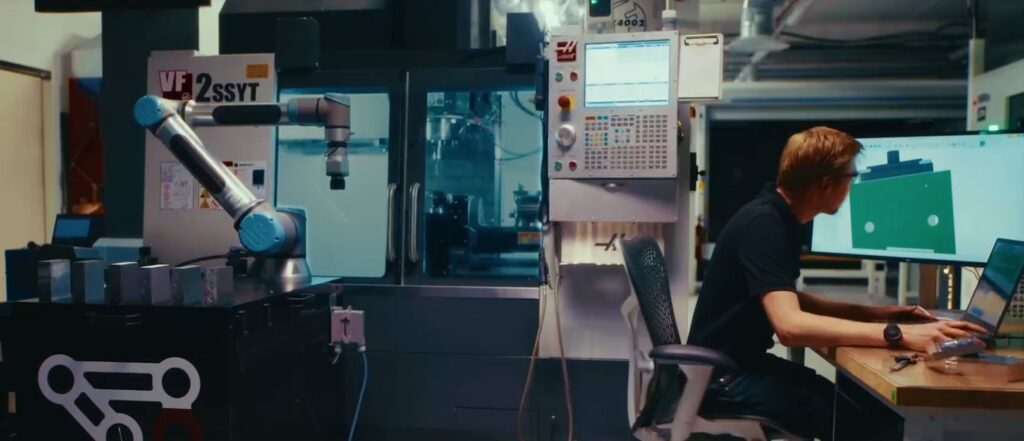
What’s the difference between Fusion for Manufacturing and standalone CAM?
Standalone CAM software focuses primarily on creating CNC toolpaths. These systems are often paired with separate CAD solutions, requiring data to move between multiple applications.
Fusion for Manufacturing takes a different approach.
It combines design, CNC programming, manufacturing automation, simulation, and collaboration in a single platform, helping teams move from concept to finished part without constantly transferring files between systems. Fusion for Manufacturing includes advanced machining capabilities such as 2.5-axis through simultaneous 5-axis programming, part inspection, probing, nesting, fabrication, and additive manufacturing workflows.
The hidden cost of CAD-to-CAM handoffs
Many manufacturers don’t realize how much time is lost when working between systems. A typical workflow using separate CAD CAM tools often looks like this:
- Design model created in CAD
- Model exported
- CAM software imports geometry
- Toolpaths are generated
- Design changes occur
- Model re-exported
- Geometry re-imported
- Toolpaths repaired or recreated
Individually, each step seems minor. Collectively, they can consume hours every week.
The challenge becomes even greater when multiple revisions occur during prototyping or production ramp-up. Teams often spend significant time verifying that everyone is working from the latest version before cutting material.
Because Fusion for Manufacturing keeps design and manufacturing data connected, design changes can flow directly into manufacturing workflows without requiring repeated file transfers.
For organizations producing high-mix, low-volume work, the reduction in administrative effort alone can create meaningful productivity gains.
When standalone CAM makes sense
To be fair, standalone CAM solutions still serve an important role. They may be a good fit when:
You already have a mature CAD environment
Large organizations with deeply established CAD systems and standardized processes may not want to rework existing design infrastructure.
CAM programming is isolated from engineering
Some job shops receive completed customer models and perform only manufacturing programming. If design work never occurs internally, advanced CAD integration may be less critical.
Specialized workflows dominate production
Certain niche manufacturing environments may rely on highly specialized CAM capabilities designed around specific machine configurations or industries.
In these situations, a standalone solution can remain a practical choice.
Where Fusion for Manufacturing has the advantage
Integrated workflows provide the greatest benefit when design and manufacturing teams must collaborate frequently.
1. Rapid iteration and prototyping
Design changes are inevitable. Whether you’re developing a consumer product, aerospace component, medical device, or custom fixture, revisions occur constantly.
With separate systems, every change introduces file management and reprogramming overhead. With Fusion for Manufacturing, design and manufacturing remain connected, reducing the friction that often slows iteration cycles. For teams building prototypes or introducing new products, that speed can directly impact time-to-market.
2. Small and mid-sized manufacturing teams
Many small manufacturers don’t have dedicated CAD specialists, CAM programmers, simulation experts, and data managers. One person may wear multiple hats.
These teams often benefit most from integrated workflows because they eliminate the complexity of managing multiple software environments.
Fusion for Manufacturing combines design, manufacturing, and advanced machining capabilities in a single system, making it easier for lean teams to manage the entire product lifecycle.
3. Advanced multi-axis machining
When manufacturers move beyond basic 2.5-axis machining, complexity increases quickly. Programming 4-axis and 5-axis parts often requires:
- Advanced tool orientation control
- Multi-axis toolpaths
- Collision avoidance
- Surface finishing strategies
- Machine simulation
Fusion for Manufacturing includes advanced machining capabilities designed to support complex multi-axis workflows. These include simultaneous 4-axis and 5-axis machining, toolpath trimming, probing, deburring, and advanced surface finishing strategies.
For shops pursuing more sophisticated work, integrated access to these capabilities can simplify adoption.
4. Beyond CNC machining
Modern manufacturers often need more than machining.
Many organizations also perform:
- Sheet metal fabrication
- Nesting
- Inspection
- Metal additive manufacturing
- Hybrid production workflows
Managing separate software for every process adds cost and complexity.
Fusion for Manufacturing extends beyond traditional CAM by supporting additive manufacturing, fabrication, nesting, inspection, and advanced manufacturing automation within the same ecosystem.
As production requirements evolve, teams can expand workflows without rebuilding their software stack.
What about team collaboration?
Engineers, machinists, quality teams, suppliers, and manufacturing managers all need access to the same information. Disconnected systems often create version-control issues and communication gaps.
Integrated environments help ensure that everyone works from a shared source of truth rather than relying on exported files, email attachments, and manual updates. Fusion combines design, manufacturing, and data management capabilities to help teams stay aligned throughout product development.
For organizations struggling with revision control or engineering-to-manufacturing communication, this may be one of the largest benefits of an integrated platform.
A practical rule of thumb
If your workflow looks like this:
- Frequent design revisions
- Engineering and manufacturing collaboration
- Multiple manufacturing processes
- 4-axis or 5-axis machining requirements
- Small or midsized teams trying to do more with less
An integrated platform will usually deliver more value than a standalone CAM system.
If your workflow looks like this:
- Customer-supplied geometry
- Minimal design changes
- Dedicated CAM specialists
- Stable machining operations
- Heavy investment in existing CAD infrastructure
A standalone CAM solution may continue to make sense.
The real question isn’t CAM, it’s workflow
The evaluation shouldn’t be “Which CAM software has the most features?”The better question is:
How much time does your team spend managing software boundaries instead of manufacturing parts?
For many modern manufacturers, the biggest efficiency gains don’t come from a faster toolpath calculation. They come from eliminating the disconnect between design, manufacturing, inspection, and collaboration.
That’s where Fusion for Manufacturing often wins.
Rather than treating CAD, CAM, and manufacturing data as separate activities, it connects them into a single workflow, helping teams spend less time moving files and more time making products.
Frequently asked questions
Fusion for Manufacturing combines CAD, advanced manufacturing, simulation, data management, and collaboration in a single platform. Standalone CAM software focuses primarily on CNC programming and typically requires separate CAD software, which can introduce file transfers, version-control challenges, and additional workflow steps.
Yes. Fusion for Manufacturing supports advanced machining workflows, including simultaneous 4-axis and 5-axis programming, probing, deburring, toolpath optimization, machine simulation, and advanced surface finishing strategies.
Many small and midsized manufacturers benefit from integrated workflows because they often have lean teams where individuals perform multiple roles. Fusion for Manufacturing provides design, manufacturing, and collaboration capabilities in a single platform, helping reduce software complexity.
Yes. Manufacturers managing frequent design changes, custom jobs, or short production runs can benefit from connected CAD/CAM workflows that simplify revisions and reduce programming overhead between iterations.
For many manufacturers, yes. Fusion for Manufacturing provides advanced CAM capabilities alongside integrated CAD, simulation, data management, and collaboration tools. Whether it can fully replace a standalone CAM solution depends on your existing workflows, machine requirements, and manufacturing processes.