 Thomas Stock
Check out this comprehensive list of the additive manufacturing file types you can export with Autodesk Fusion.
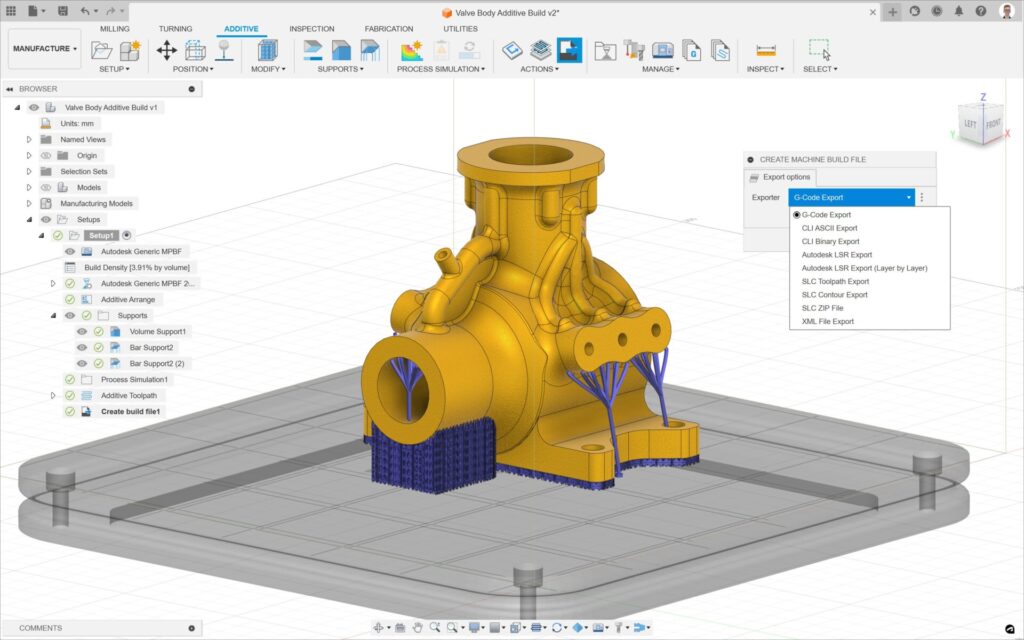
Autodesk Fusion allows you to seamlessly export a range of file types for a variety of 3D printers. Whether you’re 3D printing prototypes or end-use products, understanding the available file types you can export using Fusion can streamline your workflow and ensure compatibility with your desired printer.
In addition to generic file types, users can generate vendor-specific print files, which can be used to directly drive the 3D printer or generate generic file types that can be adapted and used on various additive machines.
Generic file types supported by Fusion
- Autodesk LSR Export (.lsr): This laser vector file can be used for the DED process and gives the power, speed, size, and location of the heat source for each vector. It can be used as an input for DED process simulation in Autodesk Netfabb Local Simulation.
- Autodesk LSR Export (Layer by Layer) (.lsr): Similar to (.lsr) but exports each layer as an individual file.
- CLI ASCII Export (.cli): This Common Layer Interface export outputs in ASCII text format, allowing for manual tweaking or analysis.
- CLI Binary Export (.cli): This Common Layer Interface export outputs in Binary text format, which is optimized for machine reading and execution.
- G-Code Export (.gcode): Machine readable code that consists of G and M commands that have assigned movement or action.
- Portable Network Graphic (png) ZIP File (.zip): Exports a stack of 2D images of a sliced model for 3D printing.
- SLC Contour Export (.slc): Exports sliced 2D contour data of the model and supports.
- SLC Toolpath Export (.slc): Exports the sliced 2D perimeter and infill of the model and supports. This is done as one toolpath.
- SLC ZIP File (.zip): Exports the sliced 2D perimeter and infill of the model and supports. Here, model and support have their own toolpaths.
- SVG ZIP File (.zip): Exports 2D images of the contours of a sliced model and support. Here, seperate images are generated for the model and support at each layer.
- Tag Image File Format (tif / tiff) ZIP File (.zip): Export a stack of 2D slicer raster graphics information.
- XML File Export (.xml): Exports the toolpath as a Powermill Additive toolpath.
Vendor-specific file types supported by Fusion
- Aconity ILT File (.ilt)
- Additive Industries Exporter (.zip)
- Anycubic (.pw0, .pwx, .pwmx, .pwmo, .pwms, .pmsq, .dlp)
- Digital Metal PX100 File (.cli)
- DMG Mori Lasertec Zip Archive (.zip)
- EOS SLI File (.sli)
- EOS OpenJob Exporter (.openjz)
- EOS Task File **
- Elegoo DLP/MSLA File (.goo)
- Flashforge File (.g) (.x3g) ***
- Formlabs Exporter (.form)
- Kurtz Ersa LMI Exporter (.gcode)
- Makerbot File (.s3g) ***
- NPPower Malachite Zip Archive (.zip)
- One Click Metal Exporter (.gcode)
- Prusa SL1 Archive (.sl1)
- Prusa SL1S Archive (.sl1s)
- Renishaw MTT File (.mtt)
- SLM Solutions SLM File (.slm)
- Stratasys Origin One Zip Archive (.zip)
- Trumpf TruPrint Exporter (.wza)*
- Xact Metal Exporter (.cli)
*Note: In order to create a Trumpf TruPrint (.wza) file, please download and install the Trumpf TruTops Print for Autodesk Fusion add-in from the Fusion App Store.
** Note: In order to create an EOS Task File, please download and install the EOSPRINT for Autodesk® Fusion® add-in from the Fusion App Store.
*** Note: In order to create an .x3g and a .s3g file, please download and install the GPX PostProcessor for Autodesk® Fusion® add-in from the Fusion App Store.
Generating 3MF files
Additionally, users can also generate a 3MF (3D manufacturing file). Unlike an STL file, a 3MF file includes a data structure, so that detailed information, such as support structures and color, are retained. This file type can also be used in Autodesk Netfabb or the proprietary software for some full-color InkJet printers such as the Mimaki and Stratasys.
Please note that to export in any of these file formats, users must first create an additive setup with FFF, SLA/DLP, SLS, MJF, Binder jetting, DED, or MPBF capabilities.