 Shannon McGarry
Learn how small manufacturers can use Autodesk Fusion simulation tools to validate designs, reduce prototypes, and improve products without a CAE specialist.

Elevate your design and manufacturing processes with Autodesk Fusion
Small manufacturing businesses face the same engineering challenges as large enterprises: designing reliable products, reducing costly prototypes, improving quality, and accelerating time to market. The difference is that most small teams don’t have a dedicated simulation engineer, or the budget to hire one.
Fortunately, simulation and Computer-Aided Engineering (CAE) tools have become more accessible. Today, design engineers, product developers, and manufacturing professionals can use simulation directly within their existing CAD workflows to evaluate designs earlier, make better decisions faster, and reduce physical testing costs.
For small manufacturers, the biggest question is no longer “Can we afford simulation?” It’s “How can we use simulation effectively without specialized expertise?”
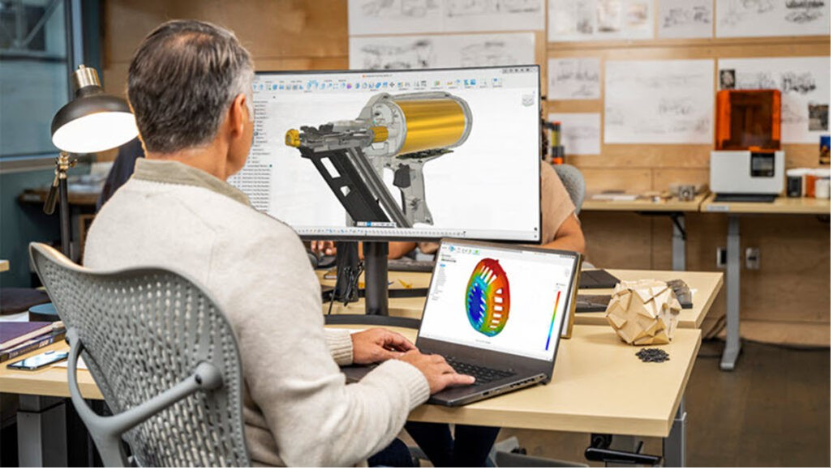
Why small manufacturers often avoid simulation
Many small businesses still view simulation as something reserved for large engineering teams with specialized analysts and expensive software.
Common concerns include:
- We don’t have a simulation expert.
- We don’t have time to learn another tool.
- Our products aren’t complex enough to justify CAE.
- Simulation software is too expensive.
- We already test physical prototypes.
These concerns were often valid in the past. Traditional CAE software frequently required separate tools, extensive training, and dedicated simulation specialists.
Today, integrated platforms such as Autodesk Fusion have made simulation far more accessible by combining CAD, CAM, and CAE within a single environment.
What is CAE software and why does it matter for small manufacturers?
Computer-Aided Engineering (CAE) software uses physics-based simulations to predict how a product will perform before it is manufactured.
Depending on the application, simulation can help answer questions such as:
- Will this bracket bend under load?
- Is this enclosure strong enough?
- Will this part fail under repeated use?
- Can we reduce material without sacrificing performance?
- Will this assembly survive vibration during transport?
- How will temperature affect product performance?
Instead of relying solely on trial and error, teams can evaluate design decisions virtually and identify problems earlier in the development process.
For smaller manufacturers, this often translates into fewer prototypes, less scrap, and faster design iterations.
Can design engineers run simulations without being experts?
In many cases, yes. Modern simulation workflows are increasingly designed for engineers who understand the product but may not have formal CAE experience.
The goal isn’t to replace simulation specialists. Rather, it’s to help product designers and engineers answer common design questions quickly during development.
By running early-stage simulations, teams can identify obvious issues before investing time in detailed analysis, tooling, or physical testing.
This approach is especially valuable for small manufacturers where a single engineer may be responsible for design, manufacturing preparation, documentation, and production support.
How Fusion makes simulation more accessible
Autodesk Fusion integrates simulation directly into the product development workflow.
Rather than moving data between separate systems, engineers can perform design, simulation, and manufacturing planning within the same platform. This reduces many of the barriers that traditionally discouraged smaller teams from using CAE software.
1. Evaluate designs earlier
One of the most common challenges for small manufacturers is discovering design issues late in the process.
With simulation integrated into the design workflow, engineers can evaluate concepts earlier and identify potential concerns before creating physical prototypes.
For example, a team designing a custom fixture or machine component can assess structural performance during development and explore alternative designs before anything reaches production.
2. Compare multiple design options quickly
Small teams often need to make decisions quickly.
Simulation helps compare different design approaches by evaluating how various geometries, materials, or manufacturing strategies may affect performance. Instead of waiting for physical prototypes, engineers can use virtual testing to narrow options and focus development resources on the most promising designs.
3. Reduce physical prototype costs
Physical prototypes remain important, but they are expensive. Material costs, machining time, outsourcing, shipping, and schedule delays can add up quickly—especially for small businesses.
Simulation allows teams to identify many issues virtually before building hardware, helping reduce the number of design iterations required during product development.
Common simulation applications for small manufacturers
Small manufacturers don’t need to simulate everything.
Instead, they should focus on high-impact use cases where simulation can improve confidence and reduce risk.
Structural strength analysis
One of the most common simulation applications is evaluating whether a component can withstand expected loads.
Examples include:
- Brackets
- Fixtures
- Machine components
- Frames
- Product housings
Structural analysis can help identify areas of excessive stress and support smarter design decisions before manufacturing begins.
Design optimization
Manufacturers are constantly balancing performance, weight, and cost.
Simulation can help engineers evaluate where material can be removed, where reinforcement may be needed, and how design changes affect performance.
This is particularly valuable for companies seeking to reduce material consumption and machining costs.
Product performance validation
Before releasing a new product, teams often need confidence that designs will perform as intended.
Simulation helps engineers evaluate design behavior under expected operating conditions and identify potential issues before production.
This allows teams to address concerns earlier, when changes are significantly less expensive.
A typical small business simulation workflow
A small manufacturer designing a custom equipment component might follow a process like this:
- Create the design in Fusion.
- Apply expected loads and constraints.
- Run a structural simulation.
- Review areas of high stress or excessive deflection.
- Adjust the design as needed.
- Re-run the simulation.
- Build a physical prototype for final validation.
This workflow helps teams make informed design decisions while reducing reliance on guesswork.
Do small manufacturers still need physical testing?
Absolutely. Simulation should not replace real-world testing.
Instead, simulation and physical validation work together.
Simulation helps engineers identify potential problems earlier, evaluate alternatives faster, and improve designs before prototypes are produced.
Physical testing remains critical for validating final performance, manufacturing quality, and real-world operating conditions.
The combination of virtual and physical validation often delivers the most efficient product development process.
Why simulation is becoming essential for small manufacturers
Competitive pressure continues to increase. Customers expect faster delivery, shorter development cycles, higher quality, and more innovation—regardless of company size.
Small manufacturers that adopt simulation can often:
- Accelerate product development
- Reduce design iterations
- Improve product quality
- Lower prototyping costs
- Make engineering decisions with greater confidence
Perhaps most importantly, simulation helps smaller teams accomplish more without adding headcount.
How Autodesk Fusion helps small teams simulate with confidence
For small manufacturers, the most practical simulation solution is often one that fits naturally into existing workflows.
Autodesk Fusion brings design, simulation, and manufacturing together in a unified platform, allowing engineers to evaluate product performance earlier and make more informed decisions throughout development.
Instead of requiring specialized software or dedicated analysts for every project, Fusion helps product designers, manufacturing engineers, and small teams incorporate simulation into everyday engineering work. This makes CAE more approachable, more accessible, and more valuable for organizations seeking to innovate while operating with limited resources.
Frequently asked questions
The best CAE software for small manufacturers is typically a solution that combines ease of use, integrated workflows, and affordability. Many small businesses prefer platforms, like Autodesk Fusion, that allow them to perform design, simulation, and manufacturing preparation within a single environment.
Yes. Modern simulation tools are increasingly designed for engineers who are not simulation specialists. They can help answer common engineering questions during product development while reducing reliance on trial-and-error design approaches.
Autodesk Fusion includes integrated simulation tools that allow teams to evaluate product performance during the design process, helping identify issues earlier and reducing development risk.
For many small manufacturers, simulation solutions, like Autodesk Fusion, can help reduce prototype costs, improve product quality, accelerate design cycles, and support better engineering decisions throughout product development.
The best CAE software for small teams depends on whether your priority is advanced simulation, accessibility, or workflow efficiency. For many startups and small engineering teams, Autodesk Fusion is a strong choice because it combines CAD, simulation, manufacturing, electronics, and data management in a single platform rather than requiring separate software purchases and integrations.
Fusion includes built-in simulation capabilities studies such as nonlinear stress, thermal analysis, structural buckling, event simulation, and injection molding simulation. Teams can access cloud-based simulation capabilities without building a dedicated CAE infrastructure.
Compared with standalone simulation tools, Fusion’s advantage is its ability to connect design, engineering validation, and manufacturing workflows in one environment. This can help startups reduce software complexity, shorten development cycles, and avoid costly data translation between systems.