 Nathan Gerdts
Some hydraulic modeling software maintains downstream pressure artificially whenever sufficient upstream head exists. While computationally convenient, this can mask valve sizing and operational issues that become apparent under varying flow conditions. Learn how InfoWorks WS Pro improves PRV design using valve headloss curves to give you a more realistic view of what’s happening.
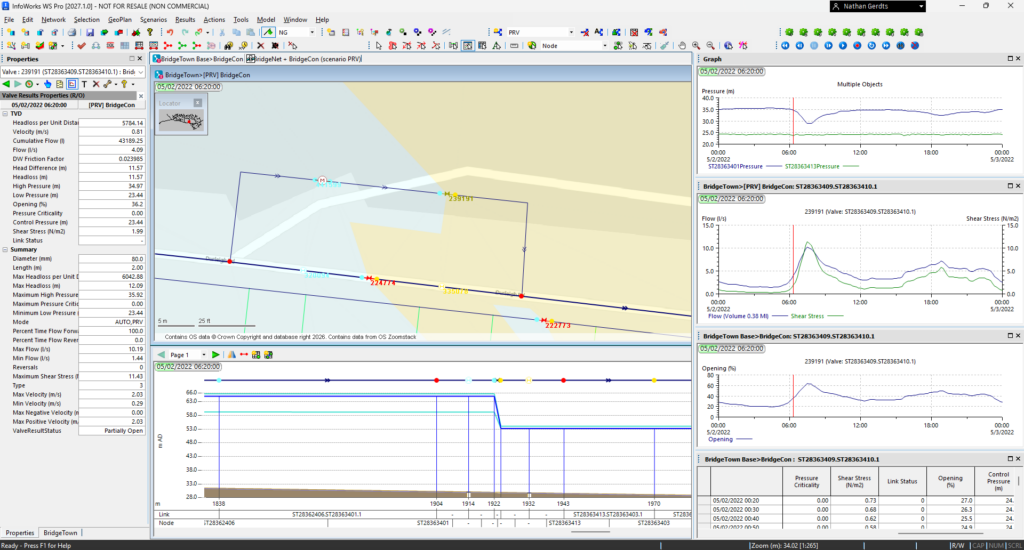
Pressure Reducing Valves (PRVs) are often treated as simple devices in hydraulic models: Set a downstream pressure, and the software enforces it whenever there is enough upstream head. While that approach is convenient, it can hide some of the most important design issues.
That is exactly why good PRV design deserves more attention.
Unlike EPANET and many other tools, InfoWorks WS Pro models PRVs and other control valves in a way that is much closer to the real-life asset. Rather than simply imposing a flat downstream pressure, the software uses valve headloss curves and modulates the percentage open to achieve the target pressure. This gives engineers a much more realistic view of valve behavior under changing operating conditions.
But, why does this nuance matter?
Modeling PRVs to match real-world behavior
In the real world, PRVs don’t perform perfectly across all conditions, and poor valve selection can easily go unnoticed if the model is oversimplified.
A valve that is incorrectly sized may still appear to “work” in a conventional model, because the downstream pressure is artificially maintained. However, this is only masking the errors, hiding behind faulty assumptions in the model.
💡 This becomes even more important as utilities move toward operational digital twins and continuously calibrated hydraulic models, where pressure reducing valves must respond realistically to changing system conditions rather than simplified assumptions. Related reading: Generate dynamic digital twin hydraulic models with InfoWater Pro and Info360 Insight.
It’s only when you start modeling PRVs with better modeling logic and capability that you start realizing your model wasn’t actually reflecting reality. In InfoWorks WS Pro, that same valve may only be able to achieve the target pressure by operating at a very small opening percentage, a clear warning sign that the design is not robust.
The same principle applies across hydraulic modeling workflows — from pressure management to FEMA flood studies — where model credibility increasingly depends on calibration, transparency, and defensible assumptions.
This is particularly important in systems that experience a wide range of flow conditions between day and night. A single PRV may be suitable at one end of the operating range but perform poorly at the other. In these cases, the better solution may be two PRVs in parallel: one large valve for higher flows and one smaller valve for lower flows. InfoWorks WS Pro helps reveal these situations, giving designers a stronger basis for equipment selection and control strategy.
System optimization is all about understanding the tools and options you have available to you. If your software can’t appropriately model PRVs, or give you optionality for how to model them, your optimization work falls short.
Using hydraulic modeling software to diagnose PRV issues
While running the engine with inappropriately sized PRVs can introduce instability in models, InfoWorks WS Pro provides detailed diagnostic reports for troubleshooting instability and showing on the map where the current behavior isn’t aligning well.
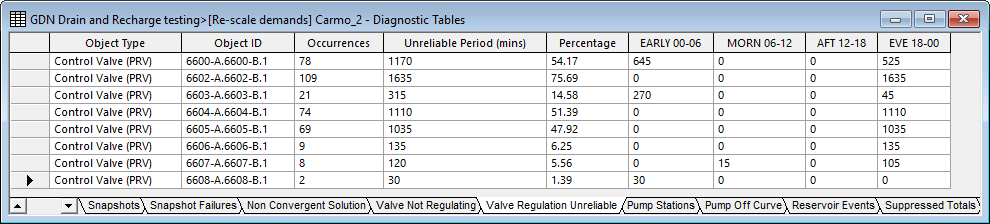
In practice, PRVs operating at extremely small opening percentages may indicate poor valve sizing or unstable operating conditions. In some cases, valves operating below approximately 10% open can become increasingly difficult to regulate effectively under changing demand conditions.
Another useful capability is the ability to visualize valve performance directly.
In the software, you can review a scatter chart of flow versus headloss, together with the valve curve at the designated opening percentage. You can also test arbitrary valve curves and opening sizes to calculate headloss behavior for different scenarios, without needing to rerun the full hydraulic model each time. That makes it much easier to understand whether a PRV is operating in a healthy and efficient range.
This is also helpful for any throttle valve during calibration. If you’re seeing a certain amount of additional head loss at your pressure logger, you can use this tool to directly estimate the correct opening percent of the valve while staying true to its valve head loss curve.
Pressure management and leakage reduction
Of course, PRV design isn’t only about selecting the right valve. It’s also about selecting the right set point.
A smart PRV set point should strike a balance between two competing objectives:
- maintaining enough pressure to satisfy demand
- minimizing leakage within the DMA
That tradeoff is rarely straightforward. If the set point is too high, leakage increases unnecessarily. If it is too low, customer service can suffer and demand may go unsatisfied.
This is another area where InfoWorks WS Pro adds significant value. By incorporating pressure-sensitive leakage throughout the model, you can quantify expected water losses across different operating scenarios. This allows leakage reduction to become part of the design decision, rather than an afterthought.
Demand area analysis for calibration
InfoWorks WS Pro also supports Demand Area Analysis, helping users calibrate demand and leakage against sensor data for a given event using built-in minimum nightly flow analysis. That gives more confidence that the hydraulic model reflects actual system behavior before using it to evaluate PRV settings.
In addition, pressure-sensitive demand can be modeled so that demand reduces when pressure falls below the desired level. This makes it possible to test alternative control regimes and quantify the tradeoff between lower leakage and the risk of unsatisfied demand.
Taken together, these capabilities help move PRV design from a simple pressure-setting exercise to a more realistic and data-driven process:
- Is the valve correctly sized?
- Is it operating in a sensible opening range?
- Would parallel PRVs perform better?
- What is the leakage impact of the chosen set point?
- What demand is at risk if pressure is reduced too far?
Extending PRV analysis with scripting and automation
For one recent project, I took this even further using InfoWorks WS Pro’s scripting capabilities. Because the software supports scripting with near-unlimited customization, I developed a Ruby script that analyzes each PRV in the system and its downstream area, then generates a user-friendly HTML report.
This made it much easier to:
- Review PRV performance across the network
- Identify operational risks
- Compare pressure management strategies
- Communicate findings clearly to stakeholders
Better PRV modeling leads to better operational decisions
The bigger point is this: Better PRV modeling leads to better PRV design.
When hydraulic modeling software reflects real valve behavior, engineers can more easily:
- Identify weak designs
- Test alternative strategies
- Optimize pressure management
- Reduce leakage
- Improve operational resilience
When the software reflects real valve behavior, it becomes much easier to spot weak designs, test alternatives, and make better operational decisions.
And that is where InfoWorks WS Pro stands out.
What is a PRV in hydraulic modeling?
A PRV, or Pressure Reducing Valve, controls downstream pressure in a water distribution network in a hydraulic model to improve pressure management and reduce leakag
Why is realistic PRV modeling important?
Realistic PRV modeling helps engineers evaluate valve sizing, operational stability, leakage impacts, and pressure management strategies more accurately.
How does InfoWorks WS Pro model PRVs differently?
InfoWorks WS Pro uses valve headloss curves and valve opening percentages rather than enforcing a fixed downstream pressure assumption.
How does PRV optimization reduce leakage?
Lowering pressure appropriately can reduce background leakage throughout the network while maintaining acceptable customer service levels.