 Tim Medearis
With the combination of AI tools + Autodesk Exchange APIs + cloud databases + free viewers, Ruby scripting is no longer just for experts. It’s now one of the fastest ways to automate hydraulic modeling workflows and connect them directly to tools dashboarding tools, like ArcGIS Online or PowerBI.

For years, Autodesk hydraulic modeling tools like InfoWorks ICM and InfoWorks WS Pro have had a powerful – but somewhat hidden – superpower: Ruby scripting.
It’s never been flashy or out in front, but it has enabled our advanced customers around the world to automate their workflows, clean data, and integrate systems. Until now, it has required time, expertise, and patience to unlock this expertise, but in 2026, it’s time for this tool to come out of the shadows.
It’s time to re-introduce Ruby scripting and Exchange. In this post, we’ll walk through a real-world example of how to go from a hydraulic model to a fully automated dashboard, without needing to become a Ruby expert.
Why Ruby scripting still matters in hydraulic modeling
The earliest usage of Ruby scripting in InfoWorks ICM traces back to 2013, when Innovyze (now part of Autodesk) released ICMExchange, enabling users to:
- Automate data cleaning and validation
- Run simulations programmatically
- Extract and transform model results
- Integrate with external systems
At the time, Ruby was a top programming language praised for its simplicity, concise code, and ease of access for startups and web applications. Since then, Python and JavaScript have picked up in popularity, leaving Ruby as an underutilized tool. However, Ruby persists; particularly within Autodesk hydraulic modeling solutions, which were built for its object-based language.
Within Autodesk workgroup products – namely InfoWorks ICM, InfoWorks WS Pro, and InfoAsset Manager – Ruby scripting has existed to serve two purposes:
- Database extensibility: This is a highly customizable in-product tool for manipulating, cleaning, validating, and extracting information from hydraulic models and asset management databases. Because the Autodesk workgroup products have generally fixed databases and schema, these scripts also have been shared and utilized by utilities and modelers all around the world, with great success. We recently wrote about the 220,000+ views our community driven Github has received.
- API access: Combined with the API service known as Exchange, Ruby has not just been an in-product tool but a system-to-system integrator. This allows simulation creation and runs, open-source data pulls, automated reports, and ETL processes with other enterprise systems, all of which can be executed without opening the software.
While the usefulness of these two purposes has been undeniable, the learning curve and path to getting there has not always been easy. Scripting naturally has a high bar – or at least the perception of a high bar. We’ve published webinars, provided examples, created documentation, and offered up example Ruby scripts for customers, but a bit more was needed to make it approachable to the average hydraulic modeler or engineer.
What’s changed: 5 upgrades that make automation easier than ever
Since then, we’ve created the last few “stepping stones” for automated, Ruby-powered hydraulic modeling success….
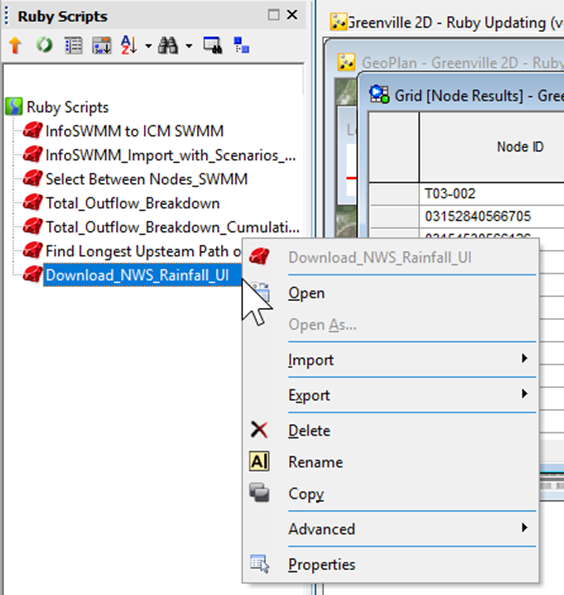
1. Store and run Ruby scripts as a database object
Ruby scripts can now be saved as database objects, making them:
- Shareable across teams
- Visible and reusable within model groups
- Accessible even in view-only environments
Ruby scripts could always be run from the UI, so this may feel like a small upgrade. Simply select your .rb file and run it or assign it to a custom task for easier access. However, by bringing it into the database, you can now transfer Ruby scripts to the rest of your model group. This turns scripts from personal tools into collaborative assets.
They’re also more visible now, so it is even easier to drag and drop them to apply the scripts to your network. Perhaps of most importance, they are accessible even to modelers with a view-only license of InfoWorks ICM/InfoWorks WS Pro.
2. Free InfoWorks viewers
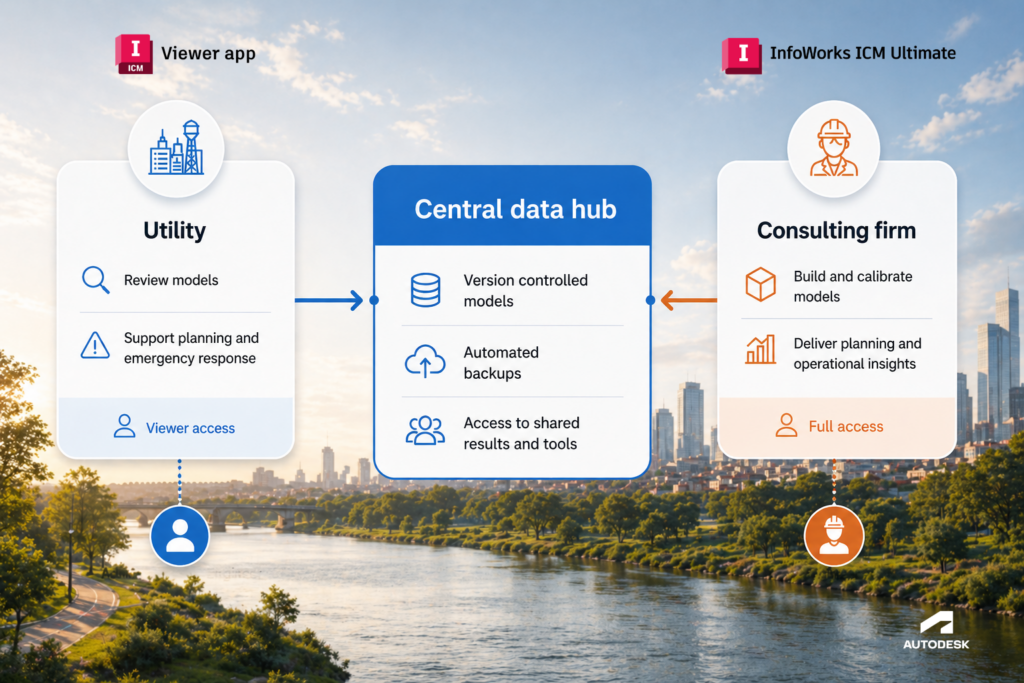
We offer a viewer for InfoWorks ICM and a viewer for InfoWorks WS Pro – both are available at no cost. These allow users to:
- Run Ruby scripts
- Explore results
- Generate reports
This removes licensing barriers to automation workflows.
Autodesk added this years ago, but this option has been underutilized, so we want to ensure our customers know about it. Viewers are free to download and can do everything but create, edit, run simulations, and re-mesh. Viewers can apply themes, create new views, graphs, or reports of results, and run Ruby scripts.
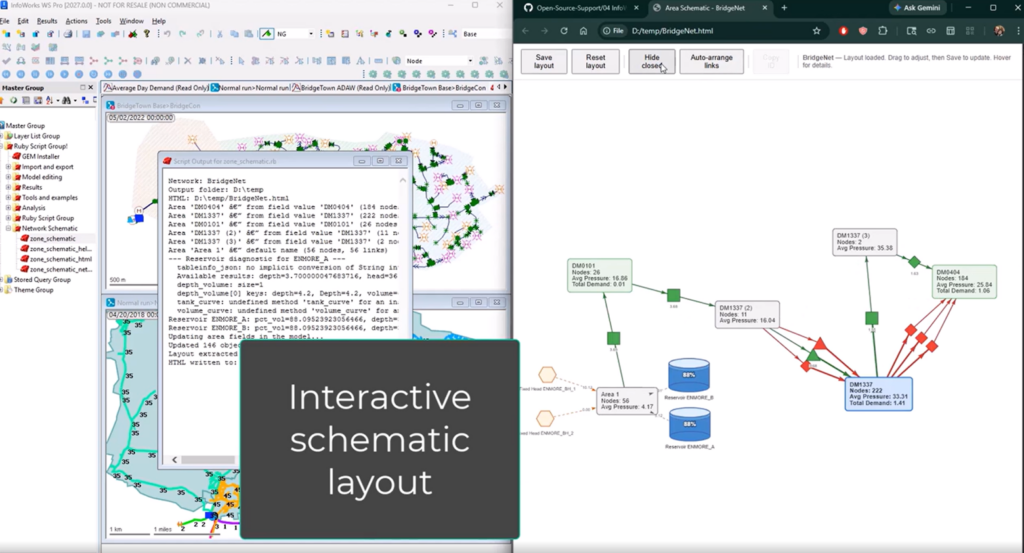
Imagine this scenario: A utility with an InfoWorks WS Pro viewer license accesses their shared database, which a consultant has provided as a live, collaborative environment. The consultant adds a Ruby script to the shared database, which the utility can drag and drop to quickly summarize the work done in the model and better understand their network through a schematic layout. This shared environment with free data flow requires no email attachments, no PDF reports, and no static deliverables.
This scenario isn’t just a “what-if” – we’ve had requests like this from our customers.
3. Cloud-based hydraulic modeling
Autodesk has also been offering cloud services for years, and the results have been extraordinary, enabling:
- Faster simulations
- Centralized data access
- Real-time collaboration across teams
With the cloud, simulation times have been reduced from days to hours to minutes. Additionally, cloud storage, has freed up terabytes of model results that otherwise would be stored on local servers. While cloud databases are not explicitly related to Ruby, it’s a complementary partner. For automation workflows, this means your models are always accessible, scalable, and up to date.
4. Exchange included
Exchange enables Ruby scripting beyond the desktop by enabling:
- Automated simulation runs
- Data pipelines and advanced ETL processes
- Integration with enterprise systems
In past iterations and offerings of Autodesk workgroup solutions, the Exchange service was not always automatically offered. Today, however, Exchange is included in InfoWorks WS Pro, InfoWorks ICM Ultimate, and InfoAsset Manager subscriptions, allowing users to automate workflows without even launching their software.
5. AI-powered script generation
The combination of AI and Machine Learning is the biggest shift. AI tools like ChatGPT, Claude, and Cursor can now:
- Generate Ruby scripts from simple prompts
- Reference Autodesk documentation
- Help debug and refine workflows
At Autodesk, we’re pioneering how to use generative design and Machine Learning to unlock creativity, but we also want to apply it to the use of tools like Ruby scripting to get the most out of our hydraulic modeling software.
Our customers can now use AI tools like Claude, Cursor, and ChatGPT to leverage all of the Ruby and Exchange documentation we’ve created – along with all of the Ruby examples on Github that our community has created – by using a few straightforward prompts.
Autodesk has also made it easier to add MCP servers that draw our online help documentation into your AI code generator of choice. This can be helpful in various ways; eg, some AI code generators allow users to specify rules around referencing relevant documentation; for example, restricting it to specific rules or adding notes in a certain, very-specific way.
Step-by-step: how to automate hydraulic modeling workflows
To tie all four of these powerful features together and show how they deliver real-world results, let’s walk through an example. This workflow connects modeling, automation, and visualization into a single pipeline – without manual intervention.
Goal: Automatically update ArcGIS Online dashboards using results from InfoWorks ICM (collection systems) and InfoWorks WS Pro (distribution systems).
Step 1: Move your hydraulic model to the cloud
This first step is to simply take your hydraulic model and transfer it to InfoWorks ICM and InfoWorks WS Pro. Benefits include:
- Faster simulations
- Centralized data storage
- Seamless automation execution
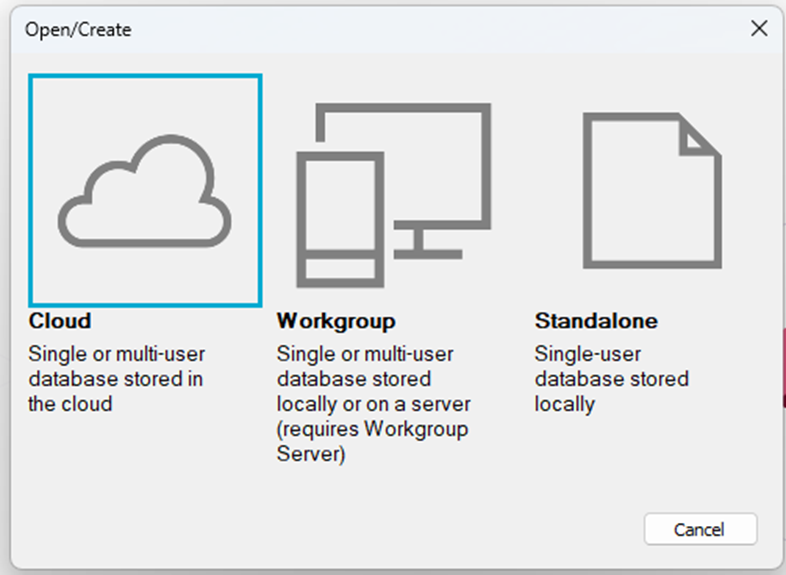
This is easier than you might think. The AWI Github repository and support articles have tons of resources and tutorials for how to apply Ruby scripting. InfoWorks ICM and WS Pro also have many built-in converters to easily transfer your current hydraulic model into our software. Additionally, you can choose how your model is stored in InfoWorks ICM and WS Pro. We’ve seen huge benefits in data storage, collaboration, and often simulation runtimes when storing your database in the secure and included cloud environment.
Step 2: Use AI to generate automation scripts
I’ll probably never be a Ruby expert. But the good news is that I don’t have to be. I just need to be a good hydraulic modeler. Instead of spending weeks learning Ruby details, with your AI tool of choice you can now:
- Specify rules for your Ruby AI environment to follow
- Connect via MCP to Autodesk help materials
- Prompt your AI for what you’d like your Autodesk Water solution to do
In these examples, I prompted my AI to do two sets of things:
My InfoWorks ICM automation:
- Download rainfall data from NWS
- Run 24-hour and 48-hour simulation events on my 1D-2D model
- Export results as shapefiles
- Upload shapefiles to ArcGIS Online and remove or archive old outputs (Python)
My InfoWorks WS Pro automation:
- Run week-long max week demands (diurnal curves change relative to time of year and day of week)
- Export week-long maximum results as shapefiles
- Upload shapefiles to ArcGIS Online and remove or archive old outputs (Python)
These scripting sequences took me a bit of time to fine tune. I provided lots of very polite ‘work harder!’ prompts to my AI, but by starting with my examples, you can iterate faster in your own project.
Step 3: Automate the script sequence
Automation can be triggered using:
- Batch (.bat) files
- Windows Task Scheduler
- Cloud-based scheduling tools
There are several ways you can do this depending on your goals and IT environment:
- You could have AI do this as well.
- You could have Windows Task Scheduler run your .bat file.
- You could have another cloud managed service automate them.
However you do it, the real benefit is that you won’t be introducing anything that you or your system can’t handle. The common barriers of compute capacity, data storage, and domain expertise have been removed, allowing you to work more creatively and effectively.
Step 4: Create engaging ways to visualize the work
The final step is visualization.
As modelers, we benefit in a big way when our work is connected, displayed, and presented in impactful ways. We shine best when we are able to bring engineers, city council members, consultants, utilities, operations, and planners closer together using the power of images, maps, charts, and graphs.
Dashboards are the answer. Automatically updated dashboards allow teams to:
- Monitor system performance
- Share insights across departments
- Communicate results to stakeholders
Instead of static reports, you now have live, continuously updated data.
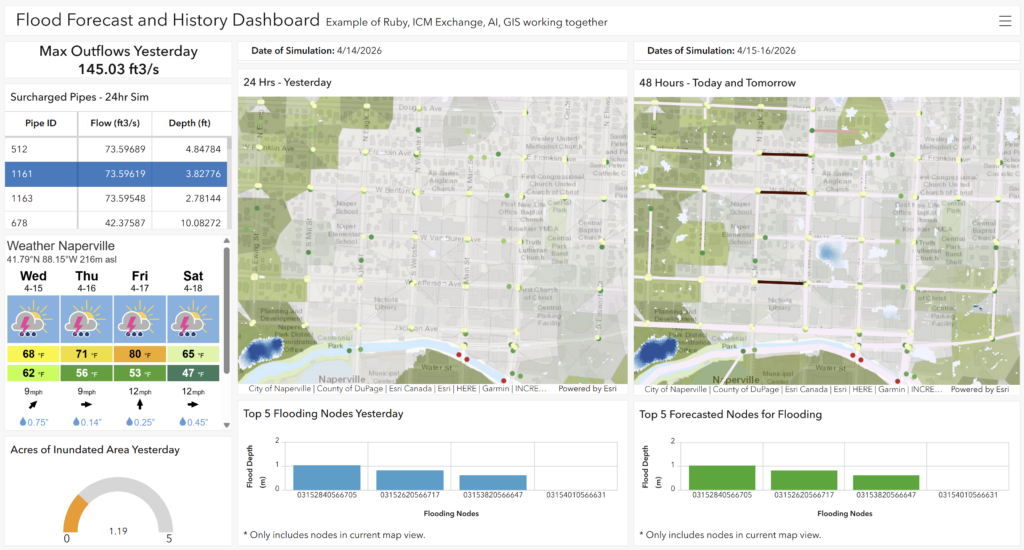
Want to see an example? Here are two automated dashboards that I created by following this workflow:
- InfoWorks WS Pro: I built a distribution model forecast dashboard that updates weekly.
- InfoWorks ICM: I created a live collection model forecast that shows both the past 24-hour history and a future 48-hour forecast.
Why this approach works (without adding risk to your workflow)
A natural concern with AI in engineering workflows is risk – especially around reliability, governance, and control.
This approach avoids those pitfalls:
- AI is used for code generation, not decision-making
- Simulations run in trusted Autodesk environments
- Ruby and Exchange are proven, production-ready technologies
In short, AI accelerates your workflow, but you stay in control of the engineering.
Pulling it all together
Lowering the barrier to entry to unlock a particular technology is something that can be easy to say, but difficult to deliver.
In my time as a technical support engineer, I’ve delivered hundreds of hours of training which should have lowered the barrier to entry for my student engineers and modelers and make them more productive, more connected, and more effective in their work. Can these new AI tools help lower the barrier even more?
With AI-assisted scripting, cloud-hosted models, Exchange APIs, and free InfoWorks viewers, I think the barrier to entry has been dramatically lowered. What once required deep scripting expertise can now start with a simple prompt and a clear idea of the outcome you want.
And importantly – this isn’t theoretical. It’s already happening.
I’m excited to see what Autodesk and our community continues to build together in this era of a more connected and AI-assisted hydraulic modeling future.
Getting started with hydraulic modeling automation
If you’re looking to get started with AI and Ruby scripting, here are a few simple ways to take the next step:
- Explore the Autodesk Water Infrastructure open-source GitHub repository: Use the real Ruby scripting examples created by the community and adapt them to your own models.
- Try a small automation first: Start with something simple like exporting results or generating a report – and build from there.
- Use AI as your assistant, not a replacement: Let tools like ChatGPT or Claude help generate and refine scripts while you stay in control of the engineering decisions
- Leverage what you already have: If you’re using InfoWorks ICM, WS Pro, or InfoAsset Manager, you already have access to Ruby and Exchange – no additional tools required.