 Jim Byrne
Wondering if Autodesk Inventor is right for your team? Learn where Inventor fits best, from small businesses and simple products to large assemblies, industrial machinery, and complex engineering workflows.
Enhance Your Engineering Workflows
Precise, powerful, and ready for innovation with Autodesk Inventor.
Choosing a CAD platform isn’t really about features, it’s about fit.
The wrong tool creates friction. Models become harder to manage as products grow more complex. Engineering changes take longer than they should. Performance suffers when assemblies get larger. Teams spend time working around limitations instead of designing products.
The right tool feels almost invisible. It matches the way your team develops products today while giving you room to grow tomorrow.
So where does Autodesk Inventor fit?
The answer depends less on company size than many people think and more on the complexity of the products you’re designing.
Start with the problem you’re trying to solve
Many companies evaluate CAD software by asking:
- Are we too small for Inventor?
- Is Inventor only for large manufacturers?
- Will it work for simple products?
- Can it handle massive assemblies?
Those are reasonable questions, but they’re not the most important ones.
A better question is:
How complex are the products and engineering processes your team manages today?
A five-person engineering company building industrial equipment may need more CAD capabilities than a fifty-person company producing relatively simple products.
The challenge isn’t company size. The challenge is managing complexity.
Is Inventor a good choice for small businesses?
Yes. One of the biggest misconceptions about Inventor is that it’s only designed for large enterprises.
In reality, many small manufacturers, machine builders, custom equipment companies, fabrication shops, and product development firms use Inventor because they face the same engineering challenges as larger organizations.
They still need to:
- Create production-ready documentation
- Manage revisions
- Build assemblies
- Design sheet metal components
- Validate designs before manufacturing
- Reduce errors and rework
A small team often has even less time and fewer resources to absorb mistakes, which makes efficient design workflows even more important.
If your products involve multiple components, mechanical systems, manufactured parts, or customer-specific configurations, Inventor can provide structure and automation that help a small team operate more effectively.
What about simpler products?
Not every company is designing aircraft, industrial machinery, or highly engineered systems.
Many teams build products that are relatively straightforward:
- Enclosures
- Fixtures
- Consumer products
- Fabricated components
- Small assemblies
- Custom parts
Inventor works well in these environments because it scales to the problem being solved.
You don’t have to use every advanced capability on day one.
Teams can start with core 3D modeling and documentation workflows and expand into simulation, automation, design configurations, and data management as their products and processes evolve.
For many organizations, that’s exactly the appeal. The software doesn’t force complexity, but it doesn’t outgrow the business either.
Where Inventor really shines: Complex products
As products become more sophisticated, the demands on CAD software increase quickly.
Assemblies become larger, dependencies between components grow, configurations multiply, and engineering changes affect multiple teams.
This is where Inventor typically provides the most value. It’s particularly well suited for:
- Industrial machinery
- Factory equipment
- Automation systems
- Material handling equipment
- Process equipment
- Production tooling
- Large fabricated assemblies
- Configure-to-order products
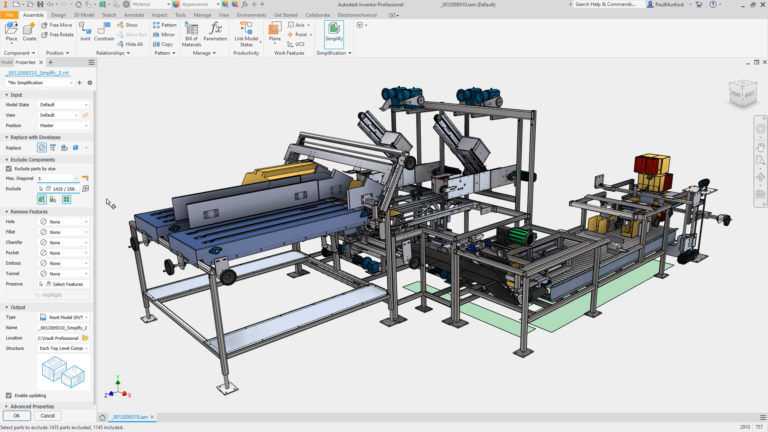
These products often contain hundreds, thousands, or even tens of thousands of parts that must work together while remaining manageable for engineering teams.
Without the right tools, complexity becomes the bottleneck.
Can Inventor handle large assemblies?
Large assemblies are one of the most common reasons companies evaluate Inventor.
As products grow, performance, navigation, and change management become increasingly important.
Engineers need to understand how components interact, identify potential issues, verify fit and function, and make updates without disrupting the entire design.
Inventor includes tools designed specifically for working with large assemblies, helping teams continue to work efficiently as products become more complex.
This is especially valuable for organizations designing:
- Manufacturing equipment
- Packaging machinery
- Industrial systems
- Heavy equipment
- Production lines
- Custom machinery
For these teams, assembly management isn’t a nice-to-have. It’s a daily requirement.
Which teams are the best fit for Inventor?
Inventor tends to be a strong fit for organizations that design physical products requiring engineering rigor, documentation, and repeatable workflows.
Common examples include:
Machine builders
Machine builders often manage large assemblies, custom configurations, purchased components, and manufacturing documentation.
Inventor supports the design process from concept through production.
Industrial equipment manufacturers
These organizations frequently balance customization with standardization, making design automation and assembly management especially important.
Fabrication and sheet metal teams
Companies producing welded structures, frames, panels, and fabricated products often benefit from Inventor’s dedicated manufacturing-focused workflows.
Configure-to-order manufacturers
When product variations become difficult to manage manually, Inventor can help standardize and automate portions of the engineering process.
Growing engineering teams
Many companies adopt Inventor not because they’re large, but because they’re becoming larger and need processes that can support future growth.
Why consider Inventor
Inventor isn’t just for large companies, and it isn’t only for highly complex products.
What makes Inventor a strong choice is its ability to support organizations as product complexity increases.
For smaller businesses, it provides professional engineering capabilities without requiring enterprise-scale operations. For larger manufacturers, it supports the workflows, documentation, assembly management, and automation needed to develop increasingly sophisticated products.
If your team is creating engineered products, managing assemblies, producing manufacturing documentation, or struggling with growing design complexity, Inventor is often worth serious consideration.
The question isn’t whether your company is big enough for Inventor.
The question is whether your products have become complex enough to benefit from it.
Frequently asked questions
Yes. Inventor is used by many small manufacturers, machine builders, fabrication shops, and engineering firms. Small teams often benefit from its ability to create production-ready designs, manage assemblies, and reduce costly engineering errors.
Inventor is particularly well suited for industrial machinery, manufacturing equipment, automation systems, sheet metal products, fabricated assemblies, tooling, and other engineered products that require detailed mechanical design and documentation.
Yes. Inventor includes tools designed for working with large assemblies, helping engineers manage complex products with hundreds or thousands of components while maintaining productivity.
Inventor is widely used in industrial equipment manufacturing, machinery design, fabrication, automation, material handling, consumer products, and custom manufacturing.
Yes. Machine builders often manage large assemblies, custom configurations, and detailed manufacturing documentation, making Inventor a strong fit for their workflows.