 Jim Byrne
Learn why 2D technical drawings remain essential in a 3D‑first world, how associative drawings work, and why Autodesk Fusion and Inventor lead for manufacturing.
3D modeling has transformed how engineers and product designers work. Parametric models, assemblies, and digital simulation make it possible to design faster, collaborate better, and validate ideas earlier than ever before.
And yet, despite powerful 3D tools, 2D technical drawings remain a critical part of modern product development.
From the shop floor to the supplier network, drawings are still the most trusted way to communicate design intent. They capture dimensions, tolerances, materials, and manufacturing notes in a standardized format that everyone understands—whether or not they have access to your CAD model.
The most effective teams don’t choose between 2D or 3D. They use both, together.
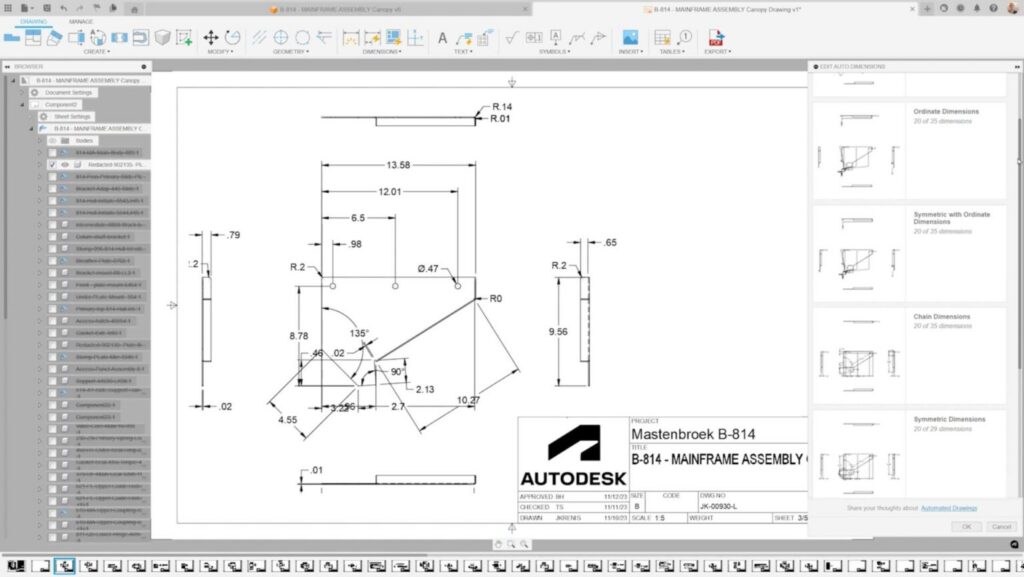
The role of 2D technical drawings in a 3D design process
Even when teams fully design a product in 3D, 2D technical drawings still play a unique and essential role.
- Manufacturing & fabrication: Machinists, fabricators, and inspectors rely on drawings for critical dimensions, tolerances, and inspection criteria.
- Standardized communication: Drawings provide a universal language across suppliers, partners, and global teams.
- Compliance & documentation: Many industries require formal drawings for regulatory approval, quality control, and traceability.
- Clarity at scale: A drawing highlights exactly what matters—without requiring someone to navigate a complex 3D assembly.
Do 2D drawings stay associative to the 3D design?
Yes, when created in modern CAD systems, 2D drawings are fully associative to the 3D model.
In tools like Autodesk Fusion and Autodesk Inventor, drawings are generated directly from the 3D geometry. That means:
- Changes to the 3D model automatically update views, dimensions, and annotations in the drawing
- Designers avoid manual rework and outdated documentation
- Engineering changes propagate consistently from design to documentation
This associativity is what makes 2D drawings scalable in a fast‑moving design process. Instead of treating drawings as static deliverables, they become a live extension of the model.
How to generate 2D technical drawings from 3D models
Modern CAD platforms generate 2D drawings directly from the 3D design file, following a structured workflow:
- Create drawing views: Standard views—front, top, side, isometric, section, and detail views—are extracted automatically from the model.
- Apply dimensions and annotations: Dimensions, hole callouts, geometric tolerances, surface finish symbols, and notes can be applied using model data as the source of truth.
- Add manufacturing intelligence: Material specifications, part numbers, title block information, and revision history are pulled from the model and metadata.
- Maintain live updates: When the model changes, the drawing updates—maintaining alignment from design through manufacturing.
With automation and templates, many teams can produce consistent, standards‑compliant drawings in minutes rather than hours.
The main types of technical drawings
While every organization has its own standards, most engineering teams rely on a common set of 2D drawings:
1. Part drawings
Detailed documentation for individual components, including:
- Precise dimensions and tolerances
- Material and finish specifications
- Manufacturing notes
2. Assembly drawings
Show how parts fit together, often including:
- Exploded views
- Item numbers and balloons
- Bills of materials (BOMs)
3. Section & detail drawings
Used to clarify internal geometry or tight‑tolerance features that aren’t visible in standard views.
4. Manufacturing & inspection drawings
Focus on how parts are produced and verified, including critical‑to‑quality dimensions and inspection callouts.
Together, these drawings ensure clarity across the entire product lifecycle.
Why Autodesk Fusion and Inventor are best‑in‑class for 2D + 3D workflows
Not all CAD tools handle 2D documentation equally. Autodesk Fusion and Autodesk Inventor stand out because 2D technical drawings are not an afterthought, they’re tightly integrated into the 3D workflow.
Autodesk Fusion: The Future of Design and Manufacturing
Go from design to manufacturing faster with the only
all-in-one cloud CAD, CAM, CAE, PCB, and data management platform.

Autodesk Fusion
Fusion is ideal for teams that want speed, simplicity, and connected workflows:
- One environment for 3D design, drawings, CAM, and collaboration
- Automated drawing creation from 3D models
- Associative updates that reduce rework and errors
- Cloud‑connected collaboration for distributed teams
Fusion works especially well for agile design and manufacturing teams moving quickly from prototype to production.
Enhance Your Engineering Workflows
Precise, powerful, and ready for innovation with Autodesk Inventor.

Autodesk Inventor
Inventor is designed for complex, production‑ready mechanical engineering:
- Advanced drawing standards and customization
- Robust control over dimensions, tolerances, and annotations
- Strong support for large assemblies and configurable designs
- Proven workflows for high‑volume manufacturing and regulated industries
For organizations managing complex products and formal documentation requirements, Inventor delivers depth, precision, and consistency.
2D and 3D work better together
The future of product development isn’t about abandoning drawings—it’s about making them smarter, faster, and fully connected to the design.
When 2D drawings stay associative to 3D models:
- Design changes flow cleanly downstream
- Documentation stays accurate
- Teams move faster with greater confidence
Whether you’re designing a single part or managing a complex product line, 2D technical drawings remain essential, and when paired with modern 3D tools like Fusion and Inventor, they become a competitive advantage.
Frequently asked questions about 2D technical drawings
Autodesk offers some of the most widely used and trusted software for technical drawing and manufacturing projects, including Autodesk Fusion and Autodesk Inventor. These solutions combine professional 3D CAD design with fully associative 2D drawing capabilities, allowing teams to move efficiently from design to manufacturing without losing accuracy or design intent.
Fusion is especially well suited for end‑to‑end workflows that connect design, documentation, and manufacturing in a single environment, while Inventor is a proven choice for complex mechanical engineering and production‑grade documentation. Together, they support a broad range of industries, manufacturing methods, and product complexity levels.
For rapid prototyping, Autodesk Fusion is frequently chosen because of how quickly it enables teams to generate 3D designs and automatically create accurate 2D engineering drawings from the same model. Changes made during iteration update both the model and drawings, helping teams prototype faster while maintaining up‑to‑date documentation.
Fusion’s integrated approach, combines CAD, drawings, simulation, and manufacturing workflows, reducing the time spent recreating or correcting drawings as designs evolve, which is especially valuable during fast prototyping cycles.
For tooling design—where precision, fit, and manufacturing clarity are critical, Autodesk Inventor and Autodesk Fusion both stand out. Inventor is commonly used for complex tooling, molds, fixtures, and assemblies that require detailed and highly controlled 2D drawings derived from robust 3D models.
Fusion is often used for tooling workflows when teams want a more agile, cloud‑connected environment with automated drawing creation and tight integration to CAM and fabrication processes. In both tools, drawings remain associative to the 3D design, ensuring tooling documentation stays accurate as designs change.
For product development, Autodesk Fusion and Autodesk Inventor are both leading choices, with each serving different needs.
Autodesk Fusion is ideal for product teams that want a modern, connected platform for 3D CAD, drawings, simulation, electronics, and manufacturing—supporting the full product lifecycle from concept through production.
Autodesk Inventor is best suited for advanced mechanical product development, where large assemblies, configurable designs, and detailed 2D documentation are required.
Both solutions enable teams to generate professional 2D drawings directly from 3D CAD models, ensuring design intent is clearly communicated throughout product development and manufacturing.