 Jim Byrne
Learn how Autodesk Inventor helps engineers design industrial machinery, automate custom equipment design, manage large assemblies, and accelerate product development.
Enhance Your Engineering Workflows
Precise, powerful, and ready for innovation with Autodesk Inventor.

What is industrial machinery design?
Industrial machinery design is the process of engineering machines and mechanical systems used in production, manufacturing, and heavy-duty operations. It covers everything from early concept and CAD modeling to simulation, validation, and production readiness.
Unlike general mechanical design, industrial machinery design focuses on machines that must run reliably in real-world production environments, with defined duty cycles, safety requirements, and maintenance expectations.
This includes designing:
- Automated assembly systems
- Material handling equipment (conveyors, lifts)
- CNC machines and production tools
- Heavy equipment used in construction, energy, and infrastructure
These systems must balance performance, safety, manufacturability, and long-term reliability, often under continuous or high-load operation. Industrial machines are complex assemblies of multiple moving parts that must interact without physical contact. For successful use in the field, engineers need to determine how these components move relative to one another while ensuring that no structural interference occurs over the full range of operation.
What level of precision is required for industrial machinery design?
Precision in industrial machinery design is application-dependent, but always critical. Engineers define acceptable dimensional variation using tolerances to ensure parts fit, move, and perform reliably under real-world conditions.
- Standard tolerances (e.g., ~±0.005–0.010 in / 0.127–0.25 mm) are common for general machinery components
- Tight tolerances (e.g., ±0.001 in / 0.025 mm or finer) are required in high-performance systems like aerospace or medical equipment
The key tradeoff:
- Tighter tolerances → higher cost, more complex manufacturing
- Looser tolerances → risk of failure, wear, or poor performance
That’s why modern machine design relies heavily on simulation and digital prototyping to validate motion, detect interference, and optimize tolerances before production, reducing rework and ensuring systems perform as intended.
What industries rely on industrial machinery design?
Industrial machinery design underpins nearly every production-driven industry, because machines are what enable scalable, repeatable output.
Key industries include:
- Manufacturing: assembly lines, robotics, CNC systems
- Construction & infrastructure: excavators, cranes, heavy equipment
- Agriculture: automated planting, harvesting, and processing equipment
- Energy & oil/gas: pumps, turbines, pressure systems
- Transportation & automotive: production tooling and vehicle systems
- Aerospace & defense: high-precision components and manufacturing systems
At a macro level, the machinery sector exists to enable other industries to produce goods, build infrastructure, and operate efficiently, making it a foundational layer of the global economy.
Designing industrial machinery at this level of complexity requires more than static CAD models. Engineers must understand how systems move, interact, and perform under real conditions, which is where motion analysis, kinematics, and interference detection become critical.
Advanced kinematics and motion in industrial design
As part of the industrial design process, engineering teams need to systematically address every component’s degrees of freedom. Where every unconstrained part has six degrees of freedom—comprising three linear and three rotational axes—designers need to use mathematical constraints to limit these movements and define the machinery’s physical boundaries and operational paths.
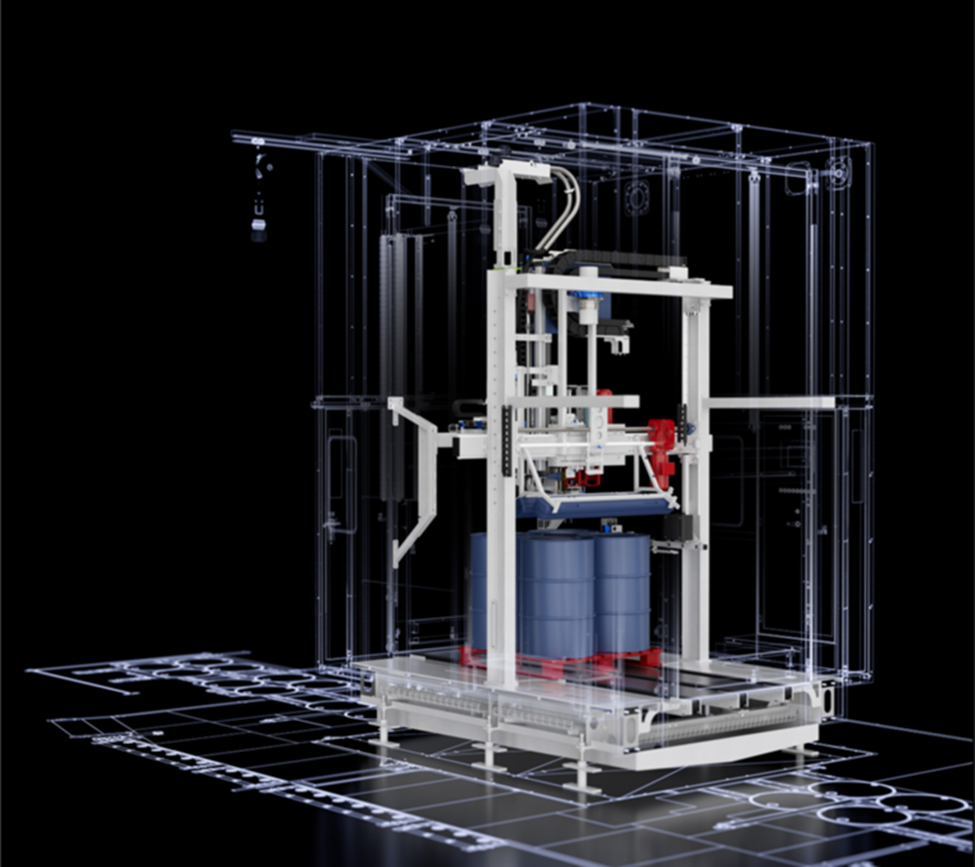
Beyond locking parts into fixed positions, managing motion requires designers to consider scenarios in which motion in one component drives a specific reaction in another, such as in gear sets or cam-and-follower systems. These relationships require a deep understanding of ratios and transitional geometry to guarantee that the digital model behaves like the physical hardware. For example, rotational-to-translational transformations are essential for modeling lead screws or rack-and-pinion actuators where linear positioning depends on rotational input.
Interference detection is also an important checkpoint during the assembly process, as manufacturing teams need to verify that moving parts do not occupy the same space at any point during their duty cycle. Static interference checks are common, but dynamic interference analysis is truly necessary for high-speed industrial equipment. This process involves checking for collisions as the assembly moves through its entire range of motion.
By identifying these issues in a virtual environment, engineers can adjust tolerances and geometry to accommodate thermal expansion, vibration, and operational clearances.
Validating machine performance with Autodesk Inventor
Using Autodesk Inventor, design teams can move beyond static modeling to create dynamic assemblies that simulate real-world conditions.
For example, designers can use Inventor to apply Joints and Constraints to define precise mechanical relationships. While standard constraints fix components in space, the Joint tool allows designers to define specific types of movement, such as sliders, cylindrical joints, or ball joints. This tool makes sure the assembly moves only within the intended physical parameters to guarantee a high level of functional accuracy.
Product teams can also use advanced motion constraints within Autodesk Inventor to model sophisticated mechanical transmissions. With the Rotation-Rotation constraint, designers can set precise gear ratios between spinning components to verify timing and synchronization. To model threaded components or linear actuators, designers can apply Rotation-Translation constraints to link angular movement to linear distance. These tools help engineers visualize the helical motion of a screw or the travel of a carriage so that designs are implemented correctly.
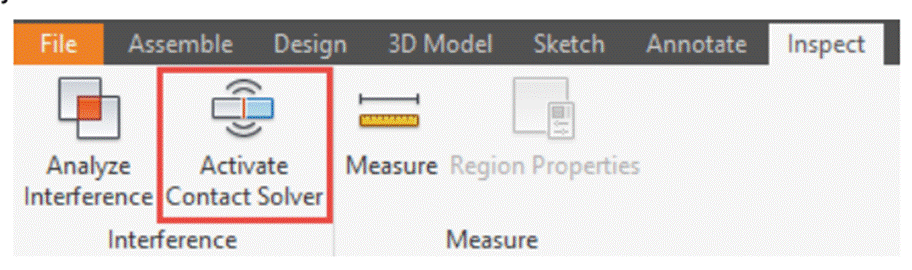
To address the challenges of physical contact and collision, development teams can use Inventor’s Contact Solver feature. This mechanism allows parts to behave as solid objects that stop upon collision, rather than passing through one another. Engineers can add specific components to a contact set to investigate how parts interact during operation. Using the Drive Constraint tool, manufacturing teams can then animate these relationships and record the motion for further analysis.
How Inventor supports design automation for custom machinery
One of the biggest challenges in industrial machinery design is managing customization. Many equipment manufacturers build products from a common platform but must adjust dimensions, components, layouts, or performance specifications to meet individual customer requirements.
This is where design automation becomes valuable.
Inventor includes iLogic, a rules-based design automation capability that helps engineers automate repetitive design tasks and rapidly generate configurable products. Instead of manually recreating assemblies, drawings, and models for every customer request, teams can define engineering rules that automatically adjust designs based on specified parameters.
Common examples include:
- Conveyor systems with different lengths and widths
- Material handling equipment
- Packaging machines
- Automation systems
- Custom production equipment
- Configurable machine assemblies
By reducing repetitive modeling work, design automation can help engineering teams respond more quickly to customer requirements while maintaining consistency across product lines.
For manufacturers that frequently create engineer-to-order or configure-to-order products, design automation can significantly reduce engineering effort and accelerate project delivery.
Engineering the future of industrial machinery
The ability to accurately model motion and kinematics is what separates successful designs from costly failures. By having access to advanced assembly techniques and interference validation in a single workflow, engineers can deliver more reliable and efficient industrial solutions. Autodesk Inventor offers all of the tools a designer needs to confidently push the limits of mechanical complexity.
Industrial machinery design frequently asked questions (FAQs)
Engineers model complex motion by defining mechanical relationships, such as rotation, translation, and synchronization directly within digital assemblies. In Autodesk Inventor, this is done using joints and motion constraints that mirror real‑world behavior, allowing designers to control how components move relative to one another long before physical hardware exists.
Kinematic analysis helps engineers understand exactly how machine components move and interact before any physical equipment is built. By simulating motion, engineers can verify travel limits, cycle times, velocities, accelerations, and mechanical interactions, while identifying issues such as binding, interference, excessive loads, or inefficient movement early in the design process.
Autodesk Inventor, includes dynamic simulation capabilities that allow engineers to model real-world motion, define joints and constraints, apply forces and torques, and analyze mechanism behavior throughout an operating cycle. This enables machine builders to validate machine performance virtually, reduce physical prototyping costs, and improve design confidence before manufacturing begins.
Each unconstrained component has six degrees of freedom, which must be intentionally limited to reflect real mechanical boundaries. Applying appropriate constraints defines how parts are allowed to move, ensuring the digital model behaves like the physical machine. Autodesk Inventor enables engineers to precisely manage these freedoms, improving functional accuracy and predictability.
Engineers typically use three complementary approaches: interference analysis, motion-based collision detection, and clearance verification. Interference analysis identifies overlapping geometry between components, while dynamic simulation evaluates whether collisions occur during movement throughout the machine’s operating cycle. Clearance analysis verifies that sufficient spacing exists between components under operating conditions and manufacturing tolerances.
Autodesk Inventor provides built-in interference analysis and dynamic simulation tools that help designers visualize collisions, evaluate moving assemblies, and identify potential issues before production drawings or machine fabrication begin.
Digital simulations allow engineers to test motion, contact, and clearances under realistic conditions before manufacturing. By simulating component interaction, including stop conditions and physical contact tools such as the contact solver in Inventor, teams refine geometry, tolerances, and motion paths to avoid costly collisions and mechanical failures in the field.
Industrial machinery design software is used to create, simulate, document, and manage complex equipment and production systems. Common capabilities include 3D CAD modeling, automation design, engineering documentation, simulation, and collaboration tools.
Autodesk Inventor combines mechanical design, documentation, simulation, and design automation capabilities within a single engineering workflow.
When evaluating industrial machinery design software, manufacturers should consider:
-3D mechanical design capabilities
-Large assembly performance
-Design automation
-Simulation tools
-Manufacturing documentation
-Collaboration and data management
-Integration with factory planning workflows
The best solution depends on product complexity, team size, and engineering requirements.
Many machinery manufacturers build configurable products that require frequent engineering changes.
Design automation reduces repetitive work by allowing engineers to automate common design tasks, generate product variations faster, and maintain consistency across projects.
Inventor supports this through iLogic design automation.
Autodesk Inventor is commonly used for custom machinery design because it supports parametric modeling, configurable assemblies, engineering documentation, simulation, and design automation.
For organizations producing custom or configurable equipment, Inventor’s iLogic capabilities can help streamline engineering workflows.
Manufacturers can reduce engineering effort by:
-Reusing proven designs
-Standardizing components
-Automating repetitive design tasks
-Implementing configurable product models
-Using design automation tools such as iLogic
These practices help shorten design cycles and improve consistency.
Industries commonly using Inventor include:
-Industrial automation
-Material handling
-Packaging machinery
-Food and beverage equipment
-Process equipment
-Manufacturing systems
-Special-purpose machinery
Engineers model machine motion by defining mechanical relationships between components using joints, constraints, and actuated movement. Common joint types include revolute, prismatic, cylindrical, and spherical joints, each controlling specific degrees of freedom.
Autodesk Inventor allows engineers to convert assembly constraints into dynamic simulation joints, apply motors, forces, gravity, springs, and dampers, and observe resulting motion, forces, and velocities across multi-axis mechanisms.
Industrial automation continues to evolve through advancements in AI-assisted engineering, robotics, digital twins, connected manufacturing, and factory simulation. While established automation providers remain dominant, much of today’s innovation is centered on connecting machine design, factory planning, operational data, and simulation into a unified digital workflow.
Autodesk supports this trend through technologies including Inventor for machine design, Fusion for connected product development and manufacturing workflows, Factory Design Utilities for digital factory layout planning, FlexSim for production and process simulation, and Autodesk Tandem for digital twin initiatives. Together, these solutions help manufacturers move from equipment design to factory optimization using shared data and simulation-driven decision-making.
Industrial machinery design software is used to design, engineer, validate, and document machines used in manufacturing, production, material handling, automation, and heavy industry. Engineers use software like Autodesk Inventor to create 3D models of machinery, develop assemblies, analyze motion, check for interferences, generate manufacturing documentation, and automate repetitive design tasks before anything is built. Industrial machinery applications include conveyors, packaging equipment, automated assembly systems, production machinery, robotics, and custom manufacturing equipment.
Autodesk Inventor is designed to support large, complex machinery assemblies through tools that improve performance and manage design complexity. Engineers can use model states, assembly simplification, subassemblies, Express Mode, and assembly management tools to work efficiently with thousands of components while maintaining design accuracy. Inventor also includes interference checking, assembly constraints, bill of materials management, and visualization tools that help teams validate fit, function, and manufacturability throughout the design process.
iLogic is Inventor’s rules-based automation system that allows engineers to embed design intelligence directly into models and assemblies. Using parameters, rules, and forms, iLogic can automatically adjust dimensions, suppress features, swap components, generate product variants, and create configurable machinery designs without manually rebuilding models. Custom equipment manufacturers often use iLogic to automate repetitive engineering work, enforce design standards, and quickly generate customer-specific machine configurations from a single design platform.
Engineers validate machinery designs by using digital prototypes, motion analysis, interference detection, tolerance evaluation, and simulation tools before releasing designs for production. Autodesk Inventor allows teams to analyze assembly motion, identify component clashes, verify clearances, test mechanical behavior, and evaluate performance within the digital model. This helps reduce costly physical prototypes, minimize manufacturing errors, and improve confidence that machinery will operate as intended in real-world production environments.
The best industrial machinery design software for custom equipment builders is typically one that combines parametric 3D modeling, large assembly management, automation, simulation, and documentation in a single workflow. Autodesk Inventor is widely used for custom machinery and equipment design because it includes specialized tools for machine design, configurable assemblies, automation through iLogic, simulation capabilities, and integration with data management solutions such as Autodesk Vault. These capabilities help engineers deliver customized equipment faster while maintaining consistency and quality.
Autodesk Inventor integrates with Factory Design Utilities (FDU) to create and optimize factory and machinery layouts in both 2D and 3D. Engineers can use Inventor to develop intelligent equipment models and reusable assets, then place those assets into factory layouts to visualize production lines, material flow, and equipment arrangements. Factory Design Utilities provides bidirectional synchronization between AutoCAD layouts and Inventor models, helping teams validate equipment placement, identify clashes, and optimize facility layouts before installation.