 Abraham Pineda
Connect tasks to your Fusion designs, start your day with priorities, and let Autodesk Assistant manage your work with Task Management in Autodesk Fusion.

Elevate your design and manufacturing processes with Autodesk Fusion
Design work doesn’t happen in isolation. Behind every design update, engineering change, or project milestone is a series of tasks that need to be organized, prioritized, and completed. But when those tasks live in separate tools, keeping track of what needs to be done—and finding the right design documents to do it—can slow things down.
Introducing Task Management in Autodesk Fusion, a smarter, more connected way to organize and manage work directly within the Fusion environment.
More than a traditional to-do list, Task Management connects your tasks to the Fusion documents they relate to, bringing work planning and design execution closer together. And with Autodesk Assistant integrated into the experience, managing your work can be as simple as asking a question.
Let’s take a closer look at how Task Management helps you stay organized, understand your priorities, and get to work faster.
Keep your tasks connected to your designs
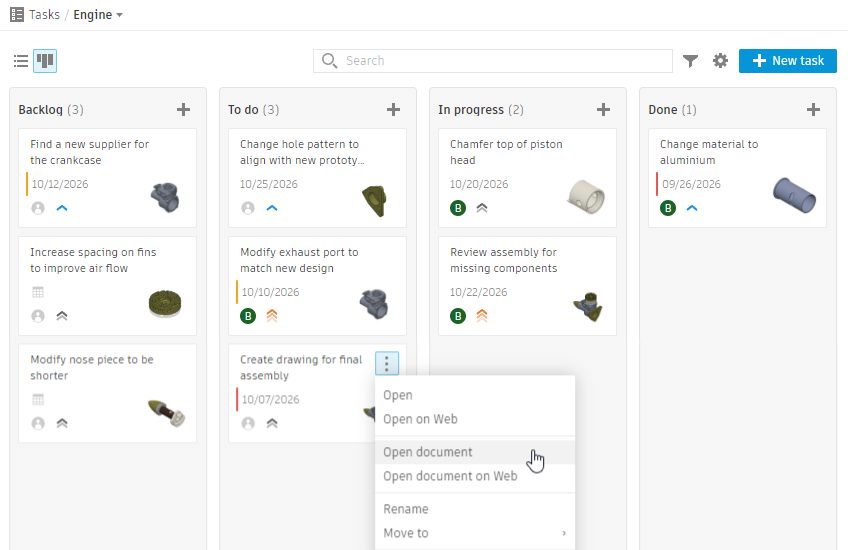
One of the most powerful aspects of Fusion Task Management is its ability to associate tasks directly with Fusion documents.
Instead of managing tasks in one place and design files in another, you can establish a direct connection between what needs to be done and the document where that work happens.
This connection works in both directions.
From task to design: When reviewing your tasks, you can open the associated Fusion document directly from the task. No need to search through projects or navigate folders to find the right file.
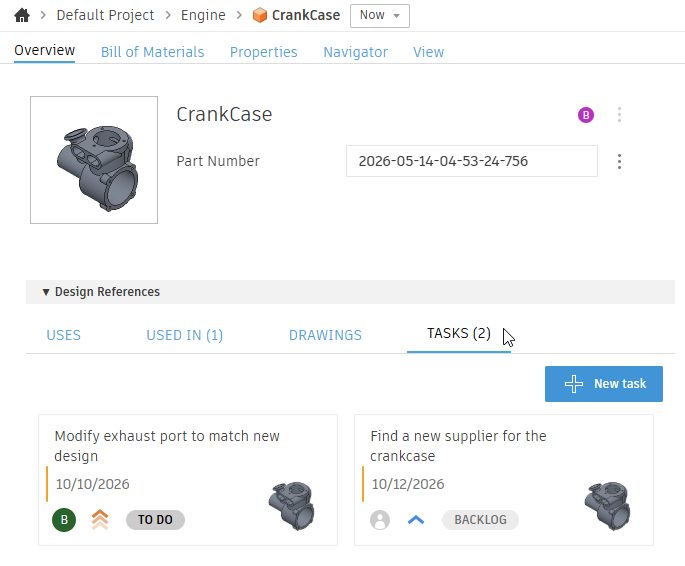
From design to task: When working in a Fusion document, you can see the tasks associated with it, giving you immediate visibility into outstanding work, priorities, and next steps.
Imagine opening an assembly that needs several design updates. Rather than referring to a separate spreadsheet or task list, you can quickly see the work associated with that document, understand what needs attention, and continue working.
By keeping tasks and designs connected, Fusion helps eliminate the disconnect between planning work and actually doing it.
Start your day with what matters most
For many Fusion users, the workday begins by opening a recently used document and deciding where to pick up. But the last document you worked on isn’t always the one that needs your attention today.
Task Management introduces a more intentional way to start your day: begin with your priorities, not your files.
With tasks organized by priority or due date, you can quickly identify what needs attention and decide where to focus your time.
Once you’ve identified your next task, simply open its associated Fusion document and get started.
Whether you’re balancing several design projects, tracking upcoming deadlines, or managing a collection of engineering changes, this task-first approach makes it easier to move from planning to execution.
Instead of asking, “Which file was I working on?”, you can start by asking, “What’s the most important thing I need to accomplish today?”

Manage your work without leaving Fusion
Task Management is integrated into both Fusion Desktop and Fusion Web, giving engineers and designers the flexibility to organize, prioritize, and track their work wherever they’re working.
By keeping tasks within the Fusion environment, users can reduce context switching and stay focused on their designs. Whether managing individual responsibilities or coordinating work across a team, Task Management provides a connected way to track outstanding work, monitor deadlines, and keep projects moving forward.
Let Autodesk Assistant help manage your tasks
Fusion Task Management also integrates with Autodesk Assistant, introducing a conversational way to find information and manage work.
Instead of manually reviewing task lists to determine what needs attention, you can ask Autodesk Assistant questions using natural language.
For example:
“What should I work on today?”
Autodesk Assistant can help you identify your priorities so you can focus on the tasks that need attention.
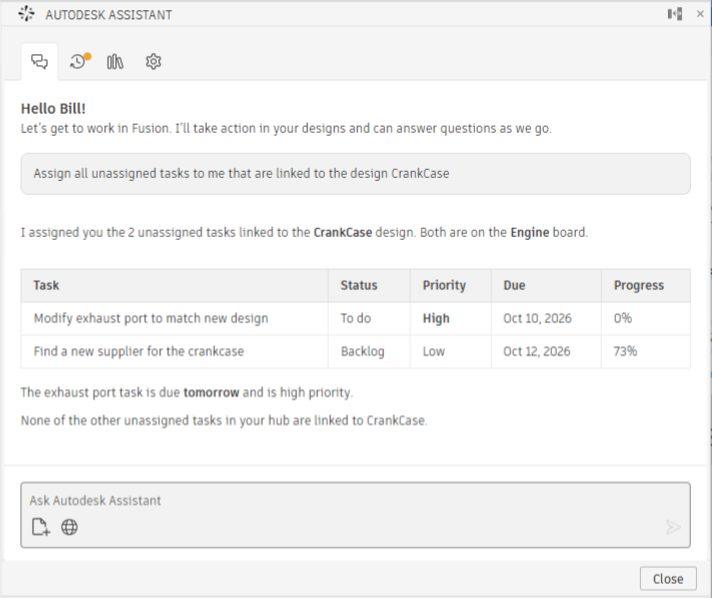
“Which tasks haven’t been assigned yet?”
Quickly identify work that still needs an owner without manually reviewing individual tasks.
But Autodesk Assistant goes beyond answering questions. It can also help you take action across your tasks.
Need to update several overdue tasks? Simply ask:
“Change the date on all overdue tasks to next Monday.”
Want to reorganize work across boards? Try:
“Move all tasks assigned to me on Board-1 to Board-2.”
By making it possible to find information and request task updates through natural language, Autodesk Assistant helps simplify everyday task management activities.
The result is a more intuitive way to stay on top of your work—without spending unnecessary time navigating lists and updating tasks individually.
Get started with Task Management in Fusion
Task Management brings a new way to approach your daily work in Fusion. Rather than starting with a document and figuring out what needs to be done, you can start with your tasks and move directly into the associated design.
To explore the experience, begin by opening Task Management in Fusion and reviewing your work priorities.
Where can I find it?
- Fusion Desktop: Home tab → left panel, between Projects and Samples
- Fusion Web: Top-right, next to Search
A more connected way to work in Fusion
Task Management is about more than keeping a list of things to do. It’s about bringing together the work that needs to happen and the designs where that work gets done.
With tasks directly associated with Fusion documents, a task-first approach to organizing your day, and conversational assistance through Autodesk Assistant, Fusion helps you move more naturally from identifying priorities to taking action.
Whether you’re managing your own design work or coordinating activities across a team, Task Management makes it easier to stay organized, maintain context, and focus on what matters most.
Your tasks and your designs, connected in one place. That’s a smarter way to get work done in Autodesk Fusion.
This capability is currently available in Fusion Insider, click here to sign up and get access.