 Shannon McGarry
Learn how intent-driven design in Fusion uses constraints, parameters, feature history, and assembly relationships to create models that are easier to modify, reuse, and scale as product requirements evolve.

Elevate your design and manufacturing processes with Autodesk Fusion
Most CAD workflows begin with geometry. Designers sketch profiles, create features, apply dimensions, and move on. The challenge often comes later, when requirements change and someone must modify a model they did not originally create. Without clearly defined relationships and constraints, even simple updates can become time-consuming investigations into how a design was built.
Intent-driven design addresses this challenge by focusing not just on what a model looks like, but on the relationships, rules, and decisions that define how it should behave as it changes. Autodesk Fusion supports this approach through parametric modeling, sketch constraints, user parameters, and associative workflows that help preserve design intent throughout the product development process.
This article explores what design intent means, how Fusion helps designers capture it, and why intent-driven modeling can lead to more adaptable, maintainable designs.
What is design intent?
Design intent is the logic behind a model. It answers questions such as:
- Why is this wall thickness 3 mm?
- Why must these holes remain symmetric?
- Why should these features always stay centered?
- Which dimensions are allowed to change, and which are fixed?
In many CAD models, that reasoning exists primarily in the designer’s head. The geometry captures the final shape, but the rationale behind it may not be obvious to colleagues, future team members, or even the original designer several months later.
When design intent is embedded directly into the model through constraints, parameters, and feature relationships, the model becomes easier to modify without breaking critical design requirements.
How Fusion supports intent-driven design
Fusion does not treat design intent as a separate feature. Instead, it provides a collection of modeling capabilities that work together to help designers capture relationships and design logic directly within their models.
Parametric modeling and feature history
In Fusion’s history-based modeling environment, every feature is recorded in a timeline. Sketches, extrusions, fillets, patterns, and other operations maintain relationships to earlier features.
As dimensions change, Fusion updates dependent geometry based on those established relationships.
The timeline itself is not the design intent. Rather, it provides the framework that records how features were created, while constraints, dimensions, and parameters define how those features should behave when modifications occur.
This allows designers to revisit models months later and understand not only what was built, but also how changes may affect downstream features.
Sketch constraints capture relationships
Many of the strongest expressions of design intent begin inside sketches. A sketch can define much more than geometry. It can define relationships.
For example:
- A symmetric constraint communicates that two elements should always remain mirrored.
- An equal constraint indicates that multiple dimensions should always match.
- A concentric constraint establishes a persistent relationship between circular features.
- A midpoint constraint ensures geometry remains centered as dimensions change.
These constraints transform sketches from static drawings into adaptable design frameworks.
When constraints are applied thoughtfully, modifications become significantly more predictable because Fusion understands the relationships that must be maintained.
User parameters make designs easier to change
One of the most effective ways to capture design intent is through user parameters. Rather than hard-coding dimensions throughout a model, designers can define named variables such as:
- Wall_Thickness
- Mounting_Hole_Diameter
- Clearance_Gap
- Bracket_Length
Multiple features can reference the same parameter.
When requirements change, updating a single parameter can automatically update all related geometry throughout the model.
This approach improves maintainability while making the model’s design logic easier for other team members to understand.
Combining parametric and direct modeling
Real-world product development rarely follows a perfectly controlled workflow.
Designers often work with supplier models, imported STEP files, legacy geometry, and customer-provided CAD data that may not contain editable feature history.
Fusion supports both history-based parametric modeling and direct editing techniques, allowing teams to modify geometry when design history is unavailable.
This flexibility lets designers preserve intent where it exists while still adapting imported models that were created outside Fusion.
Instead of forcing users into a single modeling methodology, Fusion supports a workflow that reflects how products are actually developed.
Design intent at the assembly level
Intent-driven design extends beyond individual parts. At the assembly level, designers must define how components interact.
Fusion’s joint system allows designers to establish functional relationships between parts rather than simply positioning components in space.
For example:
- Revolute joints define rotational movement.
- Slider joints define linear movement.
- Cylindrical joints define both rotation and translation.
These relationships describe how components are intended to function, making assemblies more adaptable as designs evolve.
When surrounding geometry changes, properly defined joints often require less rework because the relationship itself remains intact.
Extending design intent through generative design
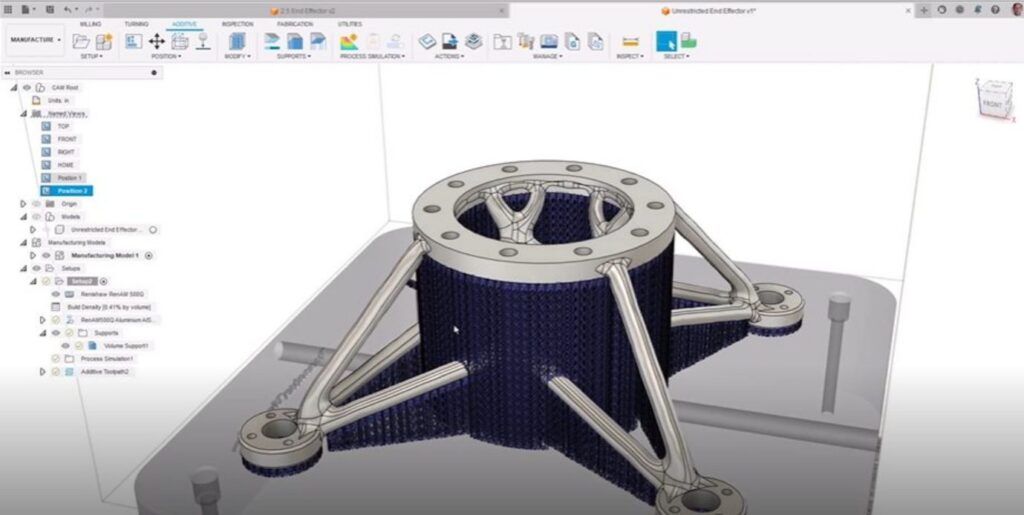
For teams using Fusion for Design or the Fusion Design Extension, generative design introduces another way of expressing intent.
Instead of modeling geometry directly, engineers define objectives and constraints such as:
- Load conditions
- Preserve regions
- Obstacle geometry
- Materials
- Manufacturing methods
- Performance targets
Fusion then generates design alternatives that satisfy those requirements.
In this workflow, designers focus on defining what the part must accomplish rather than prescribing exactly how it should look.
A practical example
Consider a bracket that will be manufactured in several configurations.
In a geometry-driven workflow, designers might duplicate the model multiple times and manually edit each variation.
In an intent-driven workflow:
- Sketch constraints define relationships between features.
- User parameters control critical dimensions.
- Patterns remain associative.
- Assembly relationships remain connected.
If the mounting pattern changes, updates can flow through the model with significantly less manual reconstruction.
The result is a design that is easier to modify, reuse, and maintain over time.
Where intent-driven design delivers the greatest value
During design teration
Products rarely remain unchanged after the first version. Intent-driven models are generally easier to adapt because relationships have been defined explicitly rather than left open to interpretation.
During team handoffs
Engineering projects often move between designers, engineers, analysts, and manufacturing teams. Models that use constraints, parameters, and well-structured feature histories communicate design logic more effectively than models built solely around geometry.
Across product families
Organizations that create configurable products often benefit significantly from parameter-driven design strategies. A well-constructed base model can support multiple configurations while maintaining consistency across variants.
Throughout manufacturing workflows
Fusion connects design, simulation, manufacturing, and data management workflows around a common product model. When geometry changes, associated drawings, assemblies, manufacturing setups, and other downstream information can often be updated more efficiently than in disconnected workflows.
Best practices for capturing design tntent in Fusion
Fully constrain sketches
Use geometric constraints and dimensions to define how the sketch should behave before creating downstream features.
Use meaningful parameter names
Named parameters are easier to understand and maintain than unnamed dimensions scattered throughout a model.
Define relationships instead of absolute locations
Whenever practical, build geometry relative to other design elements rather than fixed coordinates.
This creates models that adapt more predictably when requirements change.
Name timeline features
Renaming features provides context and makes complex timelines easier to navigate.
A feature named “Mounting Hole Pattern” is much easier to understand than “Pattern17.”
Use functional assembly relationships
Joints can communicate how parts are intended to interact, helping preserve design logic across assembly changes.
Building more resilient models
Intent-driven design is ultimately about creating models that adapt to change without losing the logic that makes them work.
By combining constraints, parameters, feature history, and assembly relationships, Autodesk Fusion helps designers build models that are easier to modify, easier to hand off, and easier to scale across evolving product requirements.
The greatest benefit is not simply that geometry updates correctly. It is that the decisions behind the design remain understandable, reusable, and connected throughout the product development process.
Frequently asked questions
What is intent-driven design in Autodesk Fusion?
Why is design intent important in Autodesk Fusion?
How does Autodesk Fusion support intent-driven design?
-Parametric feature history
-Sketch constraints
-User parameters
-Associative feature relationships
-Assembly joints
-Component hierarchies
Together, these tools help preserve design logic so models adapt more predictably when changes occur.
What role do sketch constraints play in design intent?
How do parameters improve design intent in Fusion?
Wall_Thickness can drive multiple features throughout a model. When the parameter changes, all dependent geometry updates automatically, making design variations easier to create and manage.