 Emily Suzuki
This post is also available in:
Learn about how Autodesk Fusion, a cloud-based, integrated CAD/CAM software, can transform your design process.

Elevate your design and manufacturing processes with Autodesk Fusion
Computer-aided design (CAD) and computer-aided manufacturing (CAM) offer, arguably, the best options for industrial engineers, and integrated cloud CAD/CAM software provide several improvements over separated CAD and CAM packages.
For instance, an industrial designer might struggle to download, transfer, and then reopen a CAD file in a CAM environment. Perhaps the two different software packages don’t collaborate well, or maybe the file is so large that it just takes a long time to transfer?
Not with an integrated platform like Autodesk Fusion. There is no shortage of advantages to software with every tool in one place. In this article, we’ll explore just a few reasons why integrated CAD/CAM is the way to go.
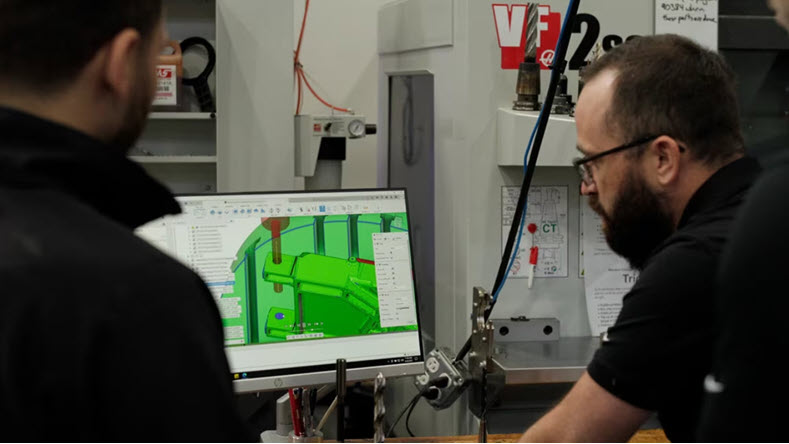
What is integrated CAD/CAM software?
CAD software is a digital space to create 2D, concepts, 3D concepts and renders. CAD is also where industrial designers and engineers draft documentation, simulate real-world functionality and transfer data to CAM.
CAM software is a tool used to automate a manufacturing process. Automated manufacturing processes include 3D printing and computer numerical control (CNC) machining. CAM generates toolpaths from the CAD design, which are then used by the 3D printer or CNC machine.
Integrated CAD/CAM, like Autodesk Fusion, combines the two tools into one software environment.
What are the benefits of integrated CAD/CAM software?
“Considering all the time-saving features in Autodesk Fusion for CNC machining and automated part setup, it’s clear that it can pay for itself in just a few weeks and in the first project.”
-Patrick Fee, Shop Manager, Conturo Prototypin
Autodesk Fusion’s integrated CAD/CAM environment provides a host of benefits, including:
- Faster file transfer and computing
- Reduced operating costs
- Streamlined workflows
- Shorter learning curves
- Remote accessibility
Faster file transfer and overall computing
With integrated cloud CAD, industrial designers can reduce the amount of time spent downloading, transferring, and uploading large data files. When CAD and CAM are integrated, file transfers take only a few seconds. You can go from a 3D design to a set of toolpaths and directional workflows without needing to open another software.
Reduced operating costs
Autodesk Fusion is an all-in-one CAD/CAM software that’s customizable to your needs. You can choose from a variety of subscription packages, all of which are affordable. And you can even unlock more advanced capabilities with Fusion Extensions. Whether you’re a large company or a small self-owned business, you can download a free trial and try it before you buy it.
Streamlined workflows
Linear, one-way workflows are archaic and disadvantageous in today’s collaborative workplace. Autodesk Fusion helps teams create connected design and manufacturing workflows without moving between separate CAD and CAM applications. Industrial designers and engineers can work on the same project, make revisions, edit parameters, and publish changes in real-time. Engineers are able to collaborate with ease and don’t have to worry about overwriting locally saved files.
| Workflow Area | Separate CAD + CAM Systems | Autodesk Fusion |
|---|---|---|
| File Transfers | Required | Built-in |
| Design Updates | Manual updates | Connected workflow |
| CNC Programming | Separate environment | Integrated |
| Collaboration | Additional tools | Included |
| Data Management | Often separate | Connected |
| Manufacturing Visibility | Limited | Shared environment |
Shorter learning curves
Fusion has a vast library of tutorials and other learning modules for engineers of any experience level. You can use Fusion Extensions and various plug-ins to tailor functionality for any project. Go from 3D design to intuitive toolpaths with ease.
Remote accessibility
Working on a digital project in real-time from the comfort of your own home has become a widespread industry option in the last two years. Using Fusion, engineers can access their CAD or CAM projects remotely from their phone, laptop, or home computer, whenever they want.
When it comes to Fusion, CAD and CAM coexist. Files exist on the cloud and thus no longer require lengthy transfers or incompatibility issues. It’s easier than ever before to design and manufacture products using Autodesk Fusion.
Try Autodesk Fusion free and experience integrated CAD/CAM workflows firsthand.
Why manufacturers choose Autodesk Fusion for CAD/CAM
Manufacturing teams often adopt Autodesk Fusion because it combines design, simulation, CAM, collaboration, and product data management capabilities in a connected platform. Rather than managing multiple workflows across separate systems, teams can move from design through production in a single environment.
Organizations often choose Autodesk Fusion to:
- Reduce manual data translation
- Improve collaboration between engineering and manufacturing
- Accelerate CNC programming
- Support design changes later in development
- Connect design and production teams
Is integrated CAD/CAM right for your team?
Integrated CAD/CAM is often a strong fit for:
- CNC machining shops
- Product development teams
- Contract manufacturers
- Industrial equipment manufacturers
- Startups building physical products
- Small and midsize manufacturers
Teams that frequently transfer files between CAD and CAM systems often see the greatest benefit from a connected workflow.
FAQ: Integrated CAD/CAM for Modern Manufacturing
Integrated CAD/CAM reduces rework by keeping design and manufacturing data connected throughout the production process. When CAD and CAM are part of the same system, toolpaths are created directly from the design model, so updates to geometry automatically flow into manufacturing workflows.
Autodesk Fusion uses a shared data foundation for CAD and CAM, which helps prevent errors caused by outdated files, manual re‑imports, or mismatched revisions.
Yes, integrated CAD/CAM is well suited for small manufacturers because it simplifies workflows and reduces software complexity.
Autodesk Fusion combines design and manufacturing tools in a single, cloud‑connected platform, allowing small teams to program parts, manage changes, and collaborate without maintaining multiple systems. This makes it easier for small manufacturers to move faster while maintaining accuracy as production needs grow.
Popular CAD/CAM tools are those that support both design and manufacturing workflows and can scale with part complexity and machine capability.
Autodesk Fusion is widely used for integrated CAD/CAM because it combines parametric modeling, CAM programming, and multi‑axis machining in one environment. Other tools often require separate CAD and CAM systems, which increases handoffs and workflow friction compared to integrated platforms.
You should consider an integrated CAD/CAM solution to reduce handoffs, improve accuracy, and speed up production.
With Autodesk Fusion, design changes do not require re‑creating toolpaths from scratch, and manufacturing teams can work directly from the latest design intent. This integration helps teams respond faster to design updates, reduce setup time, and improve consistency from prototype to production.
Yes, integrated CAD/CAM can support advanced manufacturing strategies, including multi‑axis machining.
Autodesk Fusion supports 3‑, 4‑, and 5‑axis machining within the same integrated CAD/CAM environment. This allows manufacturers to program complex parts, reduce setups, and validate toolpaths without leaving the platform, helping ensure accuracy and confidence when running multi‑axis jobs.
Integrated CAD/CAM software combines design and manufacturing tools within a single environment. Autodesk Fusion allows engineers and manufacturers to move from design to CNC programming without switching platforms.
Integrated CAD/CAM reduces file transfers, improves collaboration, streamlines workflows, and helps ensure manufacturing processes remain aligned with design changes.
Yes. Autodesk Fusion combines CAD and CAM capabilities in a single cloud-based platform. Users can design products, generate toolpaths, and prepare parts for manufacturing without using separate software.
Yes. Autodesk Fusion includes integrated CAM capabilities for CNC machining, helping manufacturers generate and optimize toolpaths while maintaining a connection to the underlying design.
Modern CAD/CAM software helps manufacturers program, simulate, and optimize complex machining operations across 3-, 4-, and 5-axis machines. Autodesk Fusion for Manufacturing supports positional 3+1 and 3+2 machining, simultaneous 4-axis machining, and simultaneous 5-axis machining within a connected CAD/CAM environment. This allows programmers to create toolpaths, validate machine motion, perform collision checks, and machine complex parts while maintaining an associative connection to the original design.
CAD/CAM software can improve quoting accuracy by connecting design data directly to manufacturing information. In Fusion, manufacturers can evaluate machining strategies, estimate machine time, assess material requirements, and leverage nesting workflows to better understand production costs. Because design, manufacturing, and production data remain connected, teams can generate more accurate estimates while reducing the risk of quoting based on outdated information.
Cloud-connected CAD/CAM platforms allow designers, engineers, machinists, and manufacturing teams to work from a shared source of truth. Autodesk Fusion combines design, manufacturing, collaboration, and data management in a single environment, helping teams access the latest revisions regardless of location. Version control, secure sharing, and connected workflows help reduce communication delays and ensure everyone is working from the same design data.
CAD/CAM software generates machine-ready NC code through post processors that translate toolpaths into instructions specific to a CNC controller. Autodesk Fusion supports post processing through the Autodesk Post Library and provides machine simulation capabilities that help validate programs before they reach the shop floor. This helps manufacturers move efficiently from programming to production while reducing programming errors and machine downtime.
What is the best all in one design and manufacturing software for small manufacturing businesses?
The best solution depends on a company’s specific requirements, but many small manufacturers look for software that combines CAD, CAM, collaboration, data management, and manufacturing workflows in a single platform. Autodesk Fusion is often selected because it brings design, engineering, manufacturing, electronics, simulation, and data management together, reducing the need for multiple disconnected software packages. This can lower software complexity while giving growing businesses access to professional-grade capabilities.
How does CAD/CAM software handle post-processing for different machine types?
Post-processing converts CAM toolpaths into controller-specific NC code. Autodesk Fusion supports a wide range of CNC machines and controllers through the Autodesk Post Library. Manufacturers can generate output tailored to milling machines, lathes, mill-turn systems, and multi-axis machines while maintaining a consistent programming workflow inside the same environment.
How does CAD/CAM software handle interoperability with non-native CAD formats?
Interoperability allows manufacturers to work with customer, supplier, and partner data created in different CAD systems. Autodesk Fusion supports importing and working with numerous CAD file formats, helping teams collaborate without requiring everyone to use the same design software. This flexibility can simplify data exchange and reduce the need to recreate geometry when working across different engineering environments.
Yes. Autodesk Fusion is widely used by manufacturers, machine shops, startups, and product development teams because it combines professional CAD and CAM capabilities in a single platform. It supports everything from 2.5-axis machining to advanced multi-axis manufacturing via Autodesk Fusion for Manufacturing, while also providing collaboration, design, simulation, and data management capabilities. Its combination of accessibility, broad functionality, and integrated workflows has made it a popular choice for both growing businesses and experienced manufacturing teams.