 Aishwarya Balamukundan
Autodesk is transforming manufacturing with AI-powered workflows in Fusion, for faster innovation, smarter collaboration, and seamless integration across design, engineering, and production.
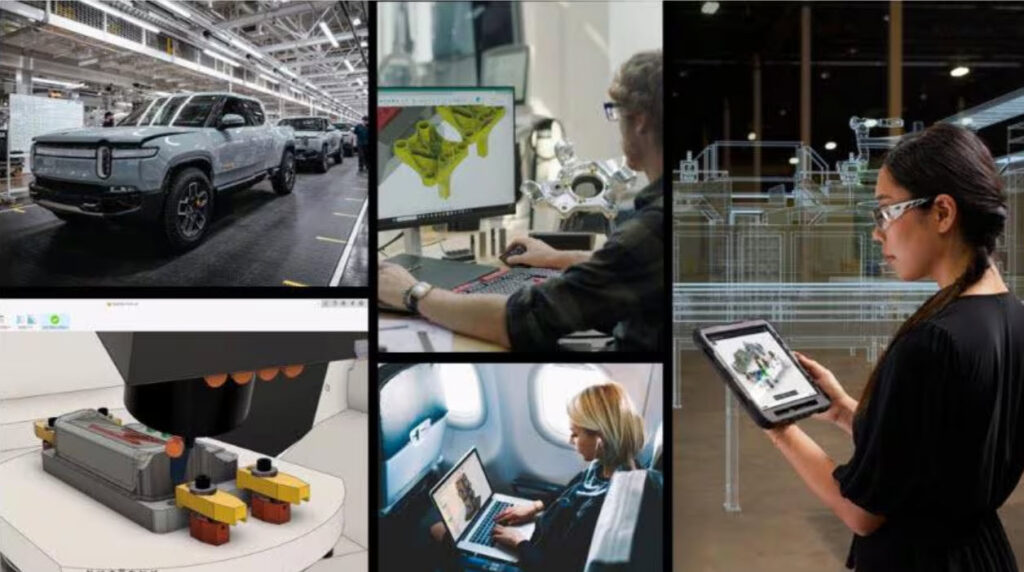
Autodesk is redefining what’s possible for manufacturers, turning the vision of intelligent, connected product development into a reality. This year at AU 2025, we made it clear: the future of manufacturing will be driven by AI-powered workflows. Fusion is at the core of this transformation – changing how products are designed, engineered, and manufactured, while reshaping how teams collaborate, solve problems, and bring ideas to life.

Elevate your design and manufacturing processes with Autodesk Fusion
Why AI and why now?
The pace of change in manufacturing has never been faster. Labor shortages, rising produce complexity, and accelerating market demands threaten to slow progress. By automating routine tasks and streamlining workflows, AI boosts productivity and frees skilled workers to focus on higher-value innovation. It helps manufacturers iterate faster, reduce errors, and respond with agility to evolving customer needs. Early adoption of AI features in Fusion like, Automated Drawings and Sketch AutoConstrain, show that these tools aren’t just welcomed. They’ve become indispensable – with millions of automated dimensions and constraints applied since launch, saving valuable engineering hours and cutting time to market.
What’s next in Fusion
AI has proven itself to be a key driver of competitive advantage and sustainable growth. Here are some of the new ways we’re putting AI in Fusion to work for you:
Accelerated, innovative design workflows
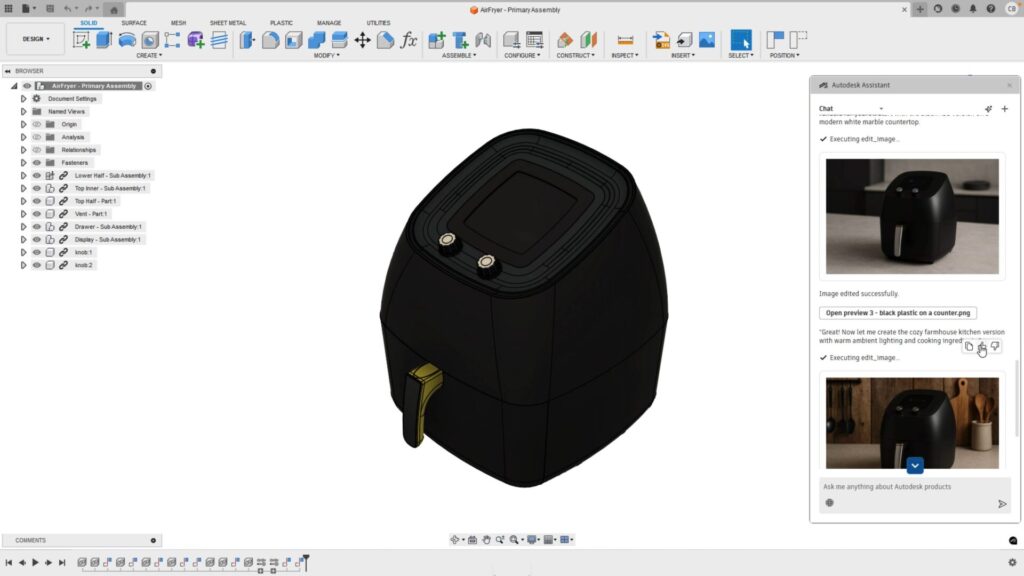
Autodesk Assistant puts the power of generative AI right where you need it—in your design workflow. Just type in a simple description, like a “contemporary air fryer,” and it instantly creates editable 3D geometry you can work with. It’s built into Autodesk’s whole portfolio and makes getting your designs started faster and way easier.
Instant onboarding and smoother collaboration
New AI-powered onboarding, driven by Autodesk Assistant makes onboarding simple. Provide your team members’ names, and AI handles every detail automatically. For expanding, complex teams, this helps eliminate bottlenecks, boosts collaboration, and lets your people focus on what matters: delivering results faster and more efficiently.
Connected data and one source of truth
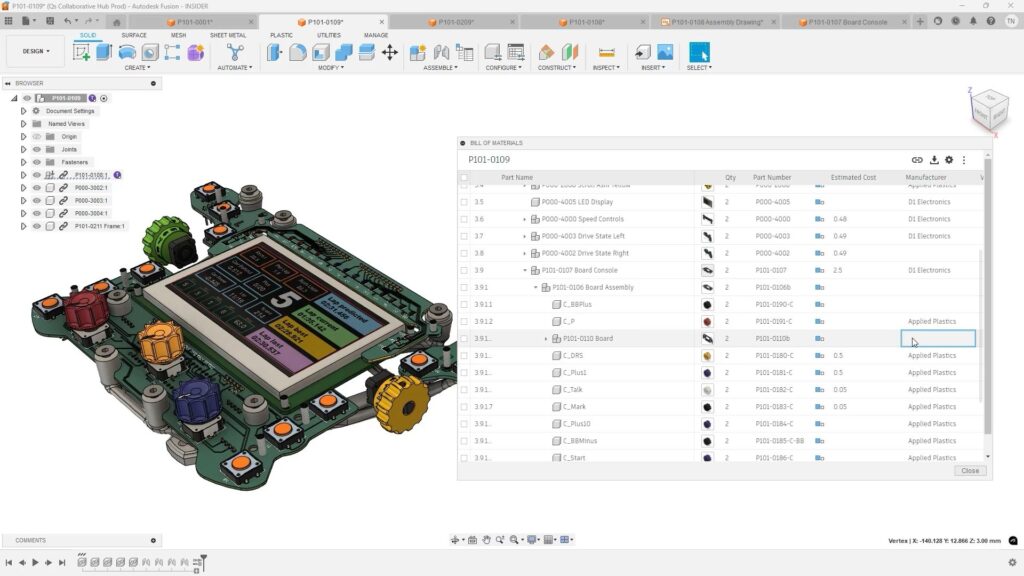
Bill of Materials in Fusion is now fully cloud-native. Multiple users can update it at the same time with real-time links to design changes. Teams can now easily collaborate from one up-to-date source, thanks to better support for properties, views, rollups, and dynamic updates — no more data lost between design and production.
Customized workflows
With the launch of Fusion MFGDM API v3, customers and partners can now build custom extensions on Fusion’s powerful data platform to unlock new AI and automation potential.
Advanced visualization
Want photorealistic images in your presentations in minutes? With Microsoft and Fusion working together, you can seamlessly place your designs in realistic settings. Use Azure OpenAI’s power, to generate high-quality renders and export directly to Microsoft 365, to enhance your marketing and sales decks without delays.
Automated design and manufacturing workflows
The new Systems Automation Modeler in Fusion automates design and manufacturing workflows. It keeps design data intact and automatically updates all related documents, creating repeatable manufacturing patterns and setting the stage for AI-driven production.
Seamless cloud-desktop sync
With the new Desktop Connector, you get faster, smoother file syncing that links your Fusion cloud data with desktop favorites like Inventor and Altium. No more manual uploads—just seamless teamwork and connected product development across all your tools.
Integrated electronic components
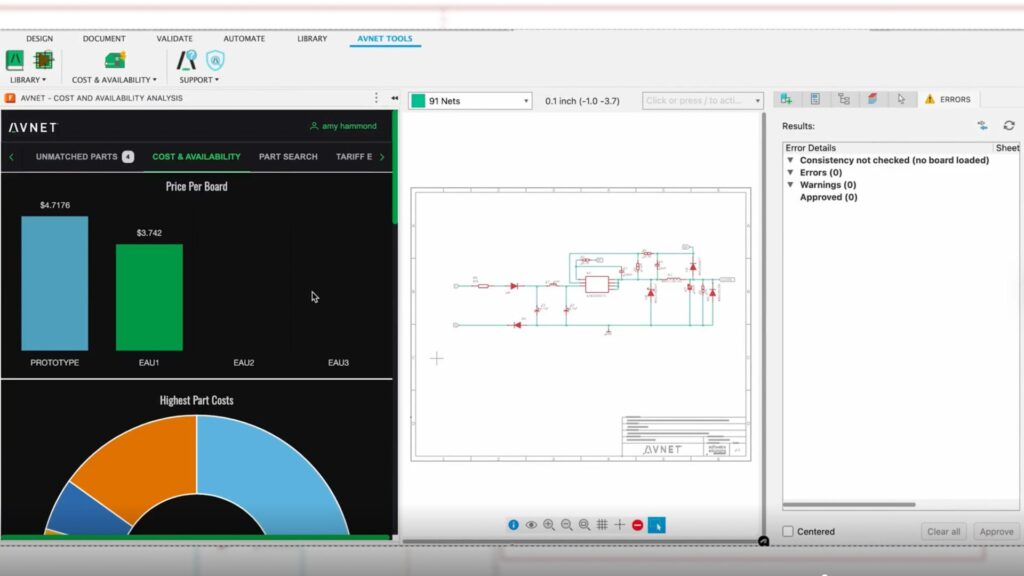
With the Fusion and Avnet partnership, incorporating real electronic components into your designs has never been easier. By embedding Avnet’s parts directly into your workflow, you can develop smarter, connected products without interrupting your creative flow. This seamless integration makes it easy to access trusted component data and ready-to-use reference designs right inside Fusion. Speed up innovation without slowing down workflows.
Instant machining quotes and CAM automation
Our new partnership with Toolpath brings AI-powered quoting and machining right inside Fusion. Easily apply proven patterns to new parts, get instant quotes, and check your setups with fast, reliable toolpath simulations—all automated to help you run smoother, faster production.
By integrating these AI capabilities into Fusion, we’re removing barriers that slow your team down so that you can focus on innovation and deliver new levels of performance amid industry-wide change. As AI transforms manufacturing, we’re committed to delivering the tools you need to thrive.
“Together, we have the chance to shape something extraordinary. As your trusted partner, we will deliver the AI tools and expertise as your trusted partner. Our customers will define what the next era of winning in manufacturing looks like.” – Jeff Kinder, Executive Vice President of Product Design and Manufacturing Solutions
Autodesk Fusion AI frequently asked questions (FAQs)
Yes. Autodesk Fusion includes AI‑powered features that help automate design work, reduce manual effort, and speed up product development. Examples include Automated Drawings, Sketch AutoConstrain, and the Autodesk Assistant, which helps generate editable design outputs from simple inputs.
These AI features are built directly into Fusion, so you can try them hands‑on with a 30-day free trial.
Autodesk Assistant is a generative AI capability built into Fusion that helps you get started faster by turning natural language prompts into editable design geometry and providing in‑context help as you work. It’s designed to accelerate early design exploration, especially for teams evaluating Fusion for concept‑to‑production workflows.
AI in Fusion helps manufacturing teams move faster by automating repetitive tasks and reducing human error across design and fabrication workflows. This includes automated drawing creation, smarter toolpath generation, and workflow automation that keeps downstream outputs in sync with design changes.
The result is less time spent on rework and setup, and more time focused on innovation. Get starte with a 30-day free trial today.
No. AI in Autodesk Fusion is designed to assist, not replace, designers, engineers, and manufacturers. Fusion’s AI automates repetitive tasks, speeds up common workflows, and provides in‑context guidance, while users remain fully in control of design decisions and outcomes. Check out all Fusion has to offer with a free 30-day trial.
Yes. Fusion’s AI capabilities are built directly into everyday workflows and don’t require AI knowledge or setup. Tools like Autodesk Assistant, automated sketch constraints, and drawing automation work inside the Fusion interface using natural language and familiar commands.
Fusion AI works with both existing and new designs. Autodesk Assistant can help modify current models, automate changes across features or parameters, update drawings, and assist with CAM and manufacturing setups—all without starting from scratch.
Start testing Fusion AI on real production designs with a free 30-day trial.
No. Autodesk Assistant is not a standalone chatbot. It’s an in‑product, action‑oriented AI built directly into Fusion that can answer questions, guide workflows, and execute supported actions inside your design and manufacturing environment.
Yes. AI‑powered onboarding and guided help in Fusion reduce the learning curve for new users by providing in‑context explanations, recommended workflows, and natural‑language assistance directly inside the product. Try it for yourself, free for 30-days.
Unlike legacy tools that bolt AI on as an add‑on, Fusion embeds AI directly into the design‑to‑manufacturing workflow. AI operates on live, connected product data, spanning CAD, CAM, electronics, and documentation, inside a single platform.